
How to Scrape California Natural Resources Agency (resources.ca.gov)
Scrape environmental data, grant listings, and state records from the California Natural Resources Agency. Use the CKAN API or Python for automated extraction.
Anti-Bot Protection Detected
- Rate Limiting
- Limits requests per IP/session over time. Can be bypassed with rotating proxies, request delays, and distributed scraping.
- IP Blocking
- Blocks known datacenter IPs and flagged addresses. Requires residential or mobile proxies to circumvent effectively.
- User-Agent Filtering
About California Natural Resources Agency
Learn what California Natural Resources Agency offers and what valuable data can be extracted from it.
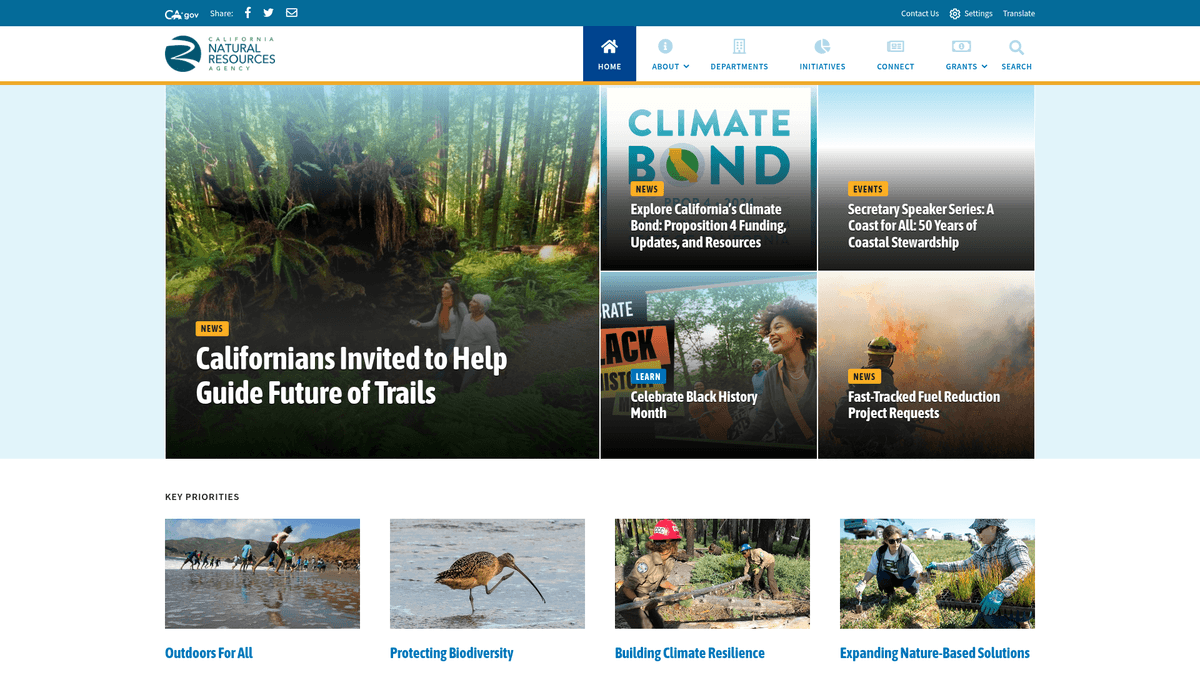
The California Natural Resources Agency (CNRA) is a cabinet-level state agency responsible for the management and restoration of California's natural, historical, and cultural resources. It oversees numerous departments including Fish and Wildlife, Water Resources, and Forestry and Fire Protection. The official website, resources.ca.gov, acts as a primary portal for public access to environmental policies, initiative datasets, and state-funded project records.
Data available on the site includes grant program details, meeting transcripts, and detailed environmental impact reports. This information is critical for environmental consultants, academic researchers, and legal professionals who need to monitor state-level environmental management and policy implementation. This portal is especially valuable for those tracking California's aggressive climate goals and biodiversity initiatives.
Scraping this data allows for the creation of aggregated databases that can track long-term ecological trends, funding distributions, and the status of environmental protections across the state. By automating the extraction process, users can bypass manual document review and perform large-scale analysis on California's resource management strategies.
Why Scrape California Natural Resources Agency?
Discover the business value and use cases for extracting data from California Natural Resources Agency.
Track Climate Resilience Funding
Monitor how Proposition 4 funds and other climate bonds are allocated to specific regional projects across California.
Aggregate Impact Reports
Collect Environmental Impact Reports (EIRs) from various departments to analyze the cumulative ecological effects of state-level infrastructure.
Monitor Grant Eligibility
Stay updated on evolving requirements for Tribal Nature-Based Solutions and Ocean Protection Council grants to assist applicants.
Analyze Water Management
Extract historical and current updates on reservoir levels and drought strategies to create predictive water availability models.
Identify Business Leads
Find state-funded restoration projects that require specialized environmental consulting, engineering, or scientific services.
Historical Policy Archiving
Build a comprehensive digital archive of California's resource management history by scraping long-term publication lists and press releases.
Scraping Challenges
Technical challenges you may encounter when scraping California Natural Resources Agency.
Complex Subdomain Ecosystem
The agency operates through dozens of subdomains like water.ca.gov and parks.ca.gov, each with unique HTML architectures and CSS selectors.
Cloudflare Bot Management
Advanced security measures are implemented to detect and block automated traffic, requiring sophisticated stealth headers and bypass techniques.
Fragmented Document Storage
A large portion of technical data is locked inside PDF files rather than directly on pages, requiring multi-stage extraction and PDF parsing.
Asynchronous Content Loading
Search interfaces for grant listings and data portals often rely on JavaScript or AJAX, making static HTML scraping ineffective.
Scrape California Natural Resources Agency with AI
No coding required. Extract data in minutes with AI-powered automation.
How It Works
Describe What You Need
Tell the AI what data you want to extract from California Natural Resources Agency. Just type it in plain language — no coding or selectors needed.
AI Extracts the Data
Our artificial intelligence navigates California Natural Resources Agency, handles dynamic content, and extracts exactly what you asked for.
Get Your Data
Receive clean, structured data ready to export as CSV, JSON, or send directly to your apps and workflows.
Why Use AI for Scraping
AI makes it easy to scrape California Natural Resources Agency without writing any code. Our AI-powered platform uses artificial intelligence to understand what data you want — just describe it in plain language and the AI extracts it automatically.
How to scrape with AI:
- Describe What You Need: Tell the AI what data you want to extract from California Natural Resources Agency. Just type it in plain language — no coding or selectors needed.
- AI Extracts the Data: Our artificial intelligence navigates California Natural Resources Agency, handles dynamic content, and extracts exactly what you asked for.
- Get Your Data: Receive clean, structured data ready to export as CSV, JSON, or send directly to your apps and workflows.
Why use AI for scraping:
- Integrated Anti-Bot Bypass: Automatio handles the complex task of bypassing Cloudflare and rate limits automatically without requiring custom script modifications.
- Visual Data Selection: Easily map data fields across diverse departmental subdomains using a visual interface, adapting to varying layouts without writing code.
- Native PDF Link Harvesting: Automatically extract and organize thousands of direct download links for environmental reports into structured spreadsheets or databases.
- Cloud-Based Scheduling: Run scrapers on a recurring schedule to capture new grant announcements or policy updates the moment they are published on the portal.
No-Code Web Scrapers for California Natural Resources Agency
Point-and-click alternatives to AI-powered scraping
Several no-code tools like Browse.ai, Octoparse, Axiom, and ParseHub can help you scrape California Natural Resources Agency. These tools use visual interfaces to select elements, but they come with trade-offs compared to AI-powered solutions.
Typical Workflow with No-Code Tools
Common Challenges
Learning curve
Understanding selectors and extraction logic takes time
Selectors break
Website changes can break your entire workflow
Dynamic content issues
JavaScript-heavy sites often require complex workarounds
CAPTCHA limitations
Most tools require manual intervention for CAPTCHAs
IP blocking
Aggressive scraping can get your IP banned
No-Code Web Scrapers for California Natural Resources Agency
Several no-code tools like Browse.ai, Octoparse, Axiom, and ParseHub can help you scrape California Natural Resources Agency. These tools use visual interfaces to select elements, but they come with trade-offs compared to AI-powered solutions.
Typical Workflow with No-Code Tools
- Install browser extension or sign up for the platform
- Navigate to the target website and open the tool
- Point-and-click to select data elements you want to extract
- Configure CSS selectors for each data field
- Set up pagination rules to scrape multiple pages
- Handle CAPTCHAs (often requires manual solving)
- Configure scheduling for automated runs
- Export data to CSV, JSON, or connect via API
Common Challenges
- Learning curve: Understanding selectors and extraction logic takes time
- Selectors break: Website changes can break your entire workflow
- Dynamic content issues: JavaScript-heavy sites often require complex workarounds
- CAPTCHA limitations: Most tools require manual intervention for CAPTCHAs
- IP blocking: Aggressive scraping can get your IP banned
Code Examples
import requests
from bs4 import BeautifulSoup

# Target URL for the news section
url = 'https://resources.ca.gov/Newsroom'
headers = {'User-Agent': 'Mozilla/5.0'}

try:
    # Sending the GET request
    response = requests.get(url, headers=headers)
    response.raise_for_status()

    # Parsing HTML content
    soup = BeautifulSoup(response.text, 'html.parser')
    articles = soup.select('.news-list-item')

    for article in articles:
        # Extracting the headline
        title = article.find('h3').text.strip()
        print(f'News: {title}')
except Exception as e:
    print(f'An error occurred: {e}')
When to Use
Best for static HTML pages where content is loaded server-side. The fastest and simplest approach when JavaScript rendering isn't required.
Advantages
- ●Fastest execution (no browser overhead)
- ●Lowest resource consumption
- ●Easy to parallelize with asyncio
- ●Great for APIs and static pages
Limitations
- ●Cannot execute JavaScript
- ●Fails on SPAs and dynamic content
- ●May struggle with complex anti-bot systems
How to Scrape California Natural Resources Agency with Code
Python + Requests
import requests
from bs4 import BeautifulSoup
# Target URL for the news section
url = 'https://resources.ca.gov/Newsroom'
headers = {'User-Agent': 'Mozilla/5.0'}
try:
# Sending the GET request
response = requests.get(url, headers=headers)
response.raise_for_status()
# Parsing HTML content
soup = BeautifulSoup(response.text, 'html.parser')
articles = soup.select('.news-list-item')
for article in articles:
# Extracting the headline
title = article.find('h3').text.strip()
print(f'News: {title}')
except Exception as e:
print(f'An error occurred: {e}')Python + Playwright
from playwright.sync_api import sync_playwright

def scrape_grants():
    with sync_playwright() as p:
        # Launching headless browser
        browser = p.chromium.launch(headless=True)
        page = browser.new_page()

        # Navigating to the grant opportunities page
        page.goto('https://resources.ca.gov/grants')

        # Waiting for the content items to load
        page.wait_for_selector('.grant-item')
        grants = page.query_selector_all('.grant-item')

        for grant in grants:
            # Extracting title from the header element
            title = grant.query_selector('h3').inner_text()
            print(f'Grant Opportunity: {title}')

        browser.close()

scrape_grants()Python + Scrapy
import scrapy

class CNRASpider(scrapy.Spider):
    name = 'cnra'
    start_urls = ['https://resources.ca.gov/Newsroom']

    def parse(self, response):
        # Loop through each news article listing
        for article in response.css('div.news-list-item'):
            yield {
                'title': article.css('h3::text').get().strip(),
                'link': article.css('a::attr(href)').get()
            }

        # Handle simple pagination if a 'next' button exists
        next_page = response.css('a.next::attr(href)').get()
        if next_page:
yield response.follow(next_page, self.parse)Node.js + Puppeteer
const puppeteer = require('puppeteer');

(async () => {
  // Launch browser and open a new page
  const browser = await puppeteer.launch();
  const page = await browser.newPage();

  // Go to the 'About Us' leadership page
  await page.goto('https://resources.ca.gov/About-Us/Who-We-Are');

  // Extract leadership profile data
  const leadership = await page.evaluate(() => {
    return Array.from(document.querySelectorAll('.staff-profile')).map(p => p.innerText.trim());
  });

  console.log('Agency Leadership:', leadership);
  await browser.close();
})();What You Can Do With California Natural Resources Agency Data
Explore practical applications and insights from California Natural Resources Agency data.
Government Grant Monitoring
Environmental non-profits can track state funding distributions to identify regional needs and underserved areas.
How to implement:
- 1Scrape the Grants section of resources.ca.gov on a weekly basis.
- 2Extract grant amounts, recipient locations, and project categories.
- 3Geocode the locations and map the data for geographic gap analysis.
Use Automatio to extract data from California Natural Resources Agency and build these applications without writing code.
What You Can Do With California Natural Resources Agency Data
- Government Grant Monitoring
Environmental non-profits can track state funding distributions to identify regional needs and underserved areas.
- Scrape the Grants section of resources.ca.gov on a weekly basis.
- Extract grant amounts, recipient locations, and project categories.
- Geocode the locations and map the data for geographic gap analysis.
- Environmental Compliance Index
Consultancies can build a searchable index of historical environmental impact filings for client property research.
- Crawl departmental project pages for document links.
- Extract PDF metadata and direct download URLs.
- Index the document text for internal search tools and client reports.
- Policy Trend Analysis
Academic researchers can analyze shifts in state environmental policy priorities by scraping meeting minutes.
- Scrape public meeting transcripts and policy documents.
- Apply Natural Language Processing (NLP) to identify recurring themes.
- Correlate these themes with legislative sessions and budget cycles.
- Water Resource Tracking
Hydrologists can automate the collection of groundwater level data for drought impact modeling.
- Access the Open Data portal CKAN API endpoints.
- Pull periodic groundwater measurements for specific California counties.
- Integrate the data into time-series databases for visualization.
- Consultant Lead Generation
Engineering firms can identify potential partners by tracking which local governments receive state infrastructure grants.
- Monitor grant award announcements via the Agency's newsroom.
- Extract recipient organization names and contact information.
- Reach out to organizations for technical partnership opportunities.
Supercharge your workflow with AI Automation
Automatio combines the power of AI agents, web automation, and smart integrations to help you accomplish more in less time.
What to get right first
Expert advice for successfully extracting data from California Natural Resources Agency.
Prioritize the CKAN API
Always check data.cnra.ca.gov first, as it offers a structured API for many datasets, reducing the need for complex HTML parsing.
Segment by Department
Build separate scrapers for different subdomains like wildlife.ca.gov to manage the specific layout variations of each agency more effectively.
Use Residential Proxies
Employ residential proxies to mimic local traffic, which helps avoid IP blocks from state-level security infrastructure during high-volume scrapes.
Implement PDF Parsing
Integrate your scraper with a PDF text extraction library to unlock the technical data contained within the thousands of reports hosted on the site.
Monitor Structure Changes
Government sites undergo periodic refreshes; set up monitoring alerts to notify you if CSS selectors fail due to a site layout update.
Optimize Scrape Frequency
Since state records and grants update on a weekly or monthly basis, avoid aggressive daily scraping to minimize your footprint on the servers.
Related Web Scraping
Frequently Asked Questions
Find answers to common questions about California Natural Resources Agency