
How to Scrape GOV.UK | UK Government Web Scraper Guide
Comprehensive guide to scraping GOV.UK for government guidance, policy updates, and official statistics. Learn to extract high-value public sector data.
Anti-Bot Protection Detected
- Rate Limiting
- Limits requests per IP/session over time. Can be bypassed with rotating proxies, request delays, and distributed scraping.
- User-Agent Filtering
- IP Blocking
- Blocks known datacenter IPs and flagged addresses. Requires residential or mobile proxies to circumvent effectively.
About GOV.UK
Learn what GOV.UK offers and what valuable data can be extracted from it.
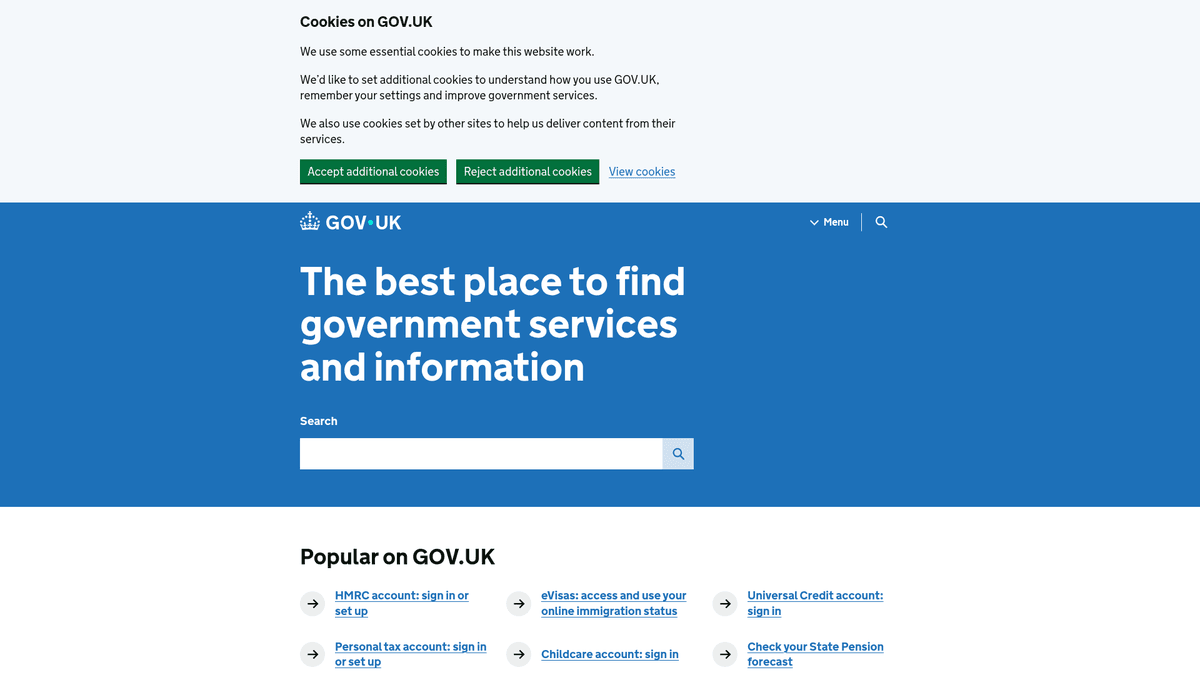
GOV.UK is the central digital portal for the United Kingdom government, providing a single point of access to services and information from all departments and agencies. Created by the Government Digital Service (GDS), it replaced hundreds of individual agency sites with a unified, user-friendly interface designed for transparency and efficiency.
The platform contains a massive repository of data, including legislative guidance, official statistics, policy white papers, and procurement notices. Because the UK government follows an 'open data by default' policy, most of the information on GOV.UK is published under the Open Government Licence, making it a goldmine for researchers, legal firms, and businesses.
Scraping GOV.UK is highly valuable for monitoring regulatory changes, tracking economic indicators, and gathering competitive intelligence from public tender announcements. Organizations use this data to automate compliance workflows and stay ahead of political developments that impact their industries.
Why Scrape GOV.UK?
Discover the business value and use cases for extracting data from GOV.UK.
Procurement Market Analysis
Analyze over 600,000 government contracts to identify spending trends, niche service demands, and funding cycles across local councils and national bodies.
Corporate Due Diligence
Extract Companies House data to verify company status, director history, and persons with significant control for risk assessment and AML compliance.
Lead Generation for B2G
Identify companies that have recently won government tenders to offer subcontracting services or competitive solutions.
Economic and Social Research
Access public records on benefits, crime statistics, and employment trends to build comprehensive economic models or social impact reports.
Historical Vehicle Data
Scrape MOT and mileage history to build automotive valuation tools or verify vehicle condition for secondary markets.
Scraping Challenges
Technical challenges you may encounter when scraping GOV.UK.
Data Fragmentation
Information is spread across various sub-services like Companies House and Find a Tender, each with different URL structures and HTML schemas.
Rate Limiting and Anti-Bot
Gov.uk uses Cloudflare and aggressive rate limiting on certain search endpoints, which can lead to temporary IP blocks if scraping speed is too high.
Frequent Structural Updates
The site is continuously updated by various departments, meaning selectors for contract values or company details may break and require regular maintenance.
Volume of Data
With hundreds of thousands of active listings and millions of historical records, managing the crawl depth and data storage requires robust infrastructure.
Scrape GOV.UK with AI
No coding required. Extract data in minutes with AI-powered automation.
How It Works
Describe What You Need
Tell the AI what data you want to extract from GOV.UK. Just type it in plain language — no coding or selectors needed.
AI Extracts the Data
Our artificial intelligence navigates GOV.UK, handles dynamic content, and extracts exactly what you asked for.
Get Your Data
Receive clean, structured data ready to export as CSV, JSON, or send directly to your apps and workflows.
Why Use AI for Scraping
AI makes it easy to scrape GOV.UK without writing any code. Our AI-powered platform uses artificial intelligence to understand what data you want — just describe it in plain language and the AI extracts it automatically.
How to scrape with AI:
- Describe What You Need: Tell the AI what data you want to extract from GOV.UK. Just type it in plain language — no coding or selectors needed.
- AI Extracts the Data: Our artificial intelligence navigates GOV.UK, handles dynamic content, and extracts exactly what you asked for.
- Get Your Data: Receive clean, structured data ready to export as CSV, JSON, or send directly to your apps and workflows.
Why use AI for scraping:
- Dynamic Content Handling: Automatio easily navigates complex search filters and JavaScript-heavy interactive tables without writing code.
- Automatic Pagination: Seamlessly handle 'Next' buttons and numbered pagination across thousands of search result pages for contract notices.
- Bypass Protection: Built-in features help manage request headers and fingerprints to navigate sites protected by Cloudflare more effectively.
- Scheduled Monitoring: Set up scrapers to run daily and capture new tender notices or company filing updates the moment they are published.
- Structured Data Export: Transform messy HTML into clean JSON or CSV formats, making it ready for integration into CRM or BI tools immediately.
No-Code Web Scrapers for GOV.UK
Point-and-click alternatives to AI-powered scraping
Several no-code tools like Browse.ai, Octoparse, Axiom, and ParseHub can help you scrape GOV.UK. These tools use visual interfaces to select elements, but they come with trade-offs compared to AI-powered solutions.
Typical Workflow with No-Code Tools
Common Challenges
Learning curve
Understanding selectors and extraction logic takes time
Selectors break
Website changes can break your entire workflow
Dynamic content issues
JavaScript-heavy sites often require complex workarounds
CAPTCHA limitations
Most tools require manual intervention for CAPTCHAs
IP blocking
Aggressive scraping can get your IP banned
No-Code Web Scrapers for GOV.UK
Several no-code tools like Browse.ai, Octoparse, Axiom, and ParseHub can help you scrape GOV.UK. These tools use visual interfaces to select elements, but they come with trade-offs compared to AI-powered solutions.
Typical Workflow with No-Code Tools
- Install browser extension or sign up for the platform
- Navigate to the target website and open the tool
- Point-and-click to select data elements you want to extract
- Configure CSS selectors for each data field
- Set up pagination rules to scrape multiple pages
- Handle CAPTCHAs (often requires manual solving)
- Configure scheduling for automated runs
- Export data to CSV, JSON, or connect via API
Common Challenges
- Learning curve: Understanding selectors and extraction logic takes time
- Selectors break: Website changes can break your entire workflow
- Dynamic content issues: JavaScript-heavy sites often require complex workarounds
- CAPTCHA limitations: Most tools require manual intervention for CAPTCHAs
- IP blocking: Aggressive scraping can get your IP banned
Code Examples
import requests
from bs4 import BeautifulSoup

# PRO TIP: Append .json to many GOV.UK URLs for raw data
url = 'https://www.gov.uk/search/news-and-communications'
headers = {'User-Agent': 'ResearchBot/1.0 (contact@example.com)'}

try:
    response = requests.get(url, headers=headers)
    response.raise_for_status()
    soup = BeautifulSoup(response.text, 'html.parser')

    for item in soup.select('.gem-c-document-list__item'):
        title = item.select_one('.gem-c-document-list__item-title').text.strip()
        link = item.select_one('a')['href']
        print(f'Update: {title} | https://www.gov.uk{link}')
except Exception as e:
    print(f'Error: {e}')
When to Use
Best for static HTML pages where content is loaded server-side. The fastest and simplest approach when JavaScript rendering isn't required.
Advantages
- ●Fastest execution (no browser overhead)
- ●Lowest resource consumption
- ●Easy to parallelize with asyncio
- ●Great for APIs and static pages
Limitations
- ●Cannot execute JavaScript
- ●Fails on SPAs and dynamic content
- ●May struggle with complex anti-bot systems
How to Scrape GOV.UK with Code
Python + Requests
import requests
from bs4 import BeautifulSoup
# PRO TIP: Append .json to many GOV.UK URLs for raw data
url = 'https://www.gov.uk/search/news-and-communications'
headers = {'User-Agent': 'ResearchBot/1.0 (contact@example.com)'}
try:
response = requests.get(url, headers=headers)
response.raise_for_status()
soup = BeautifulSoup(response.text, 'html.parser')
for item in soup.select('.gem-c-document-list__item'):
title = item.select_one('.gem-c-document-list__item-title').text.strip()
link = item.select_one('a')['href']
print(f'Update: {title} | https://www.gov.uk{link}')
except Exception as e:
print(f'Error: {e}')Python + Playwright
from playwright.sync_api import sync_playwright

with sync_playwright() as p:
    browser = p.chromium.launch(headless=True)
    page = browser.new_page()
    try:
        page.goto('https://www.gov.uk/search/all?keywords=data+protection')
        page.wait_for_selector('.gem-c-document-list__item')
        titles = page.locator('.gem-c-document-list__item-title').all_text_contents()
        for t in titles:
            print(f'Extracted: {t.strip()}')
    finally:
browser.close()Python + Scrapy
import scrapy

class GovSpider(scrapy.Spider):
    name = 'gov_spider'
    start_urls = ['https://www.gov.uk/search/news-and-communications']

    def parse(self, response):
        for article in response.css('.gem-c-document-list__item'):
            yield {
                'title': article.css('.gem-c-document-list__item-title::text').get().strip(),
                'link': response.urljoin(article.css('a::attr(href)').get())
            }
        next_page = response.css('a[rel="next"]::attr(href)').get()
        if next_page:
yield response.follow(next_page, self.parse)Node.js + Puppeteer
const puppeteer = require('puppeteer');

(async () => {
    const browser = await puppeteer.launch();
    const page = await browser.newPage();
    try {
        await page.goto('https://www.gov.uk/search/news-and-communications', { waitUntil: 'networkidle2' });
        const results = await page.evaluate(() =>
            Array.from(document.querySelectorAll('.gem-c-document-list__item-title'))
            .map(el => el.innerText.trim())
        );
        console.log(results);
    } finally {
        await browser.close();
    }
})();What You Can Do With GOV.UK Data
Explore practical applications and insights from GOV.UK data.
Regulatory Alert System
Legal and compliance teams can monitor specific guidance categories to detect law changes immediately.
How to implement:
- 1Scrape the 'Guidance and Regulation' section daily.
- 2Extract document text and last updated timestamps.
- 3Compare content against previous versions to highlight diffs.
- 4Send automated alerts to relevant internal stakeholders.
Use Automatio to extract data from GOV.UK and build these applications without writing code.
What You Can Do With GOV.UK Data
- Regulatory Alert System
Legal and compliance teams can monitor specific guidance categories to detect law changes immediately.
- Scrape the 'Guidance and Regulation' section daily.
- Extract document text and last updated timestamps.
- Compare content against previous versions to highlight diffs.
- Send automated alerts to relevant internal stakeholders.
- Tender Opportunity Tracker
Sales teams can scrape procurement notices to find new government contract opportunities.
- Target the 'Procurement' search category on GOV.UK.
- Scrape deadline dates, contact emails, and contract values.
- Filter results by industry keywords relevant to your business.
- Import leads directly into a CRM for follow-up.
- Economic Trend Analysis
Economists can aggregate statistical releases for longitudinal studies on UK performance.
- Identify statistical data series URLs.
- Scrape direct links to CSV or Excel files.
- Download and clean the datasets using automated scripts.
- Merge data into a centralized database for visualization.
- Public Policy Archive
Journalists and researchers can create a searchable archive of official government announcements.
- Scrape the 'News and Communications' section continuously.
- Extract headlines, body text, and department tags.
- Index the data in a searchable platform like Elasticsearch.
- Analyze sentiment and frequency of specific policy keywords.
- Automated Advice Bots
Non-profits can use official guidance to power chatbots that help citizens find benefit information.
- Scrape benefits and housing guidance pages.
- Map extracted text to a vector database for RAG (Retrieval-Augmented Generation).
- Set up a trigger to refresh the database when GOV.UK content changes.
- Provide real-time, accurate answers to user queries.
- Grant Discovery Engine
Educational institutions can find grant and funding opportunities for research projects.
- Scrape the 'Education, Training and Skills' funding category.
- Extract eligibility criteria and application deadlines.
- Categorize grants by department and funding amount.
- Automate weekly email summaries for faculty members.
Supercharge your workflow with AI Automation
Automatio combines the power of AI agents, web automation, and smart integrations to help you accomplish more in less time.
What to get right first
Expert advice for successfully extracting data from GOV.UK.
The .json Extension Trick
Many Gov.uk pages allow you to append .json to the URL to receive structured data directly, which is faster and more reliable than HTML scraping.
Throttle Your Requests
Avoid aggressive scraping speeds; implement a delay of 2-5 seconds between requests to prevent triggering rate limits and IP blocks.
Use Official APIs First
Leverage specific APIs for Companies House or Find a Tender, as they are explicitly designed for developers and offer much higher stability.
Handle 429 Errors Gracefully
If you receive a 'Too Many Requests' error, pause your scraper for several minutes and verify your crawl rate before resuming.
Rotate User-Agents
Always use valid, modern browser User-Agent headers to avoid being immediately identified as a basic script by security layers.
Related Web Scraping
Frequently Asked Questions
Find answers to common questions about GOV.UK