
How to Scrape Booking.com: A Comprehensive Web Scraping Guide
Learn how to scrape Booking.com for hotel prices, availability, reviews, and amenities. Discover the best tools and strategies to extract valuable travel data.
Anti-Bot Protection Detected
- Akamai Bot Manager
- Advanced bot detection using device fingerprinting, behavior analysis, and machine learning. One of the most sophisticated anti-bot systems.
- PerimeterX (HUMAN)
- Behavioral biometrics and predictive analysis. Detects automation through mouse movements, typing patterns, and page interaction.
- Google reCAPTCHA
- Google's CAPTCHA system. v2 requires user interaction, v3 runs silently with risk scoring. Can be solved with CAPTCHA services.
- Rate Limiting
- Limits requests per IP/session over time. Can be bypassed with rotating proxies, request delays, and distributed scraping.
- IP Blocking
- Blocks known datacenter IPs and flagged addresses. Requires residential or mobile proxies to circumvent effectively.
- Cloudflare
- Enterprise-grade WAF and bot management. Uses JavaScript challenges, CAPTCHAs, and behavioral analysis. Requires browser automation with stealth settings.
About Booking.com
Learn what Booking.com offers and what valuable data can be extracted from it.
The Global Travel Leader
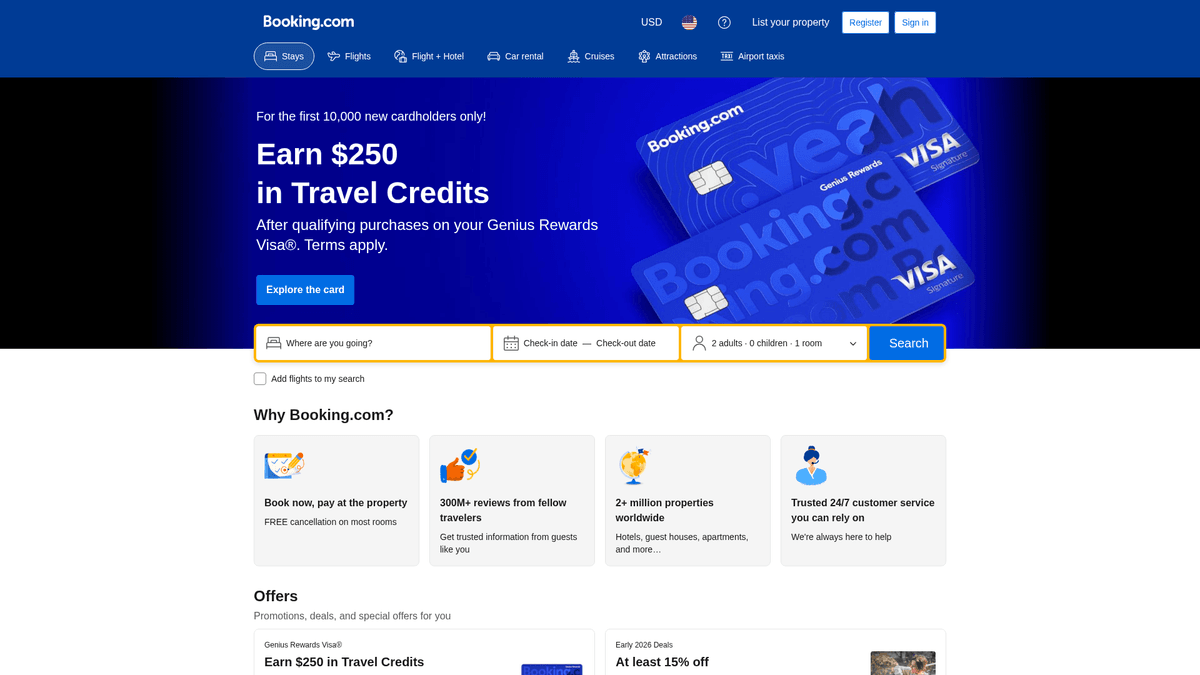
Booking.com is one of the world's leading digital travel companies, providing a platform for users to book accommodations, flights, car rentals, and attractions. It operates in over 40 languages and offers more than 28 million listings, making it the primary repository for global travel data. From luxury hotels to unique homes and apartments, the platform covers virtually every destination on Earth.
Wealth of Structured Data
The website contains a massive amount of structured information including property names, real-time pricing, geographical coordinates, user reviews, and detailed amenity lists. This data is updated constantly, reflecting the highly dynamic nature of the travel industry. For researchers and businesses, Booking.com serves as a primary source for market intelligence and consumer behavior analysis.
Business Value of Booking Data
Scraping this data is invaluable for competitive benchmarking, pricing optimization, and sentiment analysis. By extracting hotel rates and availability across different regions, companies can build predictive models for travel demand or create aggregator services that help travelers find the best deals in real-time.
Why Scrape Booking.com?
Discover the business value and use cases for extracting data from Booking.com.
Competitive Price Intelligence
Monitor hotel rates in real-time to adjust your own pricing strategy and maintain a competitive edge in local markets.
Customer Sentiment Analysis
Extract thousands of guest reviews to identify recurring service issues or common praise for specific property types.
Market Inventory Tracking
Identify new property listings and vacation rentals across different geographic regions to map out market supply trends.
Price Parity Auditing
Automate the verification of room rates across multiple platforms to ensure your properties are compliant with OTA agreements.
B2B Lead Generation
Identify properties that might benefit from specific hospitality services like professional photography, software, or cleaning.
Historical Demand Forecasting
Collect seasonal pricing and availability data to build predictive models for future travel demand surges.
Scraping Challenges
Technical challenges you may encounter when scraping Booking.com.
Enterprise-Grade Anti-Bot Protection
Booking.com utilizes sophisticated security layers like Akamai and PerimeterX that can detect and block automated crawlers instantly.
Dynamic JavaScript Rendering
Most pricing data and search results are loaded dynamically via AJAX, requiring a browser-based scraper to correctly view the content.
Geo-Targeted Pricing Variations
The website displays different prices based on the user's IP location, making high-quality residential proxies mandatory for accuracy.
Frequent Structural Updates
Regular A/B testing means HTML class names and layouts change often, which can easily break traditional CSS-based scraping scripts.
Scrape Booking.com with AI
No coding required. Extract data in minutes with AI-powered automation.
How It Works
Describe What You Need
Tell the AI what data you want to extract from Booking.com. Just type it in plain language — no coding or selectors needed.
AI Extracts the Data
Our artificial intelligence navigates Booking.com, handles dynamic content, and extracts exactly what you asked for.
Get Your Data
Receive clean, structured data ready to export as CSV, JSON, or send directly to your apps and workflows.
Why Use AI for Scraping
AI makes it easy to scrape Booking.com without writing any code. Our AI-powered platform uses artificial intelligence to understand what data you want — just describe it in plain language and the AI extracts it automatically.
How to scrape with AI:
- Describe What You Need: Tell the AI what data you want to extract from Booking.com. Just type it in plain language — no coding or selectors needed.
- AI Extracts the Data: Our artificial intelligence navigates Booking.com, handles dynamic content, and extracts exactly what you asked for.
- Get Your Data: Receive clean, structured data ready to export as CSV, JSON, or send directly to your apps and workflows.
Why use AI for scraping:
- Seamless Anti-Bot Bypassing: Automatio's infrastructure is built to navigate complex security shields like Akamai without requiring manual script adjustments.
- No-Code Visual Configuration: Create complex scraping workflows for Booking.com by simply clicking on the elements you want to extract within your browser.
- Full JavaScript Rendering Support: Automatically handles all dynamic content loading, ensuring that room details and prices are fully rendered before extraction.
- Flexible Scheduling and Automation: Set your scrapers to run on a daily or hourly basis to capture the most recent price fluctuations and new guest reviews.
- Built-in Proxy Rotation: Effortlessly integrate residential proxies to gather localized data from any country without risking IP-based blocks.
No-Code Web Scrapers for Booking.com
Point-and-click alternatives to AI-powered scraping
Several no-code tools like Browse.ai, Octoparse, Axiom, and ParseHub can help you scrape Booking.com. These tools use visual interfaces to select elements, but they come with trade-offs compared to AI-powered solutions.
Typical Workflow with No-Code Tools
Common Challenges
Learning curve
Understanding selectors and extraction logic takes time
Selectors break
Website changes can break your entire workflow
Dynamic content issues
JavaScript-heavy sites often require complex workarounds
CAPTCHA limitations
Most tools require manual intervention for CAPTCHAs
IP blocking
Aggressive scraping can get your IP banned
No-Code Web Scrapers for Booking.com
Several no-code tools like Browse.ai, Octoparse, Axiom, and ParseHub can help you scrape Booking.com. These tools use visual interfaces to select elements, but they come with trade-offs compared to AI-powered solutions.
Typical Workflow with No-Code Tools
- Install browser extension or sign up for the platform
- Navigate to the target website and open the tool
- Point-and-click to select data elements you want to extract
- Configure CSS selectors for each data field
- Set up pagination rules to scrape multiple pages
- Handle CAPTCHAs (often requires manual solving)
- Configure scheduling for automated runs
- Export data to CSV, JSON, or connect via API
Common Challenges
- Learning curve: Understanding selectors and extraction logic takes time
- Selectors break: Website changes can break your entire workflow
- Dynamic content issues: JavaScript-heavy sites often require complex workarounds
- CAPTCHA limitations: Most tools require manual intervention for CAPTCHAs
- IP blocking: Aggressive scraping can get your IP banned
Code Examples
import requests
from bs4 import BeautifulSoup

# Booking.com blocks simple requests; headers and cookies are critical.
url = 'https://www.booking.com/searchresults.html?ss=London'
headers = {
    'User-Agent': 'Mozilla/5.0 (Windows NT 10.0; Win64; x64) AppleWebKit/537.36 (KHTML, like Gecko) Chrome/119.0.0.0 Safari/537.36',
    'Accept-Language': 'en-US,en;q=0.9',
    'Accept': 'text/html,application/xhtml+xml,application/xml;q=0.9,image/avif,image/webp,*/*;q=0.8'
}

try:
    response = requests.get(url, headers=headers)
    response.raise_for_status()
    soup = BeautifulSoup(response.content, 'html.parser')
    # Selectors may change frequently; data-testid is usually more stable
    hotels = soup.find_all('div', {'data-testid': 'property-card'})
    for hotel in hotels:
        name = hotel.find('div', {'data-testid': 'title'}).text.strip()
        print(f'Hotel Found: {name}')
except Exception as e:
    print(f'Error occurred during scraping: {e}')
When to Use
Best for static HTML pages where content is loaded server-side. The fastest and simplest approach when JavaScript rendering isn't required.
Advantages
- ●Fastest execution (no browser overhead)
- ●Lowest resource consumption
- ●Easy to parallelize with asyncio
- ●Great for APIs and static pages
Limitations
- ●Cannot execute JavaScript
- ●Fails on SPAs and dynamic content
- ●May struggle with complex anti-bot systems
How to Scrape Booking.com with Code
Python + Requests
import requests
from bs4 import BeautifulSoup
# Booking.com blocks simple requests; headers and cookies are critical.
url = 'https://www.booking.com/searchresults.html?ss=London'
headers = {
'User-Agent': 'Mozilla/5.0 (Windows NT 10.0; Win64; x64) AppleWebKit/537.36 (KHTML, like Gecko) Chrome/119.0.0.0 Safari/537.36',
'Accept-Language': 'en-US,en;q=0.9',
'Accept': 'text/html,application/xhtml+xml,application/xml;q=0.9,image/avif,image/webp,*/*;q=0.8'
}
try:
response = requests.get(url, headers=headers)
response.raise_for_status()
soup = BeautifulSoup(response.content, 'html.parser')
# Selectors may change frequently; data-testid is usually more stable
hotels = soup.find_all('div', {'data-testid': 'property-card'})
for hotel in hotels:
name = hotel.find('div', {'data-testid': 'title'}).text.strip()
print(f'Hotel Found: {name}')
except Exception as e:
print(f'Error occurred during scraping: {e}')Python + Playwright
import asyncio
from playwright.async_api import async_playwright

async def scrape_booking():
    async with async_playwright() as p:
        # Use a non-headless browser or stealth plugins to avoid detection
        browser = await p.chromium.launch(headless=True)
        context = await browser.new_context(user_agent='Mozilla/5.0 (Windows NT 10.0; Win64; x64) ...')
        page = await context.new_page()

        await page.goto('https://www.booking.com/searchresults.html?ss=Paris', wait_until='networkidle')

        # Wait for the property cards to load dynamically
        await page.wait_for_selector('[data-testid="property-card"]')

        hotels = await page.query_selector_all('[data-testid="property-card"]')
        for hotel in hotels:
            title_el = await hotel.query_selector('[data-testid="title"]')
            title = await title_el.inner_text() if title_el else 'N/A'
            print(f'Name: {title}')

        await browser.close()

asyncio.run(scrape_booking())Python + Scrapy
import scrapy

class BookingSpider(scrapy.Spider):
    name = 'booking'
    allowed_domains = ['booking.com']
    start_urls = ['https://www.booking.com/searchresults.html?ss=New+York']

    custom_settings = {
        'USER_AGENT': 'Mozilla/5.0 (Windows NT 10.0; Win64; x64) AppleWebKit/537.36',
        'DOWNLOAD_DELAY': 2
    }

    def parse(self, response):
        for hotel in response.css('[data-testid="property-card"]'):
            yield {
                'name': hotel.css('[data-testid="title"]::text').get(),
                'price': hotel.css('[data-testid="price-and-discounted-price"] span::text').get(),
                'score': hotel.css('[data-testid="review-score-badge"]::text').get()
            }

        # Pagination handling
        next_page = response.css('button[aria-label="Next page"]::attr(href)').get()
        if next_page:
yield response.follow(next_page, self.parse)Node.js + Puppeteer
const puppeteer = require('puppeteer');

(async () => {
  const browser = await puppeteer.launch({ headless: true });
  const page = await browser.newPage();

  // Setting a realistic User-Agent is essential
  await page.setUserAgent('Mozilla/5.0 (Windows NT 10.0; Win64; x64) AppleWebKit/537.36');

  await page.goto('https://www.booking.com/searchresults.html?ss=Berlin', { waitUntil: 'networkidle2' });

  await page.waitForSelector('[data-testid="property-card"]');

  const results = await page.evaluate(() => {
    const items = Array.from(document.querySelectorAll('[data-testid="property-card"]'));
    return items.map(item => ({
      name: item.querySelector('[data-testid="title"]')?.innerText,
      price: item.querySelector('[data-testid="price-and-discounted-price"]')?.innerText
    }));
  });

  console.log(results);
  await browser.close();
})();What You Can Do With Booking.com Data
Explore practical applications and insights from Booking.com data.
Dynamic Price Optimization
Hotels and property managers can adjust their rates in real-time based on competitor pricing scraped daily from Booking.com.
How to implement:
- 1Identify top 10 local competitors on Booking.com.
- 2Schedule daily scrapes of prices for standard and deluxe rooms.
- 3Analyze the price gap between your property and competitors.
- 4Adjust your own pricing via channel manager API based on market average.
Use Automatio to extract data from Booking.com and build these applications without writing code.
What You Can Do With Booking.com Data
- Dynamic Price Optimization
Hotels and property managers can adjust their rates in real-time based on competitor pricing scraped daily from Booking.com.
- Identify top 10 local competitors on Booking.com.
- Schedule daily scrapes of prices for standard and deluxe rooms.
- Analyze the price gap between your property and competitors.
- Adjust your own pricing via channel manager API based on market average.
- Market Sentiment Analysis
Travel agencies can analyze thousands of customer reviews to identify top-performing properties and common regional complaints.
- Scrape all text reviews for properties in a specific city.
- Process the text using Natural Language Processing (NLP) to detect sentiment.
- Identify recurring keywords related to 'cleanliness', 'location', or 'service'.
- Generate reports to help travelers choose properties with the highest qualitative satisfaction.
- Vacation Rental ROI Mapping
Real estate investors use booking data to find high-yield areas by tracking occupancy signals and average nightly rates.
- Scrape property listings and prices across multiple neighborhoods.
- Track 'sold out' vs 'available' status over a 30-day window.
- Calculate estimated monthly revenue based on price and occupancy.
- Identify undervalued neighborhoods with high rating trends for potential investment.
- Travel Aggregator Maintenance
Meta-search engines use scraped data to provide up-to-date comparison tools for budget-conscious travelers.
- Sync listing data across multiple travel platforms including Booking.com.
- Extract real-time price changes to show 'price drop' alerts.
- Verify amenity availability (e.g., free Wi-Fi, pool) to filter results accurately.
- Display a unified view of the best deals currently available.
- Competitive Amenity Benchmarking
Hotel chains can analyze which amenities are standard in specific markets to upgrade their offerings and stay competitive.
- Scrape the 'Facilities' and 'Amenities' list for all 4-star hotels in a region.
- Calculate the frequency of specific amenities like 'Spa', 'EV Charging', or 'Gym'.
- Identify 'gaps' where your property lacks an amenity common among competitors.
- Prioritize renovations based on what current travelers value most.
Supercharge your workflow with AI Automation
Automatio combines the power of AI agents, web automation, and smart integrations to help you accomplish more in less time.
What to get right first
Expert advice for successfully extracting data from Booking.com.
Set Explicit URL Parameters
Always add 'selected_currency' and 'lang' parameters to your target URLs to ensure the data format remains consistent across all requests.
Target JSON-LD Script Tags
Look for application/ld+json script tags in the page source as they often contain highly structured metadata about the property.
Prioritize Residential Proxies
Booking.com quickly identifies and blocks datacenter IP ranges; residential proxies are necessary to appear as a legitimate home user.
Mimic Human Browsing Patterns
Introduce randomized delays and simulate mouse movements to avoid triggering behavioral detection systems used by anti-bot providers.
Extract Unique Property IDs
Always scrape the internal property ID to maintain a stable reference point even if the hotel name or description changes slightly.
Handle Localized Date Formats
Be prepared to parse different date formats depending on the language settings used during the scraping session.
Related Web Scraping
Frequently Asked Questions
Find answers to common questions about Booking.com