
How to Scrape AirlineQuality.com (Skytrax) Reviews
Learn how to scrape airline and airport reviews from AirlineQuality.com. Extract ratings, passenger sentiment, and seat data for market research.
Anti-Bot Protection Detected
- Cloudflare
- Enterprise-grade WAF and bot management. Uses JavaScript challenges, CAPTCHAs, and behavioral analysis. Requires browser automation with stealth settings.
- Rate Limiting
- Limits requests per IP/session over time. Can be bypassed with rotating proxies, request delays, and distributed scraping.
- IP Blocking
- Blocks known datacenter IPs and flagged addresses. Requires residential or mobile proxies to circumvent effectively.
- Turnstile
About AirlineQuality (Skytrax)
Learn what AirlineQuality (Skytrax) offers and what valuable data can be extracted from it.
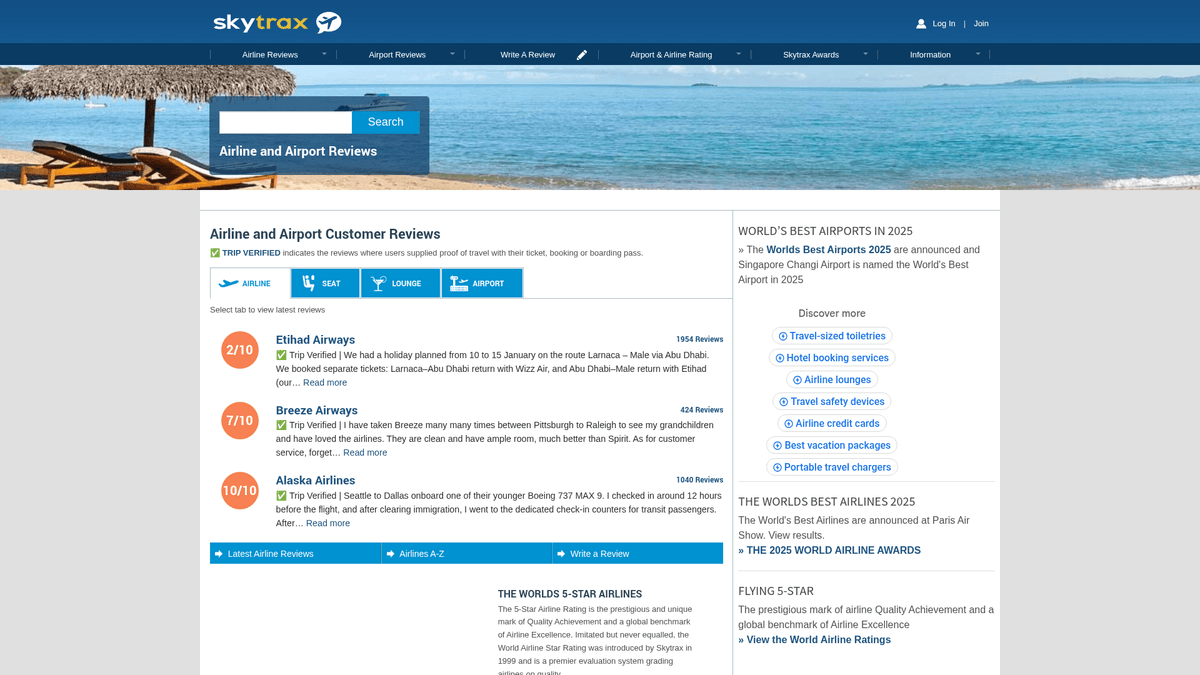
Overview of AirlineQuality.com
AirlineQuality.com, operated by Skytrax, is the leading global platform for airline and airport customer reviews. It serves as a primary source for the World Airline Awards and contains millions of data points regarding traveler experiences across over 600 airlines and 500 airports worldwide.
Data and Insights
The website provides detailed feedback on specific cabin classes (Economy, Premium Economy, Business, First), seat comfort, staff service, and ground handling. This data is critical for aviation analysts and market researchers who need to monitor brand reputation and service performance metrics.
Strategic Value
Scraping this data allows companies to perform sentiment analysis at scale, benchmark competitors, and identify common pain points in the passenger journey that can be addressed through service improvements or targeted marketing.
Why Scrape AirlineQuality (Skytrax)?
Discover the business value and use cases for extracting data from AirlineQuality (Skytrax).
Competitive Benchmarking
Directly compare your airline's service ratings against major competitors to identify specific areas for operational improvement.
Passenger Sentiment Analysis
Perform deep NLP analysis on thousands of passenger reviews to understand evolving travel trends and customer expectations.
Aircraft Performance Insights
Correlate passenger comfort ratings with specific aircraft models like the Airbus A350 or Boeing 787 to inform fleet procurement strategies.
Airport Service Monitoring
Monitor feedback on airport lounges, terminal cleanliness, and staff service to identify the best and worst-performing hubs globally.
Market Research and Reporting
Aggregate global airline data to create comprehensive industry reports or data-driven content for travel blogs and news outlets.
Scraping Challenges
Technical challenges you may encounter when scraping AirlineQuality (Skytrax).
Cloudflare Protection
The website employs Cloudflare security which can block standard HTTP requests that do not mimic realistic browser behavior.
Nested Star Ratings
Service categories like 'Food' or 'Seat Comfort' use visual star icons instead of text, requiring logic to count HTML elements for numeric values.
Dynamic Rate Limiting
Aggressive scraping without sufficient delays will lead to temporary IP bans or the presentation of CAPTCHA challenges.
Data Inconsistency
Reviewers often skip sub-ratings, meaning your scraper must be flexible enough to handle missing fields without breaking the data structure.
Scrape AirlineQuality (Skytrax) with AI
No coding required. Extract data in minutes with AI-powered automation.
How It Works
Describe What You Need
Tell the AI what data you want to extract from AirlineQuality (Skytrax). Just type it in plain language — no coding or selectors needed.
AI Extracts the Data
Our artificial intelligence navigates AirlineQuality (Skytrax), handles dynamic content, and extracts exactly what you asked for.
Get Your Data
Receive clean, structured data ready to export as CSV, JSON, or send directly to your apps and workflows.
Why Use AI for Scraping
AI makes it easy to scrape AirlineQuality (Skytrax) without writing any code. Our AI-powered platform uses artificial intelligence to understand what data you want — just describe it in plain language and the AI extracts it automatically.
How to scrape with AI:
- Describe What You Need: Tell the AI what data you want to extract from AirlineQuality (Skytrax). Just type it in plain language — no coding or selectors needed.
- AI Extracts the Data: Our artificial intelligence navigates AirlineQuality (Skytrax), handles dynamic content, and extracts exactly what you asked for.
- Get Your Data: Receive clean, structured data ready to export as CSV, JSON, or send directly to your apps and workflows.
Why use AI for scraping:
- Bypass Bot Detection: Automatio utilizes advanced fingerprinting and proxy rotation to naturally navigate past Cloudflare and Turnstile protections.
- Visual Data Mapping: Convert star-rating icons into clean numbers (1-5) using simple point-and-click selection without writing complex parsing scripts.
- Smart Pagination: Easily set up loops to crawl through hundreds of review pages by simply identifying the 'Next' button or page number pattern.
- Automated Cleaning: Use built-in text manipulation tools to strip prefixes like 'Trip Verified |' from review bodies before the data is even exported.
No-Code Web Scrapers for AirlineQuality (Skytrax)
Point-and-click alternatives to AI-powered scraping
Several no-code tools like Browse.ai, Octoparse, Axiom, and ParseHub can help you scrape AirlineQuality (Skytrax). These tools use visual interfaces to select elements, but they come with trade-offs compared to AI-powered solutions.
Typical Workflow with No-Code Tools
Common Challenges
Learning curve
Understanding selectors and extraction logic takes time
Selectors break
Website changes can break your entire workflow
Dynamic content issues
JavaScript-heavy sites often require complex workarounds
CAPTCHA limitations
Most tools require manual intervention for CAPTCHAs
IP blocking
Aggressive scraping can get your IP banned
No-Code Web Scrapers for AirlineQuality (Skytrax)
Several no-code tools like Browse.ai, Octoparse, Axiom, and ParseHub can help you scrape AirlineQuality (Skytrax). These tools use visual interfaces to select elements, but they come with trade-offs compared to AI-powered solutions.
Typical Workflow with No-Code Tools
- Install browser extension or sign up for the platform
- Navigate to the target website and open the tool
- Point-and-click to select data elements you want to extract
- Configure CSS selectors for each data field
- Set up pagination rules to scrape multiple pages
- Handle CAPTCHAs (often requires manual solving)
- Configure scheduling for automated runs
- Export data to CSV, JSON, or connect via API
Common Challenges
- Learning curve: Understanding selectors and extraction logic takes time
- Selectors break: Website changes can break your entire workflow
- Dynamic content issues: JavaScript-heavy sites often require complex workarounds
- CAPTCHA limitations: Most tools require manual intervention for CAPTCHAs
- IP blocking: Aggressive scraping can get your IP banned
Code Examples
import requests
from bs4 import BeautifulSoup

# Targeting British Airways reviews
url = "https://www.airlinequality.com/airline-reviews/british-airways/"
headers = {
    "User-Agent": "Mozilla/5.0 (Windows NT 10.0; Win64; x64) Chrome/119.0.0.0 Safari/537.36"
}

try:
    response = requests.get(url, headers=headers)
    response.raise_for_status()
    soup = BeautifulSoup(response.content, 'html.parser')

    # Find all review containers
    reviews = soup.find_all('article', itemprop="review")

    for review in reviews:
        title = review.find('h2', class_='text_header').text.strip()
        rating = review.find('span', itemprop="ratingValue").text if review.find('span', itemprop="ratingValue") else "N/A"
        body = review.find('div', class_='text_content').text.strip()

        print(f"Title: {title} | Rating: {rating}")
        print(f"Review: {body[:100]}...
")
except Exception as e:
    print(f"Error: {e}")
When to Use
Best for static HTML pages where content is loaded server-side. The fastest and simplest approach when JavaScript rendering isn't required.
Advantages
- ●Fastest execution (no browser overhead)
- ●Lowest resource consumption
- ●Easy to parallelize with asyncio
- ●Great for APIs and static pages
Limitations
- ●Cannot execute JavaScript
- ●Fails on SPAs and dynamic content
- ●May struggle with complex anti-bot systems
How to Scrape AirlineQuality (Skytrax) with Code
Python + Requests
import requests
from bs4 import BeautifulSoup
# Targeting British Airways reviews
url = "https://www.airlinequality.com/airline-reviews/british-airways/"
headers = {
"User-Agent": "Mozilla/5.0 (Windows NT 10.0; Win64; x64) Chrome/119.0.0.0 Safari/537.36"
}
try:
response = requests.get(url, headers=headers)
response.raise_for_status()
soup = BeautifulSoup(response.content, 'html.parser')
# Find all review containers
reviews = soup.find_all('article', itemprop="review")
for review in reviews:
title = review.find('h2', class_='text_header').text.strip()
rating = review.find('span', itemprop="ratingValue").text if review.find('span', itemprop="ratingValue") else "N/A"
body = review.find('div', class_='text_content').text.strip()
print(f"Title: {title} | Rating: {rating}")
print(f"Review: {body[:100]}...
")
except Exception as e:
print(f"Error: {e}")Python + Playwright
from playwright.sync_api import sync_playwright

def scrape_reviews():
    with sync_playwright() as p:
        # Launch browser to handle JS/Cloudflare
        browser = p.chromium.launch(headless=True)
        context = browser.new_context()
        page = context.new_page()

        # Navigate to target airline page
        page.goto("https://www.airlinequality.com/airline-reviews/british-airways/")

        # Wait for review articles to appear
        page.wait_for_selector('article[itemprop="review"]')

        reviews = page.locator('article[itemprop="review"]').all()
        for review in reviews:
            header = review.locator('.text_header').inner_text()
            text = review.locator('.text_content').inner_text()
            print(f"Processing: {header}")

        browser.close()

if __name__ == "__main__":
scrape_reviews()Python + Scrapy
import scrapy

class SkytraxSpider(scrapy.Spider):
    name = 'skytrax'
    start_urls = ['https://www.airlinequality.com/airline-reviews/british-airways/?pagesize=100']

    def parse(self, response):
        for review in response.css('article.review-stats'):
            yield {
                'title': review.css('h2.text_header::text').get(),
                'rating': review.css('span[itemprop="ratingValue"]::text').get(),
                'text': review.css('div.text_content::text').get(),
                'recommended': review.xpath("//td[contains(@class, 'review-rating-header') and text()='Recommended']/following-sibling::td/text()").get()
            }

        next_page = response.css('article.pagination li:last-child a::attr(href)').get()
        if next_page:
yield response.follow(next_page, self.parse)Node.js + Puppeteer
const puppeteer = require('puppeteer');

(async () => {
  const browser = await puppeteer.launch();
  const page = await browser.newPage();

  await page.goto('https://www.airlinequality.com/airline-reviews/british-airways/');

  const reviews = await page.evaluate(() => {
    const items = Array.from(document.querySelectorAll('article[itemprop="review"]'));
    return items.map(item => ({
      title: item.querySelector('.text_header')?.innerText,
      score: item.querySelector('span[itemprop="ratingValue"]')?.innerText,
      content: item.querySelector('.text_content')?.innerText
    }));
  });

  console.log(reviews);
  await browser.close();
})();What You Can Do With AirlineQuality (Skytrax) Data
Explore practical applications and insights from AirlineQuality (Skytrax) data.
Aviation Competitive Benchmarking
Airlines can analyze competitor reviews to identify where rivals are outperforming them in service quality.
How to implement:
- 1Scrape reviews for the top 5 competitors in a specific region.
- 2Calculate mean ratings for 'Seat Comfort' and 'Cabin Staff'.
- 3Generate a gap analysis report for internal stakeholders.
Use Automatio to extract data from AirlineQuality (Skytrax) and build these applications without writing code.
What You Can Do With AirlineQuality (Skytrax) Data
- Aviation Competitive Benchmarking
Airlines can analyze competitor reviews to identify where rivals are outperforming them in service quality.
- Scrape reviews for the top 5 competitors in a specific region.
- Calculate mean ratings for 'Seat Comfort' and 'Cabin Staff'.
- Generate a gap analysis report for internal stakeholders.
- Passenger Pain Point Identification
Product designers can use review text to find common complaints about specific aircraft models.
- Scrape all reviews that mention a specific aircraft (e.g., 'Boeing 777').
- Perform keyword extraction for terms like 'cramped', 'legroom', or 'uncomfortable'.
- Map complaints to specific seat types (Economy vs Business).
- Historical Performance Monitoring
Investors can track an airline's reputation over time to predict future financial performance based on customer loyalty.
- Scrape historical reviews over a 3-year period.
- Aggregate the 'Recommended' percentage by quarter.
- Correlate the satisfaction score with the airline's stock price or revenue data.
- B2B Lead Gen for Caterers
In-flight catering companies can identify airlines with poor 'Food & Beverage' ratings to offer their services.
- Filter the dataset for airlines with food ratings below 3 stars.
- Extract the specific routes where food complaints are most frequent.
- Present the data to the airline's procurement team as a business case.
- Travel Blog Content Generation
Travel media sites can create automated 'Best/Worst' lists for airports and airlines based on recent verified data.
- Aggregate the monthly ratings for the top 50 international airports.
- Calculate the 'Most Improved' based on year-over-year rating changes.
- Publish data-driven rankings to drive organic traffic.
Supercharge your workflow with AI Automation
Automatio combines the power of AI agents, web automation, and smart integrations to help you accomplish more in less time.
What to get right first
Expert advice for successfully extracting data from AirlineQuality (Skytrax).
Boost Page Size
Append '?pagesize=100' to any airline review URL to load more data per page and significantly reduce the total number of requests.
Check Verification Tags
Always capture the 'Trip Verified' status as a separate field to differentiate between high-confidence reviews and general feedback.
Respect Crawl Delays
Set a delay of at least 5 seconds between requests to comply with the site's robots.txt and maintain a long-term scraping connection.
Target Table Rows
Extract sub-ratings by targeting the 'review-ratings' table rows to ensure you correctly map labels to their corresponding star counts.
Use Residential Proxies
To avoid being identified as a bot, use residential proxies which provide IP addresses that appear as legitimate household connections.
Related Web Scraping
Frequently Asked Questions
Find answers to common questions about AirlineQuality (Skytrax)