
How to Scrape Cheapflights | Flight Data Web Scraper
Learn how to scrape real-time flight prices, routes, and airline data from Cheapflights. Expert guide on bypassing anti-bots with Python and Automatio.
Anti-Bot Protection Detected
- Cloudflare
- Enterprise-grade WAF and bot management. Uses JavaScript challenges, CAPTCHAs, and behavioral analysis. Requires browser automation with stealth settings.
- DataDome
- Real-time bot detection with ML models. Analyzes device fingerprint, network signals, and behavioral patterns. Common on e-commerce sites.
- Akamai Bot Manager
- Advanced bot detection using device fingerprinting, behavior analysis, and machine learning. One of the most sophisticated anti-bot systems.
- Browser Fingerprinting
- Identifies bots through browser characteristics: canvas, WebGL, fonts, plugins. Requires spoofing or real browser profiles.
- Residential Proxy Detection
About Cheapflights
Learn what Cheapflights offers and what valuable data can be extracted from it.
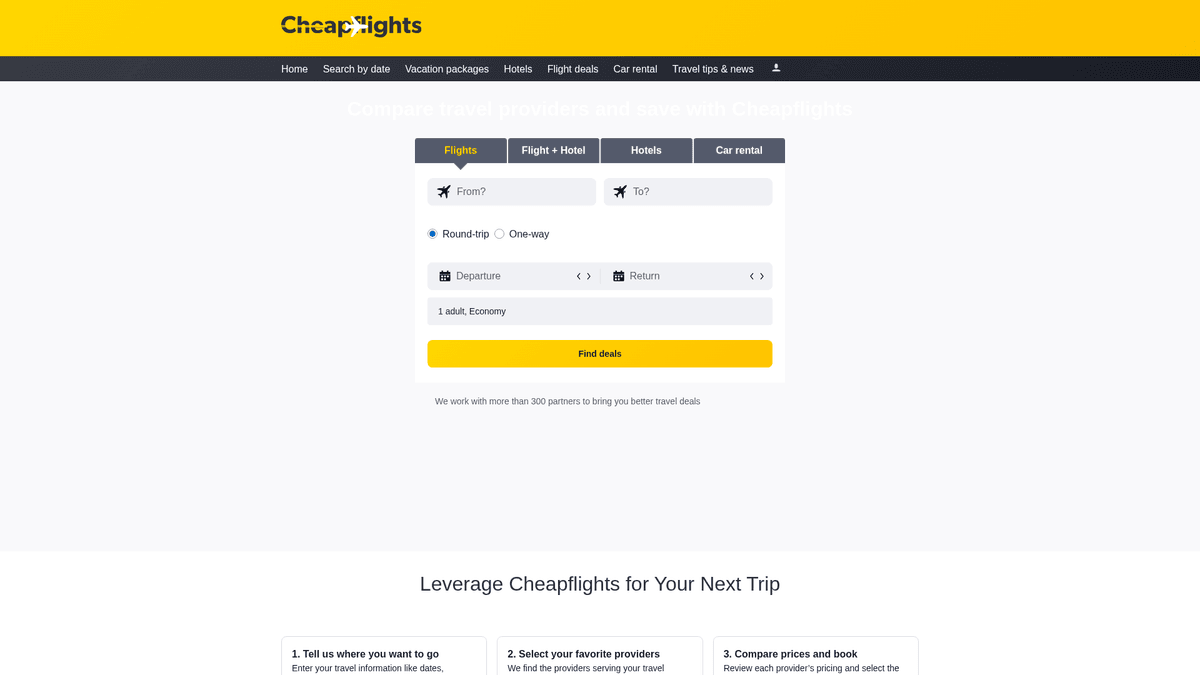
Cheapflights is a premier travel metasearch engine owned by Booking Holdings and operated as a sister brand to Kayak. It functions as a massive aggregator, scanning hundreds of airlines, travel agencies, and booking platforms to find the best airfares, hotels, and car rental deals. Unlike a direct booking site, Cheapflights focuses on price comparison, often redirecting users to provider websites to complete their transactions.
Data from Cheapflights is highly valuable because it represents the pulse of global travel pricing. For businesses, this data enables competitive benchmarking, the creation of deal-alert apps, and deep market research into aviation trends. Because travel prices fluctuate by the minute, the site employs aggressive protection to prevent automated scraping from degrading performance or creating imbalances.
By extracting this information at scale, developers can build tools that predict price drops or find hidden flight deals across thousands of routes. However, successfully scraping the platform requires a robust approach to handle dynamic content and sophisticated bot detection systems.
Why Scrape Cheapflights?
Discover the business value and use cases for extracting data from Cheapflights.
Real-Time Pricing Intelligence
Monitor flight price fluctuations across hundreds of airlines to identify the best booking windows and stay ahead of market shifts.
Competitor Fare Comparison
Help travel agencies and airlines benchmark their rates against industry leaders by aggregating data from diverse travel partners.
Aggregator Feed Generation
Power niche travel apps, price-drop notification services, and specialized deal websites with a steady stream of fresh airfare data.
Historical Trend Forecasting
Build a comprehensive database of seasonal travel costs to predict future price spikes and identify long-term economic patterns in aviation.
Route Frequency Analysis
Track the frequency of flights and layover patterns between specific city pairs to assess market demand and carrier dominance.
Scraping Challenges
Technical challenges you may encounter when scraping Cheapflights.
Sophisticated Anti-Bot Protection
The site employs Akamai and DataDome to detect automated traffic through advanced behavioral analysis and browser fingerprinting.
TLS and JA3 Fingerprinting
Security systems check the low-level TLS handshake of the connection, blocking standard scraping libraries that don't mimic real browser signatures.
Dynamic AJAX Content
Search results are loaded asynchronously via JavaScript, meaning static HTML parsers will fail to see any flight listings without a rendering engine.
Localized IP Geofencing
Prices and availability vary significantly based on the user's geographical location, necessitating the use of high-quality residential proxies.
Scrape Cheapflights with AI
No coding required. Extract data in minutes with AI-powered automation.
How It Works
Describe What You Need
Tell the AI what data you want to extract from Cheapflights. Just type it in plain language — no coding or selectors needed.
AI Extracts the Data
Our artificial intelligence navigates Cheapflights, handles dynamic content, and extracts exactly what you asked for.
Get Your Data
Receive clean, structured data ready to export as CSV, JSON, or send directly to your apps and workflows.
Why Use AI for Scraping
AI makes it easy to scrape Cheapflights without writing any code. Our AI-powered platform uses artificial intelligence to understand what data you want — just describe it in plain language and the AI extracts it automatically.
How to scrape with AI:
- Describe What You Need: Tell the AI what data you want to extract from Cheapflights. Just type it in plain language — no coding or selectors needed.
- AI Extracts the Data: Our artificial intelligence navigates Cheapflights, handles dynamic content, and extracts exactly what you asked for.
- Get Your Data: Receive clean, structured data ready to export as CSV, JSON, or send directly to your apps and workflows.
Why use AI for scraping:
- Automated TLS Masking: Bypasses low-level detection by automatically configuring JA3 signatures to match the profiles of legitimate, modern web browsers.
- Visual Extraction Engine: Handles all JavaScript execution and dynamic content loading natively, ensuring that complex flight result cards are fully rendered before data capture.
- Seamless Proxy Integration: Easily rotates through residential IP pools to overcome regional pricing variances and avoid the IP bans common with data center traffic.
- Scheduled Monitoring Workflows: Set up recurring scraping instances to track specific routes daily or hourly without any manual intervention, feeding data directly to your database.
No-Code Web Scrapers for Cheapflights
Point-and-click alternatives to AI-powered scraping
Several no-code tools like Browse.ai, Octoparse, Axiom, and ParseHub can help you scrape Cheapflights. These tools use visual interfaces to select elements, but they come with trade-offs compared to AI-powered solutions.
Typical Workflow with No-Code Tools
Common Challenges
Learning curve
Understanding selectors and extraction logic takes time
Selectors break
Website changes can break your entire workflow
Dynamic content issues
JavaScript-heavy sites often require complex workarounds
CAPTCHA limitations
Most tools require manual intervention for CAPTCHAs
IP blocking
Aggressive scraping can get your IP banned
No-Code Web Scrapers for Cheapflights
Several no-code tools like Browse.ai, Octoparse, Axiom, and ParseHub can help you scrape Cheapflights. These tools use visual interfaces to select elements, but they come with trade-offs compared to AI-powered solutions.
Typical Workflow with No-Code Tools
- Install browser extension or sign up for the platform
- Navigate to the target website and open the tool
- Point-and-click to select data elements you want to extract
- Configure CSS selectors for each data field
- Set up pagination rules to scrape multiple pages
- Handle CAPTCHAs (often requires manual solving)
- Configure scheduling for automated runs
- Export data to CSV, JSON, or connect via API
Common Challenges
- Learning curve: Understanding selectors and extraction logic takes time
- Selectors break: Website changes can break your entire workflow
- Dynamic content issues: JavaScript-heavy sites often require complex workarounds
- CAPTCHA limitations: Most tools require manual intervention for CAPTCHAs
- IP blocking: Aggressive scraping can get your IP banned
Code Examples
import requests
from bs4 import BeautifulSoup

# Note: Cheapflights uses Cloudflare; requests might require specialized headers or a session.
url = 'https://www.cheapflights.com/flights-to-london/new-york/'
headers = {
    'User-Agent': 'Mozilla/5.0 (Windows NT 10.0; Win64; x64) AppleWebKit/537.36 (KHTML, like Gecko) Chrome/119.0.0.0 Safari/537.36',
    'Accept-Language': 'en-US,en;q=0.9'
}

try:
    response = requests.get(url, headers=headers)
    if response.status_code == 200:
        soup = BeautifulSoup(response.text, 'html.parser')
        title = soup.find('title').text
        print(f'Page Title: {title}')
    else:
        print(f'Failed to retrieve data. Status code: {response.status_code}')
except Exception as e:
    print(f'Error occurred: {e}')
When to Use
Best for static HTML pages where content is loaded server-side. The fastest and simplest approach when JavaScript rendering isn't required.
Advantages
- ●Fastest execution (no browser overhead)
- ●Lowest resource consumption
- ●Easy to parallelize with asyncio
- ●Great for APIs and static pages
Limitations
- ●Cannot execute JavaScript
- ●Fails on SPAs and dynamic content
- ●May struggle with complex anti-bot systems
How to Scrape Cheapflights with Code
Python + Requests
import requests
from bs4 import BeautifulSoup
# Note: Cheapflights uses Cloudflare; requests might require specialized headers or a session.
url = 'https://www.cheapflights.com/flights-to-london/new-york/'
headers = {
'User-Agent': 'Mozilla/5.0 (Windows NT 10.0; Win64; x64) AppleWebKit/537.36 (KHTML, like Gecko) Chrome/119.0.0.0 Safari/537.36',
'Accept-Language': 'en-US,en;q=0.9'
}
try:
response = requests.get(url, headers=headers)
if response.status_code == 200:
soup = BeautifulSoup(response.text, 'html.parser')
title = soup.find('title').text
print(f'Page Title: {title}')
else:
print(f'Failed to retrieve data. Status code: {response.status_code}')
except Exception as e:
print(f'Error occurred: {e}')Python + Playwright
import asyncio
from playwright.async_api import async_playwright

async def scrape_cheapflights():
    async with async_playwright() as p:
        # Launching with a real-looking browser context
        browser = await p.chromium.launch(headless=True)
        page = await browser.new_page(user_agent='Mozilla/5.0 (Windows NT 10.0; Win64; x64) Chrome/119.0.0.0')

        # Navigate to a specific flight search result
        await page.goto('https://www.cheapflights.com/flights/NYC-LON/2026-06-15')

        # Wait for flight results to load dynamically
        try:
            await page.wait_for_selector('.resultWrapper', timeout=15000)
            flights = await page.query_selector_all('.resultWrapper')
            for flight in flights[:5]:
                price = await flight.query_selector('.price-text')
                print(f'Found flight price: {await price.inner_text()}')
        except:
            print('Flight results did not load or were blocked.')

        await browser.close()

asyncio.run(scrape_cheapflights())Python + Scrapy
import scrapy

class CheapflightsSpider(scrapy.Spider):
    name = 'cheapflights_spider'
    start_urls = ['https://www.cheapflights.com/flights/']

    def parse(self, response):
        # Scrapy is best for crawling links; for search results, use Scrapy-Playwright
        for item in response.css('.destination-card'):
            yield {
                'destination': item.css('.city-name::text').get(),
                'price': item.css('.price-value::text').get(),
                'route': item.css('.route-info::text').get(),
}Node.js + Puppeteer
const puppeteer = require('puppeteer-extra');
const StealthPlugin = require('puppeteer-extra-plugin-stealth');
puppeteer.use(StealthPlugin());

(async () => {
  const browser = await puppeteer.launch({ headless: true });
  const page = await browser.newPage();

  // Navigate to a search result
  await page.goto('https://www.cheapflights.com/flights/SFO-TYO/2026-08-20');

  // Wait for the dynamic flight cards to appear
  await page.waitForSelector('.resultWrapper', { timeout: 10000 });

  const results = await page.evaluate(() => {
    return Array.from(document.querySelectorAll('.resultWrapper')).map(el => ({
      price: el.querySelector('.price-text')?.innerText,
      airline: el.querySelector('.codeshare-airline-name')?.innerText
    }));
  });

  console.log(results);
  await browser.close();
})();What You Can Do With Cheapflights Data
Explore practical applications and insights from Cheapflights data.
Dynamic Price Tracker
Travel agencies can monitor specific routes and alert users when prices drop below a target threshold.
How to implement:
- 1Schedule daily scrapes for popular flight routes.
- 2Store pricing history in a central database.
- 3Trigger automated email notifications when target prices are met.
Use Automatio to extract data from Cheapflights and build these applications without writing code.
What You Can Do With Cheapflights Data
- Dynamic Price Tracker
Travel agencies can monitor specific routes and alert users when prices drop below a target threshold.
- Schedule daily scrapes for popular flight routes.
- Store pricing history in a central database.
- Trigger automated email notifications when target prices are met.
- Market Trend Analysis
Aviation analysts use aggregated data to understand seasonal demand and airline pricing strategies.
- Collect monthly average price data for key global corridors.
- Correlate price fluctuations with major events or fuel price changes.
- Visualize trends to provide business intelligence for travel startups.
- Error Fare Detection
Identify massive pricing mistakes made by airlines to offer exclusive deals to premium subscribers.
- Scrape all departures from major international hubs every 30 minutes.
- Use statistical analysis to identify prices that fall far outside standard deviations.
- Manually verify and publish error fares to a deal platform.
- Competitive Pricing Dashboard
Airlines can use aggregated data to adjust their own fares in real-time against competitors.
- Scrape competitor fares on overlapping routes multiple times a day.
- Inject scraped data into an internal pricing engine via API.
- Automatically update seat prices to maintain market competitiveness.
- Travel Content Generation
Automatically generate Best Time to Book guides based on historical price data.
- Scrape and aggregate yearly price data for specific destinations.
- Identify the cheapest and most expensive months to visit.
- Generate automated infographics and blog posts to drive SEO traffic.
Supercharge your workflow with AI Automation
Automatio combines the power of AI agents, web automation, and smart integrations to help you accomplish more in less time.
What to get right first
Expert advice for successfully extracting data from Cheapflights.
Use Residential Proxies
Avoid data center IPs, as they are flagged almost instantly by Akamai; residential proxies provide the high trust scores needed for successful extraction.
Monitor Internal APIs
Use the browser's Network tab to identify background XHR or GraphQL requests, which often contain more structured data than the visible HTML.
Capture Session Cookies
Run an initial handshake session on the home page to acquire valid 'FT' cookies, which are required for subsequent search result pages to load correctly.
Implement Random Delays
Mimic human browsing patterns by adding randomized pauses between searches to prevent triggering rate-limiting and behavioral security triggers.
Match User-Agents with TLS
Ensure your browser's User-Agent string exactly matches the JA3 fingerprint of your scraper to avoid being flagged for inconsistent client signatures.
Related Web Scraping
Frequently Asked Questions
Find answers to common questions about Cheapflights