
How to Scrape Thrillophilia Tour Packages & Reviews
Learn how to scrape Thrillophilia to extract tour package prices, itineraries, and customer reviews. High-quality travel data for market analysis and...
Anti-Bot Protection Detected
- Cloudflare
- Enterprise-grade WAF and bot management. Uses JavaScript challenges, CAPTCHAs, and behavioral analysis. Requires browser automation with stealth settings.
- Rate Limiting
- Limits requests per IP/session over time. Can be bypassed with rotating proxies, request delays, and distributed scraping.
- IP Blocking
- Blocks known datacenter IPs and flagged addresses. Requires residential or mobile proxies to circumvent effectively.
- Browser Fingerprinting
- Identifies bots through browser characteristics: canvas, WebGL, fonts, plugins. Requires spoofing or real browser profiles.
About Thrillophilia
Learn what Thrillophilia offers and what valuable data can be extracted from it.
The Premier Destination for Travel Experiences
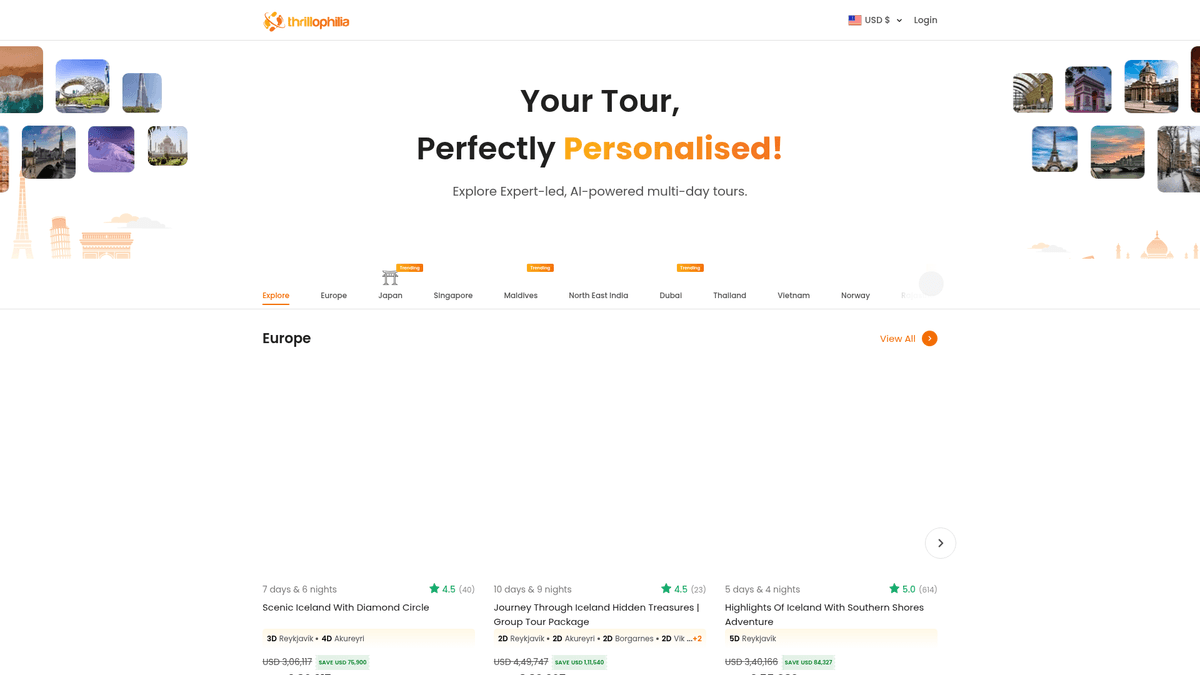
Thrillophilia is a prominent travel and adventure platform based in India that provides expert-led, end-to-end tour packages across the globe. It specializes in curated travel experiences ranging from Himalayan expeditions and Rajasthan heritage tours to international getaways in Europe, Southeast Asia, and the Middle East.
Data Richness and Value
The platform features detailed listings for multi-day tours, honeymoon packages, and group adventures. The listings on Thrillophilia contain a wealth of structured data including specific itineraries, night-by-night stay details, discounted pricing, user ratings, and descriptive reviews. This information is highly valuable for travel agencies and market researchers.
Why it Matters for Data Analysis
For businesses in the travel sector, scraping Thrillophilia provides a competitive edge. By monitoring price fluctuations and customer sentiment through reviews, companies can optimize their own offerings and identify emerging travel trends before they go mainstream.
Why Scrape Thrillophilia?
Discover the business value and use cases for extracting data from Thrillophilia.
Real-time Price Intelligence
Monitor dynamic price fluctuations and seasonal discounts on Thrillophilia to ensure your own travel offerings remain competitive in the market.
Itinerary Benchmarking
Extract detailed day-wise plans and inclusion lists to analyze how leading tour operators structure their experiences and use this data to improve your own products.
Sentiment and Review Analysis
Gather thousands of user reviews to perform sentiment analysis, identifying common traveler pain points and popular attractions across different demographics.
Market Trend Identification
Track the frequency of new listings and review volumes for specific destinations to identify emerging travel hotspots before they go mainstream.
Operator Performance Tracking
Identify and vet local service providers and tour operators mentioned in listings to build a database of high-quality potential business partners.
Scraping Challenges
Technical challenges you may encounter when scraping Thrillophilia.
Cloudflare Bot Management
Thrillophilia employs aggressive Cloudflare protection that can detect and block standard automated requests through browser fingerprinting and IP reputation checks.
Dynamic Content Rendering
The website is built using Next.js, meaning crucial data like prices and itineraries are often injected via JavaScript after the initial page load, requiring a headless browser.
Interactive Pagination
Instead of traditional numbered pages, many listing sections use a Load More Products button that requires active browser interaction to reveal the full tour catalog.
Nested Data Extraction
Tour itineraries are often stored in complex nested HTML structures (Day 1, Day 2, etc.), making it difficult to maintain clean data mapping without advanced selectors.
Scrape Thrillophilia with AI
No coding required. Extract data in minutes with AI-powered automation.
How It Works
Describe What You Need
Tell the AI what data you want to extract from Thrillophilia. Just type it in plain language — no coding or selectors needed.
AI Extracts the Data
Our artificial intelligence navigates Thrillophilia, handles dynamic content, and extracts exactly what you asked for.
Get Your Data
Receive clean, structured data ready to export as CSV, JSON, or send directly to your apps and workflows.
Why Use AI for Scraping
AI makes it easy to scrape Thrillophilia without writing any code. Our AI-powered platform uses artificial intelligence to understand what data you want — just describe it in plain language and the AI extracts it automatically.
How to scrape with AI:
- Describe What You Need: Tell the AI what data you want to extract from Thrillophilia. Just type it in plain language — no coding or selectors needed.
- AI Extracts the Data: Our artificial intelligence navigates Thrillophilia, handles dynamic content, and extracts exactly what you asked for.
- Get Your Data: Receive clean, structured data ready to export as CSV, JSON, or send directly to your apps and workflows.
Why use AI for scraping:
- Automated Anti-Bot Bypass: Automatio handles complex challenges like Cloudflare and browser fingerprinting automatically, ensuring your scrapers run without constant manual intervention.
- Visual Pagination Handling: Easily configure the tool to click Load More buttons or navigate through nested links visually, removing the need for complex looping scripts.
- JavaScript-Ready Extraction: Since Automatio acts like a real browser, it waits for Next.js components to fully hydrate, capturing final prices and itinerary details accurately every time.
- Structured Data Export: Automatically transform complex tour details into clean, structured CSV or JSON formats, ready for immediate use in your internal databases or AI models.
No-Code Web Scrapers for Thrillophilia
Point-and-click alternatives to AI-powered scraping
Several no-code tools like Browse.ai, Octoparse, Axiom, and ParseHub can help you scrape Thrillophilia. These tools use visual interfaces to select elements, but they come with trade-offs compared to AI-powered solutions.
Typical Workflow with No-Code Tools
Common Challenges
Learning curve
Understanding selectors and extraction logic takes time
Selectors break
Website changes can break your entire workflow
Dynamic content issues
JavaScript-heavy sites often require complex workarounds
CAPTCHA limitations
Most tools require manual intervention for CAPTCHAs
IP blocking
Aggressive scraping can get your IP banned
No-Code Web Scrapers for Thrillophilia
Several no-code tools like Browse.ai, Octoparse, Axiom, and ParseHub can help you scrape Thrillophilia. These tools use visual interfaces to select elements, but they come with trade-offs compared to AI-powered solutions.
Typical Workflow with No-Code Tools
- Install browser extension or sign up for the platform
- Navigate to the target website and open the tool
- Point-and-click to select data elements you want to extract
- Configure CSS selectors for each data field
- Set up pagination rules to scrape multiple pages
- Handle CAPTCHAs (often requires manual solving)
- Configure scheduling for automated runs
- Export data to CSV, JSON, or connect via API
Common Challenges
- Learning curve: Understanding selectors and extraction logic takes time
- Selectors break: Website changes can break your entire workflow
- Dynamic content issues: JavaScript-heavy sites often require complex workarounds
- CAPTCHA limitations: Most tools require manual intervention for CAPTCHAs
- IP blocking: Aggressive scraping can get your IP banned
Code Examples
import requests
from bs4 import BeautifulSoup

# Thrillophilia uses Cloudflare, so standard requests might fail without proper headers or session management
headers = {'User-Agent': 'Mozilla/5.0 (Windows NT 10.0; Win64; x64) AppleWebKit/537.36 (KHTML, like Gecko) Chrome/91.0.4472.124 Safari/537.36'}
url = 'https://www.thrillophilia.com/destinations/bali/tours'

def scrape_thrill(url):
    try:
        response = requests.get(url, headers=headers)
        response.raise_for_status()
        soup = BeautifulSoup(response.text, 'html.parser')
        # Selectors vary based on specific destination pages
        tours = soup.select('.tour-card')
        for tour in tours:
            title = tour.find('h3').text.strip()
            price = tour.select_one('.price-value').text.strip() if tour.select_one('.price-value') else 'N/A'
            print(f'Tour: {title} | Price: {price}')
    except Exception as e:
        print(f'Error occurred: {e}')

scrape_thrill(url)
When to Use
Best for static HTML pages where content is loaded server-side. The fastest and simplest approach when JavaScript rendering isn't required.
Advantages
- ●Fastest execution (no browser overhead)
- ●Lowest resource consumption
- ●Easy to parallelize with asyncio
- ●Great for APIs and static pages
Limitations
- ●Cannot execute JavaScript
- ●Fails on SPAs and dynamic content
- ●May struggle with complex anti-bot systems
How to Scrape Thrillophilia with Code
Python + Requests
import requests
from bs4 import BeautifulSoup
# Thrillophilia uses Cloudflare, so standard requests might fail without proper headers or session management
headers = {'User-Agent': 'Mozilla/5.0 (Windows NT 10.0; Win64; x64) AppleWebKit/537.36 (KHTML, like Gecko) Chrome/91.0.4472.124 Safari/537.36'}
url = 'https://www.thrillophilia.com/destinations/bali/tours'
def scrape_thrill(url):
try:
response = requests.get(url, headers=headers)
response.raise_for_status()
soup = BeautifulSoup(response.text, 'html.parser')
# Selectors vary based on specific destination pages
tours = soup.select('.tour-card')
for tour in tours:
title = tour.find('h3').text.strip()
price = tour.select_one('.price-value').text.strip() if tour.select_one('.price-value') else 'N/A'
print(f'Tour: {title} | Price: {price}')
except Exception as e:
print(f'Error occurred: {e}')
scrape_thrill(url)Python + Playwright
from playwright.sync_api import sync_playwright

def run():
    with sync_playwright() as p:
        # Launching with a real browser profile helps bypass basic detections
        browser = p.chromium.launch(headless=True)
        page = browser.new_page()
        page.goto('https://www.thrillophilia.com/destinations/egypt/tours', wait_until='networkidle')

        # Wait for tour cards to load dynamically
        page.wait_for_selector('.tour-card')

        tours = page.query_selector_all('.tour-card')
        for tour in tours:
            title = tour.query_selector('h3').inner_text()
            print(f'Extracted: {title}')

        browser.close()

run()Python + Scrapy
import scrapy

class ThrillSpider(scrapy.Spider):
    name = 'thrillophilia'
    start_urls = ['https://www.thrillophilia.com/destinations/japan/tours']

    def parse(self, response):
        for tour in response.css('.tour-card'):
            yield {
                'title': tour.css('h3::text').get(),
                'price': tour.css('.current-price::text').get(),
                'rating': tour.css('.rating-value::text').get()
            }

        # Handling pagination
        next_page = response.css('a.next-page::attr(href)').get()
        if next_page:
yield response.follow(next_page, self.parse)Node.js + Puppeteer
const puppeteer = require('puppeteer');

(async () => {
  const browser = await puppeteer.launch();
  const page = await browser.newPage();
  await page.goto('https://www.thrillophilia.com/destinations/maldives');

  // Execute script in browser context to extract data
  const tours = await page.evaluate(() => {
    const items = document.querySelectorAll('.tour-card');
    return Array.from(items).map(item => ({
      title: item.querySelector('h3')?.innerText,
      price: item.querySelector('.price')?.innerText
    }));
  });

  console.log(tours);
  await browser.close();
})();What You Can Do With Thrillophilia Data
Explore practical applications and insights from Thrillophilia data.
Dynamic Price Monitoring
Monitor activity prices daily to adjust competitive pricing strategies.
How to implement:
- 1Scrape tour prices daily for top destinations
- 2Store historical data in a SQL database
- 3Set up alerts for price drops over 15%
- 4Sync with internal CRM to update your own pricing
Use Automatio to extract data from Thrillophilia and build these applications without writing code.
What You Can Do With Thrillophilia Data
- Dynamic Price Monitoring
Monitor activity prices daily to adjust competitive pricing strategies.
- Scrape tour prices daily for top destinations
- Store historical data in a SQL database
- Set up alerts for price drops over 15%
- Sync with internal CRM to update your own pricing
- Sentiment Analysis on Reviews
Analyze thousands of reviews to understand traveler pain points.
- Extract all review texts and ratings
- Apply NLP models to categorize sentiment
- Identify specific keywords related to 'safety' or 'delays'
- Generate reports for service improvement
- Itinerary Trend Discovery
Use itinerary data to design new tour packages that follow market trends.
- Scrape the night-by-night breakdown of top-selling tours
- Identify common hotel and activity patterns
- Compare popularity of destinations across different regions
- Draft new products based on high-performing itinerary structures
- Lead Gen for Travel Gear
Identify popular activities to target equipment sales to specific demographics.
- Track the most booked adventure types (e.g., trekking vs. luxury)
- Correlate activity popularity with seasonal trends
- Target marketing campaigns for gear based on destination activity tags
- Tour Operator Verification
Monitor which operators are consistently rated highly across the platform.
- Extract operator names and their average rating scores
- Track the volume of tours handled by each operator
- Vet potential partners for your own travel agency network
Supercharge your workflow with AI Automation
Automatio combines the power of AI agents, web automation, and smart integrations to help you accomplish more in less time.
What to get right first
Expert advice for successfully extracting data from Thrillophilia.
Prioritize Residential Proxies
To avoid being flagged by Thrillophilia's security systems, use high-quality residential proxies that mimic real residential user traffic rather than data center IPs.
Extract the NEXT_DATA Script
Check the page source for a script tag containing __NEXT_DATA__; it often holds a complete JSON object of the page's data, which can be much faster to parse.
Implement Random Delays
Set up random wait times between interactions to mimic human browsing patterns and reduce the likelihood of triggering rate limits or security challenges.
Handle Lazy-Loaded Images
Many images only load when they enter the viewport; ensure your scraper scrolls through the page to capture all tour photo URLs correctly.
Normalize Currency and Price
Prices may change based on your proxy location. Always extract the currency code alongside the numerical value to prevent data inconsistency.
Related Web Scraping
Frequently Asked Questions
Find answers to common questions about Thrillophilia