
How to Scrape Kalodata: TikTok Shop Data Extraction Guide
Extract product prices and creator performance from Kalodata. Leverage TikTok Shop analytics for market research and sales growth with our guide.
Anti-Bot Protection Detected
- Cloudflare
- Enterprise-grade WAF and bot management. Uses JavaScript challenges, CAPTCHAs, and behavioral analysis. Requires browser automation with stealth settings.
- Login Wall
- Rate Limiting
- Limits requests per IP/session over time. Can be bypassed with rotating proxies, request delays, and distributed scraping.
- IP Blocking
- Blocks known datacenter IPs and flagged addresses. Requires residential or mobile proxies to circumvent effectively.
- Browser Fingerprinting
- Identifies bots through browser characteristics: canvas, WebGL, fonts, plugins. Requires spoofing or real browser profiles.
About Kalodata
Learn what Kalodata offers and what valuable data can be extracted from it.
Platform Overview
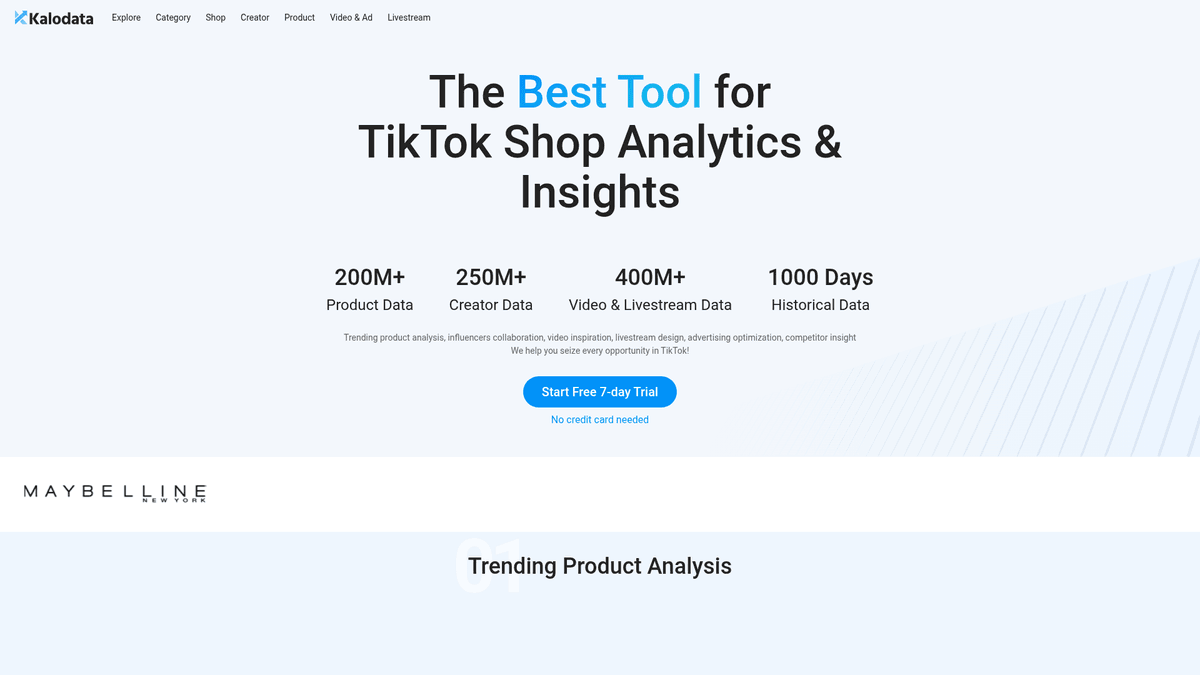
Kalodata is a premier analytics and insights platform specifically designed for TikTok Shop e-commerce. Founded by former key members of TikTok's global e-commerce division, it provides deep intelligence into trending products, creator performance, and shop rankings across international markets. The platform aggregates data from public TikTok channels to help sellers and brands make data-driven decisions based on real-time sales trends.
Data Intelligence
The website hosts massive datasets, including over 200 million product records, 250 million creator profiles, and 400 million video and livestream data points. This information is organized into sophisticated ranking tables, allowing users to filter by revenue growth, seller type, and niche categories. It acts as a comprehensive monitoring tool for the entire TikTok Shop ecosystem, offering insights into what is currently driving consumer behavior.
Strategic Value
Scraping Kalodata is highly valuable for market research and competitive analysis. Businesses can track viral product trends before they saturate the market, identify top-performing influencers for affiliate marketing, and monitor competitor sales volumes. By automating data extraction, users can build proprietary databases of high-growth e-commerce opportunities and stay ahead of the rapidly changing social commerce landscape.
Why Scrape Kalodata?
Discover the business value and use cases for extracting data from Kalodata.
Viral Trend Discovery
Identify TikTok Shop products experiencing sudden sales surges before they reach peak popularity to capitalize on early market trends.
Influencer Performance Benchmarking
Extract creator metrics to find influencers who generate high conversion rates and actual revenue rather than just vanity metrics.
Competitive Revenue Tracking
Monitor the daily and weekly earnings of rival shops to understand their market share and the effectiveness of their product launches.
Ad Creative Optimization
Analyze which video hooks and formats are driving the most sales for top-performing brands to refine your own TikTok advertising strategy.
Historical Market Analysis
Access up to 1,000 days of historical data to track long-term price fluctuations and seasonal demand patterns across different regions.
Global Market Expansion
Compare category performance across regions like the US, UK, and SE Asia to determine which markets are most receptive to your products.
Scraping Challenges
Technical challenges you may encounter when scraping Kalodata.
Sophisticated Cloudflare Protection
Kalodata uses advanced Cloudflare security and Turnstile CAPTCHAs to detect and block headless browsers and automated agents.
Dynamic React Rendering
The platform is built on a modern JavaScript framework, meaning data tables are rendered dynamically and require full browser execution to extract.
Strict Authentication Walls
Accessing detailed analytics and historical revenue metrics requires a logged-in session, necessitating complex cookie management and session persistence.
Frequent UI Transformations
The site's frontend structure and CSS selectors undergo regular updates, which can break traditional scrapers that rely on static HTML elements.
Aggressive Rate Limiting
Rapid requests from a single IP address trigger immediate blocks or 'Too Many Requests' errors, requiring sophisticated rotation and timing strategies.
Scrape Kalodata with AI
No coding required. Extract data in minutes with AI-powered automation.
How It Works
Describe What You Need
Tell the AI what data you want to extract from Kalodata. Just type it in plain language — no coding or selectors needed.
AI Extracts the Data
Our artificial intelligence navigates Kalodata, handles dynamic content, and extracts exactly what you asked for.
Get Your Data
Receive clean, structured data ready to export as CSV, JSON, or send directly to your apps and workflows.
Why Use AI for Scraping
AI makes it easy to scrape Kalodata without writing any code. Our AI-powered platform uses artificial intelligence to understand what data you want — just describe it in plain language and the AI extracts it automatically.
How to scrape with AI:
- Describe What You Need: Tell the AI what data you want to extract from Kalodata. Just type it in plain language — no coding or selectors needed.
- AI Extracts the Data: Our artificial intelligence navigates Kalodata, handles dynamic content, and extracts exactly what you asked for.
- Get Your Data: Receive clean, structured data ready to export as CSV, JSON, or send directly to your apps and workflows.
Why use AI for scraping:
- Built-in Anti-Bot Bypass: Automatio automatically handles Cloudflare challenges and browser fingerprinting, ensuring your scraping tasks stay undetected and unblocked.
- No-Code Data Extraction: Set up complex scrapers for TikTok analytics using a visual interface without writing a single line of Python or Playwright code.
- Seamless JS Rendering: Natively supports dynamic React-based content, ensuring that all revenue tables and charts are fully loaded before data collection begins.
- Automated Monitoring Schedules: Schedule your scrapers to run daily or weekly to automatically update your internal databases with the latest TikTok Shop trends and sales data.
- Residential Proxy Integration: Easily route requests through high-quality residential proxies to mimic real user behavior and maintain long-term access to restricted data.
No-Code Web Scrapers for Kalodata
Point-and-click alternatives to AI-powered scraping
Several no-code tools like Browse.ai, Octoparse, Axiom, and ParseHub can help you scrape Kalodata. These tools use visual interfaces to select elements, but they come with trade-offs compared to AI-powered solutions.
Typical Workflow with No-Code Tools
Common Challenges
Learning curve
Understanding selectors and extraction logic takes time
Selectors break
Website changes can break your entire workflow
Dynamic content issues
JavaScript-heavy sites often require complex workarounds
CAPTCHA limitations
Most tools require manual intervention for CAPTCHAs
IP blocking
Aggressive scraping can get your IP banned
No-Code Web Scrapers for Kalodata
Several no-code tools like Browse.ai, Octoparse, Axiom, and ParseHub can help you scrape Kalodata. These tools use visual interfaces to select elements, but they come with trade-offs compared to AI-powered solutions.
Typical Workflow with No-Code Tools
- Install browser extension or sign up for the platform
- Navigate to the target website and open the tool
- Point-and-click to select data elements you want to extract
- Configure CSS selectors for each data field
- Set up pagination rules to scrape multiple pages
- Handle CAPTCHAs (often requires manual solving)
- Configure scheduling for automated runs
- Export data to CSV, JSON, or connect via API
Common Challenges
- Learning curve: Understanding selectors and extraction logic takes time
- Selectors break: Website changes can break your entire workflow
- Dynamic content issues: JavaScript-heavy sites often require complex workarounds
- CAPTCHA limitations: Most tools require manual intervention for CAPTCHAs
- IP blocking: Aggressive scraping can get your IP banned
Code Examples
import requests
from bs4 import BeautifulSoup

# Kalodata uses dynamic rendering, so standard requests will return minimal HTML.
# This example demonstrates how to approach the site with standard headers.
url = 'https://www.kalodata.com/product'
headers = {
    'User-Agent': 'Mozilla/5.0 (Windows NT 10.0; Win64; x64) AppleWebKit/537.36 (KHTML, like Gecko) Chrome/119.0.0.0 Safari/537.36',
    'Accept-Language': 'en-US,en;q=0.9'
}

try:
    response = requests.get(url, headers=headers)
    response.raise_for_status()
    soup = BeautifulSoup(response.text, 'html.parser')

    # In Next.js apps, structured data is often in a __NEXT_DATA__ script tag
    next_data = soup.find('script', id='__NEXT_DATA__')
    if next_data:
        print('Found hydration object - parse this JSON for direct data')
    else:
        print('Data is rendered client-side; consider using Playwright.')
except Exception as e:
    print(f'Error encountered: {e}')
When to Use
Best for static HTML pages where content is loaded server-side. The fastest and simplest approach when JavaScript rendering isn't required.
Advantages
- ●Fastest execution (no browser overhead)
- ●Lowest resource consumption
- ●Easy to parallelize with asyncio
- ●Great for APIs and static pages
Limitations
- ●Cannot execute JavaScript
- ●Fails on SPAs and dynamic content
- ●May struggle with complex anti-bot systems
How to Scrape Kalodata with Code
Python + Requests
import requests
from bs4 import BeautifulSoup
# Kalodata uses dynamic rendering, so standard requests will return minimal HTML.
# This example demonstrates how to approach the site with standard headers.
url = 'https://www.kalodata.com/product'
headers = {
'User-Agent': 'Mozilla/5.0 (Windows NT 10.0; Win64; x64) AppleWebKit/537.36 (KHTML, like Gecko) Chrome/119.0.0.0 Safari/537.36',
'Accept-Language': 'en-US,en;q=0.9'
}
try:
response = requests.get(url, headers=headers)
response.raise_for_status()
soup = BeautifulSoup(response.text, 'html.parser')
# In Next.js apps, structured data is often in a __NEXT_DATA__ script tag
next_data = soup.find('script', id='__NEXT_DATA__')
if next_data:
print('Found hydration object - parse this JSON for direct data')
else:
print('Data is rendered client-side; consider using Playwright.')
except Exception as e:
print(f'Error encountered: {e}')Python + Playwright
import asyncio
from playwright.async_api import async_playwright

async def scrape_kalodata():
    async with async_playwright() as p:
        # Using stealth-like parameters to avoid Cloudflare detection
        browser = await p.chromium.launch(headless=True)
        context = await browser.new_context(user_agent='Mozilla/5.0 (Windows NT 10.0; Win64; x64) AppleWebKit/537.36')
        page = await context.new_page()

        # Navigate to the product rankings page
        await page.goto('https://www.kalodata.com/product')

        # Wait for the table rows to load dynamically from the internal API
        await page.wait_for_selector('.table-row-container', timeout=15000)

        # Extract product names and associated metrics
        products = await page.query_selector_all('.product-name-class')
        for product in products:
            name = await product.inner_text()
            print(f'Product Found: {name}')

        await browser.close()

asyncio.run(scrape_kalodata())Python + Scrapy
import scrapy

class KalodataSpider(scrapy.Spider):
    name = 'kalodata_spider'
    start_urls = ['https://www.kalodata.com/shop']

    def parse(self, response):
        # Note: Scrapy needs a middleware like scrapy-playwright for this JS-heavy site
        for shop in response.css('.shop-list-item'):
            yield {
                'name': shop.css('.shop-name::text').get(),
                'revenue': shop.css('.revenue-value::text').get(),
                'sold': shop.css('.items-sold::text').get(),
            }

        # Standard pagination handling for numbered pages
        next_page = response.css('a.next-page-selector::attr(href)').get()
        if next_page:
yield response.follow(next_page, self.parse)Node.js + Puppeteer
const puppeteer = require('puppeteer-extra');
const StealthPlugin = require('puppeteer-extra-plugin-stealth');
puppeteer.use(StealthPlugin());

(async () => {
  const browser = await puppeteer.launch({ headless: true });
  const page = await browser.newPage();

  // Navigate to creator insights
  await page.goto('https://www.kalodata.com/creator', { waitUntil: 'networkidle2' });

  // Wait for the dynamic list to populate
  await page.waitForSelector('.creator-list-container');

  const creators = await page.evaluate(() => {
    const items = Array.from(document.querySelectorAll('.creator-item'));
    return items.map(item => ({
      name: item.querySelector('.name')?.innerText,
      followers: item.querySelector('.followers')?.innerText,
      category: item.querySelector('.category-tag')?.innerText
    }));
  });

  console.log(creators);
  await browser.close();
})();What You Can Do With Kalodata Data
Explore practical applications and insights from Kalodata data.
Viral Product Scouting
Dropshippers and retailers use Kalodata to find products with surging sales but low market competition.
How to implement:
- 1Scrape the 'Product Rank' page daily.
- 2Filter for items with a Revenue Growth Rate above 50%.
- 3Cross-reference identified items with sourcing platforms like AliExpress.
- 4Launch targeted social media ads for the trending item.
Use Automatio to extract data from Kalodata and build these applications without writing code.
What You Can Do With Kalodata Data
- Viral Product Scouting
Dropshippers and retailers use Kalodata to find products with surging sales but low market competition.
- Scrape the 'Product Rank' page daily.
- Filter for items with a Revenue Growth Rate above 50%.
- Cross-reference identified items with sourcing platforms like AliExpress.
- Launch targeted social media ads for the trending item.
- Competitor Revenue Analysis
Brands monitor direct competitors on TikTok Shop to benchmark growth and marketing efficiency.
- Extract monthly revenue and items sold for a list of competitor shop URLs.
- Analyze the ratio of livestream revenue versus short-video revenue.
- Identify which specific creators are driving the most traffic for those competitors.
- Adjust internal marketing budgets based on observed competitor success.
- Influencer Matching Strategy
Agencies build databases of creators who generate actual sales conversion rather than just high view counts.
- Scrape the 'Creator Rank' list for specific niches like Beauty or Electronics.
- Extract 'Average Revenue per Video' and 'Follower Conversion' metrics.
- Sort by creators with high revenue but moderate follower counts.
- Automate outreach to the identified top-performing micro-influencers.
- Global Market Expansion
E-commerce companies identify which international regions are most receptive to specific product categories.
- Aggregate sales data across all geographic regions supported by Kalodata.
- Compare category rankings across countries like the US, UK, and Thailand.
- Calculate the average unit price for successful products in each specific region.
- Determine the optimal country for the next international inventory shipment.
- Brand Monitoring
Corporate brands track unauthorized sellers or grey market activity within the TikTok Shop ecosystem.
- Scrape product listings using brand-specific keywords.
- Identify shops selling brand items without authorization.
- Monitor pricing consistency across multiple third-party sellers.
- Generate weekly reports for legal and compliance teams.
- Affiliate Strategy Optimization
Sellers analyze which affiliate commission rates are generating the most volume for similar products.
- Scrape competitor products and their associated affiliate commission percentages.
- Correlate commission rates with the number of creators promoting the product.
- Identify the 'sweet spot' commission rate that attracts high-quality creators.
- Update internal affiliate offers to remain competitive in the creator marketplace.
Supercharge your workflow with AI Automation
Automatio combines the power of AI agents, web automation, and smart integrations to help you accomplish more in less time.
What to get right first
Expert advice for successfully extracting data from Kalodata.
Target Hydration Objects
Look for the __NEXT_DATA__ script tag in the HTML source code to find structured JSON data without having to parse complex DOM elements.
Use Residential Proxies
Datacenter IPs are frequently flagged; rotating residential proxies are essential for large-scale extraction to bypass Kalodata's security layers.
Intercept API Responses
Monitor the browser's network tab for XHR requests to capture clean JSON data directly from Kalodata's internal APIs during page load.
Manage Sessions Carefully
Handle JWT tokens and browser cookies properly to maintain authenticated sessions, which are required to view high-value revenue metrics.
Implement Random Delays
Mimic human browsing by adding varied sleep intervals between requests and random mouse movements to lower your automation profile signature.
Rotate User Agents
Maintain a list of modern browser User-Agent strings and rotate them regularly to avoid being flagged for consistent, repetitive patterns.
Related Web Scraping
How to Scrape Tata 1mg | 1mg.com Medicine Data Scraper

How to Scrape Carwow: Extract Used Car Data and Prices
How to Scrape HP.com: A Technical Guide to Product & Price Data
How to Scrape eBay | eBay Web Scraper Guide
How to Scrape The Range UK | Product Data & Prices Scraper
How to Scrape ThemeForest Web Data

How to Scrape StubHub: The Ultimate Web Scraping Guide
How to Scrape AliExpress: The Ultimate 2025 Data Extraction Guide
Frequently Asked Questions
Find answers to common questions about Kalodata