
How to Scrape ThemeForest Web Data
Learn how to scrape ThemeForest to extract WordPress themes, website templates, pricing, and sales data. Power your market research and competitive analysis...
Anti-Bot Protection Detected
- Cloudflare
- Enterprise-grade WAF and bot management. Uses JavaScript challenges, CAPTCHAs, and behavioral analysis. Requires browser automation with stealth settings.
- Rate Limiting
- Limits requests per IP/session over time. Can be bypassed with rotating proxies, request delays, and distributed scraping.
- IP Blocking
- Blocks known datacenter IPs and flagged addresses. Requires residential or mobile proxies to circumvent effectively.
- Browser Fingerprinting
- Identifies bots through browser characteristics: canvas, WebGL, fonts, plugins. Requires spoofing or real browser profiles.
- Google reCAPTCHA
- Google's CAPTCHA system. v2 requires user interaction, v3 runs silently with risk scoring. Can be solved with CAPTCHA services.
About ThemeForest
Learn what ThemeForest offers and what valuable data can be extracted from it.
ThemeForest is a digital marketplace part of the Envato Market family, serving as one of the world's largest platforms for buying and selling website templates and CMS themes. It operates as a hub for independent developers to showcase their WordPress themes, HTML5 templates, and marketing assets to a global audience. The platform is highly curated, with every item undergoing a quality review process to ensure it meets professional design and coding standards.
The site contains structured listings for tens of thousands of digital products, featuring rich metadata such as author identity, sales performance, user ratings, and technical specifications. This includes details like software compatibility, layout responsiveness, and integrated plugins, making it a comprehensive repository of the web development industry's state.
Scraping ThemeForest is highly valuable for competitive intelligence and market trend analysis. By aggregating sales and pricing data, businesses can identify high-demand niches, monitor the success of competitors, and discover emerging design trends across the WordPress ecosystem. This data allows developers and agencies to make data-driven decisions about product development and marketing strategies.
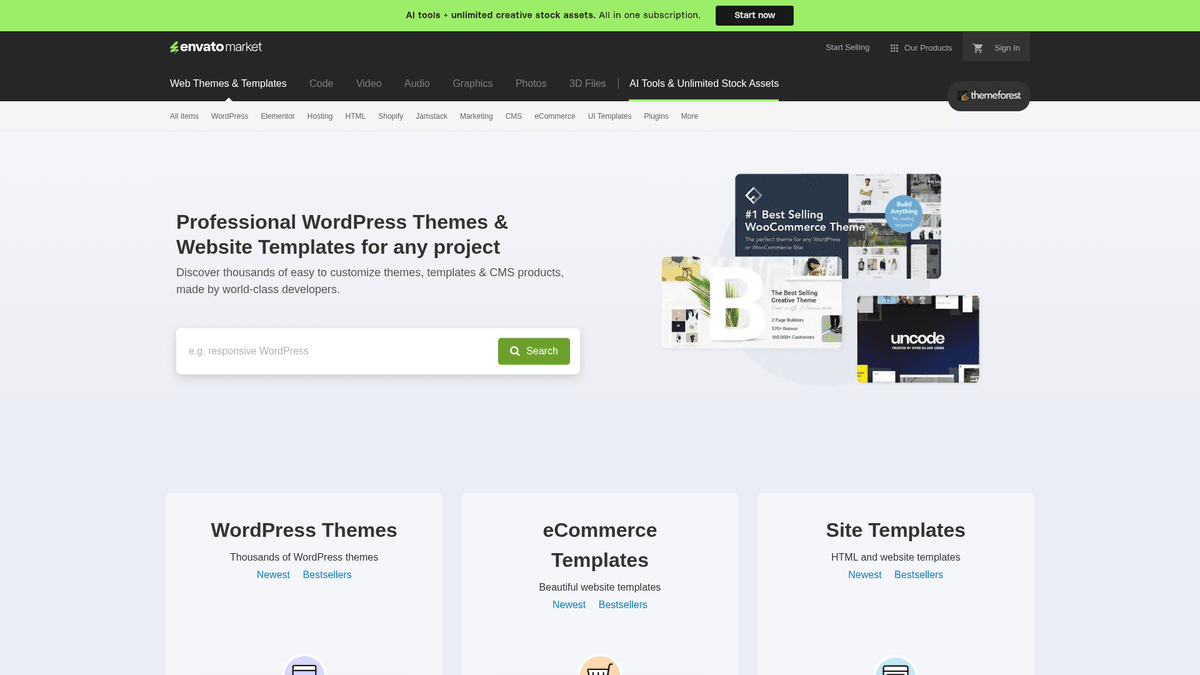
Why Scrape ThemeForest?
Discover the business value and use cases for extracting data from ThemeForest.
Market Trend Analysis
Identify which web design styles, frameworks, and CMS platforms are gaining popularity by tracking sales volume and new releases across different categories.
Competitive Pricing Strategy
Monitor the pricing of top-selling themes and individual authors to optimize your own product pricing or to find the best value-for-money templates for clients.
Lead Generation for Agencies
Find popular themes with specific technical gaps and offer specialized customization, maintenance, or SEO services to the large user bases of those specific products.
Sentiment Analysis
Scrape user comments and reviews to understand common pain points, feature requests, and technical issues found in existing templates to build better alternatives.
Portfolio Monitoring
Track the performance of specific power authors or competitor portfolios to see which item updates or new launches are driving the most revenue in real-time.
Tech Stack Intelligence
Extract compatibility data from listings to see how quickly the developer community adopts new versions of WordPress, Bootstrap, or specific page builders like Elementor.
Scraping Challenges
Technical challenges you may encounter when scraping ThemeForest.
Aggressive Cloudflare Protection
ThemeForest utilizes Cloudflare Enterprise settings that detect automated scrapers through JavaScript challenges, TLS fingerprinting, and advanced browser analysis.
Dynamic Content Rendering
Many search filters, sorting options, and metadata fields update content dynamically via AJAX, requiring a browser-based scraping approach to capture all data.
Strict Rate Limiting
Sending too many requests in a short window results in immediate IP bans or temporary blocks monitored by Envato's internal security systems.
Complex and Shifting DOM
The website structure and CSS classes are frequently updated or obfuscated to deter simple scrapers that rely on static selectors.
Scrape ThemeForest with AI
No coding required. Extract data in minutes with AI-powered automation.
How It Works
Describe What You Need
Tell the AI what data you want to extract from ThemeForest. Just type it in plain language — no coding or selectors needed.
AI Extracts the Data
Our artificial intelligence navigates ThemeForest, handles dynamic content, and extracts exactly what you asked for.
Get Your Data
Receive clean, structured data ready to export as CSV, JSON, or send directly to your apps and workflows.
Why Use AI for Scraping
AI makes it easy to scrape ThemeForest without writing any code. Our AI-powered platform uses artificial intelligence to understand what data you want — just describe it in plain language and the AI extracts it automatically.
How to scrape with AI:
- Describe What You Need: Tell the AI what data you want to extract from ThemeForest. Just type it in plain language — no coding or selectors needed.
- AI Extracts the Data: Our artificial intelligence navigates ThemeForest, handles dynamic content, and extracts exactly what you asked for.
- Get Your Data: Receive clean, structured data ready to export as CSV, JSON, or send directly to your apps and workflows.
Why use AI for scraping:
- Automated Cloudflare Bypass: Automatio's advanced infrastructure is designed to successfully navigate Cloudflare's 'I'm Under Attack' mode and other security layers without getting blocked.
- Visual No-Code Selection: Easily select template titles, prices, and complex sales data using a point-and-click interface without writing a single line of code or complex CSS selectors.
- Built-in Residential Proxies: Seamlessly utilize high-quality residential proxies within the platform to rotate IP addresses and mimic legitimate human traffic from any global location.
- Automatic Pagination Navigation: Configure the scraper to automatically navigate through hundreds of search result pages to collect thousands of template listings efficiently.
- Scheduled Data Extraction: Set up workflows to run daily or weekly to monitor changes in pricing, sales numbers, and new item releases automatically without manual intervention.
No-Code Web Scrapers for ThemeForest
Point-and-click alternatives to AI-powered scraping
Several no-code tools like Browse.ai, Octoparse, Axiom, and ParseHub can help you scrape ThemeForest. These tools use visual interfaces to select elements, but they come with trade-offs compared to AI-powered solutions.
Typical Workflow with No-Code Tools
Common Challenges
Learning curve
Understanding selectors and extraction logic takes time
Selectors break
Website changes can break your entire workflow
Dynamic content issues
JavaScript-heavy sites often require complex workarounds
CAPTCHA limitations
Most tools require manual intervention for CAPTCHAs
IP blocking
Aggressive scraping can get your IP banned
No-Code Web Scrapers for ThemeForest
Several no-code tools like Browse.ai, Octoparse, Axiom, and ParseHub can help you scrape ThemeForest. These tools use visual interfaces to select elements, but they come with trade-offs compared to AI-powered solutions.
Typical Workflow with No-Code Tools
- Install browser extension or sign up for the platform
- Navigate to the target website and open the tool
- Point-and-click to select data elements you want to extract
- Configure CSS selectors for each data field
- Set up pagination rules to scrape multiple pages
- Handle CAPTCHAs (often requires manual solving)
- Configure scheduling for automated runs
- Export data to CSV, JSON, or connect via API
Common Challenges
- Learning curve: Understanding selectors and extraction logic takes time
- Selectors break: Website changes can break your entire workflow
- Dynamic content issues: JavaScript-heavy sites often require complex workarounds
- CAPTCHA limitations: Most tools require manual intervention for CAPTCHAs
- IP blocking: Aggressive scraping can get your IP banned
Code Examples
import requests
from bs4 import BeautifulSoup

# Note: This basic approach may be blocked by Cloudflare
url = 'https://themeforest.net/category/wordpress'
headers = {
    'User-Agent': 'Mozilla/5.0 (Windows NT 10.0; Win64; x64) AppleWebKit/537.36 (KHTML, like Gecko) Chrome/119.0.0.0 Safari/537.36'
}

try:
    response = requests.get(url, headers=headers)
    response.raise_for_status()
    soup = BeautifulSoup(response.text, 'html.parser')
    # Example: Finding item titles in the grid
    items = soup.select('li.search-grid__item')
    for item in items:
        title = item.select_one('h3').text.strip()
        price = item.select_one('.price').text.strip()
        print(f'Theme: {title} | Price: {price}')
except Exception as e:
    print(f'Error scraping ThemeForest: {e}')
When to Use
Best for static HTML pages where content is loaded server-side. The fastest and simplest approach when JavaScript rendering isn't required.
Advantages
- ●Fastest execution (no browser overhead)
- ●Lowest resource consumption
- ●Easy to parallelize with asyncio
- ●Great for APIs and static pages
Limitations
- ●Cannot execute JavaScript
- ●Fails on SPAs and dynamic content
- ●May struggle with complex anti-bot systems
How to Scrape ThemeForest with Code
Python + Requests
import requests
from bs4 import BeautifulSoup
# Note: This basic approach may be blocked by Cloudflare
url = 'https://themeforest.net/category/wordpress'
headers = {
'User-Agent': 'Mozilla/5.0 (Windows NT 10.0; Win64; x64) AppleWebKit/537.36 (KHTML, like Gecko) Chrome/119.0.0.0 Safari/537.36'
}
try:
response = requests.get(url, headers=headers)
response.raise_for_status()
soup = BeautifulSoup(response.text, 'html.parser')
# Example: Finding item titles in the grid
items = soup.select('li.search-grid__item')
for item in items:
title = item.select_one('h3').text.strip()
price = item.select_one('.price').text.strip()
print(f'Theme: {title} | Price: {price}')
except Exception as e:
print(f'Error scraping ThemeForest: {e}')Python + Playwright
from playwright.sync_api import sync_playwright

def scrape_themeforest():
    with sync_playwright() as p:
        browser = p.chromium.launch(headless=True)
        page = browser.new_page()
        # Navigating to the WordPress category
        page.goto('https://themeforest.net/category/wordpress')
        # Wait for the listing items to load
        page.wait_for_selector('li.search-grid__item')

        items = page.query_selector_all('li.search-grid__item')
        for item in items:
            title = item.query_selector('h3').inner_text()
            sales = item.query_selector('.item-thumbnail__sales').inner_text()
            print(f'Found item: {title} with {sales}')

        browser.close()

scrape_themeforest()Python + Scrapy
import scrapy

class ThemeForestSpider(scrapy.Spider):
    name = 'themeforest'
    start_urls = ['https://themeforest.net/category/wordpress']

    def parse(self, response):
        for item in response.css('li.search-grid__item'):
            yield {
                'title': item.css('h3 a::text').get().strip(),
                'price': item.css('.price::text').get(),
                'sales': item.css('.item-thumbnail__sales::text').get(),
                'url': response.urljoin(item.css('h3 a::attr(href)').get())
            }

        # Handling pagination
        next_page = response.css('a.next_page::attr(href)').get()
        if next_page:
yield response.follow(next_page, self.parse)Node.js + Puppeteer
const puppeteer = require('puppeteer-extra');
const StealthPlugin = require('puppeteer-extra-plugin-stealth');
puppeteer.use(StealthPlugin());

(async () => {
  const browser = await puppeteer.launch({ headless: true });
  const page = await browser.newPage();
  await page.goto('https://themeforest.net/category/wordpress');

  // Wait for product cards to be visible
  await page.waitForSelector('li.search-grid__item');

  const data = await page.evaluate(() => {
    const themes = Array.from(document.querySelectorAll('li.search-grid__item'));
    return themes.map(el => ({
      title: el.querySelector('h3').innerText.trim(),
      price: el.querySelector('.price').innerText.trim()
    }));
  });

  console.log(data);
  await browser.close();
})();What You Can Do With ThemeForest Data
Explore practical applications and insights from ThemeForest data.
Competitive Pricing Intelligence
Analyze the pricing landscape of specific niches to set competitive prices for your own products.
How to implement:
- 1Scrape prices and sales for top-selling themes in your category.
- 2Calculate the average and median price points.
- 3Track price fluctuations during seasonal sales events.
- 4Adjust your pricing strategy based on market-wide trends.
Use Automatio to extract data from ThemeForest and build these applications without writing code.
What You Can Do With ThemeForest Data
- Competitive Pricing Intelligence
Analyze the pricing landscape of specific niches to set competitive prices for your own products.
- Scrape prices and sales for top-selling themes in your category.
- Calculate the average and median price points.
- Track price fluctuations during seasonal sales events.
- Adjust your pricing strategy based on market-wide trends.
- Demand Forecasting for New Themes
Identify trending design styles and features before developing a new template.
- Scrape the 'Newest' and 'Bestsellers' tabs weekly.
- Compare the sales growth rate of new releases across different categories.
- Identify features listed in descriptions that appear frequently in top-rated items.
- Focus your development on the highest growth categories.
- Lead Generation for Web Customization
Find themes with high sales but specific user complaints to offer specialized support services.
- Scrape items with high sales volume but mediocre ratings.
- Analyze common complaints in the comment and review sections.
- Target advertisements to users of those specific themes.
- Offer customization services to address those common technical gaps.
- Content Aggregation for Affiliate Sites
Automatically update your review or comparison site with the latest theme data.
- Extract metadata including thumbnails, ratings, and price.
- Automate the download of preview images.
- Generate affiliate links using the item ID.
- Populate your blog or directory with the freshest data.
- Historical Market Research
Study the evolution of web design trends over several years for academic or business reports.
- Perform monthly scrapes of all major categories.
- Store attributes like 'Software Version' and 'Framework' in a time-series database.
- Visualize the decline of older frameworks and the rise of visual builders.
- Predict future tech stack requirements based on historical shifts.
Supercharge your workflow with AI Automation
Automatio combines the power of AI agents, web automation, and smart integrations to help you accomplish more in less time.
What to get right first
Expert advice for successfully extracting data from ThemeForest.
Use Residential Proxies
ThemeForest detects data center IPs easily. Using residential proxies is essential to mimic real user traffic and bypass aggressive IP-based blocking.
Clean Sales Data with Regex
The site often displays sales as '1.2k'. Use regex or formatting tools to convert these into raw numbers for accurate mathematical analysis in your spreadsheets.
Handle Lazy Loading
Ensure your scraper scrolls down the page or waits for specific element selectors, as some metadata and images load only when they enter the viewport.
Rotate TLS Fingerprints
Mimic the TLS handshake of a real modern browser to bypass the sophisticated fingerprinting used by Cloudflare to distinguish bots from humans.
Extract the Unique Item ID
Always scrape the unique Item ID from the URL or metadata. This allows you to track a product consistently even if the author changes the listing title.
Monitor for Structural Updates
Envato frequently updates their front-end; use robust, relative selectors or text-based matching to ensure your scraping logic remains stable over time.
Related Web Scraping

How to Scrape Tata 1mg | 1mg.com Medicine Data Scraper

How to Scrape Carwow: Extract Used Car Data and Prices
How to Scrape Kalodata: TikTok Shop Data Extraction Guide
How to Scrape HP.com: A Technical Guide to Product & Price Data

How to Scrape eBay | eBay Web Scraper Guide
How to Scrape The Range UK | Product Data & Prices Scraper

How to Scrape StubHub: The Ultimate Web Scraping Guide
How to Scrape AliExpress: The Ultimate 2025 Data Extraction Guide
Frequently Asked Questions
Find answers to common questions about ThemeForest