

How to Scrape Imgur: A Comprehensive Guide to Image Data Extraction
Discover how to scrape Imgur for viral images, memes, and metadata. Extract titles, tags, and view counts to power your content research and AI training.
Free to start: 1,000 credits, no card, nothing to install.

About Imgur
Learn what Imgur offers and what valuable data can be extracted from it.
Overview of Imgur
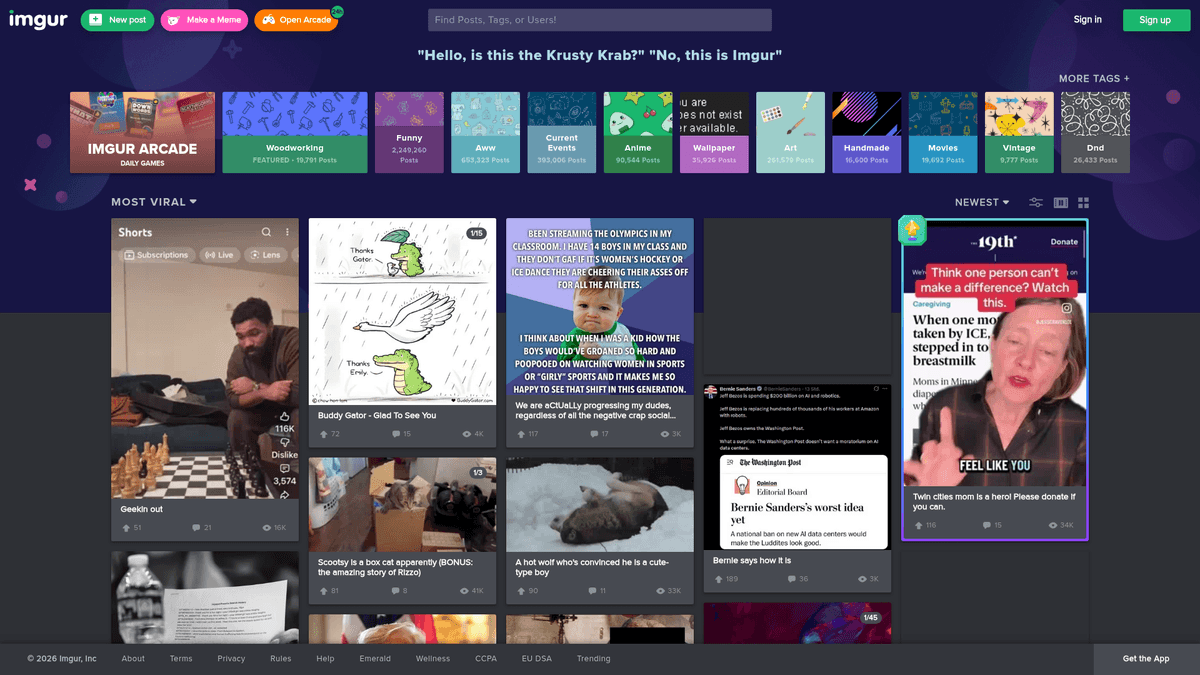
Imgur is a massive American online image sharing and hosting service that has become the backbone of visual culture on sites like Reddit. Launched in 2009, it hosts millions of viral memes, GIFs, and high-quality photography, serving as a primary source for internet trends and digital storytelling.
Data Richness
The platform contains a wealth of structured and unstructured data, including post titles, user-generated descriptions, tags, and engagement metrics like upvotes and view counts. This makes it an invaluable resource for anyone looking to analyze internet culture, track viral growth, or aggregate visual media for specific niches.
Scraping Value
Scraping Imgur data is particularly valuable for sentiment analysis, trend forecasting, and training machine learning models. By extracting metadata associated with trending images, researchers can gain deep insights into what content resonates with global audiences at any given moment.
Why Scrape Imgur?
Discover the business value and use cases for extracting data from Imgur.
Viral Content Detection
Identify trending memes and visual media before they explode on other social networks by tracking view-to-upvote ratios.
AI and Machine Learning Training
Harvest thousands of labeled images and their descriptions to train advanced computer vision and natural language processing models.
Consumer Sentiment Analysis
Extract and analyze user comments on viral posts to understand public perception of global events, brands, or products.
Niche Content Aggregation
Automatically curate high-quality galleries for specific hobbies or interests by filtering for specific tags and engagement thresholds.
Marketing Trend Research
Study the types of visual content (GIFs vs. static images) that achieve the highest engagement rates among specific demographics.
Digital Historical Archiving
Create a permanent record of internet culture by backing up viral media that might otherwise be deleted or lost over time.
Scraping Challenges
Technical challenges you may encounter when scraping Imgur.
Cloudflare WAF Protection
Imgur uses advanced Cloudflare security, which frequently triggers Turnstile challenges and JavaScript puzzles for automated scripts.
Dynamic Infinite Scroll
Content is not loaded all at once; scrapers must simulate user scrolling to trigger the AJAX requests that populate the gallery.
Aggressive Rate Limiting
The platform quickly identifies and throttles IP addresses that make excessive requests to gallery pages or media assets.
Inconsistent Selector Patterns
Imgur periodically updates its front-end code, leading to dynamic class names that can break static CSS-based scrapers.
Server Capacity Throttling
Frequent 'Over Capacity' errors require scrapers to have robust retry logic to handle transient server instability gracefully.
Scrape Imgur with AI
No coding required. Extract data in minutes with AI-powered automation.
How It Works
Describe What You Need
Tell the AI what data you want to extract from Imgur. Just type it in plain language — no coding or selectors needed.
AI Extracts the Data
Our artificial intelligence navigates Imgur, handles dynamic content, and extracts exactly what you asked for.
Get Your Data
Receive clean, structured data ready to export as CSV, JSON, or send directly to your apps and workflows.
Why Use AI for Scraping
No-Code Web Scrapers for Imgur
Point-and-click alternatives to AI-powered scraping
Several no-code tools like Browse.ai, Octoparse, Axiom, and ParseHub can help you scrape Imgur. These tools use visual interfaces to select elements, but they come with trade-offs compared to AI-powered solutions.
Typical Workflow with No-Code Tools
Common Challenges
Learning curve
Understanding selectors and extraction logic takes time
Selectors break
Website changes can break your entire workflow
Dynamic content issues
JavaScript-heavy sites often require complex workarounds
CAPTCHA limitations
Most tools require manual intervention for CAPTCHAs
IP blocking
Aggressive scraping can get your IP banned
Code Examples
import requests
from bs4 import BeautifulSoup

url = 'https://imgur.com/gallery/hot'
# Using headers to mimic a real browser
headers = {
    'User-Agent': 'Mozilla/5.0 (Windows NT 10.0; Win64; x64) AppleWebKit/537.36 (KHTML, like Gecko) Chrome/91.0.4472.124 Safari/537.36'
}

try:
    response = requests.get(url, headers=headers)
    response.raise_for_status()
    soup = BeautifulSoup(response.text, 'html.parser')

    # Example: Print the page title to verify access
    print(f'Page Title: {soup.title.text}')
except requests.exceptions.RequestException as e:
    print(f'Error: {e}')
When to Use
Best for static HTML pages where content is loaded server-side. The fastest and simplest approach when JavaScript rendering isn't required.
Advantages
- ●Fastest execution (no browser overhead)
- ●Lowest resource consumption
- ●Easy to parallelize with asyncio
- ●Great for APIs and static pages
Limitations
- ●Cannot execute JavaScript
- ●Fails on SPAs and dynamic content
- ●May struggle with complex anti-bot systems
import asyncio
from playwright.async_api import async_playwright

async def run():
    async with async_playwright() as p:
        # Launching browser with a standard viewport
        browser = await p.chromium.launch(headless=True)
        page = await browser.new_page()

        # Navigate to Imgur
        await page.goto('https://imgur.com/gallery/hot')

        # Wait for the gallery items to load (JS rendered)
        await page.wait_for_selector('.Post-item')

        # Extract data from the first few items
        titles = await page.eval_on_selector_all('.Post-item-title', 'elements => elements.map(e => e.innerText)')
        for title in titles[:5]:
            print(f'Post Title: {title}')

        await browser.close()

asyncio.run(run())
When to Use
Use when content loads dynamically via JavaScript, or when you need to interact with the page (clicks, scrolls, form fills). Handles modern anti-bot detection better.
Advantages
- ●Executes JavaScript like a real browser
- ●Handles SPAs and dynamic content
- ●Better anti-bot evasion with stealth plugins
- ●Can take screenshots and PDFs
Limitations
- ●Slower than HTTP requests
- ●Higher memory/CPU usage
- ●More complex to set up
import scrapy

class ImgurSpider(scrapy.Spider):
    name = 'imgur'
    start_urls = ['https://imgur.com/gallery/hot']

    def parse(self, response):
        # Scrapy extracts from the initial HTML; note that Imgur loads most content via JS
        for post in response.css('.Post-item'):
            yield {
                'title': post.css('.Post-item-title::text').get(),
                'link': post.css('a::attr(href)').get(),
            }

        # Example logic for finding the next page or API endpoint
        # Imgur often uses JSON API endpoints for pagination
When to Use
Ideal for large-scale crawling projects that need to scrape thousands of pages. Built-in support for rate limiting, retries, and data pipelines.
Advantages
- ●Built for scale (millions of pages)
- ●Automatic request throttling
- ●Built-in data export pipelines
- ●Middleware system for proxies/headers
Limitations
- ●Steeper learning curve
- ●Overkill for small projects
- ●No native JavaScript rendering
const puppeteer = require('puppeteer');

(async () => {
  const browser = await puppeteer.launch();
  const page = await browser.newPage();

  // Mimic a desktop browser to reduce blocking risk
  await page.setViewport({ width: 1280, height: 800 });

  await page.goto('https://imgur.com/gallery/hot', { waitUntil: 'networkidle2' });

  // Extract post titles from the gallery
  const titles = await page.evaluate(() => {
    const elements = document.querySelectorAll('.Post-item-title');
    return Array.from(elements).map(el => el.innerText);
  });

  console.log('Found Titles:', titles.slice(0, 5));

  await browser.close();
})();
When to Use
Choose this if you're in a Node.js/JavaScript ecosystem or need tight integration with frontend tools. Similar capabilities to Playwright.
Advantages
- ●Native JavaScript/TypeScript support
- ●Chrome DevTools Protocol access
- ●Large ecosystem and community
- ●Good for JS-heavy projects
Limitations
- ●Chrome-only (vs Playwright's multi-browser)
- ●Similar overhead to Playwright
- ●Less mature stealth options
What You Can Do With Imgur Data
Explore practical applications and insights from Imgur data.
Viral Content Aggregator
Create a niche website that automatically republishes trending images from specific Imgur tags.
How to implement:
- 1Identify target tags like #nature or #gaming.
- 2Scrape image URLs and titles daily using automated triggers.
- 3Use webhooks to post the content to your CMS or social media channels.
Use Automatio to extract data from Imgur and build these applications without writing code.
Meme Trend Analysis
Track the lifecycle and popularity of specific memes for digital marketing agencies.
How to implement:
- 1Scrape post dates and view counts for specific keywords over time.
- 2Store data in a time-series database for trend visualization.
- 3Analyze growth and decay patterns of viral engagement.
Use Automatio to extract data from Imgur and build these applications without writing code.
Sentiment Monitoring
Analyze user comments to understand public opinion on viral topics or news events.
How to implement:
- 1Extract comment threads from popular gallery posts.
- 2Run sentiment analysis algorithms on the text data.
- 3Generate reports on overall community sentiment.
Use Automatio to extract data from Imgur and build these applications without writing code.
Machine Learning Datasets
Build massive datasets of labeled images for training computer vision models.
How to implement:
- 1Scrape images alongside their tags and descriptions for labeling.
- 2Filter data for high-resolution quality and specific categories.
- 3Export to structured JSON or CSV for model training pipelines.
Use Automatio to extract data from Imgur and build these applications without writing code.
Digital Asset Archiving
Create a permanent archive of cultural milestones by backing up viral media assets.
How to implement:
- 1Monitor the 'Hot' and 'Top' sections of the Imgur gallery.
- 2Download high-quality versions of images and videos.
- 3Store metadata including original author and date for historical accuracy.
Use Automatio to extract data from Imgur and build these applications without writing code.
Brand Mention Tracking
Identify when brands or products appear in viral images and how users react to them.
How to implement:
- 1Search for brand-related keywords and tags.
- 2Scrape image content and associated comments.
- 3Quantify brand exposure and visual sentiment.
Use Automatio to extract data from Imgur and build these applications without writing code.
Supercharge your workflow with AI Automation
Automatio combines the power of AI agents, web automation, and smart integrations to help you accomplish more in less time.
What to get right first
Expert advice for successfully extracting data from Imgur.
Prioritize Residential Proxies
Datacenter IPs are often blacklisted by Imgur's security; using residential proxies significantly increases your success rate.
Simulate Human Behavior
Add random delays between scrolls and clicks to mimic a real user session and stay under the radar of behavioral analysis bots.
Monitor Internal JSON API
Inspect the network tab to find the underlying JSON endpoints Imgur uses to load its gallery data, as these are often easier to parse than HTML.
Handle Images Gracefully
If downloading high-resolution media, ensure your script handles timeouts and partial downloads to avoid corrupted files.
Rotate User-Agents Regularly
Switch between modern mobile and desktop User-Agent strings to avoid fingerprinting patterns that suggest automated activity.
Implement Intelligent Retries
Configure your scraper to pause and retry when encountering 'Imgur is over capacity' messages to maximize data collection efficiency.
Related Web Scraping

How to Scrape Behance: A Step-by-Step Guide for Creative Data Extraction
YouTube Scraper: Videos, Views and Channels in a table
Social Blade Scraper: Rank, Subscribers and Views in a table
How to Scrape Bento.me | Bento.me Web Scraper

How to Scrape Vimeo: A Guide to Extracting Video Metadata

Patreon Scraper: Creators, Members and Posts in a table
Goodreads Scraper: Titles, Ratings and Years in a table

How to Scrape Bluesky (bsky.app): API and Web Methods
Frequently Asked Questions
Find answers to common questions about Imgur
Is it legal to scrape Imgur?
Scraping publicly available data on Imgur is generally legal for personal or research purposes. However, you must comply with copyright laws regarding the images themselves and avoid violating Imgur's Terms of Service for commercial exploitation. Always check the site's robots.txt for specific crawl directives.
Does Imgur have an official API?
Yes, Imgur offers a RESTful API (Version 3) that uses OAuth 2.0 for authentication. While it is stable and provides structured JSON data, it is subject to strict credit-based rate limits, which is why many developers supplement it with web scraping.
How can I avoid getting blocked by Imgur?
To prevent IP bans, you should use rotating residential proxies and avoid making high-frequency requests. Additionally, using a browser-based scraper that can solve JavaScript challenges and simulate human-like interactions is the most effective way to stay unblocked.
What data format can I export Imgur data to?
With tools like Automatio, you can export Imgur data into various formats including CSV, JSON, or directly into a Google Sheet. JSON is particularly useful if you are capturing hierarchical data like nested comment threads.
How often should I scrape Imgur for viral trends?
For real-time monitoring of viral content, scraping every 1 to 2 hours is recommended. If you are collecting data for historical analysis or machine learning, a daily crawl of specific tags or user profiles is usually sufficient to capture most activity.
Which proxies work best for scraping Imgur?
Residential proxies are the gold standard for Imgur because they are assigned to real home devices, making them nearly impossible to distinguish from legitimate users. Datacenter proxies are often pre-emptively blocked by the platform's Cloudflare shield.
Can I scrape high-resolution images and videos?
Yes, you can extract the direct links to high-resolution media assets by targeting the 'src' attributes in the HTML. It is best to extract the URLs first and then use a separate downloader to fetch the actual files to avoid overloading your main scraper.
How do I handle Imgur's infinite scroll?
You must use a scraper that supports JavaScript execution to scroll the page until the desired amount of content is loaded. Alternatively, you can identify the pagination parameters in the XHR requests and fetch 'pages' of data directly from Imgur's internal endpoints.