
How to Scrape MakerWorld: 3D Model Data & Designer Stats
Learn how to scrape MakerWorld for 3D model listings, download counts, and creator statistics. Extract valuable 3D printing trends and designer data...
Anti-Bot Protection Detected
- Cloudflare
- Enterprise-grade WAF and bot management. Uses JavaScript challenges, CAPTCHAs, and behavioral analysis. Requires browser automation with stealth settings.
- Rate Limiting
- Limits requests per IP/session over time. Can be bypassed with rotating proxies, request delays, and distributed scraping.
- Browser Fingerprinting
- Identifies bots through browser characteristics: canvas, WebGL, fonts, plugins. Requires spoofing or real browser profiles.
- Dynamic CSS Classes
- CAPTCHA
- Challenge-response test to verify human users. Can be image-based, text-based, or invisible. Often requires third-party solving services.
About MakerWorld
Learn what MakerWorld offers and what valuable data can be extracted from it.
The Premier Hub for 3D Printing
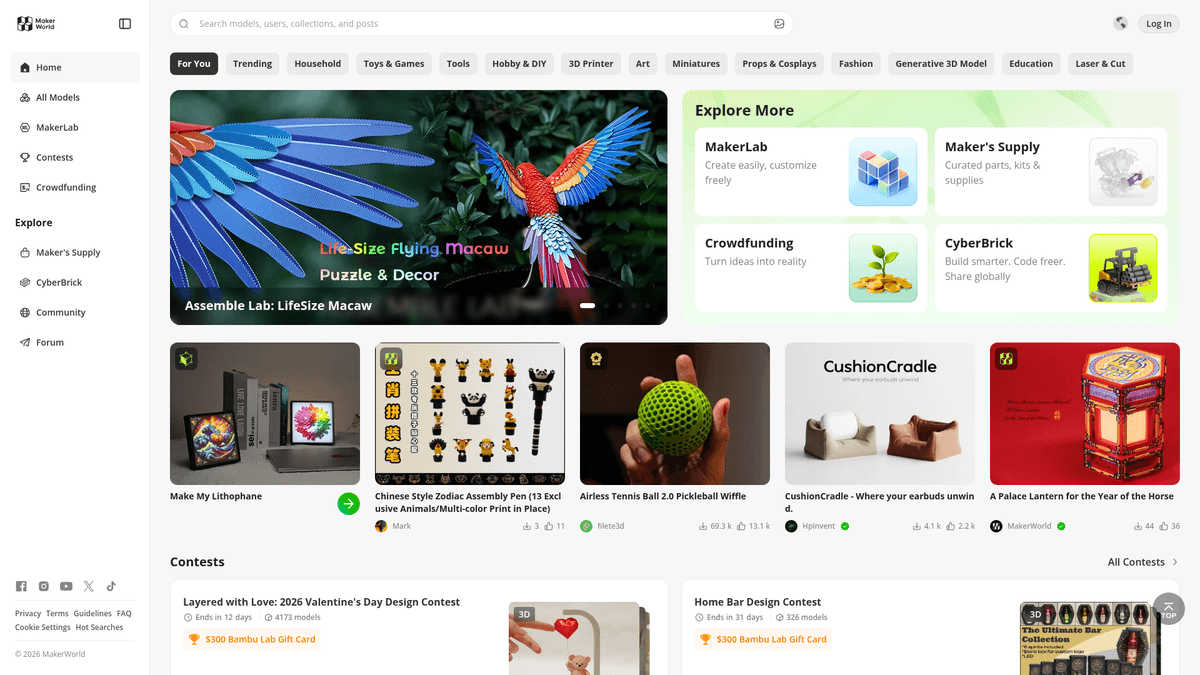
MakerWorld is a comprehensive 3D model sharing platform developed by Bambu Lab, designed to integrate seamlessly with their ecosystem of 3D printers. Unlike traditional repositories, MakerWorld focuses on a 'one-click' printing experience through its Bambu Studio and Handy App integrations, hosting high-quality 3D files (STLs, 3MFs) and detailed print profiles.
Data-Rich Community Ecosystem
The website contains rich data including model titles, detailed descriptions, download counts, likes, and creator profile information. It is heavily utilized by the 3D printing community to discover new projects and track the popularity of various designs through social metrics and print success ratings. The platform organizes content into diverse categories such as functional tools, decorative arts, and mechanical parts.
Strategic Business Value
Scraping MakerWorld is valuable for market research, identifying trending categories in additive manufacturing, and monitoring the performance of designers. The data can be used to aggregate 3D assets, analyze the growth of the open-source hardware ecosystem, and monitor competitive assets in the 3D printing market. This information helps businesses and researchers understand consumer preferences and technological trends in 3D modeling.
Why Scrape MakerWorld?
Discover the business value and use cases for extracting data from MakerWorld.
Trend Forecasting
Identify which 3D model styles, such as articulated designs or functional tools, are gaining the most traction to stay ahead of market shifts.
Competitor Benchmarking
Monitor other designers' download-to-like ratios and engagement metrics to improve your own content strategy and maximize reward points.
Hardware Ecosystem Analysis
Track the popularity and volume of dedicated print profiles for specific printer models to understand the growth of the hardware ecosystem.
Creator Reward Monitoring
Automate the tracking of points and 'Boosts' across multiple profiles to optimize gift card redemptions for high-volume designers.
Niche Content Aggregation
Build specialized search engines or directories for specific interests, like tabletop gaming accessories or mechanical replacement parts.
Sentiment and Review Mining
Scrape user comments and feedback to understand common print failures or desired improvements for specific model categories.
Scraping Challenges
Technical challenges you may encounter when scraping MakerWorld.
Cloudflare and Turnstile Protection
MakerWorld uses aggressive bot detection and security challenges that block standard requests and require advanced bypass techniques.
Dynamic React Rendering
The platform is a single-page application where model data is not present in the initial HTML and requires a headless browser for execution.
Unstable CSS Selectors
The site uses Material UI with dynamic class names that change frequently, making traditional selector-based scraping difficult to maintain.
Strict Rate Limiting
Sending requests too quickly leads to temporary IP bans or persistent security checks, necessitating randomized delays and proxy rotation.
Scrape MakerWorld with AI
No coding required. Extract data in minutes with AI-powered automation.
How It Works
Describe What You Need
Tell the AI what data you want to extract from MakerWorld. Just type it in plain language — no coding or selectors needed.
AI Extracts the Data
Our artificial intelligence navigates MakerWorld, handles dynamic content, and extracts exactly what you asked for.
Get Your Data
Receive clean, structured data ready to export as CSV, JSON, or send directly to your apps and workflows.
Why Use AI for Scraping
AI makes it easy to scrape MakerWorld without writing any code. Our AI-powered platform uses artificial intelligence to understand what data you want — just describe it in plain language and the AI extracts it automatically.
How to scrape with AI:
- Describe What You Need: Tell the AI what data you want to extract from MakerWorld. Just type it in plain language — no coding or selectors needed.
- AI Extracts the Data: Our artificial intelligence navigates MakerWorld, handles dynamic content, and extracts exactly what you asked for.
- Get Your Data: Receive clean, structured data ready to export as CSV, JSON, or send directly to your apps and workflows.
Why use AI for scraping:
- Zero-Config Bot Mitigation: Automatio automatically handles complex browser fingerprinting and headers to navigate through MakerWorld's security walls without manual coding.
- Visual Selector Precision: Easily select complex Material UI elements and nested data points using an intuitive interface that bypasses obfuscated CSS class names.
- Automated Pagination Handling: Effortlessly manage infinite scroll and 'Load More' buttons with a single click to extract thousands of models from category pages.
- Cloud-Based Scheduling: Configure your scraper to run at set intervals to consistently track changes in download counts and popularity rankings over time.
No-Code Web Scrapers for MakerWorld
Point-and-click alternatives to AI-powered scraping
Several no-code tools like Browse.ai, Octoparse, Axiom, and ParseHub can help you scrape MakerWorld. These tools use visual interfaces to select elements, but they come with trade-offs compared to AI-powered solutions.
Typical Workflow with No-Code Tools
Common Challenges
Learning curve
Understanding selectors and extraction logic takes time
Selectors break
Website changes can break your entire workflow
Dynamic content issues
JavaScript-heavy sites often require complex workarounds
CAPTCHA limitations
Most tools require manual intervention for CAPTCHAs
IP blocking
Aggressive scraping can get your IP banned
No-Code Web Scrapers for MakerWorld
Several no-code tools like Browse.ai, Octoparse, Axiom, and ParseHub can help you scrape MakerWorld. These tools use visual interfaces to select elements, but they come with trade-offs compared to AI-powered solutions.
Typical Workflow with No-Code Tools
- Install browser extension or sign up for the platform
- Navigate to the target website and open the tool
- Point-and-click to select data elements you want to extract
- Configure CSS selectors for each data field
- Set up pagination rules to scrape multiple pages
- Handle CAPTCHAs (often requires manual solving)
- Configure scheduling for automated runs
- Export data to CSV, JSON, or connect via API
Common Challenges
- Learning curve: Understanding selectors and extraction logic takes time
- Selectors break: Website changes can break your entire workflow
- Dynamic content issues: JavaScript-heavy sites often require complex workarounds
- CAPTCHA limitations: Most tools require manual intervention for CAPTCHAs
- IP blocking: Aggressive scraping can get your IP banned
Code Examples
import requests
from bs4 import BeautifulSoup

# Basic requests often fail on MakerWorld due to Cloudflare and React rendering
url = 'https://makerworld.com/en/models'
headers = {
    'User-Agent': 'Mozilla/5.0 (Windows NT 10.0; Win64; x64) AppleWebKit/537.36 (KHTML, like Gecko) Chrome/119.0.0.0 Safari/537.36',
    'Accept-Language': 'en-US,en;q=0.9'
}

try:
    # This will likely return a Cloudflare challenge or a JS skeleton
    response = requests.get(url, headers=headers, timeout=10)
    if response.status_code == 200:
        soup = BeautifulSoup(response.text, 'html.parser')
        # Note: Actual content won't be here as it requires JS rendering
        print('Site reached, but content is dynamic.')
    else:
        print(f'Blocked by Cloudflare: HTTP {response.status_code}')
except Exception as e:
    print(f'Error: {e}')
When to Use
Best for static HTML pages where content is loaded server-side. The fastest and simplest approach when JavaScript rendering isn't required.
Advantages
- ●Fastest execution (no browser overhead)
- ●Lowest resource consumption
- ●Easy to parallelize with asyncio
- ●Great for APIs and static pages
Limitations
- ●Cannot execute JavaScript
- ●Fails on SPAs and dynamic content
- ●May struggle with complex anti-bot systems
How to Scrape MakerWorld with Code
Python + Requests
import requests
from bs4 import BeautifulSoup
# Basic requests often fail on MakerWorld due to Cloudflare and React rendering
url = 'https://makerworld.com/en/models'
headers = {
'User-Agent': 'Mozilla/5.0 (Windows NT 10.0; Win64; x64) AppleWebKit/537.36 (KHTML, like Gecko) Chrome/119.0.0.0 Safari/537.36',
'Accept-Language': 'en-US,en;q=0.9'
}
try:
# This will likely return a Cloudflare challenge or a JS skeleton
response = requests.get(url, headers=headers, timeout=10)
if response.status_code == 200:
soup = BeautifulSoup(response.text, 'html.parser')
# Note: Actual content won't be here as it requires JS rendering
print('Site reached, but content is dynamic.')
else:
print(f'Blocked by Cloudflare: HTTP {response.status_code}')
except Exception as e:
print(f'Error: {e}')Python + Playwright
from playwright.sync_api import sync_playwright

def scrape_makerworld():
    with sync_playwright() as p:
        # Launching with stealth-like headers
        browser = p.chromium.launch(headless=True)
        page = browser.new_page()
        page.goto('https://makerworld.com/en/models', wait_until='networkidle')

        # Wait for the model cards which are rendered via React
        page.wait_for_selector("div[data-testid='model-card']")

        models = page.query_selector_all("div[data-testid='model-card']")
        for model in models:
            # Using standard attributes often more stable than CSS classes
            title = model.query_selector('h3').inner_text()
            print(f'Model Found: {title}')

        browser.close()

scrape_makerworld()Python + Scrapy
import scrapy
from scrapy_playwright.page import PageMethod

class MakerworldSpider(scrapy.Spider):
    name = 'makerworld'
    start_urls = ['https://makerworld.com/en/models']

    def start_requests(self):
        for url in self.start_urls:
            yield scrapy.Request(
                url,
                meta=dict(
                    playwright=True,
                    playwright_page_methods=[
                        PageMethod('wait_for_selector', "div[data-testid='model-card']"),
                    ],
                )
            )

    def parse(self, response):
        # Scrapy-playwright allows parsing the JS-rendered HTML
        for model in response.css("div[data-testid='model-card']"):
            yield {
                'title': model.css('h3::text').get(),
                'downloads': model.css('span.stats-downloads::text').get(),
                'link': response.urljoin(model.css('a::attr(href)').get())
}Node.js + Puppeteer
const puppeteer = require('puppeteer');

(async () => {
  const browser = await puppeteer.launch({ headless: true });
  const page = await browser.newPage();

  // Set a realistic User-Agent
  await page.setUserAgent('Mozilla/5.0 (Windows NT 10.0; Win64; x64) Chrome/119.0.0.0');

  await page.goto('https://makerworld.com/en/models', { waitUntil: 'networkidle2' });

  // Wait for the React component to mount
  await page.waitForSelector("div[data-testid='model-card']");

  const models = await page.evaluate(() => {
    const cards = Array.from(document.querySelectorAll("div[data-testid='model-card']"));
    return cards.map(card => ({
      title: card.querySelector('h3')?.innerText,
      link: card.querySelector('a')?.href
    }));
  });

  console.log(models);
  await browser.close();
})();What You Can Do With MakerWorld Data
Explore practical applications and insights from MakerWorld data.
3D Printing Market Analysis
Analyze which types of models (functional vs. decorative) are most popular to understand global market demand.
How to implement:
- 1Scrape top categories for model metadata and download counts
- 2Aggregate metrics weekly to track growth rates over time
- 3Visualize trends to identify emerging 3D printing niches
Use Automatio to extract data from MakerWorld and build these applications without writing code.
What You Can Do With MakerWorld Data
- 3D Printing Market Analysis
Analyze which types of models (functional vs. decorative) are most popular to understand global market demand.
- Scrape top categories for model metadata and download counts
- Aggregate metrics weekly to track growth rates over time
- Visualize trends to identify emerging 3D printing niches
- Creator Influence Tracking
Identify top-performing designers to scout talent or for sponsorship opportunities in the hardware space.
- Scrape creator profile pages for total download and follower stats
- Monitor new upload frequency per designer each month
- Rank creators based on engagement-to-download ratios
- Material Demand Forecasting
Forecast filament demand by analyzing the types of materials required by popular models on the platform.
- Extract 'Filament Requirements' from model print profiles
- Sum required materials across top-trending models
- Analyze the most requested filament colors and types (PLA, PETG, etc.)
- 3D Asset Search Aggregator
Build a searchable index of 3D models from multiple platforms like MakerWorld for easier user discovery.
- Extract model titles, tags, and thumbnail URLs from MakerWorld
- Index metadata in a centralized database with full-text search
- Provide deep links to the original MakerWorld listing pages for traffic
Supercharge your workflow with AI Automation
Automatio combines the power of AI agents, web automation, and smart integrations to help you accomplish more in less time.
What to get right first
Expert advice for successfully extracting data from MakerWorld.
Emulate Mobile User-Agents
Mobile layouts are often less complex and can sometimes bypass aggressive anti-bot measures designed for desktop browsers.
Leverage Sitemaps for Direct URLs
Check /sitemap.xml to find direct model URLs; this is more efficient than crawling search results and reduces the risk of getting blocked.
Target Stable Attributes
Focus on data-testid or stable structural HTML attributes rather than dynamic class names to ensure your scraper remains robust after UI updates.
Randomize Interaction Patterns
Avoid static patterns by setting your wait times between clicks or scrolls to random intervals between 5 and 15 seconds to mimic human behavior.
Rotate Premium Residential Proxies
Use high-quality residential IPs to avoid detection, as data center proxies are frequently flagged and blocked by Cloudflare.
Monitor Internal JSON Endpoints
Inspect network traffic to find internal API calls that return structured JSON data, which is often easier to parse than HTML.
Related Web Scraping

How to Scrape GitHub | The Ultimate 2025 Technical Guide

How to Scrape Pollen.com: Local Allergy Data Extraction Guide

How to Scrape Britannica: Educational Data Web Scraper

How to Scrape RethinkEd: A Technical Data Extraction Guide

How to Scrape Wikipedia: The Ultimate Web Scraping Guide

How to Scrape Weather.com: A Guide to Weather Data Extraction

How to Scrape Worldometers for Real-Time Global Statistics

How to Scrape American Museum of Natural History (AMNH)
Frequently Asked Questions
Find answers to common questions about MakerWorld