
How to Scrape CoinMarketCap: A Complete Web Scraping Guide
Learn how to scrape CoinMarketCap for real-time cryptocurrency prices, market cap, and volume. Extract valuable financial data for trading and market analysis.
Anti-Bot Protection Detected
- Cloudflare
- Enterprise-grade WAF and bot management. Uses JavaScript challenges, CAPTCHAs, and behavioral analysis. Requires browser automation with stealth settings.
- Rate Limiting
- Limits requests per IP/session over time. Can be bypassed with rotating proxies, request delays, and distributed scraping.
- Browser Fingerprinting
- Identifies bots through browser characteristics: canvas, WebGL, fonts, plugins. Requires spoofing or real browser profiles.
- Dynamic CSS Classes
- JavaScript Challenge
- Requires executing JavaScript to access content. Simple requests fail; need headless browser like Playwright or Puppeteer.
About CoinMarketCap
Learn what CoinMarketCap offers and what valuable data can be extracted from it.
The Authority in Crypto Data
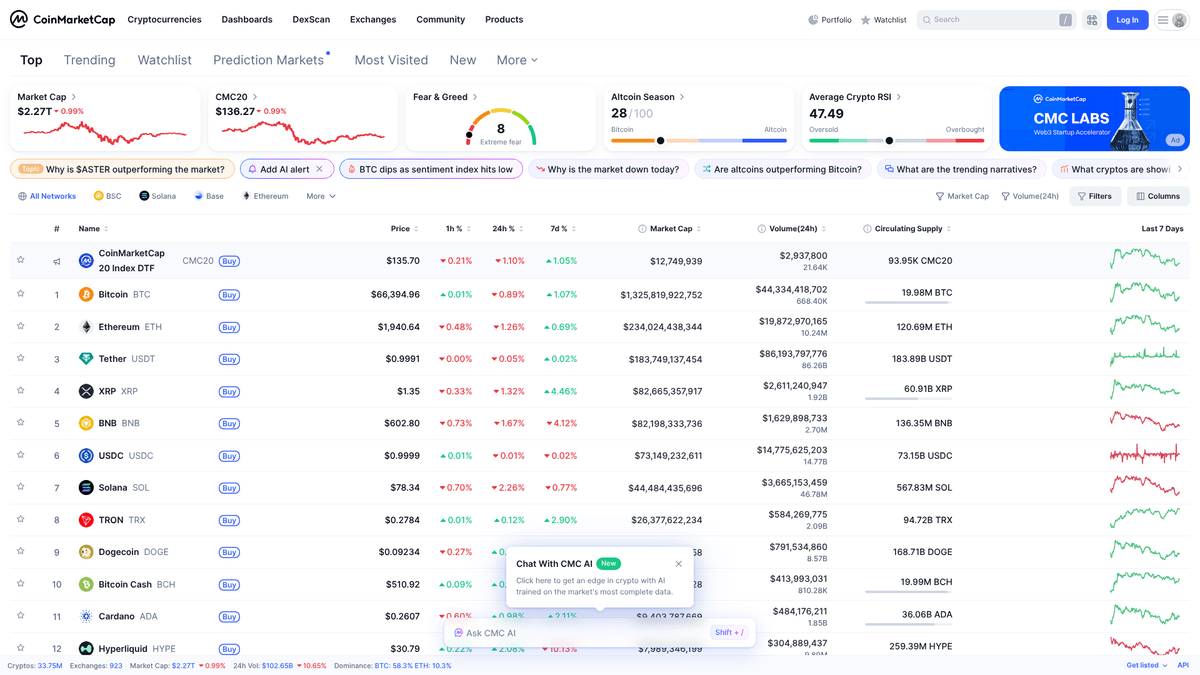
CoinMarketCap is the world's most-referenced price-tracking website for cryptoassets, providing accurate real-time data on thousands of digital currencies. Founded in 2013, it serves as a critical hub for the crypto ecosystem by aggregating data from hundreds of global exchanges into a unified and transparent interface. The platform is essential for tracking market capitalization, trading volumes, and supply metrics.
Data Depth and Structure
The website contains highly structured data for cryptocurrencies, including rankings, historical charts, exchange markets, and project-specific information like contract addresses and social links. For developers and investors, this data is the foundation for building portfolio trackers, sentiment analysis tools, and automated trading systems.
Why Scraping is Essential
Scraping CoinMarketCap is highly valuable because it provides a consolidated view of the fragmented crypto market. By automating data extraction, users can bypass the limitations of free API tiers, monitor price movements across the entire market in real-time, and perform deep historical analysis without manual data entry.
Why Scrape CoinMarketCap?
Discover the business value and use cases for extracting data from CoinMarketCap.
Real-Time Market Monitoring
Gain a competitive edge by tracking live cryptocurrency price fluctuations, market capitalization shifts, and 24h trading volume across thousands of assets simultaneously.
Historical Trend Backtesting
Extract historical pricing snapshots and market data to validate algorithmic trading strategies and analyze long-term market cycles across the blockchain ecosystem.
Cross-Exchange Arbitrage
Aggregate price data from different exchange listings for the same token to identify profitable price discrepancies and market inefficiencies in real-time.
Portfolio Management Automation
Feed live financial data directly into custom portfolio trackers or internal dashboards without the high subscription costs of professional financial terminals.
New Listing Alerts
Monitor the 'Recently Added' section to detect new projects early, allowing investors to perform quick fundamental analysis before a project gains mass popularity.
Ecosystem Sentiment Analysis
Collect project descriptions, tags, and social media links to categorize market trends and correlate project fundamentals with price performance.
Scraping Challenges
Technical challenges you may encounter when scraping CoinMarketCap.
Cloudflare Enterprise Security
CoinMarketCap employs advanced Cloudflare security measures that detect and block standard HTTP requests, requiring sophisticated browser emulation and stealth techniques.
JavaScript-Heavy Rendering
The website is built with modern frameworks like React and Next.js, meaning the price data is not present in the initial HTML and must be rendered by a headless browser.
Aggressive Rate Limiting
Frequent requests from the same IP address quickly trigger CAPTCHAs or temporary blocks, making high-frequency data collection difficult without managed proxy pools.
Dynamic and Obfuscated CSS
The site frequently randomizes its CSS class names and DOM structure to break automated scrapers that rely on fragile selectors for data extraction.
Infinite Scroll and Pagination
Loading the full list of thousands of cryptocurrencies requires handling complex dynamic scrolling and pagination logic to ensure no data points are missed.
Scrape CoinMarketCap with AI
No coding required. Extract data in minutes with AI-powered automation.
How It Works
Describe What You Need
Tell the AI what data you want to extract from CoinMarketCap. Just type it in plain language — no coding or selectors needed.
AI Extracts the Data
Our artificial intelligence navigates CoinMarketCap, handles dynamic content, and extracts exactly what you asked for.
Get Your Data
Receive clean, structured data ready to export as CSV, JSON, or send directly to your apps and workflows.
Why Use AI for Scraping
AI makes it easy to scrape CoinMarketCap without writing any code. Our AI-powered platform uses artificial intelligence to understand what data you want — just describe it in plain language and the AI extracts it automatically.
How to scrape with AI:
- Describe What You Need: Tell the AI what data you want to extract from CoinMarketCap. Just type it in plain language — no coding or selectors needed.
- AI Extracts the Data: Our artificial intelligence navigates CoinMarketCap, handles dynamic content, and extracts exactly what you asked for.
- Get Your Data: Receive clean, structured data ready to export as CSV, JSON, or send directly to your apps and workflows.
Why use AI for scraping:
- Built-in Anti-Bot Bypass: Automatio handles Cloudflare challenges and browser fingerprinting automatically, allowing you to focus on data extraction rather than technical workarounds.
- Visual Data Mapping: Easily select the price, symbol, and market cap fields using a point-and-click interface, eliminating the need to write complex XPaths for obfuscated elements.
- Automated Proxy Rotation: Integrated residential proxy support ensures your scraper avoids rate limits by rotating through millions of global IP addresses seamlessly.
- High-Frequency Scheduling: Configure your scraping workflow to run at specific intervals—down to the minute—to maintain a real-time database of the crypto market.
- Cloud-Based Reliability: Run your CoinMarketCap scrapers on Automatio's cloud servers, ensuring consistent data collection without consuming your local machine's resources.
No-Code Web Scrapers for CoinMarketCap
Point-and-click alternatives to AI-powered scraping
Several no-code tools like Browse.ai, Octoparse, Axiom, and ParseHub can help you scrape CoinMarketCap. These tools use visual interfaces to select elements, but they come with trade-offs compared to AI-powered solutions.
Typical Workflow with No-Code Tools
Common Challenges
Learning curve
Understanding selectors and extraction logic takes time
Selectors break
Website changes can break your entire workflow
Dynamic content issues
JavaScript-heavy sites often require complex workarounds
CAPTCHA limitations
Most tools require manual intervention for CAPTCHAs
IP blocking
Aggressive scraping can get your IP banned
No-Code Web Scrapers for CoinMarketCap
Several no-code tools like Browse.ai, Octoparse, Axiom, and ParseHub can help you scrape CoinMarketCap. These tools use visual interfaces to select elements, but they come with trade-offs compared to AI-powered solutions.
Typical Workflow with No-Code Tools
- Install browser extension or sign up for the platform
- Navigate to the target website and open the tool
- Point-and-click to select data elements you want to extract
- Configure CSS selectors for each data field
- Set up pagination rules to scrape multiple pages
- Handle CAPTCHAs (often requires manual solving)
- Configure scheduling for automated runs
- Export data to CSV, JSON, or connect via API
Common Challenges
- Learning curve: Understanding selectors and extraction logic takes time
- Selectors break: Website changes can break your entire workflow
- Dynamic content issues: JavaScript-heavy sites often require complex workarounds
- CAPTCHA limitations: Most tools require manual intervention for CAPTCHAs
- IP blocking: Aggressive scraping can get your IP banned
Code Examples
import requests
from bs4 import BeautifulSoup

# Headers are crucial to mimic a real browser session
headers = {
    'User-Agent': 'Mozilla/5.0 (Windows NT 10.0; Win64; x64) AppleWebKit/537.36 (KHTML, like Gecko) Chrome/120.0.0.0 Safari/537.36'
}

def scrape_cmc():
    url = 'https://coinmarketcap.com/'
    try:
        response = requests.get(url, headers=headers)
        response.raise_for_status()
        soup = BeautifulSoup(response.text, 'html.parser')

        # CMC uses dynamic classes; finding the table is the first step
        table = soup.find('table', class_='cmc-table')
        rows = table.find('tbody').find_all('tr', limit=10)

        for row in rows:
            name = row.find('p', class_='coin-item-name').text if row.find('p', class_='coin-item-name') else 'N/A'
            print(f'Asset Name: {name}')
    except Exception as e:
        print(f'Error: {e}')

if __name__ == '__main__':
    scrape_cmc()
When to Use
Best for static HTML pages where content is loaded server-side. The fastest and simplest approach when JavaScript rendering isn't required.
Advantages
- ●Fastest execution (no browser overhead)
- ●Lowest resource consumption
- ●Easy to parallelize with asyncio
- ●Great for APIs and static pages
Limitations
- ●Cannot execute JavaScript
- ●Fails on SPAs and dynamic content
- ●May struggle with complex anti-bot systems
How to Scrape CoinMarketCap with Code
Python + Requests
import requests
from bs4 import BeautifulSoup
# Headers are crucial to mimic a real browser session
headers = {
'User-Agent': 'Mozilla/5.0 (Windows NT 10.0; Win64; x64) AppleWebKit/537.36 (KHTML, like Gecko) Chrome/120.0.0.0 Safari/537.36'
}
def scrape_cmc():
url = 'https://coinmarketcap.com/'
try:
response = requests.get(url, headers=headers)
response.raise_for_status()
soup = BeautifulSoup(response.text, 'html.parser')
# CMC uses dynamic classes; finding the table is the first step
table = soup.find('table', class_='cmc-table')
rows = table.find('tbody').find_all('tr', limit=10)
for row in rows:
name = row.find('p', class_='coin-item-name').text if row.find('p', class_='coin-item-name') else 'N/A'
print(f'Asset Name: {name}')
except Exception as e:
print(f'Error: {e}')
if __name__ == '__main__':
scrape_cmc()Python + Playwright
from playwright.sync_api import sync_playwright

def run():
    with sync_playwright() as p:
        # Launching a headed browser can sometimes help with debugging
        browser = p.chromium.launch(headless=True)
        context = browser.new_context(user_agent='Mozilla/5.0 (Windows NT 10.0; Win64; x64) Chrome/120.0.0.0')
        page = context.new_page()

        page.goto('https://coinmarketcap.com/')

        # Wait for the dynamic React table to render fully
        page.wait_for_selector('table.cmc-table')

        # Extracting the top 10 coin names using the specific class
        coins = page.query_selector_all('.coin-item-name')
        for coin in coins[:10]:
            print(coin.inner_text())

        browser.close()

run()Python + Scrapy
import scrapy

class CoinSpider(scrapy.Spider):
    name = 'coin_spider'
    start_urls = ['https://coinmarketcap.com/']

    def parse(self, response):
        # Scrapy selectors can handle CSS paths efficiently
        for row in response.css('table.cmc-table tbody tr'):
            yield {
                'name': row.css('p.coin-item-name::text').get(),
                'symbol': row.css('p.coin-item-symbol::text').get(),
                'price': row.css('div.sc-131cee3c-0 span::text').get()
            }

        # Basic pagination handling for subsequent pages
        next_page = response.css('li.next a::attr(href)').get()
        if next_page:
yield response.follow(next_page, self.parse)Node.js + Puppeteer
const puppeteer = require('puppeteer');

(async () => {
  const browser = await puppeteer.launch();
  const page = await browser.newPage();
  await page.setViewport({ width: 1280, height: 800 });

  // Using networkidle2 ensures most React components have finished loading
  await page.goto('https://coinmarketcap.com/', { waitUntil: 'networkidle2' });

  const data = await page.evaluate(() => {
    const results = [];
    const rows = document.querySelectorAll('table.cmc-table tbody tr');
    rows.forEach((row, index) => {
      if (index < 10) {
        results.push({
          name: row.querySelector('.coin-item-name')?.innerText,
          price: row.querySelector('.sc-131cee3c-0')?.innerText
        });
      }
    });
    return results;
  });

  console.log(data);
  await browser.close();
})();What You Can Do With CoinMarketCap Data
Explore practical applications and insights from CoinMarketCap data.
Automated Arbitrage Discovery
Traders can use the data to identify price differences across multiple exchanges listed on CMC.
How to implement:
- 1Scrape prices and liquidity for a specific coin across all listed markets.
- 2Compare the prices against real-time exchange API data.
- 3Execute trades when the spread covers transaction fees.
Use Automatio to extract data from CoinMarketCap and build these applications without writing code.
What You Can Do With CoinMarketCap Data
- Automated Arbitrage Discovery
Traders can use the data to identify price differences across multiple exchanges listed on CMC.
- Scrape prices and liquidity for a specific coin across all listed markets.
- Compare the prices against real-time exchange API data.
- Execute trades when the spread covers transaction fees.
- New Listing Sentiment Analysis
Researchers can track new projects to see how social signals correlate with price action.
- Scrape the 'Recently Added' section of CMC daily.
- Extract official project links and social media handles.
- Analyze social media growth in the first 48 hours to predict market momentum.
- Historical Market Cap Modeling
Financial analysts can build models based on supply metrics and market caps over time.
- Scrape historical snapshots of the top 100 cryptocurrencies.
- Extract circulating supply and total supply data.
- Apply regression models to forecast future market cap distributions.
- Crypto Lead Generation
Service providers can find new projects that need marketing, legal, or technical assistance.
- Scrape contact information or social links from new coin profile pages.
- Filter projects by market cap or category (e.g., DeFi, Gaming).
- Reach out to project leads via extracted social platforms.
Supercharge your workflow with AI Automation
Automatio combines the power of AI agents, web automation, and smart integrations to help you accomplish more in less time.
What to get right first
Expert advice for successfully extracting data from CoinMarketCap.
Utilize Stealth Browser Drivers
Standard Puppeteer or Selenium instances are easily flagged. Use stealth plugins that mimic human mouse movements and browser headers to reduce detection risk.
Extract the __NEXT_DATA__ Object
Instead of parsing the visual table, look for the script tag containing the Next.js JSON state. This often contains clean, structured data for the entire page in one place.
Prioritize Residential Proxies
Datacenter proxies are frequently blacklisted by CMC. Using high-quality residential proxies is the most reliable way to maintain a high success rate for large-scale scrapes.
Implement Randomized Wait Times
Avoid static scraping intervals. Introduce random delays between 5 and 15 seconds to simulate a real user browsing the market listings.
Monitor for Class Name Changes
CoinMarketCap often updates its front-end code. Build your selectors using stable attributes like 'data-test' or relative positions within the table rather than specific class names.
Target Mobile API Endpoints
Investigate the network traffic while using the mobile site. Sometimes the backend API endpoints used by mobile views have less restrictive security than the main desktop site.
Related Web Scraping
How to Scrape Moon.ly | Step-by-Step NFT Data Extraction Guide

How to Scrape Yahoo Finance: Extract Stock Market Data

How to Scrape Rocket Mortgage: A Comprehensive Guide
How to Scrape Open Collective: Financial and Contributor Data Guide
How to Scrape jup.ag: Jupiter DEX Web Scraper Guide

How to Scrape Indiegogo: The Ultimate Crowdfunding Data Extraction Guide
How to Scrape ICO Drops: Comprehensive Crypto Data Guide

How to Scrape Crypto.com: Comprehensive Market Data Guide
Frequently Asked Questions
Find answers to common questions about CoinMarketCap