
How to Scrape Open Collective: Financial and Contributor Data Guide
Learn how to scrape Open Collective for financial transactions, contributor lists, and project funding data. Extract transparent insights for market research.
Anti-Bot Protection Detected
- Cloudflare
- Enterprise-grade WAF and bot management. Uses JavaScript challenges, CAPTCHAs, and behavioral analysis. Requires browser automation with stealth settings.
- Rate Limiting
- Limits requests per IP/session over time. Can be bypassed with rotating proxies, request delays, and distributed scraping.
- WAF
About Open Collective
Learn what Open Collective offers and what valuable data can be extracted from it.
About Open Collective
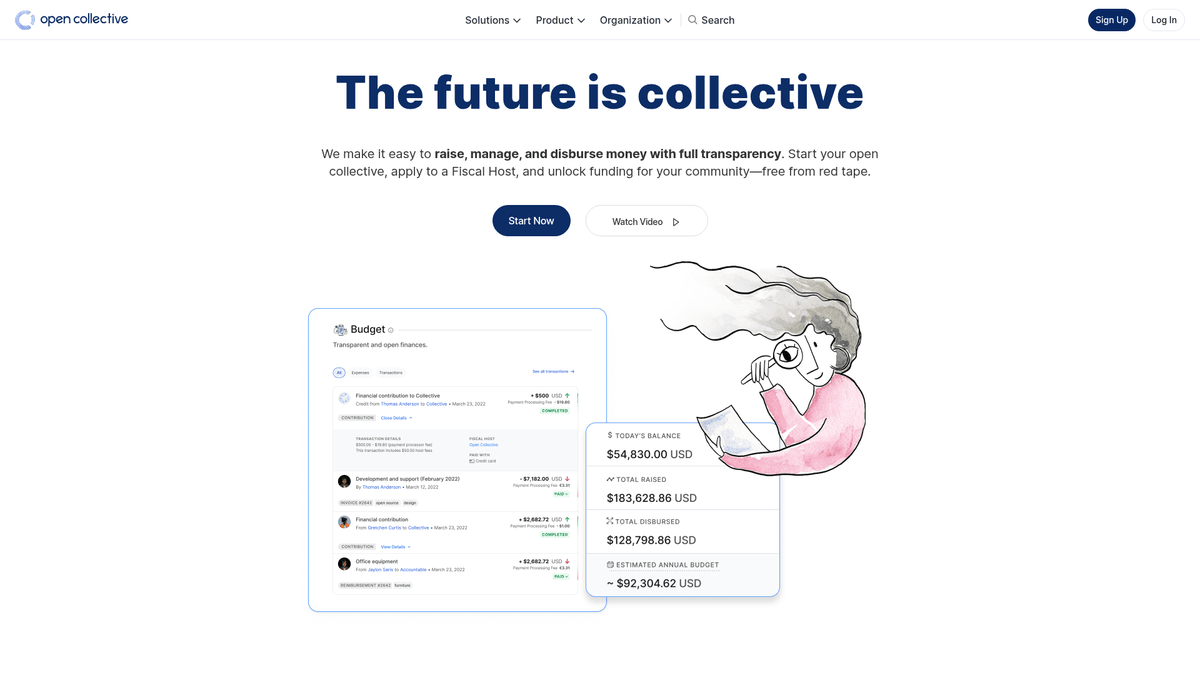
Open Collective is a unique financial and legal platform designed to provide transparency for community-led organizations, open-source software projects, and neighborhood associations. By acting as a decentralized funding tool, it allows 'collectives' to raise money and manage expenses without the need for a formal legal entity, often utilizing fiscal hosts for administrative support. Major tech projects like Babel and Webpack rely on this platform to manage their community-funded ecosystems.
The platform is renowned for its radical transparency. Every transaction, whether a donation from a major corporation or a small expense for a community meetup, is logged and publicly visible. This provides a wealth of data regarding the financial health and spending habits of some of the world's most critical open-source dependencies.
Scraping Open Collective is highly valuable for organizations looking to perform market research on the open-source economy. It allows users to identify corporate sponsorship leads, track developer funding trends, and audit the financial sustainability of critical software projects. The data serves as a direct window into the flow of capital within the global developer community.
Why Scrape Open Collective?
Discover the business value and use cases for extracting data from Open Collective.
Analyze Open Source Sustainability
Track the financial health and long-term viability of critical tech infrastructure projects like Webpack, Babel, and Logseq.
Corporate Sponsorship Prospecting
Identify organizations that already sponsor open-source software to build a targeted list of potential leads for your own initiatives.
Financial Transparency Audits
Monitor how decentralized groups and community collectives allocate their funds to ensure accountability for donors and stakeholders.
Market Trend Discovery
Evaluate which categories—such as tech, environmental activism, or education—are receiving the highest growth in community funding.
Contributor & Influencer Research
Discover top individual and corporate contributors within specific niches to find key influencers for outreach or recruitment.
Grant Impact Tracking
Aggregate data on how large grants are disbursed across multiple projects to measure the real-world impact of philanthropic spending.
Scraping Challenges
Technical challenges you may encounter when scraping Open Collective.
JavaScript-Heavy Rendering
Open Collective is built as a modern web application that requires full JavaScript execution to render financial ledgers and contributor lists.
Complex GraphQL Architecture
The site fetches data through deeply nested GraphQL queries, making traditional HTML parsing less efficient than monitoring API responses.
Dynamic Loading Patterns
Transaction histories and member lists often use infinite scrolling or 'Load More' buttons that require event-driven automation to fully extract.
Cloudflare & Rate Limiting
High-frequency scraping can trigger Cloudflare's Web Application Firewall (WAF) or result in temporary IP bans due to strict global rate limits.
Nested Data Structures
Information about fiscal hosts, collectives, and expenses is distributed across different page layers, requiring complex multi-step navigation.
Scrape Open Collective with AI
No coding required. Extract data in minutes with AI-powered automation.
How It Works
Describe What You Need
Tell the AI what data you want to extract from Open Collective. Just type it in plain language — no coding or selectors needed.
AI Extracts the Data
Our artificial intelligence navigates Open Collective, handles dynamic content, and extracts exactly what you asked for.
Get Your Data
Receive clean, structured data ready to export as CSV, JSON, or send directly to your apps and workflows.
Why Use AI for Scraping
AI makes it easy to scrape Open Collective without writing any code. Our AI-powered platform uses artificial intelligence to understand what data you want — just describe it in plain language and the AI extracts it automatically.
How to scrape with AI:
- Describe What You Need: Tell the AI what data you want to extract from Open Collective. Just type it in plain language — no coding or selectors needed.
- AI Extracts the Data: Our artificial intelligence navigates Open Collective, handles dynamic content, and extracts exactly what you asked for.
- Get Your Data: Receive clean, structured data ready to export as CSV, JSON, or send directly to your apps and workflows.
Why use AI for scraping:
- Visual Data Extraction: Extract complex financial records and contributor tables using a point-and-click interface without writing any GraphQL query logic.
- Intelligent Pagination Handling: Automatically handle infinite scroll or 'Load More' buttons to ensure every single expense or donation is captured from the ledger.
- Automated Monitoring Schedules: Set up a recurring bot to scrape data every 24 hours, ensuring you always have the most up-to-date balance and transaction records.
- Bypass Anti-Bot Measures: Utilize built-in IP rotation and human-like interaction features to avoid being flagged by Cloudflare while scraping at scale.
- Direct JSON/CSV Export: Instantly transform raw web data into structured formats that are ready for analysis in Google Sheets, Excel, or internal databases.
No-Code Web Scrapers for Open Collective
Point-and-click alternatives to AI-powered scraping
Several no-code tools like Browse.ai, Octoparse, Axiom, and ParseHub can help you scrape Open Collective. These tools use visual interfaces to select elements, but they come with trade-offs compared to AI-powered solutions.
Typical Workflow with No-Code Tools
Common Challenges
Learning curve
Understanding selectors and extraction logic takes time
Selectors break
Website changes can break your entire workflow
Dynamic content issues
JavaScript-heavy sites often require complex workarounds
CAPTCHA limitations
Most tools require manual intervention for CAPTCHAs
IP blocking
Aggressive scraping can get your IP banned
No-Code Web Scrapers for Open Collective
Several no-code tools like Browse.ai, Octoparse, Axiom, and ParseHub can help you scrape Open Collective. These tools use visual interfaces to select elements, but they come with trade-offs compared to AI-powered solutions.
Typical Workflow with No-Code Tools
- Install browser extension or sign up for the platform
- Navigate to the target website and open the tool
- Point-and-click to select data elements you want to extract
- Configure CSS selectors for each data field
- Set up pagination rules to scrape multiple pages
- Handle CAPTCHAs (often requires manual solving)
- Configure scheduling for automated runs
- Export data to CSV, JSON, or connect via API
Common Challenges
- Learning curve: Understanding selectors and extraction logic takes time
- Selectors break: Website changes can break your entire workflow
- Dynamic content issues: JavaScript-heavy sites often require complex workarounds
- CAPTCHA limitations: Most tools require manual intervention for CAPTCHAs
- IP blocking: Aggressive scraping can get your IP banned
Code Examples
import requests

# The Open Collective GraphQL endpoint
url = 'https://api.opencollective.com/graphql/v2'

# GraphQL query to get basic info about a collective
query = '''
query {
  collective(slug: "webpack") {
    name
    stats {
      totalAmountReceived { value }
      balance { value }
    }
  }
}
'''

headers = {'Content-Type': 'application/json'}

try:
    # Sending POST request to the API
    response = requests.post(url, json={'query': query}, headers=headers)
    response.raise_for_status()
    data = response.json()

    # Extracting and printing the name and balance
    collective = data['data']['collective']
    print(f"Name: {collective['name']}")
    print(f"Balance: {collective['stats']['balance']['value']}")
except Exception as e:
    print(f"An error occurred: {e}")
When to Use
Best for static HTML pages where content is loaded server-side. The fastest and simplest approach when JavaScript rendering isn't required.
Advantages
- ●Fastest execution (no browser overhead)
- ●Lowest resource consumption
- ●Easy to parallelize with asyncio
- ●Great for APIs and static pages
Limitations
- ●Cannot execute JavaScript
- ●Fails on SPAs and dynamic content
- ●May struggle with complex anti-bot systems
How to Scrape Open Collective with Code
Python + Requests
import requests
# The Open Collective GraphQL endpoint
url = 'https://api.opencollective.com/graphql/v2'
# GraphQL query to get basic info about a collective
query = '''
query {
collective(slug: "webpack") {
name
stats {
totalAmountReceived { value }
balance { value }
}
}
}
'''
headers = {'Content-Type': 'application/json'}
try:
# Sending POST request to the API
response = requests.post(url, json={'query': query}, headers=headers)
response.raise_for_status()
data = response.json()
# Extracting and printing the name and balance
collective = data['data']['collective']
print(f"Name: {collective['name']}")
print(f"Balance: {collective['stats']['balance']['value']}")
except Exception as e:
print(f"An error occurred: {e}")Python + Playwright
from playwright.sync_api import sync_playwright

def scrape_opencollective():
    with sync_playwright() as p:
        # Launching browser with JS support
        browser = p.chromium.launch(headless=True)
        page = browser.new_page()
        page.goto('https://opencollective.com/discover')

        # Wait for collective cards to load
        page.wait_for_selector('.CollectiveCard')

        # Extract data from the DOM
        collectives = page.query_selector_all('.CollectiveCard')
        for c in collectives:
            name = c.query_selector('h2').inner_text()
            print(f'Found project: {name}')

        browser.close()

scrape_opencollective()Python + Scrapy
import scrapy
import json

class OpenCollectiveSpider(scrapy.Spider):
    name = 'opencollective'
    start_urls = ['https://opencollective.com/webpack']

    def parse(self, response):
        # Open Collective uses Next.js; data is often inside a script tag
        next_data = response.xpath('//script[@id="__NEXT_DATA__"]/text()').get()
        if next_data:
            parsed_data = json.loads(next_data)
            collective = parsed_data['props']['pageProps']['collective']

            yield {
                'name': collective.get('name'),
                'balance': collective.get('stats', {}).get('balance'),
                'currency': collective.get('currency')
}Node.js + Puppeteer
const puppeteer = require('puppeteer');

(async () => {
  const browser = await puppeteer.launch();
  const page = await browser.newPage();
  await page.goto('https://opencollective.com/discover');

  // Wait for the dynamic content to load
  await page.waitForSelector('.CollectiveCard');

  // Map over elements to extract names
  const data = await page.evaluate(() => {
    return Array.from(document.querySelectorAll('.CollectiveCard')).map(el => ({
      name: el.querySelector('h2').innerText
    }));
  });

  console.log(data);
  await browser.close();
})();What You Can Do With Open Collective Data
Explore practical applications and insights from Open Collective data.
Open Source Growth Forecasting
Identify trending technologies by tracking financial growth rates of specific collective categories.
How to implement:
- 1Extract monthly revenue for top projects in specific tags
- 2Calculate compound annual growth rates (CAGR)
- 3Visualize project funding health to predict tech adoption
Use Automatio to extract data from Open Collective and build these applications without writing code.
What You Can Do With Open Collective Data
- Open Source Growth Forecasting
Identify trending technologies by tracking financial growth rates of specific collective categories.
- Extract monthly revenue for top projects in specific tags
- Calculate compound annual growth rates (CAGR)
- Visualize project funding health to predict tech adoption
- Lead Generation for SaaS
Identify well-funded projects that may need developer tools, hosting, or professional services.
- Filter collectives by budget and total amount raised
- Extract project descriptions and external website URLs
- Verify the tech stack through linked GitHub repositories
- Corporate Philanthropy Audit
Track where major corporations are spending their open-source contribution budgets.
- Scrape contributor lists for top projects
- Filter for organizational profiles vs individual profiles
- Aggregate contribution amounts by corporate entity
- Community Impact Research
Analyze how decentralized groups distribute their funds to understand social impact.
- Scrape the full transaction ledger for a specific collective
- Categorize expenses (travel, salaries, hardware)
- Generate reports on resource allocation within community groups
- Developer Recruitment Pipeline
Find active leaders in specific ecosystems based on their community management and contribution history.
- Scrape member lists of key technical collectives
- Cross-reference contributors with their public social profiles
- Identify active maintainers for high-level outreach
Supercharge your workflow with AI Automation
Automatio combines the power of AI agents, web automation, and smart integrations to help you accomplish more in less time.
What to get right first
Expert advice for successfully extracting data from Open Collective.
Extract via URL Slugs
The easiest way to target specific collectives is to use their unique URL slugs which can be harvested from the main discover page.
Check for __NEXT_DATA__
The page source often contains a script tag with the ID __NEXT_DATA__ that holds pre-rendered JSON, which can be faster than scraping the UI.
Use 'data-cy' Selectors
Target the 'data-cy' attributes in your selectors, as these are testing IDs that remain stable even when CSS classes change during site updates.
Monitor XHR Requests
Use browser developer tools to find the direct GraphQL endpoint calls, as these provide the cleanest data structure for financial transactions.
Implement Random Delays
Add randomized wait times between 2 and 6 seconds to mimic natural browsing and stay under the radar of automated bot detection.
Leverage Official Documentation
Review the Open Collective GraphQL API documentation to understand the naming conventions for different financial data fields.
Related Web Scraping
How to Scrape Moon.ly | Step-by-Step NFT Data Extraction Guide
How to Scrape Yahoo Finance: Extract Stock Market Data
How to Scrape Rocket Mortgage: A Comprehensive Guide
How to Scrape jup.ag: Jupiter DEX Web Scraper Guide

How to Scrape Indiegogo: The Ultimate Crowdfunding Data Extraction Guide
How to Scrape ICO Drops: Comprehensive Crypto Data Guide
How to Scrape Crypto.com: Comprehensive Market Data Guide
How to Scrape Coinpaprika: Crypto Market Data Extraction Guide
Frequently Asked Questions
Find answers to common questions about Open Collective