
How to Scrape ICO Drops: Comprehensive Crypto Data Guide
Learn how to scrape ICO Drops for real-time crypto token data, ROI statistics, and VC funding details. Master the techniques to bypass Cloudflare protection.
Anti-Bot Protection Detected
- Cloudflare
- Enterprise-grade WAF and bot management. Uses JavaScript challenges, CAPTCHAs, and behavioral analysis. Requires browser automation with stealth settings.
- Rate Limiting
- Limits requests per IP/session over time. Can be bypassed with rotating proxies, request delays, and distributed scraping.
- IP Blocking
- Blocks known datacenter IPs and flagged addresses. Requires residential or mobile proxies to circumvent effectively.
- Browser Fingerprinting
- Identifies bots through browser characteristics: canvas, WebGL, fonts, plugins. Requires spoofing or real browser profiles.
- Browser Fingerprinting
- Identifies bots through browser characteristics: canvas, WebGL, fonts, plugins. Requires spoofing or real browser profiles.
About ICO Drops
Learn what ICO Drops offers and what valuable data can be extracted from it.
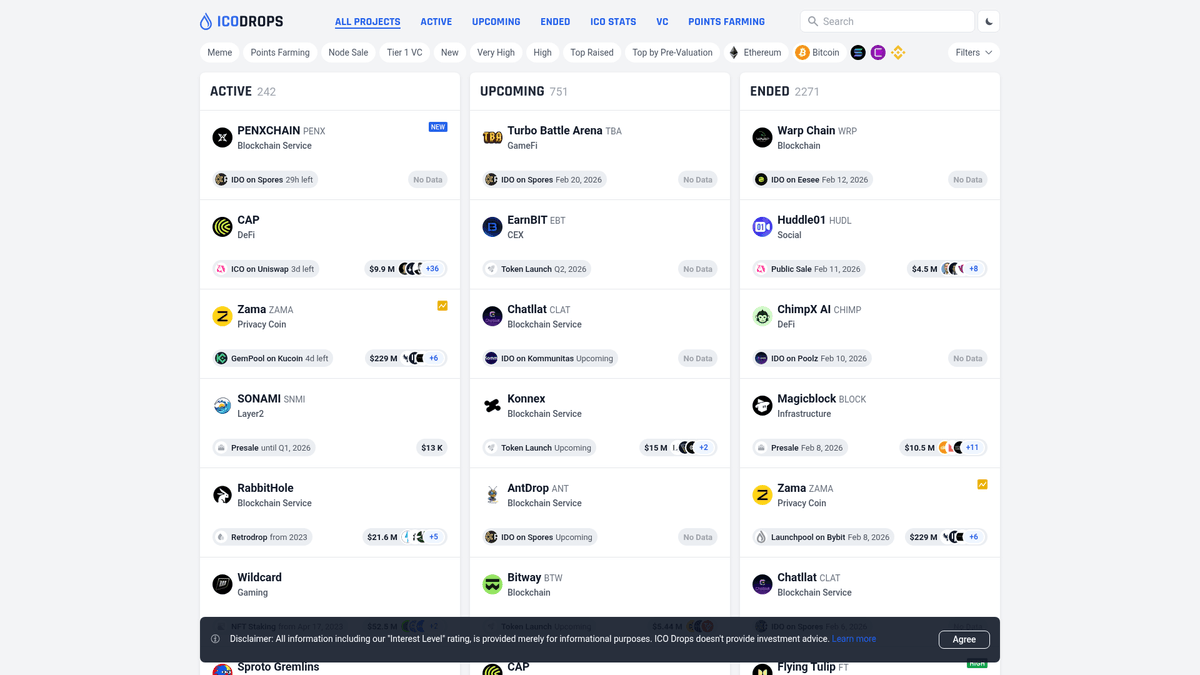
ICO Drops is an independent ICO (Initial Coin Offering) database and calendar that tracks the most significant token sales in the blockchain industry. It categorizes projects into Active, Upcoming, and Ended ICOs, providing a comprehensive view of the market's fundraising landscape.
The platform is highly regarded for its curated 'Interest Level' ratings and detailed project breakdowns, which include tokenomics, whitepapers, and social media links. For researchers and investors, it serves as a primary source for identifying early-stage gems and tracking 'smart money' by listing Tier 1 venture capital participants and launchpad performance data. Tracking these metrics via scraping allows for high-frequency market analysis that is otherwise impossible manually.
Why Scrape ICO Drops?
Discover the business value and use cases for extracting data from ICO Drops.
Venture Capital Tracking
Monitor investments from top-tier firms like Pantera and a16z to identify which projects the 'smart money' is backing early.
ROI Performance Benchmarking
Analyze historical return data across different ecosystems and launchpads to determine which platforms yield the highest average returns.
Early Project Discovery
Automate the monitoring of the 'Upcoming' section to get a head start on whitelists and community participation before mainstream hype.
Tokenomics and Vesting Data
Extract structured data on token distribution and lock-up periods to model potential supply shocks and market impact.
Sentiment and Interest Analysis
Scrape the proprietary 'Interest Level' ratings to gauge retail sentiment and prioritize research on high-demand projects.
Scraping Challenges
Technical challenges you may encounter when scraping ICO Drops.
Cloudflare Bot Management
The site employs aggressive Cloudflare protection that triggers JavaScript challenges and 403 errors for basic scraping scripts.
Infinite Scroll in Archives
The 'Ended ICO' section utilizes infinite scrolling, which requires active DOM manipulation to load historical data into the view.
Dynamic Content Rendering
Live ROI statistics and current price updates are often rendered via client-side JavaScript, necessitating a headless browser approach.
Semi-Dynamic Selectors
The HTML structure of listing cards can vary slightly between project types, requiring flexible and robust CSS or XPath selectors.
Scrape ICO Drops with AI
No coding required. Extract data in minutes with AI-powered automation.
How It Works
Describe What You Need
Tell the AI what data you want to extract from ICO Drops. Just type it in plain language — no coding or selectors needed.
AI Extracts the Data
Our artificial intelligence navigates ICO Drops, handles dynamic content, and extracts exactly what you asked for.
Get Your Data
Receive clean, structured data ready to export as CSV, JSON, or send directly to your apps and workflows.
Why Use AI for Scraping
AI makes it easy to scrape ICO Drops without writing any code. Our AI-powered platform uses artificial intelligence to understand what data you want — just describe it in plain language and the AI extracts it automatically.
How to scrape with AI:
- Describe What You Need: Tell the AI what data you want to extract from ICO Drops. Just type it in plain language — no coding or selectors needed.
- AI Extracts the Data: Our artificial intelligence navigates ICO Drops, handles dynamic content, and extracts exactly what you asked for.
- Get Your Data: Receive clean, structured data ready to export as CSV, JSON, or send directly to your apps and workflows.
Why use AI for scraping:
- Effortless Anti-Bot Bypass: Automatio automatically manages browser fingerprinting and advanced headers to navigate Cloudflare protection without manual configuration.
- Visual Data Extraction: Select complex nested data like investor lists and ROI stats through a simple point-and-click interface instead of complex code.
- Automated Infinite Scrolling: Easily configure the scraper to scroll through thousands of ended projects to build a complete historical cryptocurrency database.
- Scheduled Market Monitoring: Set up recurring scraping tasks to check for new 'Upcoming' listings every hour and sync them directly to your CRM or database.
- Direct Integration Pipelines: Send scraped ICO data straight to Google Sheets or via Webhooks to trigger real-time alerts for your investment team.
No-Code Web Scrapers for ICO Drops
Point-and-click alternatives to AI-powered scraping
Several no-code tools like Browse.ai, Octoparse, Axiom, and ParseHub can help you scrape ICO Drops. These tools use visual interfaces to select elements, but they come with trade-offs compared to AI-powered solutions.
Typical Workflow with No-Code Tools
Common Challenges
Learning curve
Understanding selectors and extraction logic takes time
Selectors break
Website changes can break your entire workflow
Dynamic content issues
JavaScript-heavy sites often require complex workarounds
CAPTCHA limitations
Most tools require manual intervention for CAPTCHAs
IP blocking
Aggressive scraping can get your IP banned
No-Code Web Scrapers for ICO Drops
Several no-code tools like Browse.ai, Octoparse, Axiom, and ParseHub can help you scrape ICO Drops. These tools use visual interfaces to select elements, but they come with trade-offs compared to AI-powered solutions.
Typical Workflow with No-Code Tools
- Install browser extension or sign up for the platform
- Navigate to the target website and open the tool
- Point-and-click to select data elements you want to extract
- Configure CSS selectors for each data field
- Set up pagination rules to scrape multiple pages
- Handle CAPTCHAs (often requires manual solving)
- Configure scheduling for automated runs
- Export data to CSV, JSON, or connect via API
Common Challenges
- Learning curve: Understanding selectors and extraction logic takes time
- Selectors break: Website changes can break your entire workflow
- Dynamic content issues: JavaScript-heavy sites often require complex workarounds
- CAPTCHA limitations: Most tools require manual intervention for CAPTCHAs
- IP blocking: Aggressive scraping can get your IP banned
Code Examples
import requests
from bs4 import BeautifulSoup

# Note: This basic approach may be blocked by Cloudflare
url = 'https://icodrops.com/category/active-ico/'
headers = {'User-Agent': 'Mozilla/5.0 (Windows NT 10.0; Win64; x64) AppleWebKit/537.36'}

try:
    response = requests.get(url, headers=headers)
    soup = BeautifulSoup(response.text, 'html.parser')
    projects = soup.select('.a_ico')
    for p in projects:
        name = p.select_one('.btn-active').text.strip()
        print(f'Active Project: {name}')
except Exception as e:
    print(f'Error: {e}')
When to Use
Best for static HTML pages where content is loaded server-side. The fastest and simplest approach when JavaScript rendering isn't required.
Advantages
- ●Fastest execution (no browser overhead)
- ●Lowest resource consumption
- ●Easy to parallelize with asyncio
- ●Great for APIs and static pages
Limitations
- ●Cannot execute JavaScript
- ●Fails on SPAs and dynamic content
- ●May struggle with complex anti-bot systems
How to Scrape ICO Drops with Code
Python + Requests
import requests
from bs4 import BeautifulSoup
# Note: This basic approach may be blocked by Cloudflare
url = 'https://icodrops.com/category/active-ico/'
headers = {'User-Agent': 'Mozilla/5.0 (Windows NT 10.0; Win64; x64) AppleWebKit/537.36'}
try:
response = requests.get(url, headers=headers)
soup = BeautifulSoup(response.text, 'html.parser')
projects = soup.select('.a_ico')
for p in projects:
name = p.select_one('.btn-active').text.strip()
print(f'Active Project: {name}')
except Exception as e:
print(f'Error: {e}')Python + Playwright
from playwright.sync_api import sync_playwright

def scrape_icodrops():
    with sync_playwright() as p:
        # Using stealth to handle Cloudflare challenges
        browser = p.chromium.launch(headless=True)
        page = browser.new_page()
        page.goto('https://icodrops.com/category/upcoming-ico/')
        page.wait_for_selector('.a_ico')

        listings = page.query_selector_all('.a_ico')
        for item in listings:
            name = item.query_selector('.btn-active').inner_text()
            print(f'Upcoming Project: {name}')
        browser.close()

scrape_icodrops()Python + Scrapy
import scrapy

class IcoDropsSpider(scrapy.Spider):
    name = 'icodrops'
    start_urls = ['https://icodrops.com/category/ended-ico/']

    def parse(self, response):
        for ico in response.css('.a_ico'):
            yield {
                'name': ico.css('.btn-active::text').get().strip(),
                'url': ico.css('a::attr(href)').get(),
                'interest': ico.css('.interest::text').get()
            }
# Logic for 'Load More' would go hereNode.js + Puppeteer
const puppeteer = require('puppeteer');

(async () => {
  const browser = await puppeteer.launch();
  const page = await browser.newPage();
  await page.goto('https://icodrops.com/category/active-ico/');

  const data = await page.evaluate(() => {
    return Array.from(document.querySelectorAll('.a_ico')).map(el => ({
      name: el.innerText.split('\
')[0].trim(),
      link: el.querySelector('a').href
    }));
  });

  console.log(data);
  await browser.close();
})();What You Can Do With ICO Drops Data
Explore practical applications and insights from ICO Drops data.
VC Sentiment Tracker
Identify which venture capital firms are most active in specific sectors (e.g., DeFi, L1s).
How to implement:
- 1Scrape the 'Investors' section from project detail pages.
- 2Count project occurrences per VC firm.
- 3Filter by 'Interest Level' to weight the quality of investments.
- 4Visualize the data to see which VCs have the best historical ROI.
Use Automatio to extract data from ICO Drops and build these applications without writing code.
What You Can Do With ICO Drops Data
- VC Sentiment Tracker
Identify which venture capital firms are most active in specific sectors (e.g., DeFi, L1s).
- Scrape the 'Investors' section from project detail pages.
- Count project occurrences per VC firm.
- Filter by 'Interest Level' to weight the quality of investments.
- Visualize the data to see which VCs have the best historical ROI.
- Launchpad Performance Analytics
Analyze which IDO platforms provide the highest returns for retail investors.
- Extract the 'Launchpad' and 'ROI' fields for all Ended ICOs.
- Group projects by their launch platform (e.g., Polkastarter, DAO Maker).
- Calculate the average 'Current ROI' per platform.
- Export to a dashboard for investment decision support.
- Real-time Funding Alerts
Get notified as soon as a high-interest project is added to the database.
- Schedule a scraper to run every 30 minutes on the 'Upcoming' page.
- Compare the current list against the previously stored database.
- Trigger a Discord or Telegram notification for any new project with a 'High' rating.
- Extract the whitelist link automatically from the detail page.
- Competitive Landscape Map
Build a database of project categories to see which niches are becoming oversaturated.
- Scrape project names and categories from the last 12 months.
- Aggregate the data by category (e.g., Gaming, AI, Privacy).
- Calculate the total funds raised per category.
- Identify 'blue ocean' opportunities where funding is low but interest is high.
Supercharge your workflow with AI Automation
Automatio combines the power of AI agents, web automation, and smart integrations to help you accomplish more in less time.
What to get right first
Expert advice for successfully extracting data from ICO Drops.
Prioritize Residential Proxies
Standard datacenter IPs are frequently blacklisted by crypto data providers; use residential proxies to ensure high success rates.
Inspect Hidden XHR Endpoints
Use the browser's network inspector to find direct JSON endpoints that feed the infinite scroll, which can be faster than scraping the UI.
Enable Browser Stealth Mode
Always use stealth plugins when using Playwright or Puppeteer to mask automated browser traits that Cloudflare looks for.
Leverage the XML Sitemap
Access icodrops.com/sitemap.xml to get a direct list of all project URLs, allowing you to crawl detail pages without traversing the listing UI.
Randomize Interaction Delays
Vary the timing between clicks and page loads to mimic human browsing behavior and avoid triggering rate-limiting thresholds.
Related Web Scraping
How to Scrape Moon.ly | Step-by-Step NFT Data Extraction Guide
How to Scrape Yahoo Finance: Extract Stock Market Data
How to Scrape Rocket Mortgage: A Comprehensive Guide
How to Scrape Open Collective: Financial and Contributor Data Guide
How to Scrape jup.ag: Jupiter DEX Web Scraper Guide
How to Scrape Indiegogo: The Ultimate Crowdfunding Data Extraction Guide
How to Scrape Crypto.com: Comprehensive Market Data Guide
How to Scrape Coinpaprika: Crypto Market Data Extraction Guide
Frequently Asked Questions
Find answers to common questions about ICO Drops