
How to Scrape Indiegogo: The Ultimate Crowdfunding Data Extraction Guide
Learn how to scrape Indiegogo campaign data, funding goals, and backer stats. Extract real-time crowdfunding insights for market research and trend analysis.
Anti-Bot Protection Detected
- Cloudflare
- Enterprise-grade WAF and bot management. Uses JavaScript challenges, CAPTCHAs, and behavioral analysis. Requires browser automation with stealth settings.
- Google reCAPTCHA
- Google's CAPTCHA system. v2 requires user interaction, v3 runs silently with risk scoring. Can be solved with CAPTCHA services.
- Rate Limiting
- Limits requests per IP/session over time. Can be bypassed with rotating proxies, request delays, and distributed scraping.
- Browser Fingerprinting
- Identifies bots through browser characteristics: canvas, WebGL, fonts, plugins. Requires spoofing or real browser profiles.
- IP Blocking
- Blocks known datacenter IPs and flagged addresses. Requires residential or mobile proxies to circumvent effectively.
About Indiegogo
Learn what Indiegogo offers and what valuable data can be extracted from it.
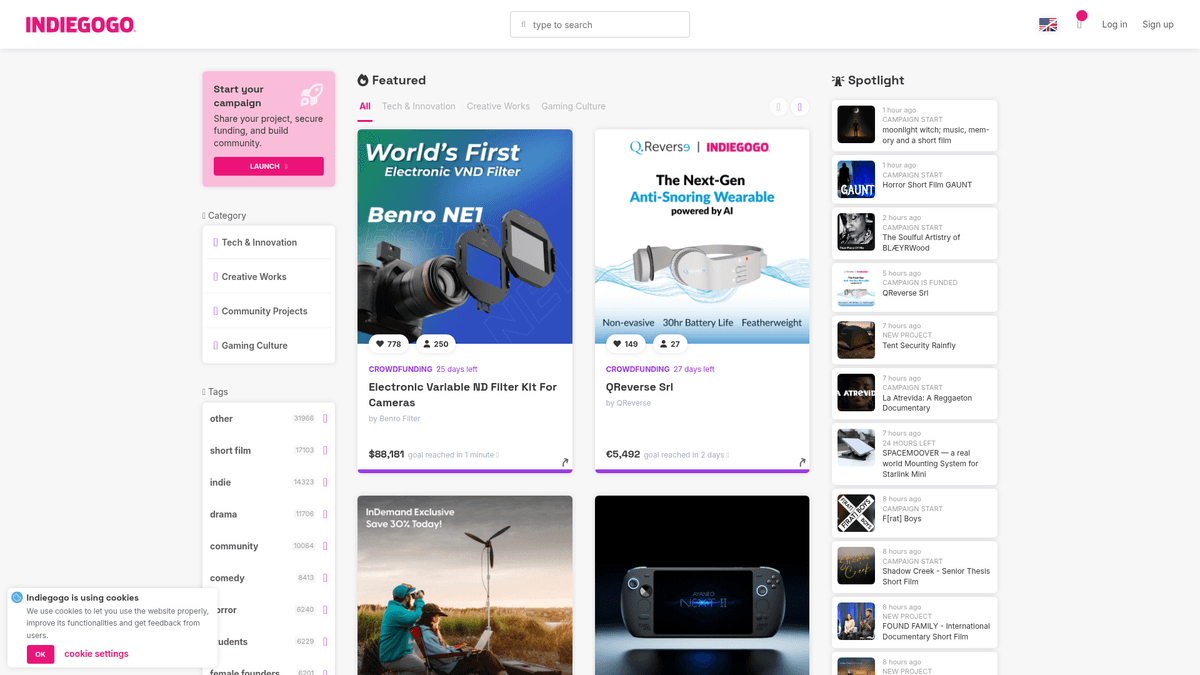
Indiegogo is a premier global crowdfunding platform that serves as a launchpad for entrepreneurs and creators to fund innovative tech, design, and creative projects. Since its launch in 2008, it has facilitated millions of dollars in funding across thousands of active campaigns, ranging from high-tech consumer electronics to independent films.
The platform is a massive repository of structured data, including funding progress, backer counts, project timelines, and detailed product specifications. It also features a robust community section with updates and comments, providing qualitative data on consumer sentiment and market demand for new concepts.
Scraping Indiegogo is highly valuable for market researchers, venture capitalists, and product developers. By aggregating data on successful vs. failed projects, businesses can identify emerging trends, conduct competitive analysis on similar product categories, and gauge price sensitivity among early adopters before products hit traditional retail markets.
Why Scrape Indiegogo?
Discover the business value and use cases for extracting data from Indiegogo.
Market Trend Identification
Scraping Indiegogo allows you to identify emerging tech and design trends by tracking which product categories receive the most funding and engagement before they hit mainstream markets.
Competitive Pricing Intelligence
Extract data on perk tiers and pricing structures to understand how successful competitors position their products and what price points resonate best with early adopters.
Investment Lead Generation
Venture capitalists and angel investors can monitor projects that reach their funding goals rapidly, identifying high-potential startups for early-stage investment opportunities.
Product Sourcing for E-commerce
Retailers and distributors can use scraped data to find innovative products early in their lifecycle, enabling them to secure distribution rights before competitors.
Customer Sentiment Analysis
By extracting comments and updates, businesses can perform sentiment analysis to understand common user pain points and desired features in specific product niches.
Historical Benchmarking
Building a database of past campaigns helps new creators predict their own success by comparing their metrics against thousands of historical project outcomes.
Scraping Challenges
Technical challenges you may encounter when scraping Indiegogo.
Aggressive Cloudflare Protection
Indiegogo uses sophisticated anti-bot measures that can trigger JS challenges or CAPTCHAs, blocking automated scripts that don't mimic real browser behavior.
JavaScript-Dependent Rendering
The website is a React-based Single Page Application, meaning data is loaded dynamically and isn't available in the initial HTML source, requiring a headless browser to extract.
Infinite Scroll Complexity
Search and category pages utilize infinite scrolling or 'Load More' buttons, which requires specific interaction logic to ensure all projects are loaded before extraction begins.
Data Variability by Phase
Campaigns change layout and data fields when transitioning from 'Crowdfunding' to 'InDemand' or 'Closed' status, making it difficult to maintain consistent selectors.
Rate Limiting and IP Bans
Frequent requests to project pages can lead to temporary IP blacklisting, necessitating the use of rotated residential proxies to maintain a high success rate.
Scrape Indiegogo with AI
No coding required. Extract data in minutes with AI-powered automation.
How It Works
Describe What You Need
Tell the AI what data you want to extract from Indiegogo. Just type it in plain language — no coding or selectors needed.
AI Extracts the Data
Our artificial intelligence navigates Indiegogo, handles dynamic content, and extracts exactly what you asked for.
Get Your Data
Receive clean, structured data ready to export as CSV, JSON, or send directly to your apps and workflows.
Why Use AI for Scraping
AI makes it easy to scrape Indiegogo without writing any code. Our AI-powered platform uses artificial intelligence to understand what data you want — just describe it in plain language and the AI extracts it automatically.
How to scrape with AI:
- Describe What You Need: Tell the AI what data you want to extract from Indiegogo. Just type it in plain language — no coding or selectors needed.
- AI Extracts the Data: Our artificial intelligence navigates Indiegogo, handles dynamic content, and extracts exactly what you asked for.
- Get Your Data: Receive clean, structured data ready to export as CSV, JSON, or send directly to your apps and workflows.
Why use AI for scraping:
- Automatic JS Rendering: Automatio natively handles Indiegogo’s React-based dynamic content, ensuring that all funding amounts and backer counts are fully loaded before extraction.
- Effortless Anti-Bot Bypass: The platform manages complex browser fingerprinting and proxy rotation, allowing you to bypass Cloudflare security without writing custom scripts.
- Visual Data Selection: Instead of hunting through obfuscated CSS classes, you can simply click on the elements you want to scrape, such as project titles, goals, and perk descriptions.
- Scheduled Monitoring: Easily set up recurring scrapers to track a campaign's daily funding growth or monitor new arrivals in specific categories without manual intervention.
- No-Code Pagination Handling: Configure the bot to handle infinite scrolling or 'Load More' triggers with a single click, enabling bulk extraction of thousands of projects across the platform.
No-Code Web Scrapers for Indiegogo
Point-and-click alternatives to AI-powered scraping
Several no-code tools like Browse.ai, Octoparse, Axiom, and ParseHub can help you scrape Indiegogo. These tools use visual interfaces to select elements, but they come with trade-offs compared to AI-powered solutions.
Typical Workflow with No-Code Tools
Common Challenges
Learning curve
Understanding selectors and extraction logic takes time
Selectors break
Website changes can break your entire workflow
Dynamic content issues
JavaScript-heavy sites often require complex workarounds
CAPTCHA limitations
Most tools require manual intervention for CAPTCHAs
IP blocking
Aggressive scraping can get your IP banned
No-Code Web Scrapers for Indiegogo
Several no-code tools like Browse.ai, Octoparse, Axiom, and ParseHub can help you scrape Indiegogo. These tools use visual interfaces to select elements, but they come with trade-offs compared to AI-powered solutions.
Typical Workflow with No-Code Tools
- Install browser extension or sign up for the platform
- Navigate to the target website and open the tool
- Point-and-click to select data elements you want to extract
- Configure CSS selectors for each data field
- Set up pagination rules to scrape multiple pages
- Handle CAPTCHAs (often requires manual solving)
- Configure scheduling for automated runs
- Export data to CSV, JSON, or connect via API
Common Challenges
- Learning curve: Understanding selectors and extraction logic takes time
- Selectors break: Website changes can break your entire workflow
- Dynamic content issues: JavaScript-heavy sites often require complex workarounds
- CAPTCHA limitations: Most tools require manual intervention for CAPTCHAs
- IP blocking: Aggressive scraping can get your IP banned
Code Examples
import requests
from bs4 import BeautifulSoup
import json

# Indiegogo uses React; Requests is best for pulling metadata from JSON-LD scripts
def scrape_indiegogo_static(url):
    headers = {
        'User-Agent': 'Mozilla/5.0 (Windows NT 10.0; Win64; x64) AppleWebKit/537.36 (KHTML, like Gecko) Chrome/119.0.0.0 Safari/537.36'
    }

    response = requests.get(url, headers=headers)
    if response.status_code == 200:
        soup = BeautifulSoup(response.text, 'html.parser')
        # Locate structured data scripts
        script = soup.find('script', type='application/ld+json')
        if script:
            data = json.loads(script.string)
            print(f"Project: {data.get('name')}")
            return data
    return None

# Example usage:
# scrape_indiegogo_static('https://www.indiegogo.com/projects/example-project')
When to Use
Best for static HTML pages where content is loaded server-side. The fastest and simplest approach when JavaScript rendering isn't required.
Advantages
- ●Fastest execution (no browser overhead)
- ●Lowest resource consumption
- ●Easy to parallelize with asyncio
- ●Great for APIs and static pages
Limitations
- ●Cannot execute JavaScript
- ●Fails on SPAs and dynamic content
- ●May struggle with complex anti-bot systems
How to Scrape Indiegogo with Code
Python + Requests
import requests
from bs4 import BeautifulSoup
import json
# Indiegogo uses React; Requests is best for pulling metadata from JSON-LD scripts
def scrape_indiegogo_static(url):
headers = {
'User-Agent': 'Mozilla/5.0 (Windows NT 10.0; Win64; x64) AppleWebKit/537.36 (KHTML, like Gecko) Chrome/119.0.0.0 Safari/537.36'
}
response = requests.get(url, headers=headers)
if response.status_code == 200:
soup = BeautifulSoup(response.text, 'html.parser')
# Locate structured data scripts
script = soup.find('script', type='application/ld+json')
if script:
data = json.loads(script.string)
print(f"Project: {data.get('name')}")
return data
return None
# Example usage:
# scrape_indiegogo_static('https://www.indiegogo.com/projects/example-project')Python + Playwright
from playwright.sync_api import sync_playwright

def scrape_indiegogo_dynamic(url):
    with sync_playwright() as p:
        # Launching browser with a clean context
        browser = p.chromium.launch(headless=True)
        page = browser.new_page()

        # Navigate and wait for React to hydrate the components
        page.goto(url, wait_until='networkidle')

        # Specific selector for the funding amount
        page.wait_for_selector('.i-project-raise-amount')

        results = {
            "title": page.inner_text('h1'),
            "funding": page.inner_text('.i-project-raise-amount'),
            "backers": page.inner_text('.i-project-raise-backers')
        }

        print(results)
        browser.close()

# Example usage:
# scrape_indiegogo_dynamic('https://www.indiegogo.com/projects/example-project')Python + Scrapy
import scrapy
from scrapy_playwright.page import PageMethod

class IndiegogoSpider(scrapy.Spider):
    name = 'indiegogo_spider'

    def start_requests(self):
        # Use scrapy-playwright to handle the dynamic content
        yield scrapy.Request(
            'https://www.indiegogo.com/explore/all',
            meta={
                "playwright": True,
                "playwright_page_methods": [
                    PageMethod("wait_for_selector", ".discoverableCard-base"),
                ],
            }
        )

    def parse(self, response):
        for card in response.css('.discoverableCard-base'):
            yield {
                'name': card.css('.discoverableCard-title::text').get(),
                'raised': card.css('.discoverableCard-formattedAmount::text').get(),
                'url': response.urljoin(card.css('a::attr(href)').get())
}Node.js + Puppeteer
const puppeteer = require('puppeteer');

async function scrapeIndiegogo(url) {
    const browser = await puppeteer.launch({ headless: true });
    const page = await browser.newPage();

    // Set custom user agent to bypass basic bot detection
    await page.setUserAgent('Mozilla/5.0 (Windows NT 10.0; Win64; x64) Chrome/120.0.0.0');

    await page.goto(url, { waitUntil: 'networkidle2' });

    const data = await page.evaluate(() => {
        return {
            projectTitle: document.querySelector('h1')?.innerText,
            amountRaised: document.querySelector('.i-project-raise-amount')?.innerText,
            percentFunded: document.querySelector('.i-project-raise-percent')?.innerText
        };
    });

    console.log(data);
    await browser.close();
}

// scrapeIndiegogo('https://www.indiegogo.com/projects/example-project');What You Can Do With Indiegogo Data
Explore practical applications and insights from Indiegogo data.
Trend Forecasting
Identify which product categories (e.g., sustainable tech or AI gadgets) are gaining the most traction.
How to implement:
- 1Scrape project categories and weekly funding growth rates.
- 2Identify projects that reach 50% funding within their first 48 hours.
- 3Analyze keyword frequency in project taglines to spot emerging buzzwords.
Use Automatio to extract data from Indiegogo and build these applications without writing code.
What You Can Do With Indiegogo Data
- Trend Forecasting
Identify which product categories (e.g., sustainable tech or AI gadgets) are gaining the most traction.
- Scrape project categories and weekly funding growth rates.
- Identify projects that reach 50% funding within their first 48 hours.
- Analyze keyword frequency in project taglines to spot emerging buzzwords.
- Pricing Strategy Research
Companies can benchmark their own product pricing against successful crowdfunding tiers.
- Extract all perk/reward price points from top-funded projects.
- Compare the 'Early Bird' discount percentage across similar categories.
- Analyze the ratio of backer counts to specific price tiers to find the 'sweet spot' for pricing.
- VC & Investment Scouting
Investors can find high-potential startups before they seek traditional Series A funding.
- Set up a daily scraper for projects that have exceeded $100k in funding.
- Filter for projects with high social media engagement or backer comment activity.
- Export founder profiles and external links to perform deeper due diligence.
- Supply Chain Lead Gen
Manufacturing and shipping companies can find new clients who have just secured production capital.
- Monitor the 'Tech' and 'Hardware' categories for successfully funded projects.
- Scrape the project location to match with local fulfillment capabilities.
- Use the extracted founder names to initiate outreach for manufacturing partnerships.
Supercharge your workflow with AI Automation
Automatio combines the power of AI agents, web automation, and smart integrations to help you accomplish more in less time.
What to get right first
Expert advice for successfully extracting data from Indiegogo.
Inspect Network XHR Traffic
Before scraping the DOM, check the Network tab in your browser for internal GraphQL calls which often return clean JSON data that is easier and faster to parse.
Utilize JSON-LD Scripts
Look for the application/ld+json script tags in the page source; they contain highly structured metadata about the project, creator, and currency that is less likely to change.
Use Residential Proxies
To avoid being flagged by Cloudflare, use high-quality residential proxies that route traffic through real home devices, making your scraper indistinguishable from a human visitor.
Capture Multi-Currency Data
Indiegogo supports many currencies; always ensure you scrape the currency symbol or ISO code along with the numerical value to ensure your data remains accurate for global analysis.
Implement Random Delays
Avoid a predictable scraping pattern by introducing random 'sleep' intervals between 3 and 8 seconds to prevent triggering Indiegogo’s rate-limiting algorithms.
Rotate User Agents Regularly
Switch between various modern desktop and mobile User-Agent strings to reduce the risk of fingerprinting-based blocks from the platform's security layers.
Scrape During Off-Peak Hours
Running large-scale extraction jobs during low-traffic periods for Indiegogo's primary markets can result in faster response times and fewer security challenges.
Related Web Scraping
How to Scrape Moon.ly | Step-by-Step NFT Data Extraction Guide
How to Scrape Yahoo Finance: Extract Stock Market Data
How to Scrape Rocket Mortgage: A Comprehensive Guide
How to Scrape Open Collective: Financial and Contributor Data Guide
How to Scrape jup.ag: Jupiter DEX Web Scraper Guide
How to Scrape ICO Drops: Comprehensive Crypto Data Guide
How to Scrape Crypto.com: Comprehensive Market Data Guide
How to Scrape Coinpaprika: Crypto Market Data Extraction Guide
Frequently Asked Questions
Find answers to common questions about Indiegogo