
How to Scrape Daily Paws: A Step-by-Step Web Scraper Guide
Learn how to scrape Daily Paws for dog breed specs, pet health guides, and reviews. Master bypassing Cloudflare protection to extract structured pet data.
Anti-Bot Protection Detected
- Cloudflare
- Enterprise-grade WAF and bot management. Uses JavaScript challenges, CAPTCHAs, and behavioral analysis. Requires browser automation with stealth settings.
- Rate Limiting
- Limits requests per IP/session over time. Can be bypassed with rotating proxies, request delays, and distributed scraping.
- IP Reputation Filtering
- AI Crawler Detection
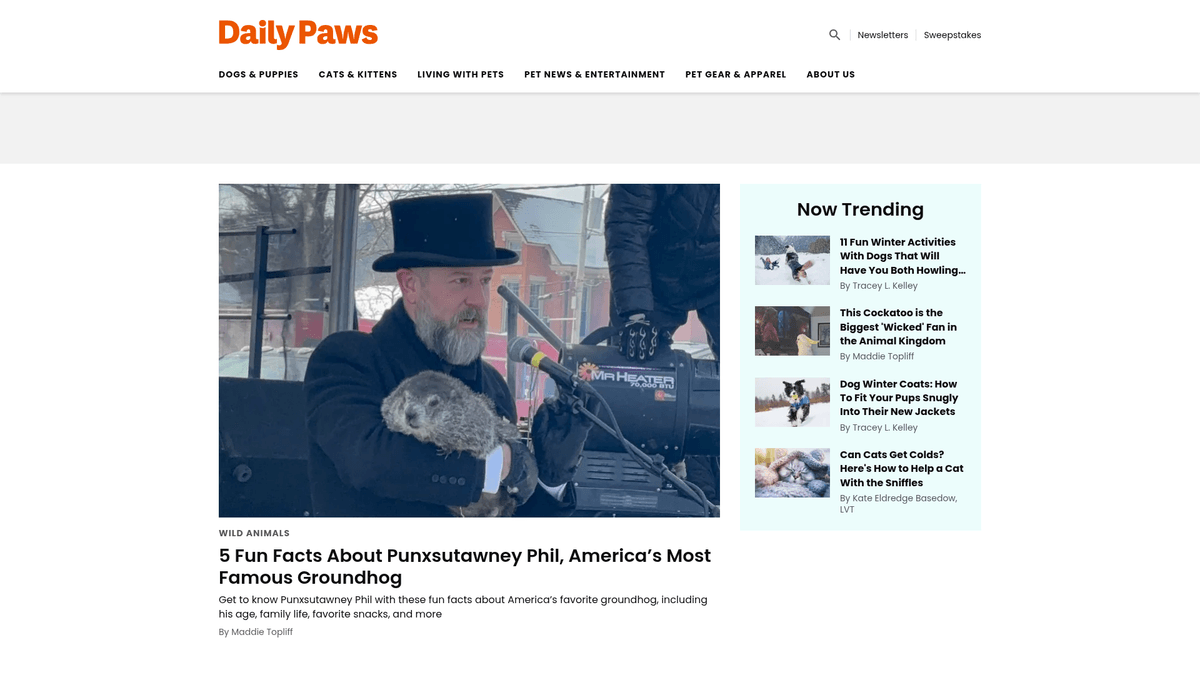
About Daily Paws
Learn what Daily Paws offers and what valuable data can be extracted from it.
Expert-Backed Pet Information
Daily Paws is a leading digital resource for pet owners, offering a massive database of vet-vetted information on animal health, behavior, and lifestyle. Owned by Dotdash Meredith (People Inc.), the site is renowned for its structured breed profiles, nutritional advice, and rigorous product testing. It serves as a go-to platform for both new and experienced pet parents seeking scientifically accurate care instructions for dogs and cats.
High-Value Pet Data
The platform contains thousands of detailed records, including breed-specific physical attributes, temperament scores, and health predispositions. This data is incredibly valuable for market researchers, developers building pet-care applications, and retailers tracking the latest pet industry trends. Because the content is reviewed by a Board of Veterinary Medicine, it is considered a gold standard for pet-related data sets.
Why Developers Scrape Daily Paws
Scraping Daily Paws allows for the automated collection of product reviews, breed specifications, and health guides. This information is frequently used to fuel recommendation engines, create pet insurance risk models, and build niche-specific e-commerce comparison tools. The structured nature of their 'mntl-structured-data' components makes it a primary target for data scientists in the veterinary and pet-tech sectors.
Why Scrape Daily Paws?
Discover the business value and use cases for extracting data from Daily Paws.
Build Breed-Specific Apps
Extract comprehensive temperament, exercise, and grooming requirements to power pet recommendation engines and mobile pet care applications.
Veterinary Market Analysis
Gather expert-reviewed health data and symptom guides to identify trends in pet wellness and gaps in existing care information.
Competitive SEO Intelligence
Analyze how Dotdash Meredith structures high-authority lifestyle content to optimize your own site's search rankings and keyword strategy.
Product Review Aggregation
Collect detailed evaluations and pricing for pet gear to build price comparison tools or perform consumer sentiment research.
AI Model Fine-Tuning
Use professionally vetted editorial content to train specialized language models for veterinary support or automated pet care advice.
Nutrition and Recipe Mining
Capture a vast database of vet-approved pet food recipes and nutritional facts for inclusion in health-tracking software.
Scraping Challenges
Technical challenges you may encounter when scraping Daily Paws.
Advanced Bot Mitigation
Daily Paws utilizes Cloudflare's security suite, which can detect and block standard scraping libraries via IP reputation and TLS fingerprinting.
Complex Mantle Framework
The site's reliance on the Mantle UI framework means data is often nested within dynamic elements that require JavaScript execution to fully render.
Explicit AI Crawler Restrictions
The site's robots.txt explicitly disallows major AI and LLM crawlers, requiring sophisticated stealth techniques to access the same high-quality data.
Lazy-Loaded Structured Content
Key breed traits and attributes are often loaded as the user scrolls, necessitating automation that simulates real human scrolling behavior.
Dynamic Utility Class Names
Frequent updates to the site's design can change CSS selectors, making it essential to use resilient selection strategies like regex or structural analysis.
Scrape Daily Paws with AI
No coding required. Extract data in minutes with AI-powered automation.
How It Works
Describe What You Need
Tell the AI what data you want to extract from Daily Paws. Just type it in plain language — no coding or selectors needed.
AI Extracts the Data
Our artificial intelligence navigates Daily Paws, handles dynamic content, and extracts exactly what you asked for.
Get Your Data
Receive clean, structured data ready to export as CSV, JSON, or send directly to your apps and workflows.
Why Use AI for Scraping
AI makes it easy to scrape Daily Paws without writing any code. Our AI-powered platform uses artificial intelligence to understand what data you want — just describe it in plain language and the AI extracts it automatically.
How to scrape with AI:
- Describe What You Need: Tell the AI what data you want to extract from Daily Paws. Just type it in plain language — no coding or selectors needed.
- AI Extracts the Data: Our artificial intelligence navigates Daily Paws, handles dynamic content, and extracts exactly what you asked for.
- Get Your Data: Receive clean, structured data ready to export as CSV, JSON, or send directly to your apps and workflows.
Why use AI for scraping:
- Bypassing Security Walls: Automatio effectively handles Cloudflare's managed challenges and Turnstile checks without requiring manual intervention or CAPTCHA solving.
- No-Code Mantle Interaction: Visually click and select the exact breed attributes you need without writing complex code to navigate the site's nested HTML structure.
- Seamless Proxy Rotation: Integrated residential proxy support ensures your scraper avoids rate limits and IP bans by appearing as a regular home visitor.
- Dynamic Loading Support: Automatically waits for JavaScript elements to load and handles 'Load More' buttons or infinite scrolling to capture entire breed directories.
- Scheduled Content Syncing: Set your scraper to run on a schedule to automatically capture newly published health alerts, news, or product recalls as they go live.
No-Code Web Scrapers for Daily Paws
Point-and-click alternatives to AI-powered scraping
Several no-code tools like Browse.ai, Octoparse, Axiom, and ParseHub can help you scrape Daily Paws. These tools use visual interfaces to select elements, but they come with trade-offs compared to AI-powered solutions.
Typical Workflow with No-Code Tools
Common Challenges
Learning curve
Understanding selectors and extraction logic takes time
Selectors break
Website changes can break your entire workflow
Dynamic content issues
JavaScript-heavy sites often require complex workarounds
CAPTCHA limitations
Most tools require manual intervention for CAPTCHAs
IP blocking
Aggressive scraping can get your IP banned
No-Code Web Scrapers for Daily Paws
Several no-code tools like Browse.ai, Octoparse, Axiom, and ParseHub can help you scrape Daily Paws. These tools use visual interfaces to select elements, but they come with trade-offs compared to AI-powered solutions.
Typical Workflow with No-Code Tools
- Install browser extension or sign up for the platform
- Navigate to the target website and open the tool
- Point-and-click to select data elements you want to extract
- Configure CSS selectors for each data field
- Set up pagination rules to scrape multiple pages
- Handle CAPTCHAs (often requires manual solving)
- Configure scheduling for automated runs
- Export data to CSV, JSON, or connect via API
Common Challenges
- Learning curve: Understanding selectors and extraction logic takes time
- Selectors break: Website changes can break your entire workflow
- Dynamic content issues: JavaScript-heavy sites often require complex workarounds
- CAPTCHA limitations: Most tools require manual intervention for CAPTCHAs
- IP blocking: Aggressive scraping can get your IP banned
Code Examples
import requests
from bs4 import BeautifulSoup

# Daily Paws requires a real browser User-Agent
headers = {
    'User-Agent': 'Mozilla/5.0 (Windows NT 10.0; Win64; x64) AppleWebKit/537.36 (KHTML, like Gecko) Chrome/91.0.4472.124 Safari/537.36'
}

url = 'https://www.dailypaws.com/dogs-puppies/dog-breeds/labrador-retriever'

try:
    response = requests.get(url, headers=headers, timeout=10)
    if response.status_code == 200:
        soup = BeautifulSoup(response.text, 'html.parser')
        # Use the specific Dotdash prefix selectors
        breed_name = soup.find('h1', class_='mntl-attribution__headline').text.strip()
        print(f'Breed: {breed_name}')
    else:
        print(f'Blocked by Cloudflare: {response.status_code}')
except Exception as e:
    print(f'An error occurred: {e}')
When to Use
Best for static HTML pages where content is loaded server-side. The fastest and simplest approach when JavaScript rendering isn't required.
Advantages
- ●Fastest execution (no browser overhead)
- ●Lowest resource consumption
- ●Easy to parallelize with asyncio
- ●Great for APIs and static pages
Limitations
- ●Cannot execute JavaScript
- ●Fails on SPAs and dynamic content
- ●May struggle with complex anti-bot systems
How to Scrape Daily Paws with Code
Python + Requests
import requests
from bs4 import BeautifulSoup
# Daily Paws requires a real browser User-Agent
headers = {
'User-Agent': 'Mozilla/5.0 (Windows NT 10.0; Win64; x64) AppleWebKit/537.36 (KHTML, like Gecko) Chrome/91.0.4472.124 Safari/537.36'
}
url = 'https://www.dailypaws.com/dogs-puppies/dog-breeds/labrador-retriever'
try:
response = requests.get(url, headers=headers, timeout=10)
if response.status_code == 200:
soup = BeautifulSoup(response.text, 'html.parser')
# Use the specific Dotdash prefix selectors
breed_name = soup.find('h1', class_='mntl-attribution__headline').text.strip()
print(f'Breed: {breed_name}')
else:
print(f'Blocked by Cloudflare: {response.status_code}')
except Exception as e:
print(f'An error occurred: {e}')Python + Playwright
from playwright.sync_api import sync_playwright

def scrape_daily_paws():
    with sync_playwright() as p:
        # Headless mode should be off if facing heavy Cloudflare
        browser = p.chromium.launch(headless=True)
        page = browser.new_page()

        # Navigate to a breed listing page
        page.goto('https://www.dailypaws.com/dogs-puppies/dog-breeds')

        # Wait for the cards to load
        page.wait_for_selector('.mntl-card-list-items')

        # Extract titles of the first 5 breeds
        breeds = page.query_selector_all('.mntl-card-list-items span.card__title')
        for breed in breeds[:5]:
            print(breed.inner_text())

        browser.close()

scrape_daily_paws()Python + Scrapy
import scrapy

class DailyPawsSpider(scrapy.Spider):
    name = 'dailypaws'
    allowed_domains = ['dailypaws.com']
    start_urls = ['https://www.dailypaws.com/dogs-puppies/dog-breeds']

    def parse(self, response):
        # Iterate through breed cards
        for item in response.css('a.mntl-card-list-items'):
            yield {
                'name': item.css('span.card__title::text').get(),
                'link': item.attrib['href']
            }

        # Follow pagination if available
        next_page = response.css('a.mntl-pagination__next::attr(href)').get()
        if next_page:
yield response.follow(next_page, self.parse)Node.js + Puppeteer
const puppeteer = require('puppeteer');

(async () => {
  const browser = await puppeteer.launch({ headless: true });
  const page = await browser.newPage();

  // Set a believable user agent
  await page.setUserAgent('Mozilla/5.0 (Macintosh; Intel Mac OS X 10_15_7) AppleWebKit/537.36');

  await page.goto('https://www.dailypaws.com/dogs-puppies/dog-breeds');

  const data = await page.evaluate(() => {
    const titles = Array.from(document.querySelectorAll('.card__title'));
    return titles.map(t => t.innerText.trim());
  });

  console.log('Scraped Breeds:', data);
  await browser.close();
})();What You Can Do With Daily Paws Data
Explore practical applications and insights from Daily Paws data.
Smart Breed Matchmaking Engine
Create an AI-driven tool that recommends dog breeds based on a user's apartment size, activity level, and grooming preferences.
How to implement:
- 1Scrape temperament, size, and exercise needs for all 200+ breeds.
- 2Normalize text data into numerical scores for filtering.
- 3Develop a front-end questionnaire for potential pet owners.
- 4Map user inputs to the scraped breed attributes using a weighted algorithm.
Use Automatio to extract data from Daily Paws and build these applications without writing code.
What You Can Do With Daily Paws Data
- Smart Breed Matchmaking Engine
Create an AI-driven tool that recommends dog breeds based on a user's apartment size, activity level, and grooming preferences.
- Scrape temperament, size, and exercise needs for all 200+ breeds.
- Normalize text data into numerical scores for filtering.
- Develop a front-end questionnaire for potential pet owners.
- Map user inputs to the scraped breed attributes using a weighted algorithm.
- Pet Care Cost Calculator
Provide a service that estimates the annual cost of pet ownership based on specific breed health data and gear prices.
- Scrape average weight and health predispositions for specific breeds.
- Extract price data from Daily Paws product reviews and roundups.
- Correlate breed size with food consumption and medical risks.
- Generate a multi-year financial forecast for prospective owners.
- Veterinary Knowledge Dashboard
Aggregate veterinary-reviewed health articles into a searchable database for junior clinics or veterinary students.
- Crawl the 'Health & Care' section for all verified medical advice.
- Index content by symptoms, conditions, and 'expert reviewer' credentials.
- Use NLP to categorize articles by medical urgency level.
- Provide an API endpoint for clinical lookup tools.
- E-commerce Sentiment Analysis
Analyze reviews for pet toys and gear to help manufacturers understand common failure points in their products.
- Identify and scrape product review articles for top-rated pet gear.
- Extract review text and numerical scores.
- Perform sentiment analysis on pros and cons sections.
- Deliver competitive intelligence reports to product development teams.
- Pet News Monitoring Service
Stay updated on the latest pet health recalls and safety warnings by monitoring the news section.
- Schedule a daily crawl of the Daily Paws 'News' category.
- Filter for keywords like 'Recall', 'Warning', or 'Safety Alert'.
- Automatically push alerts to a Discord channel or email list.
- Archive historical data to track brand reliability over time.
Supercharge your workflow with AI Automation
Automatio combines the power of AI agents, web automation, and smart integrations to help you accomplish more in less time.
What to get right first
Expert advice for successfully extracting data from Daily Paws.
Parse LD+JSON Scripts
Look for the application/ld+json script tags in the HTML source; they often contain the most organized and clean version of breed specifications.
Target MNTL-Prefix Classes
For stability, use CSS selectors that target classes starting with 'mntl-', as these represent the core framework components and are less likely to change.
Simulate Human Pacing
Implement randomized delays and avoid bursts of high-concurrency requests to minimize the chance of triggering the site's rate-limiting firewalls.
Validate Media URLs
Extract image URLs from data-src attributes rather than standard src tags to ensure you are getting the high-resolution version intended for lazy loading.
Monitor for Content Updates
Track the 'last updated' meta tags on health guides to ensure your local database remains current with the latest veterinary advice.
Use Residential IP Pools
Always prioritize residential or mobile proxies over data center IPs, as the latter are frequently flagged by Dotdash Meredith's security infrastructure.
Related Web Scraping

Frequently Asked Questions
Find answers to common questions about Daily Paws