
How to Scrape Web Designer News
Learn how to scrape Web Designer News to extract trending design stories, source URLs, and timestamps. Perfect for design trend monitoring and content...
About Web Designer News
Learn what Web Designer News offers and what valuable data can be extracted from it.
Overview of Web Designer News
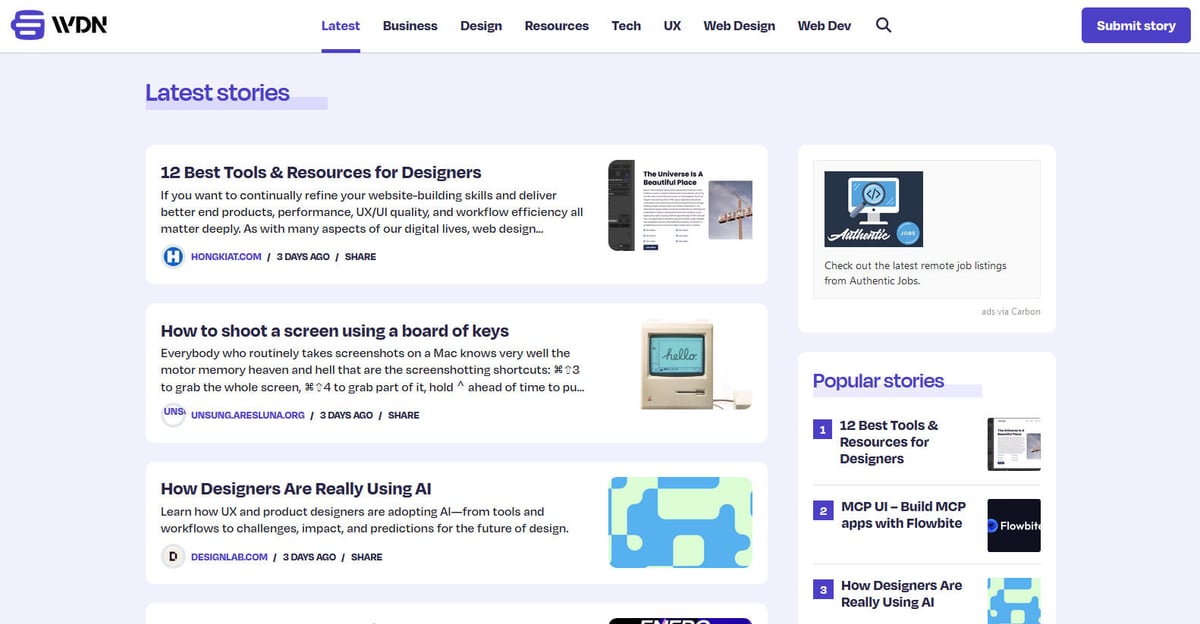
Web Designer News is a premier community-driven news aggregator specifically curated for the web design and development ecosystem. Since its inception, the platform has functioned as a central hub where professionals discover a hand-picked selection of the most relevant news stories, tutorials, tools, and resources from across the internet. It covers a wide spectrum of topics including UX design, business strategy, technology updates, and graphic design, presented in a clean, chronological feed.
Website Architecture and Data Potential
The website's architecture is built on WordPress, featuring a highly structured layout that organizes content into specific categories like 'Web Design', 'Web Dev', 'UX', and 'Resources'. Because it aggregates data from thousands of individual blogs and journals into a single, searchable interface, it serves as a high-quality filter for industry intelligence. This structure makes it an ideal target for web scraping, as it provides access to a pre-vetted stream of high-value industry data without the need to crawl hundreds of separate domains.
Why Scrape Web Designer News?
Discover the business value and use cases for extracting data from Web Designer News.
Real-time Trend Discovery
Spot emerging design frameworks, UI libraries, and prototyping tools the moment they gain traction in the professional community.
Automated Content Curation
Keep your own design blog, newsletter, or social media channels updated by aggregating the highest-quality stories vetted by industry editors.
Market Intelligence
Identify which design agencies and software companies are consistently producing viral or editorially-selected content to understand market leaders.
SEO and Keyword Research
Analyze the headlines and snippets of trending stories to identify the most relevant keywords and topics capturing the industry's attention.
Historical Industry Archiving
Build a long-term database of web design evolution to track how specific styles, coding standards, and technologies fluctuate in popularity over years.
B2B Lead Generation
Discover new startups and agencies being featured on the platform to identify potential partners or clients in the creative technology space.
Scraping Challenges
Technical challenges you may encounter when scraping Web Designer News.
Internal Tracking Redirects
The website uses internal '/go/' links for outbound traffic, meaning a scraper must follow redirects to extract the actual source URL.
Relative Date Parsing
Timestamps are often displayed in relative formats like '5 hours ago', requiring custom logic to convert them into standardized ISO date formats.
Data Consistency Issues
Some posts feature full descriptive snippets and categories while others only provide a title, making it difficult to maintain a uniform database structure.
Server-Side Rate Limiting
The Nginx-based infrastructure can detect and throttle high-frequency requests, necessitating the use of delays and rotating headers to avoid IP blocks.
Scrape Web Designer News with AI
No coding required. Extract data in minutes with AI-powered automation.
How It Works
Describe What You Need
Tell the AI what data you want to extract from Web Designer News. Just type it in plain language — no coding or selectors needed.
AI Extracts the Data
Our artificial intelligence navigates Web Designer News, handles dynamic content, and extracts exactly what you asked for.
Get Your Data
Receive clean, structured data ready to export as CSV, JSON, or send directly to your apps and workflows.
Why Use AI for Scraping
AI makes it easy to scrape Web Designer News without writing any code. Our AI-powered platform uses artificial intelligence to understand what data you want — just describe it in plain language and the AI extracts it automatically.
How to scrape with AI:
- Describe What You Need: Tell the AI what data you want to extract from Web Designer News. Just type it in plain language — no coding or selectors needed.
- AI Extracts the Data: Our artificial intelligence navigates Web Designer News, handles dynamic content, and extracts exactly what you asked for.
- Get Your Data: Receive clean, structured data ready to export as CSV, JSON, or send directly to your apps and workflows.
Why use AI for scraping:
- Visual Redirect Handling: Automatio can be configured to automatically follow internal 'go' links and capture the final destination URL without writing complex redirection logic.
- No-Code Pagination: Effortlessly navigate through the site's extensive archive pages by simply selecting the 'Next' button in the point-and-click interface.
- Cloud-Based Scheduling: Run your scrapers on a recurring daily schedule in the cloud so your design news database stays updated without manual intervention.
- Structured Data Syncing: Directly export your scraped news data to Google Sheets, Webflow, or via API to power your own design-focused applications instantly.
No-Code Web Scrapers for Web Designer News
Point-and-click alternatives to AI-powered scraping
Several no-code tools like Browse.ai, Octoparse, Axiom, and ParseHub can help you scrape Web Designer News. These tools use visual interfaces to select elements, but they come with trade-offs compared to AI-powered solutions.
Typical Workflow with No-Code Tools
Common Challenges
Learning curve
Understanding selectors and extraction logic takes time
Selectors break
Website changes can break your entire workflow
Dynamic content issues
JavaScript-heavy sites often require complex workarounds
CAPTCHA limitations
Most tools require manual intervention for CAPTCHAs
IP blocking
Aggressive scraping can get your IP banned
No-Code Web Scrapers for Web Designer News
Several no-code tools like Browse.ai, Octoparse, Axiom, and ParseHub can help you scrape Web Designer News. These tools use visual interfaces to select elements, but they come with trade-offs compared to AI-powered solutions.
Typical Workflow with No-Code Tools
- Install browser extension or sign up for the platform
- Navigate to the target website and open the tool
- Point-and-click to select data elements you want to extract
- Configure CSS selectors for each data field
- Set up pagination rules to scrape multiple pages
- Handle CAPTCHAs (often requires manual solving)
- Configure scheduling for automated runs
- Export data to CSV, JSON, or connect via API
Common Challenges
- Learning curve: Understanding selectors and extraction logic takes time
- Selectors break: Website changes can break your entire workflow
- Dynamic content issues: JavaScript-heavy sites often require complex workarounds
- CAPTCHA limitations: Most tools require manual intervention for CAPTCHAs
- IP blocking: Aggressive scraping can get your IP banned
Code Examples
import requests
from bs4 import BeautifulSoup

headers = {'User-Agent': 'Mozilla/5.0 (Windows NT 10.0; Win64; x64) AppleWebKit/537.36 (KHTML, like Gecko) Chrome/91.0.4472.124 Safari/537.36'}
url = 'https://webdesignernews.com/'

try:
    # Send request to the main page
    response = requests.get(url, headers=headers)
    response.raise_for_status()
    soup = BeautifulSoup(response.text, 'html.parser')

    # Locate post containers
    posts = soup.find_all('div', class_='single-post')

    for post in posts:
        title = post.find('h3').get_text(strip=True)
        # Check if source site name exists
        source = post.find('span', class_='site_name').get_text(strip=True) if post.find('span', class_='site_name') else 'Unknown'
        link = post.find('h3').find('a')['href']
        print(f'Title: {title} | Source: {source} | Link: {link}')
except Exception as e:
    print(f'An error occurred: {e}')
When to Use
Best for static HTML pages where content is loaded server-side. The fastest and simplest approach when JavaScript rendering isn't required.
Advantages
- ●Fastest execution (no browser overhead)
- ●Lowest resource consumption
- ●Easy to parallelize with asyncio
- ●Great for APIs and static pages
Limitations
- ●Cannot execute JavaScript
- ●Fails on SPAs and dynamic content
- ●May struggle with complex anti-bot systems
How to Scrape Web Designer News with Code
Python + Requests
import requests
from bs4 import BeautifulSoup
headers = {'User-Agent': 'Mozilla/5.0 (Windows NT 10.0; Win64; x64) AppleWebKit/537.36 (KHTML, like Gecko) Chrome/91.0.4472.124 Safari/537.36'}
url = 'https://webdesignernews.com/'
try:
# Send request to the main page
response = requests.get(url, headers=headers)
response.raise_for_status()
soup = BeautifulSoup(response.text, 'html.parser')
# Locate post containers
posts = soup.find_all('div', class_='single-post')
for post in posts:
title = post.find('h3').get_text(strip=True)
# Check if source site name exists
source = post.find('span', class_='site_name').get_text(strip=True) if post.find('span', class_='site_name') else 'Unknown'
link = post.find('h3').find('a')['href']
print(f'Title: {title} | Source: {source} | Link: {link}')
except Exception as e:
print(f'An error occurred: {e}')Python + Playwright
from playwright.sync_api import sync_playwright

def scrape_wdn():
    with sync_playwright() as p:
        # Launch headless browser
        browser = p.chromium.launch(headless=True)
        page = browser.new_page()
        page.goto('https://webdesignernews.com/')

        # Wait for the post elements to load
        page.wait_for_selector('.single-post')

        posts = page.query_selector_all('.single-post')
        for post in posts:
            title_el = post.query_selector('h3 a')
            if title_el:
                title = title_el.inner_text()
                link = title_el.get_attribute('href')
                print(f'Scraped: {title} - {link}')

        browser.close()

scrape_wdn()Python + Scrapy
import scrapy

class WdnSpider(scrapy.Spider):
    name = 'wdn_spider'
    start_urls = ['https://webdesignernews.com/']

    def parse(self, response):
        # Extract each post in the feed
        for post in response.css('.single-post'):
            yield {
                'title': post.css('h3 a::text').get(),
                'source': post.css('.site_name::text').get(),
                'link': post.css('h3 a::attr(href)').get()
            }

        # Handle pagination by finding the 'Next' link
        next_page = response.css('a.next::attr(href)').get()
        if next_page:
yield response.follow(next_page, self.parse)Node.js + Puppeteer
const puppeteer = require('puppeteer');

(async () => {
  const browser = await puppeteer.launch();
  const page = await browser.newPage();
  await page.goto('https://webdesignernews.com/', { waitUntil: 'domcontentloaded' });

  // Evaluate the page to extract data fields
  const results = await page.evaluate(() => {
    const items = Array.from(document.querySelectorAll('.single-post'));
    return items.map(item => ({
      title: item.querySelector('h3 a') ? item.querySelector('h3 a').innerText : null,
      source: item.querySelector('.site_name') ? item.querySelector('.site_name').innerText : null,
      link: item.querySelector('h3 a') ? item.querySelector('h3 a').href : null
    }));
  });

  console.log(results);
  await browser.close();
})();What You Can Do With Web Designer News Data
Explore practical applications and insights from Web Designer News data.
Automated Design News Feed
Create a live, curated news channel for professional design teams via Slack or Discord.
How to implement:
- 1Scrape top-rated stories every 4 hours.
- 2Filter results by relevant category tags like 'UX' or 'Web Dev'.
- 3Send extracted titles and summaries to a messaging webhook.
- 4Archive the data to track long-term industry tool popularity.
Use Automatio to extract data from Web Designer News and build these applications without writing code.
What You Can Do With Web Designer News Data
- Automated Design News Feed
Create a live, curated news channel for professional design teams via Slack or Discord.
- Scrape top-rated stories every 4 hours.
- Filter results by relevant category tags like 'UX' or 'Web Dev'.
- Send extracted titles and summaries to a messaging webhook.
- Archive the data to track long-term industry tool popularity.
- Design Tool Trend Tracker
Identify which design software or libraries are gaining the most community traction.
- Extract titles and excerpts from the 'Resources' category archive.
- Perform keyword frequency analysis on specific terms (e.g., 'Figma', 'React').
- Compare mention growth month-over-month to identify rising stars.
- Export visual reports for marketing or product strategy teams.
- Competitor Backlink Monitoring
Identify which blogs or agencies are successfully placing content on major hubs.
- Scrape the 'Source Website Name' field for all historical listings.
- Aggregate mention counts per external domain to see who is featured most.
- Analyze the types of content that get accepted for better outreach.
- Identify potential collaboration partners in the design space.
- Machine Learning Training Dataset
Use the curated snippets and summaries to train technical summarization models.
- Scrape 10,000+ story titles and corresponding excerpt summaries.
- Clean the text data to remove internal tracking parameters and HTML.
- Use the title as the target and the excerpt as input for fine-tuning.
- Test the model on new, unscoped design articles for performance.
Supercharge your workflow with AI Automation
Automatio combines the power of AI agents, web automation, and smart integrations to help you accomplish more in less time.
What to get right first
Expert advice for successfully extracting data from Web Designer News.
Utilize the REST API
Access the site's WordPress REST API at /wp-json/wp/v2/posts for a cleaner, structured JSON feed that is faster to process than raw HTML.
Monitor the Sidebar
Scrape the 'Popular' and 'Recent' sidebar sections to prioritize high-engagement content for your curation or analysis.
Rotate Browser Headers
Always use realistic User-Agent strings and rotate them to mimic different browser types, reducing the risk of being flagged by Nginx security.
Extract Category Metadata
Target the specific CSS classes for post categories to enable deep filtering and topical analysis in your final dataset.
Handle Lazy Images
Thumbnail images may use lazy-loading; ensure your scraper targets the 'data-src' or 'srcset' attributes to avoid missing visual assets.
Implement Request Delays
A simple 2-3 second delay between requests ensures you don't overwhelm the server and helps your scraping activity remain undetected.
Related Web Scraping
Frequently Asked Questions
Find answers to common questions about Web Designer News