
How to Scrape Hacker News (news.ycombinator.com)
Learn how to scrape Hacker News to extract top tech stories, job listings, and community discussions. Perfect for market research and trend analysis.
Anti-Bot Protection Detected
- Rate Limiting
- Limits requests per IP/session over time. Can be bypassed with rotating proxies, request delays, and distributed scraping.
- IP Blocking
- Blocks known datacenter IPs and flagged addresses. Requires residential or mobile proxies to circumvent effectively.
- User-Agent Filtering
About Hacker News
Learn what Hacker News offers and what valuable data can be extracted from it.
The Tech Hub
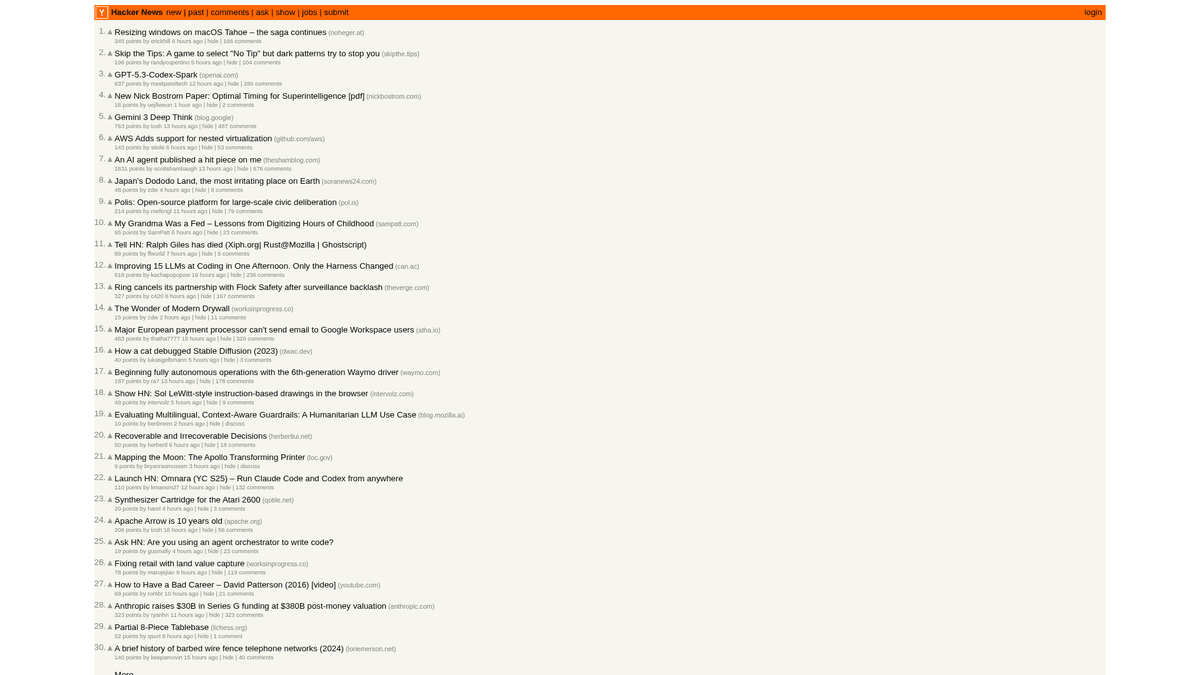
Hacker News is a social news website focusing on computer science and entrepreneurship, operated by the startup incubator Y Combinator. It functions as a community-driven platform where users submit links to technical articles, startup news, and deep-dive discussions.
Data Richness
The platform contains a wealth of real-time data including upvoted tech stories, "Show HN" startup launches, "Ask HN" community questions, and specialized job boards. It is widely considered the pulse of the Silicon Valley ecosystem and the broader global developer community.
Strategic Value
Scraping this data allows businesses and researchers to monitor emerging technologies, track competitor mentions, and identify influential thought leaders. Because the site layout is remarkably stable and lean, it is one of the most reliable sources for automated technical news aggregation.
Why Scrape Hacker News?
Discover the business value and use cases for extracting data from Hacker News.
Market Trend Identification
Monitor the front page to see which programming languages, frameworks, or tools are gaining traction in the developer community in real-time.
Sentiment Analysis
Scrape comment threads to analyze how a highly technical audience reacts to new product launches, policy changes, or market shifts.
Startup Intelligence
Track 'Show HN' posts to discover early-stage startups and innovative side projects before they reach mainstream media coverage.
Lead Generation for Recruitment
Extract hiring company data from the Jobs section to find growing tech companies that are actively looking for specific expertise.
Content Aggregation
Build high-quality technical news feeds or newsletters by filtering for posts with the highest upvotes or specific developer keywords.
Scraping Challenges
Technical challenges you may encounter when scraping Hacker News.
IP Rate Limiting
Hacker News is aggressive about limiting high-frequency requests from a single IP address, necessitating a slow crawl speed or proxy rotation.
Parsing Nested Tables
The site uses legacy HTML table structures to nest comments, requiring careful traversal logic to correctly reconstruct parent-child relationships.
Relative Timestamps
Times are displayed as 'X hours ago,' which requires conversion logic if you need absolute timestamps for a historical time-series database.
Dynamic Rankings
The front page changes rapidly as items rise and fall, which can lead to data duplicates or missed items if scraping isn't handled via unique IDs.
Scrape Hacker News with AI
No coding required. Extract data in minutes with AI-powered automation.
How It Works
Describe What You Need
Tell the AI what data you want to extract from Hacker News. Just type it in plain language — no coding or selectors needed.
AI Extracts the Data
Our artificial intelligence navigates Hacker News, handles dynamic content, and extracts exactly what you asked for.
Get Your Data
Receive clean, structured data ready to export as CSV, JSON, or send directly to your apps and workflows.
Why Use AI for Scraping
AI makes it easy to scrape Hacker News without writing any code. Our AI-powered platform uses artificial intelligence to understand what data you want — just describe it in plain language and the AI extracts it automatically.
How to scrape with AI:
- Describe What You Need: Tell the AI what data you want to extract from Hacker News. Just type it in plain language — no coding or selectors needed.
- AI Extracts the Data: Our artificial intelligence navigates Hacker News, handles dynamic content, and extracts exactly what you asked for.
- Get Your Data: Receive clean, structured data ready to export as CSV, JSON, or send directly to your apps and workflows.
Why use AI for scraping:
- No-Code Story Extraction: Extract titles, points, and URLs in minutes by simply clicking on elements instead of writing custom CSS or XPath selectors for nested tables.
- Smart Pagination Handling: Automatio effortlessly handles the 'More' link to crawl through multiple pages of history or deep comment threads automatically.
- Built-in Proxy Rotation: Bypass rate limits automatically with integrated proxy rotation, ensuring your scraping tasks are never interrupted by IP blocks.
- Scheduled Monitoring: Set up a schedule to automatically scrape the front page every hour to keep your database updated with the latest tech trends.
- Direct Integration: Send scraped Hacker News data directly to Google Sheets or webhooks to trigger alerts when specific keywords appear in discussions.
No-Code Web Scrapers for Hacker News
Point-and-click alternatives to AI-powered scraping
Several no-code tools like Browse.ai, Octoparse, Axiom, and ParseHub can help you scrape Hacker News. These tools use visual interfaces to select elements, but they come with trade-offs compared to AI-powered solutions.
Typical Workflow with No-Code Tools
Common Challenges
Learning curve
Understanding selectors and extraction logic takes time
Selectors break
Website changes can break your entire workflow
Dynamic content issues
JavaScript-heavy sites often require complex workarounds
CAPTCHA limitations
Most tools require manual intervention for CAPTCHAs
IP blocking
Aggressive scraping can get your IP banned
No-Code Web Scrapers for Hacker News
Several no-code tools like Browse.ai, Octoparse, Axiom, and ParseHub can help you scrape Hacker News. These tools use visual interfaces to select elements, but they come with trade-offs compared to AI-powered solutions.
Typical Workflow with No-Code Tools
- Install browser extension or sign up for the platform
- Navigate to the target website and open the tool
- Point-and-click to select data elements you want to extract
- Configure CSS selectors for each data field
- Set up pagination rules to scrape multiple pages
- Handle CAPTCHAs (often requires manual solving)
- Configure scheduling for automated runs
- Export data to CSV, JSON, or connect via API
Common Challenges
- Learning curve: Understanding selectors and extraction logic takes time
- Selectors break: Website changes can break your entire workflow
- Dynamic content issues: JavaScript-heavy sites often require complex workarounds
- CAPTCHA limitations: Most tools require manual intervention for CAPTCHAs
- IP blocking: Aggressive scraping can get your IP banned
Code Examples
import requests
from bs4 import BeautifulSoup

url = 'https://news.ycombinator.com/'
headers = {'User-Agent': 'Mozilla/5.0 (Windows NT 10.0; Win64; x64) AppleWebKit/537.36'}

try:
    response = requests.get(url, headers=headers)
    response.raise_for_status()
    soup = BeautifulSoup(response.text, 'html.parser')

    # Stories are contained in rows with class 'athing'
    posts = soup.select('.athing')
    for post in posts:
        title_element = post.select_one('.titleline > a')
        title = title_element.text
        link = title_element['href']
        print(f'Title: {title}
Link: {link}
---')
except Exception as e:
    print(f'Scraping failed: {e}')
When to Use
Best for static HTML pages where content is loaded server-side. The fastest and simplest approach when JavaScript rendering isn't required.
Advantages
- ●Fastest execution (no browser overhead)
- ●Lowest resource consumption
- ●Easy to parallelize with asyncio
- ●Great for APIs and static pages
Limitations
- ●Cannot execute JavaScript
- ●Fails on SPAs and dynamic content
- ●May struggle with complex anti-bot systems
How to Scrape Hacker News with Code
Python + Requests
import requests
from bs4 import BeautifulSoup
url = 'https://news.ycombinator.com/'
headers = {'User-Agent': 'Mozilla/5.0 (Windows NT 10.0; Win64; x64) AppleWebKit/537.36'}
try:
response = requests.get(url, headers=headers)
response.raise_for_status()
soup = BeautifulSoup(response.text, 'html.parser')
# Stories are contained in rows with class 'athing'
posts = soup.select('.athing')
for post in posts:
title_element = post.select_one('.titleline > a')
title = title_element.text
link = title_element['href']
print(f'Title: {title}
Link: {link}
---')
except Exception as e:
print(f'Scraping failed: {e}')Python + Playwright
from playwright.sync_api import sync_playwright

with sync_playwright() as p:
    browser = p.chromium.launch(headless=True)
    page = browser.new_page()
    page.goto('https://news.ycombinator.com/')

    # Wait for the table to load
    page.wait_for_selector('.athing')

    # Extract all story titles and links
    items = page.query_selector_all('.athing')
    for item in items:
        title_link = item.query_selector('.titleline > a')
        if title_link:
            print(title_link.inner_text(), title_link.get_attribute('href'))

browser.close()Python + Scrapy
import scrapy

class HackerNewsSpider(scrapy.Spider):
    name = 'hn_spider'
    start_urls = ['https://news.ycombinator.com/']

    def parse(self, response):
        for post in response.css('.athing'):
            yield {
                'id': post.attrib.get('id'),
                'title': post.css('.titleline > a::text').get(),
                'link': post.css('.titleline > a::attr(href)').get(),
            }

        # Follow pagination 'More' link
        next_page = response.css('a.morelink::attr(href)').get()
        if next_page:
yield response.follow(next_page, self.parse)Node.js + Puppeteer
const puppeteer = require('puppeteer');

(async () => {
  const browser = await puppeteer.launch();
  const page = await browser.newPage();
  await page.goto('https://news.ycombinator.com/');

  const results = await page.evaluate(() => {
    const items = Array.from(document.querySelectorAll('.athing'));
    return items.map(item => ({
      title: item.querySelector('.titleline > a').innerText,
      url: item.querySelector('.titleline > a').href
    }));
  });

  console.log(results);
  await browser.close();
})();What You Can Do With Hacker News Data
Explore practical applications and insights from Hacker News data.
Startup Trend Discovery
Identify which industries or product types are being launched and discussed most frequently.
How to implement:
- 1Scrape the 'Show HN' category on a weekly basis.
- 2Clean and categorize startup descriptions using NLP.
- 3Rank trends based on community upvotes and comment sentiment.
Use Automatio to extract data from Hacker News and build these applications without writing code.
What You Can Do With Hacker News Data
- Startup Trend Discovery
Identify which industries or product types are being launched and discussed most frequently.
- Scrape the 'Show HN' category on a weekly basis.
- Clean and categorize startup descriptions using NLP.
- Rank trends based on community upvotes and comment sentiment.
- Tech Sourcing & Recruitment
Extract job listings and company details from specialized monthly hiring threads.
- Monitor for the monthly 'Who is hiring' thread ID.
- Scrape all top-level comments which contain job descriptions.
- Parse text for specific tech stacks like Rust, AI, or React.
- Competitive Intelligence
Track mentions of competitors in comments to understand public perception and complaints.
- Set up a keyword-based scraper for specific brand names.
- Extract user comments and timestamps for sentiment analysis.
- Generate weekly reports on brand health versus competitors.
- Automated Content Curation
Create a high-signal tech newsletter that only includes the most relevant stories.
- Scrape the front page every 6 hours.
- Filter for posts that exceed a threshold of 200 points.
- Automate the delivery of these links to a Telegram bot or email list.
- Venture Capital Lead Gen
Discover early-stage startups that are gaining significant community traction.
- Track 'Show HN' posts that hit the front page.
- Monitor the growth rate of upvotes over the first 4 hours.
- Alert analysts when a post shows viral growth patterns.
Supercharge your workflow with AI Automation
Automatio combines the power of AI agents, web automation, and smart integrations to help you accomplish more in less time.
What to get right first
Expert advice for successfully extracting data from Hacker News.
Leverage the Official API
For high-volume data, use the official Firebase API which is more efficient and reliable than parsing the legacy HTML structure.
Respect Robots.txt
Always check the site's robots.txt and include a crawl delay of at least 30 seconds to avoid being permanently blocked by the server.
Target Unique Item IDs
Every story and comment has a unique numeric ID in the HTML; use this as the primary key in your database to prevent duplicate entries.
Rotate User Agents
Change your browser headers frequently to prevent the server from identifying your traffic as automated bot activity.
Use the Algolia Search API
For historical data or complex keyword searches, the community-maintained Algolia HN API is significantly faster and more flexible.
Recursive Comment Parsing
When scraping comments, look for the 'indent' width in the HTML to programmatically determine the nesting level of the discussion.
Related Web Scraping



Frequently Asked Questions
Find answers to common questions about Hacker News