
How to Scrape pump.fun: A Technical Guide to Real-Time Solana Data
Learn how to scrape pump.fun for real-time Solana token launches, market caps, and bonding curve data. Build high-frequency trading bots and rug-pull alerts.
Anti-Bot Protection Detected
- Cloudflare
- Enterprise-grade WAF and bot management. Uses JavaScript challenges, CAPTCHAs, and behavioral analysis. Requires browser automation with stealth settings.
- Rate Limiting
- Limits requests per IP/session over time. Can be bypassed with rotating proxies, request delays, and distributed scraping.
- Browser Fingerprinting
- Identifies bots through browser characteristics: canvas, WebGL, fonts, plugins. Requires spoofing or real browser profiles.
- WebSockets
About pump.fun
Learn what pump.fun offers and what valuable data can be extracted from it.
The Epicenter of Solana Meme Coins
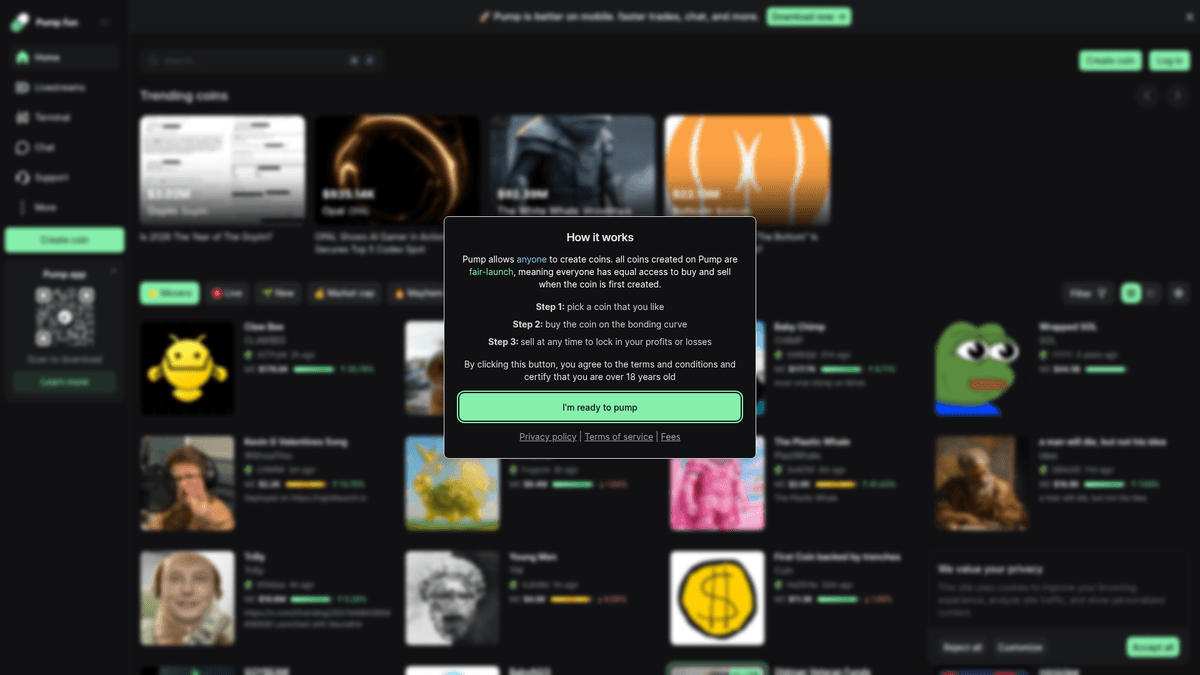
pump.fun is a decentralized finance (DeFi) platform on the Solana blockchain that enables users to launch meme coins instantly without providing initial liquidity. It uses a unique 'bonding curve' mechanism where the price increases as more people buy, eventually migrating the token to a major decentralized exchange like Raydium once it reaches a specific market capitalization threshold. The platform has become the epicenter of the Solana meme coin ecosystem, hosting thousands of new token launches daily.
High-Velocity Token Data
The website provides a real-time feed of newly created tokens, their market capitalization, bonding curve progress, and detailed transaction history. It also includes social links (Twitter/Telegram), creator wallet addresses, and live chat logs for every token. Because new projects are launched every few seconds, the site is a high-velocity data source that requires specialized scraping techniques to monitor effectively.
Why This Data is Crucial
Scraping pump.fun is extremely valuable for crypto traders and developers building sniping bots, sentiment analysis tools, or rug-pull detection services. By extracting token metadata and holder behavior in real-time, users can identify high-momentum projects before they hit mainstream exchanges and automate their entry into the market. Given the high stakes of meme coin trading, having an automated data edge is a significant competitive advantage.
Why Scrape pump.fun?
Discover the business value and use cases for extracting data from pump.fun.
Real-Time Token Sniping
Extracting newly created tokens the moment they appear allows traders to gain an early entry advantage before the mass market discovers the launch.
Developer Credibility Assessment
By scraping creator wallet addresses and their historical launch performance, you can identify patterns of serial rug-pullers or find high-quality 'fair launch' developers.
Liquidity Migration Forecasting
Monitoring bonding curve progress percentages in real-time helps predict exactly when a token will migrate to Raydium, allowing for strategic position management.
Whale Movement Detection
Tracking large wallet entries into specific bonding curves allows you to follow 'smart money' and identify which memecoins are being accumulated by institutional-sized players.
Social Sentiment Extraction
Scraping the live comment sections and social media links (X, Telegram) provides raw data for sentiment analysis to gauge community hype and social proof.
Market Narrative Tracking
Aggregating tickers and descriptions across thousands of daily launches helps identify emerging trends like AI-agents, political memes, or specific animal narratives.
Scraping Challenges
Technical challenges you may encounter when scraping pump.fun.
Advanced Cloudflare WAF
The site employs aggressive Cloudflare protection, including JS challenges and TLS fingerprinting, which frequently blocks standard automation libraries with 403 Forbidden errors.
WebSocket Dependency
The most critical data, such as live price updates and new token events, is pushed via WebSockets rather than static HTML, requiring a scraper that can intercept and decode socket frames.
High-Velocity Data Stream
With dozens of coins launching every minute, the scraper must be highly optimized for low latency; even a five-second delay can result in missing the most profitable entry points.
Highly Dynamic DOM
The application is built on Next.js with frequent state updates that cause elements to re-render, making traditional CSS selectors unstable and prone to breaking during a session.
Scrape pump.fun with AI
No coding required. Extract data in minutes with AI-powered automation.
How It Works
Describe What You Need
Tell the AI what data you want to extract from pump.fun. Just type it in plain language — no coding or selectors needed.
AI Extracts the Data
Our artificial intelligence navigates pump.fun, handles dynamic content, and extracts exactly what you asked for.
Get Your Data
Receive clean, structured data ready to export as CSV, JSON, or send directly to your apps and workflows.
Why Use AI for Scraping
AI makes it easy to scrape pump.fun without writing any code. Our AI-powered platform uses artificial intelligence to understand what data you want — just describe it in plain language and the AI extracts it automatically.
How to scrape with AI:
- Describe What You Need: Tell the AI what data you want to extract from pump.fun. Just type it in plain language — no coding or selectors needed.
- AI Extracts the Data: Our artificial intelligence navigates pump.fun, handles dynamic content, and extracts exactly what you asked for.
- Get Your Data: Receive clean, structured data ready to export as CSV, JSON, or send directly to your apps and workflows.
Why use AI for scraping:
- Automatic Anti-Bot Bypass: Automatio handles complex browser fingerprinting and Cloudflare challenges out of the box, ensuring your scraper stays undetected without manual configuration.
- Visual Data Mapping: Easily map data points like bonding curve progress bars and creator wallets using a visual interface, even if the underlying HTML classes are dynamic.
- Real-Time Webhook Triggers: Connect your scraped data directly to external trading scripts or Telegram alert bots via instant Webhooks the moment a new token meets your specific criteria.
- Cloud-Based 24/7 Uptime: Run your monitors on Automatio's cloud infrastructure to ensure you never miss a midnight launch or a sudden 'King of the Hill' breakout while offline.
- Headless Browser Stability: Automatio expertly manages the heavy JavaScript rendering requirements of the Pump.fun platform, preventing memory leaks and crashes common in DIY setups.
No-Code Web Scrapers for pump.fun
Point-and-click alternatives to AI-powered scraping
Several no-code tools like Browse.ai, Octoparse, Axiom, and ParseHub can help you scrape pump.fun. These tools use visual interfaces to select elements, but they come with trade-offs compared to AI-powered solutions.
Typical Workflow with No-Code Tools
Common Challenges
Learning curve
Understanding selectors and extraction logic takes time
Selectors break
Website changes can break your entire workflow
Dynamic content issues
JavaScript-heavy sites often require complex workarounds
CAPTCHA limitations
Most tools require manual intervention for CAPTCHAs
IP blocking
Aggressive scraping can get your IP banned
No-Code Web Scrapers for pump.fun
Several no-code tools like Browse.ai, Octoparse, Axiom, and ParseHub can help you scrape pump.fun. These tools use visual interfaces to select elements, but they come with trade-offs compared to AI-powered solutions.
Typical Workflow with No-Code Tools
- Install browser extension or sign up for the platform
- Navigate to the target website and open the tool
- Point-and-click to select data elements you want to extract
- Configure CSS selectors for each data field
- Set up pagination rules to scrape multiple pages
- Handle CAPTCHAs (often requires manual solving)
- Configure scheduling for automated runs
- Export data to CSV, JSON, or connect via API
Common Challenges
- Learning curve: Understanding selectors and extraction logic takes time
- Selectors break: Website changes can break your entire workflow
- Dynamic content issues: JavaScript-heavy sites often require complex workarounds
- CAPTCHA limitations: Most tools require manual intervention for CAPTCHAs
- IP blocking: Aggressive scraping can get your IP banned
Code Examples
import requests
from bs4 import BeautifulSoup
import json

# Note: pump.fun uses Cloudflare. This approach targets the initial state blob.
url = 'https://pump.fun/board'
headers = {
    'User-Agent': 'Mozilla/5.0 (Windows NT 10.0; Win64; x64) AppleWebKit/537.36 (KHTML, like Gecko) Chrome/119.0.0.0 Safari/537.36'
}

try:
    session = requests.Session()
    response = session.get(url, headers=headers)

    if response.status_code == 200:
        soup = BeautifulSoup(response.text, 'html.parser')
        # Extract the Next.js data blob containing initial tokens
        next_data = soup.find('script', id='__NEXT_DATA__')
        if next_data:
            data = json.loads(next_data.string)
            print('Successfully extracted initial token data.')
        else:
            print('Dynamic content not found in static HTML.')
    else:
        print(f'Blocked by Cloudflare? Status: {response.status_code}')
except Exception as e:
    print(f'Error: {e}')
When to Use
Best for static HTML pages where content is loaded server-side. The fastest and simplest approach when JavaScript rendering isn't required.
Advantages
- ●Fastest execution (no browser overhead)
- ●Lowest resource consumption
- ●Easy to parallelize with asyncio
- ●Great for APIs and static pages
Limitations
- ●Cannot execute JavaScript
- ●Fails on SPAs and dynamic content
- ●May struggle with complex anti-bot systems
How to Scrape pump.fun with Code
Python + Requests
import requests
from bs4 import BeautifulSoup
import json
# Note: pump.fun uses Cloudflare. This approach targets the initial state blob.
url = 'https://pump.fun/board'
headers = {
'User-Agent': 'Mozilla/5.0 (Windows NT 10.0; Win64; x64) AppleWebKit/537.36 (KHTML, like Gecko) Chrome/119.0.0.0 Safari/537.36'
}
try:
session = requests.Session()
response = session.get(url, headers=headers)
if response.status_code == 200:
soup = BeautifulSoup(response.text, 'html.parser')
# Extract the Next.js data blob containing initial tokens
next_data = soup.find('script', id='__NEXT_DATA__')
if next_data:
data = json.loads(next_data.string)
print('Successfully extracted initial token data.')
else:
print('Dynamic content not found in static HTML.')
else:
print(f'Blocked by Cloudflare? Status: {response.status_code}')
except Exception as e:
print(f'Error: {e}')Python + Playwright
import asyncio
from playwright.async_api import async_playwright

async def scrape_pump_fun():
    async with async_playwright() as p:
        # Launching with stealth settings is recommended
        browser = await p.chromium.launch(headless=True)
        context = await browser.new_context(
            user_agent='Mozilla/5.0 (Windows NT 10.0; Win64; x64) AppleWebKit/537.36 (KHTML, like Gecko) Chrome/121.0.0.0 Safari/537.36'
        )
        page = await context.new_page()

        # Navigate and wait for JS to render the token board
        await page.goto('https://pump.fun/board', wait_until='networkidle')
        await page.wait_for_selector('.token-card')

        tokens = await page.query_selector_all('.token-card')
        for token in tokens[:5]:
            name = await (await token.query_selector('.name')).inner_text()
            mcap = await (await token.query_selector('.market-cap')).inner_text()
            print(f'Token: {name} | MCAP: {mcap}')

        await browser.close()

asyncio.run(scrape_pump_fun())Python + Scrapy
import scrapy
from scrapy_playwright.page import PageMethod

class PumpFunSpider(scrapy.Spider):
    name = 'pump_spider'

    def start_requests(self):
        yield scrapy.Request(
            url='https://pump.fun/board',
            meta={
                'playwright': True,
                'playwright_page_methods': [
                    PageMethod('wait_for_selector', '.token-card')
                ]
            }
        )

    def parse(self, response):
        for token in response.css('.token-card'):
            yield {
                'name': token.css('.token-name::text').get(),
                'ticker': token.css('.ticker::text').get(),
                'mcap': token.css('.mcap-value::text').get(),
}Node.js + Puppeteer
const puppeteer = require('puppeteer-extra');
const StealthPlugin = require('puppeteer-extra-plugin-stealth');
puppeteer.use(StealthPlugin());

(async () => {
  const browser = await puppeteer.launch({ headless: true });
  const page = await browser.newPage();

  await page.goto('https://pump.fun/board', { waitUntil: 'networkidle2' });

  // Wait for the token cards to load dynamically
  await page.waitForSelector('.token-card');

  const data = await page.evaluate(() => {
    const cards = Array.from(document.querySelectorAll('.token-card'));
    return cards.map(card => ({
      name: card.querySelector('.name')?.innerText,
      ticker: card.querySelector('.symbol')?.innerText,
      mcap: card.querySelector('.market-cap')?.innerText
    }));
  });

  console.log(data);
  await browser.close();
})();What You Can Do With pump.fun Data
Explore practical applications and insights from pump.fun data.
Real-time Meme Coin Sniper
Identify and buy promising new tokens the second they are launched on the platform.
How to implement:
- 1Setup a WebSocket scraper to listen for 'coinCreated' events.
- 2Apply filters for social links and creator reputation.
- 3Trigger a purchase transaction via Solana web3.js.
- 4Monitor bonding curve progress for exit strategy.
Use Automatio to extract data from pump.fun and build these applications without writing code.
What You Can Do With pump.fun Data
- Real-time Meme Coin Sniper
Identify and buy promising new tokens the second they are launched on the platform.
- Setup a WebSocket scraper to listen for 'coinCreated' events.
- Apply filters for social links and creator reputation.
- Trigger a purchase transaction via Solana web3.js.
- Monitor bonding curve progress for exit strategy.
- Rug-Pull Detection Dashboard
Create a service that warns traders about potential scams based on developer history.
- Scrape the creator wallet address for every new launch.
- Query historical data to see the lifespan of their previous tokens.
- Identify 'bundled' launches where one developer controls multiple initial wallets.
- Alert users via Telegram or Discord UI.
- Sentiment-Based Trend Analysis
Visualize which themes (e.g., AI, Cats, Politics) are currently dominating the Solana ecosystem.
- Scrape token names and descriptions from the 'New' feed.
- Use Natural Language Processing to categorize themes.
- Count the frequency of each category over a rolling 24-hour window.
- Plot trends on a dashboard for market research.
- Whale Movement Tracker
Monitor which tokens are being accumulated by high-net-worth wallet addresses.
- Scrape the detailed trade history for trending tokens.
- Identify recurring wallet addresses with large purchase volumes.
- Set up alerts for when these 'whales' enter a new token launch.
- Aggregate buy/sell ratios to determine market strength.
- Bonding Curve Arbitrage
Predict when a token will move to Raydium to capitalize on liquidity changes.
- Scrape the 'Bonding Curve Progress' percentage in real-time.
- Calculate the rate of growth over 5-minute intervals.
- Identify tokens nearing the 100% threshold.
- Automate entry before the DEX migration occurs.
Supercharge your workflow with AI Automation
Automatio combines the power of AI agents, web automation, and smart integrations to help you accomplish more in less time.
What to get right first
Expert advice for successfully extracting data from pump.fun.
Intercept Initial State Data
Instead of waiting for the UI to load, extract the '__NEXT_DATA__' JSON script tag from the source code for a faster, structured snapshot of the current token board.
Listen to WebSocket Frames
Target the 'coinCreated' and 'trade' events in the WebSocket stream to receive data updates milliseconds before they are visually rendered on the frontend.
Filter by Social Metadata
Program your scraper to prioritize tokens that have valid X and Telegram links, as these projects have a statistically higher chance of surviving the initial bonding curve.
Use High-Speed Residential Proxies
Rotate high-quality residential IPs to avoid rate limits, especially if you are monitoring hundreds of individual token pages simultaneously for price movements.
Monitor the King of the Hill
Set up a specific scraper instance for the 'King of the Hill' slot, as tokens reaching this position often experience a massive surge in volatility and volume.
Verify Creator Wallet History
Cross-reference the creator's wallet address with on-chain explorers via your scraper to automatically flag developers who have previously rugged coins.
Related Web Scraping
How to Scrape Yahoo Finance: Extract Stock Market Data
How to Scrape Moon.ly | Step-by-Step NFT Data Extraction Guide
How to Scrape Rocket Mortgage: A Comprehensive Guide
How to Scrape Open Collective: Financial and Contributor Data Guide
How to Scrape jup.ag: Jupiter DEX Web Scraper Guide
How to Scrape Indiegogo: The Ultimate Crowdfunding Data Extraction Guide
How to Scrape ICO Drops: Comprehensive Crypto Data Guide
How to Scrape Crypto.com: Comprehensive Market Data Guide
Frequently Asked Questions
Find answers to common questions about pump.fun