
How to Scrape Seeking Alpha: Financial Data & Transcripts
Learn how to scrape Seeking Alpha for stock news, analyst ratings, and earnings transcripts. Learn to bypass Cloudflare and extract financial insights...
Anti-Bot Protection Detected
- Cloudflare
- Enterprise-grade WAF and bot management. Uses JavaScript challenges, CAPTCHAs, and behavioral analysis. Requires browser automation with stealth settings.
- DataDome
- Real-time bot detection with ML models. Analyzes device fingerprint, network signals, and behavioral patterns. Common on e-commerce sites.
- Google reCAPTCHA
- Google's CAPTCHA system. v2 requires user interaction, v3 runs silently with risk scoring. Can be solved with CAPTCHA services.
- Rate Limiting
- Limits requests per IP/session over time. Can be bypassed with rotating proxies, request delays, and distributed scraping.
- IP Blocking
- Blocks known datacenter IPs and flagged addresses. Requires residential or mobile proxies to circumvent effectively.
About Seeking Alpha
Learn what Seeking Alpha offers and what valuable data can be extracted from it.
The Premier Hub for Financial Intelligence
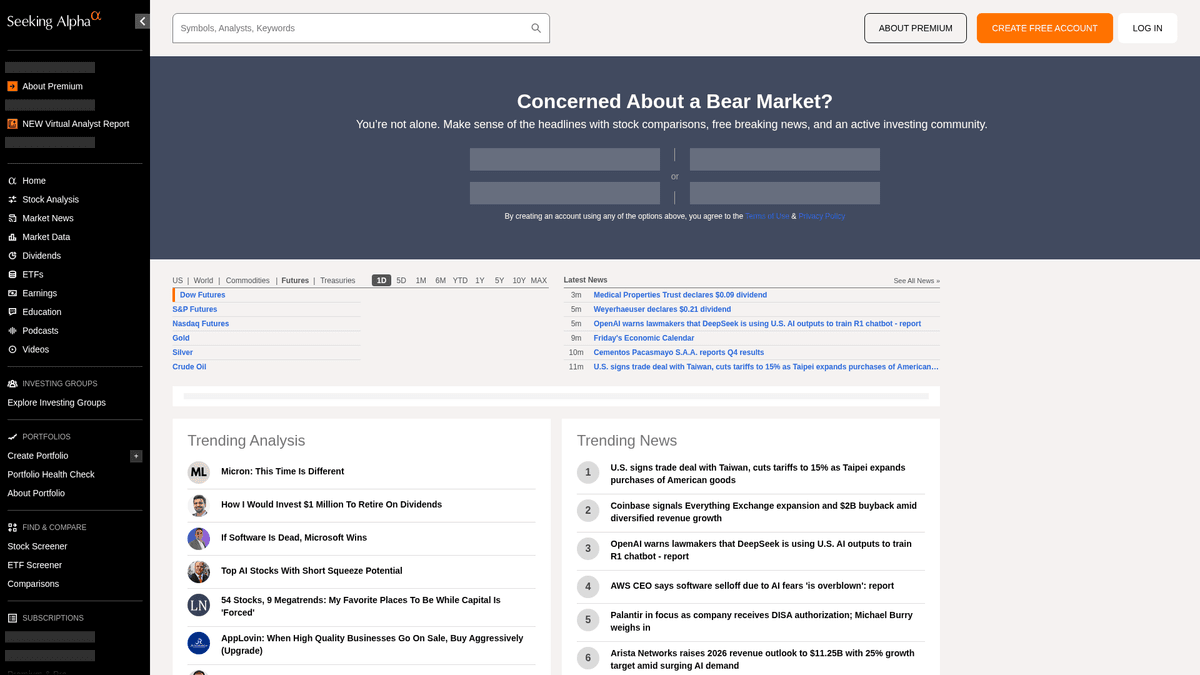
Seeking Alpha is a leading crowd-sourced financial research platform that serves as a vital bridge between raw market data and actionable investment insights. It hosts an extensive library of analysis articles, real-time market news, and the internet's most comprehensive repository of earnings call transcripts for thousands of publicly traded companies.
Diverse Data Ecosystem
The platform offers a wealth of structured and unstructured data, including stock ideas, dividend histories, and the proprietary Market-beating Quant ratings. Managed by a professional editorial team, the content is generated by thousands of independent analysts whose contributions must meet high quality and compliance standards before publication.
Strategic Value for Data Extraction
Scraping Seeking Alpha is essential for financial analysts and quantitative traders who perform sentiment analysis, track historical earnings trends, and monitor news across specific tickers. The data provides granular insights into market psychology and corporate performance that can be used to build sophisticated financial models and perform competitive intelligence.
Why Scrape Seeking Alpha?
Discover the business value and use cases for extracting data from Seeking Alpha.
Sentiment Analysis
Extract crowdsourced articles and comments to perform natural language processing for gauging market sentiment on specific stock tickers.
Earnings Intelligence
Collect earnings call transcripts to identify key corporate guidance trends, financial outlooks, and executive sentiment across various industries.
Proprietary Quant Ratings
Monitor Seeking Alpha's unique Quant ratings and analyst conviction scores to power automated trading signals or portfolio management tools.
Competitive Research
Track what top-rated analysts are saying about competitors in your sector to stay ahead of industry shifts and market expectations.
Historical Data Archiving
Build a private repository of analyst recommendations and stock price reactions to evaluate the long-term accuracy of specific investment writers.
Scraping Challenges
Technical challenges you may encounter when scraping Seeking Alpha.
Advanced Bot Detection
Seeking Alpha employs sophisticated perimeter security like Cloudflare and PerimeterX that monitor for automated browser fingerprints and behavioral patterns.
Premium Content Paywalls
Many high-value datasets, including detailed quant metrics and historical transcripts, are behind a subscription wall requiring secure session management.
Dynamic Content Rendering
The platform uses a modern React framework, meaning data is often loaded asynchronously via XHR requests rather than being present in the initial HTML source.
Strict Rate Limiting
Aggressive request frequencies quickly trigger 403 Forbidden errors and temporary IP bans if the scraping behavior does not mimic a human user.
Scrape Seeking Alpha with AI
No coding required. Extract data in minutes with AI-powered automation.
How It Works
Describe What You Need
Tell the AI what data you want to extract from Seeking Alpha. Just type it in plain language — no coding or selectors needed.
AI Extracts the Data
Our artificial intelligence navigates Seeking Alpha, handles dynamic content, and extracts exactly what you asked for.
Get Your Data
Receive clean, structured data ready to export as CSV, JSON, or send directly to your apps and workflows.
Why Use AI for Scraping
AI makes it easy to scrape Seeking Alpha without writing any code. Our AI-powered platform uses artificial intelligence to understand what data you want — just describe it in plain language and the AI extracts it automatically.
How to scrape with AI:
- Describe What You Need: Tell the AI what data you want to extract from Seeking Alpha. Just type it in plain language — no coding or selectors needed.
- AI Extracts the Data: Our artificial intelligence navigates Seeking Alpha, handles dynamic content, and extracts exactly what you asked for.
- Get Your Data: Receive clean, structured data ready to export as CSV, JSON, or send directly to your apps and workflows.
Why use AI for scraping:
- Stealth Fingerprint Masking: Automatio automatically rotates browser fingerprints and headers to bypass detection systems like Cloudflare without requiring manual configuration.
- Dynamic Rendering Support: The tool's headless browser architecture ensures all React-based components and financial charts are fully rendered before data extraction begins.
- No-Code Session Handling: Easily manage logins and persistent cookies to access premium transcripts and analyst ratings without writing complex authentication scripts.
- Visual Data Selection: Pick complex financial table data visually, ensuring stable extraction even when the underlying CSS classes or page layouts change.
No-Code Web Scrapers for Seeking Alpha
Point-and-click alternatives to AI-powered scraping
Several no-code tools like Browse.ai, Octoparse, Axiom, and ParseHub can help you scrape Seeking Alpha. These tools use visual interfaces to select elements, but they come with trade-offs compared to AI-powered solutions.
Typical Workflow with No-Code Tools
Common Challenges
Learning curve
Understanding selectors and extraction logic takes time
Selectors break
Website changes can break your entire workflow
Dynamic content issues
JavaScript-heavy sites often require complex workarounds
CAPTCHA limitations
Most tools require manual intervention for CAPTCHAs
IP blocking
Aggressive scraping can get your IP banned
No-Code Web Scrapers for Seeking Alpha
Several no-code tools like Browse.ai, Octoparse, Axiom, and ParseHub can help you scrape Seeking Alpha. These tools use visual interfaces to select elements, but they come with trade-offs compared to AI-powered solutions.
Typical Workflow with No-Code Tools
- Install browser extension or sign up for the platform
- Navigate to the target website and open the tool
- Point-and-click to select data elements you want to extract
- Configure CSS selectors for each data field
- Set up pagination rules to scrape multiple pages
- Handle CAPTCHAs (often requires manual solving)
- Configure scheduling for automated runs
- Export data to CSV, JSON, or connect via API
Common Challenges
- Learning curve: Understanding selectors and extraction logic takes time
- Selectors break: Website changes can break your entire workflow
- Dynamic content issues: JavaScript-heavy sites often require complex workarounds
- CAPTCHA limitations: Most tools require manual intervention for CAPTCHAs
- IP blocking: Aggressive scraping can get your IP banned
Code Examples
import requests
from bs4 import BeautifulSoup

# URL for the latest market news
url = 'https://seekingalpha.com/market-news'

# Standard browser headers to mimic human behavior
headers = {
    'User-Agent': 'Mozilla/5.0 (Windows NT 10.0; Win64; x64) AppleWebKit/537.36 (KHTML, like Gecko) Chrome/120.0.0.0 Safari/537.36',
    'Accept-Language': 'en-US,en;q=0.9',
    'Referer': 'https://seekingalpha.com/'
}

def scrape_sa_news():
    try:
        response = requests.get(url, headers=headers, timeout=10)
        if response.status_code == 200:
            soup = BeautifulSoup(response.text, 'html.parser')
            # Extract headlines using data-test-id attributes
            headlines = soup.find_all('a', {'data-test-id': 'post-list-item-title'})
            for item in headlines:
                print(f'News Title: {item.text.strip()}')
        else:
            print(f'Blocked with status: {response.status_code}')
    except Exception as e:
        print(f'Error occurred: {e}')

if __name__ == "__main__":
    scrape_sa_news()
When to Use
Best for static HTML pages where content is loaded server-side. The fastest and simplest approach when JavaScript rendering isn't required.
Advantages
- ●Fastest execution (no browser overhead)
- ●Lowest resource consumption
- ●Easy to parallelize with asyncio
- ●Great for APIs and static pages
Limitations
- ●Cannot execute JavaScript
- ●Fails on SPAs and dynamic content
- ●May struggle with complex anti-bot systems
How to Scrape Seeking Alpha with Code
Python + Requests
import requests
from bs4 import BeautifulSoup
# URL for the latest market news
url = 'https://seekingalpha.com/market-news'
# Standard browser headers to mimic human behavior
headers = {
'User-Agent': 'Mozilla/5.0 (Windows NT 10.0; Win64; x64) AppleWebKit/537.36 (KHTML, like Gecko) Chrome/120.0.0.0 Safari/537.36',
'Accept-Language': 'en-US,en;q=0.9',
'Referer': 'https://seekingalpha.com/'
}
def scrape_sa_news():
try:
response = requests.get(url, headers=headers, timeout=10)
if response.status_code == 200:
soup = BeautifulSoup(response.text, 'html.parser')
# Extract headlines using data-test-id attributes
headlines = soup.find_all('a', {'data-test-id': 'post-list-item-title'})
for item in headlines:
print(f'News Title: {item.text.strip()}')
else:
print(f'Blocked with status: {response.status_code}')
except Exception as e:
print(f'Error occurred: {e}')
if __name__ == "__main__":
scrape_sa_news()Python + Playwright
from playwright.sync_api import sync_playwright

def run(playwright):
    # Launching a Chromium browser
    browser = playwright.chromium.launch(headless=True)
    context = browser.new_context(
        user_agent='Mozilla/5.0 (Windows NT 10.0; Win64; x64) AppleWebKit/537.36 (KHTML, like Gecko) Chrome/120.0.0.0 Safari/537.36'
    )
    page = context.new_page()

    try:
        # Navigating to a specific stock symbol page
        page.goto('https://seekingalpha.com/symbol/AAPL/transcripts')

        # Wait for the main content to render dynamically
        page.wait_for_selector('article', timeout=15000)

        # Locate and extract transcript titles
        titles = page.locator('h3').all_inner_texts()
        for title in titles:
            print(f'Found Transcript: {title}')

    except Exception as e:
        print(f'Extraction failed: {e}')
    finally:
        browser.close()

with sync_playwright() as playwright:
run(playwright)Python + Scrapy
import scrapy

class SeekingAlphaSpider(scrapy.Spider):
    name = 'sa_spider'
    allowed_domains = ['seekingalpha.com']
    start_urls = ['https://seekingalpha.com/latest-articles']

    custom_settings = {
        'DOWNLOAD_DELAY': 8,
        'USER_AGENT': 'Mozilla/5.0 (Windows NT 10.0; Win64; x64) Chrome/120.0.0.0',
        'ROBOTSTXT_OBEY': False,
        'COOKIES_ENABLED': True
    }

    def parse(self, response):
        for article in response.css('article'):
            yield {
                'title': article.css('h3 a::text').get(),
                'link': response.urljoin(article.css('h3 a::attr(href)').get()),
                'author': article.css('span[data-test-id="author-name"]::text').get()
            }

        # Handle simple pagination via 'next' links
        next_page = response.css('a.next_page::attr(href)').get()
        if next_page:
yield response.follow(next_page, self.parse)Node.js + Puppeteer
const puppeteer = require('puppeteer');

(async () => {
  const browser = await puppeteer.launch({ headless: true });
  const page = await browser.newPage();

  // Set high-quality User-Agent
  await page.setUserAgent('Mozilla/5.0 (Windows NT 10.0; Win64; x64) AppleWebKit/537.36 (KHTML, like Gecko) Chrome/120.0.0.0 Safari/537.36');

  try {
    // Navigate to Seeking Alpha homepage
    await page.goto('https://seekingalpha.com/', { waitUntil: 'networkidle2' });

    // Evaluate scripts in the browser context to extract titles
    const trending = await page.evaluate(() => {
      const nodes = Array.from(document.querySelectorAll('h3'));
      return nodes.map(n => n.innerText.trim());
    });

    console.log('Trending Content:', trending);
  } catch (err) {
    console.error('Puppeteer encountered an error:', err);
  } finally {
    await browser.close();
  }
})();What You Can Do With Seeking Alpha Data
Explore practical applications and insights from Seeking Alpha data.
Quantitative Sentiment Analysis
Financial firms use analyst articles to determine market sentiment for specific stock sectors.
How to implement:
- 1Extract all analysis articles for a specific industry ticker.
- 2Process content through an NLP engine to calculate sentiment polarity.
- 3Integrate sentiment scores into existing trading algorithms.
- 4Trigger automated buy/sell alerts based on sentiment shifts.
Use Automatio to extract data from Seeking Alpha and build these applications without writing code.
What You Can Do With Seeking Alpha Data
- Quantitative Sentiment Analysis
Financial firms use analyst articles to determine market sentiment for specific stock sectors.
- Extract all analysis articles for a specific industry ticker.
- Process content through an NLP engine to calculate sentiment polarity.
- Integrate sentiment scores into existing trading algorithms.
- Trigger automated buy/sell alerts based on sentiment shifts.
- Earnings Insight Extraction
Extract critical corporate guidance directly from earnings transcripts for rapid reporting.
- Automate a daily scrape of the Earnings Transcripts section.
- Search for specific financial keywords like 'EBITDA' or 'Outlook'.
- Isolate the sentences containing management guidance metrics.
- Export the findings to a structured CSV for investment committee review.
- Dividend Yield Benchmarking
Compare dividend performance across thousands of stocks to find yield opportunities.
- Scrape dividend history and payout ratios for a defined stock list.
- Calculate average yield vs historical trends using scraped data.
- Identify stocks that have recently increased their distribution.
- Update a private dashboard with real-time yield comparisons.
- Analyst Performance Tracking
Identify high-accuracy authors to follow for better investment ideas.
- Scrape historical ratings and articles from top-rated authors.
- Cross-reference article publication dates with stock price performance.
- Rank authors based on the accuracy of their 'Buy' or 'Sell' recommendations.
- Send automated notifications when high-ranked authors post new ideas.
Supercharge your workflow with AI Automation
Automatio combines the power of AI agents, web automation, and smart integrations to help you accomplish more in less time.
What to get right first
Expert advice for successfully extracting data from Seeking Alpha.
Prioritize Residential Proxies
Seeking Alpha blacklists most datacenter IPs; using residential proxies makes your traffic appear as legitimate residential internet users.
Target Internal API Endpoints
Inspect network traffic to find JSON-based internal API calls (v3/api), which are often easier to parse than raw HTML structures.
Implement Human-Like Delays
Randomize your interaction timing and keep request volume low to avoid triggering behavioral detection systems that look for robotic patterns.
Use Data Attributes for Selectors
Target 'data-test-id' attributes in your selectors, as these are less likely to change during site updates compared to dynamic React CSS classes.
Scrape During Off-Peak Hours
Perform large-scale data collection during market close or weekends to reduce the risk of triggering high-traffic rate limits.
Related Web Scraping
How to Scrape Moon.ly | Step-by-Step NFT Data Extraction Guide
How to Scrape Yahoo Finance: Extract Stock Market Data
How to Scrape Rocket Mortgage: A Comprehensive Guide
How to Scrape Open Collective: Financial and Contributor Data Guide
How to Scrape jup.ag: Jupiter DEX Web Scraper Guide
How to Scrape Indiegogo: The Ultimate Crowdfunding Data Extraction Guide
How to Scrape ICO Drops: Comprehensive Crypto Data Guide
How to Scrape Crypto.com: Comprehensive Market Data Guide
Frequently Asked Questions
Find answers to common questions about Seeking Alpha