
Web Designer News のスクレイピング方法
Web Designer News をスクレイピングして、トレンドのデザインストーリー、ソース URL、タイムスタンプを抽出する方法を学びましょう。デザインのトレンド監視やコンテンツの集約に最適です。
Web Designer Newsについて
Web Designer Newsが提供するものと抽出可能な貴重なデータを発見してください。
Web Designer News の概要
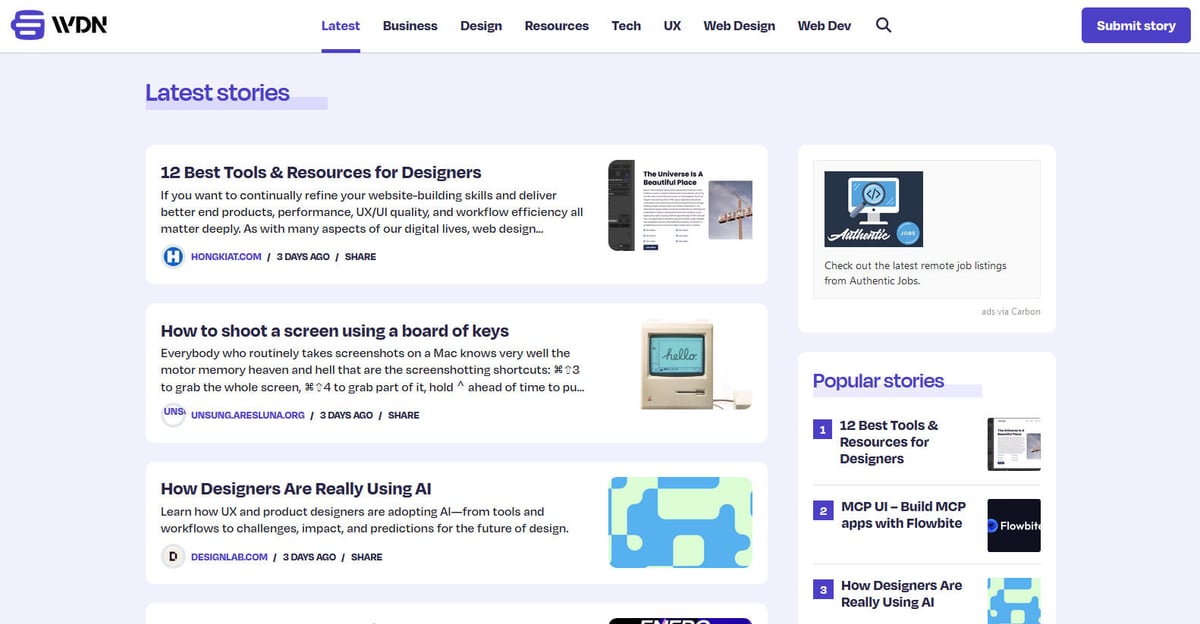
Web Designer News は、ウェブデザインと開発のエコシステムに特化してキュレーションされた、コミュニティ主導の主要なニュースアグリゲーターです。設立以来、このプラットフォームは、UX デザイン、ビジネス戦略、テクノロジーの更新、グラフィックデザインなど、幅広いトピックを網羅する、厳選された最新ニュース、チュートリアル、ツール、リソースをインターネット上から集約する中心的なハブとして機能しています。クリーンな時系列フィードで情報が提供されます。
サイト構造とデータの可能性
ウェブサイトのアーキテクチャは WordPress 上に構築されており、コンテンツを「Web Design」「Web Dev」「UX」「Resources」などの特定のカテゴリに整理する、高度に構造化されたレイアウトが特徴です。数千の個別のブログやジャーナルからのデータを単一の検索可能なインターフェースに集約しているため、業界インテリジェンスの高品質なフィルターとして機能します。この構造は、何百もの別々のドメインを巡回することなく、事前に精査された価値の高い業界データにアクセスできるため、ウェブスクレイピングにとって理想的なターゲットとなります。
なぜWeb Designer Newsをスクレイピングするのか?
Web Designer Newsからのデータ抽出のビジネス価値とユースケースを発見してください。
最新のデザイン動向やツールをリアルタイムで特定する。
ニュースレターやソーシャルメディア向けの業界ニュースキュレーションを自動化する。
競合他社の掲載コンテンツを監視して競合分析を行う。
自然言語処理 (NLP) トレーニング用の高品質なデータセットを生成する。
社内チームのナレッジベース用に、一元化されたデザインリソースライブラリを構築する。
スクレイピングの課題
Web Designer Newsのスクレイピング時に遭遇する可能性のある技術的課題。
サイト内部の「go」リンクシステムによる技術的なリダイレクトの処理。
古いアーカイブ投稿におけるサムネイル画像の不定期な欠落。
Nginx 保護による高頻度リクエストへのサーバーサイド rate limiting。
Web Designer NewsをAIでスクレイピング
コーディング不要。AI搭載の自動化で数分でデータを抽出。
仕組み
必要なものを記述
Web Designer Newsから抽出したいデータをAIに伝えてください。自然言語で入力するだけ — コードやセレクターは不要です。
AIがデータを抽出
人工知能がWeb Designer Newsをナビゲートし、動的コンテンツを処理し、あなたが求めたものを正確に抽出します。
データを取得
CSV、JSONでエクスポートしたり、アプリやワークフローに直接送信できる、クリーンで構造化されたデータを受け取ります。
なぜスクレイピングにAIを使うのか
AIを使えば、コードを書かずにWeb Designer Newsを簡単にスクレイピングできます。人工知能搭載のプラットフォームが必要なデータを理解します — 自然言語で記述するだけで、AIが自動的に抽出します。
How to scrape with AI:
- 必要なものを記述: Web Designer Newsから抽出したいデータをAIに伝えてください。自然言語で入力するだけ — コードやセレクターは不要です。
- AIがデータを抽出: 人工知能がWeb Designer Newsをナビゲートし、動的コンテンツを処理し、あなたが求めたものを正確に抽出します。
- データを取得: CSV、JSONでエクスポートしたり、アプリやワークフローに直接送信できる、クリーンで構造化されたデータを受け取ります。
Why use AI for scraping:
- 非技術職のデザイナーやマーケター向けの完全な no-code ワークフロー。
- クラウドベースのスケジュール機能により、毎日のニュース抽出を自動化。
- ページネーションと構造化要素の検出を標準サポート。
- Google Sheets との直接連携による即時のデータ配信。
Web Designer News用ノーコードWebスクレイパー
AI搭載スクレイピングのポイント&クリック代替手段
Browse.ai、Octoparse、Axiom、ParseHubなどのノーコードツールは、コードを書かずにWeb Designer Newsをスクレイピングするのに役立ちます。これらのツールは視覚的なインターフェースを使用してデータを選択しますが、複雑な動的コンテンツやアンチボット対策には苦戦する場合があります。
ノーコードツールでの一般的なワークフロー
一般的な課題
学習曲線
セレクタと抽出ロジックの理解に時間がかかる
セレクタの破損
Webサイトの変更によりワークフロー全体が壊れる可能性がある
動的コンテンツの問題
JavaScript多用サイトは複雑な回避策が必要
CAPTCHAの制限
ほとんどのツールはCAPTCHAに手動介入が必要
IPブロック
過度なスクレイピングはIPのブロックにつながる可能性がある
Web Designer News用ノーコードWebスクレイパー
Browse.ai、Octoparse、Axiom、ParseHubなどのノーコードツールは、コードを書かずにWeb Designer Newsをスクレイピングするのに役立ちます。これらのツールは視覚的なインターフェースを使用してデータを選択しますが、複雑な動的コンテンツやアンチボット対策には苦戦する場合があります。
ノーコードツールでの一般的なワークフロー
- ブラウザ拡張機能をインストールするかプラットフォームに登録する
- ターゲットWebサイトに移動してツールを開く
- ポイント&クリックで抽出するデータ要素を選択する
- 各データフィールドのCSSセレクタを設定する
- 複数ページをスクレイピングするためのページネーションルールを設定する
- CAPTCHAに対処する(多くの場合手動解決が必要)
- 自動実行のスケジュールを設定する
- データをCSV、JSONにエクスポートするかAPIで接続する
一般的な課題
- 学習曲線: セレクタと抽出ロジックの理解に時間がかかる
- セレクタの破損: Webサイトの変更によりワークフロー全体が壊れる可能性がある
- 動的コンテンツの問題: JavaScript多用サイトは複雑な回避策が必要
- CAPTCHAの制限: ほとんどのツールはCAPTCHAに手動介入が必要
- IPブロック: 過度なスクレイピングはIPのブロックにつながる可能性がある
コード例
import requests
from bs4 import BeautifulSoup

headers = {'User-Agent': 'Mozilla/5.0 (Windows NT 10.0; Win64; x64) AppleWebKit/537.36 (KHTML, like Gecko) Chrome/91.0.4472.124 Safari/537.36'}
url = 'https://webdesignernews.com/'

try:
    # Send request to the main page
    response = requests.get(url, headers=headers)
    response.raise_for_status()
    soup = BeautifulSoup(response.text, 'html.parser')

    # Locate post containers
    posts = soup.find_all('div', class_='single-post')

    for post in posts:
        title = post.find('h3').get_text(strip=True)
        # Check if source site name exists
        source = post.find('span', class_='site_name').get_text(strip=True) if post.find('span', class_='site_name') else 'Unknown'
        link = post.find('h3').find('a')['href']
        print(f'Title: {title} | Source: {source} | Link: {link}')
except Exception as e:
    print(f'An error occurred: {e}')
いつ使うか
JavaScriptが最小限の静的HTMLページに最適。ブログ、ニュースサイト、シンプルなEコマース製品ページに理想的。
メリット
- ●最速の実行(ブラウザオーバーヘッドなし)
- ●最小限のリソース消費
- ●asyncioで簡単に並列化
- ●APIと静的ページに最適
制限事項
- ●JavaScriptを実行できない
- ●SPAや動的コンテンツで失敗
- ●複雑なアンチボットシステムで苦戦する可能性
コードでWeb Designer Newsをスクレイピングする方法
Python + Requests
import requests
from bs4 import BeautifulSoup
headers = {'User-Agent': 'Mozilla/5.0 (Windows NT 10.0; Win64; x64) AppleWebKit/537.36 (KHTML, like Gecko) Chrome/91.0.4472.124 Safari/537.36'}
url = 'https://webdesignernews.com/'
try:
# Send request to the main page
response = requests.get(url, headers=headers)
response.raise_for_status()
soup = BeautifulSoup(response.text, 'html.parser')
# Locate post containers
posts = soup.find_all('div', class_='single-post')
for post in posts:
title = post.find('h3').get_text(strip=True)
# Check if source site name exists
source = post.find('span', class_='site_name').get_text(strip=True) if post.find('span', class_='site_name') else 'Unknown'
link = post.find('h3').find('a')['href']
print(f'Title: {title} | Source: {source} | Link: {link}')
except Exception as e:
print(f'An error occurred: {e}')Python + Playwright
from playwright.sync_api import sync_playwright

def scrape_wdn():
    with sync_playwright() as p:
        # Launch headless browser
        browser = p.chromium.launch(headless=True)
        page = browser.new_page()
        page.goto('https://webdesignernews.com/')

        # Wait for the post elements to load
        page.wait_for_selector('.single-post')

        posts = page.query_selector_all('.single-post')
        for post in posts:
            title_el = post.query_selector('h3 a')
            if title_el:
                title = title_el.inner_text()
                link = title_el.get_attribute('href')
                print(f'Scraped: {title} - {link}')

        browser.close()

scrape_wdn()Python + Scrapy
import scrapy

class WdnSpider(scrapy.Spider):
    name = 'wdn_spider'
    start_urls = ['https://webdesignernews.com/']

    def parse(self, response):
        # Extract each post in the feed
        for post in response.css('.single-post'):
            yield {
                'title': post.css('h3 a::text').get(),
                'source': post.css('.site_name::text').get(),
                'link': post.css('h3 a::attr(href)').get()
            }

        # Handle pagination by finding the 'Next' link
        next_page = response.css('a.next::attr(href)').get()
        if next_page:
yield response.follow(next_page, self.parse)Node.js + Puppeteer
const puppeteer = require('puppeteer');

(async () => {
  const browser = await puppeteer.launch();
  const page = await browser.newPage();
  await page.goto('https://webdesignernews.com/', { waitUntil: 'domcontentloaded' });

  // Evaluate the page to extract data fields
  const results = await page.evaluate(() => {
    const items = Array.from(document.querySelectorAll('.single-post'));
    return items.map(item => ({
      title: item.querySelector('h3 a') ? item.querySelector('h3 a').innerText : null,
      source: item.querySelector('.site_name') ? item.querySelector('.site_name').innerText : null,
      link: item.querySelector('h3 a') ? item.querySelector('h3 a').href : null
    }));
  });

  console.log(results);
  await browser.close();
})();Web Designer Newsデータで何ができるか
Web Designer Newsデータからの実用的なアプリケーションとインサイトを探索してください。
自動デザインニュースフィード
Slack や Discord を通じて、プロのデザインチーム向けのライブでキュレーションされたニュースチャンネルを作成します。
実装方法:
- 14時間ごとに評価の高いストーリーをスクレイピングする。
- 2「UX」や「Web Dev」などの関連カテゴリタグで結果をフィルタリングする。
- 3抽出したタイトルとサマリーをメッセージング Webhook に送信する。
- 4業界ツールの長期的な人気を追跡するためにデータをアーカイブする。
Automatioを使用してWeb Designer Newsからデータを抽出し、コードを書かずにこれらのアプリケーションを構築しましょう。
Web Designer Newsデータで何ができるか
- 自動デザインニュースフィード
Slack や Discord を通じて、プロのデザインチーム向けのライブでキュレーションされたニュースチャンネルを作成します。
- 4時間ごとに評価の高いストーリーをスクレイピングする。
- 「UX」や「Web Dev」などの関連カテゴリタグで結果をフィルタリングする。
- 抽出したタイトルとサマリーをメッセージング Webhook に送信する。
- 業界ツールの長期的な人気を追跡するためにデータをアーカイブする。
- デザインツールトレンドトラッカー
どのデザインソフトウェアやライブラリがコミュニティで最も注目を集めているかを特定します。
- 「Resources」カテゴリのアーカイブからタイトルと要約を抽出する。
- 特定の用語(例:「Figma」、「React」)のキーワード頻度分析を行う。
- 言及数の伸びを月単位で比較し、急上昇しているトレンドを特定する。
- マーケティングや製品戦略チーム向けのビジュアルレポートをエクスポートする。
- 競合バックリンクモニタリング
どのブログやエージェンシーが主要なハブへのコンテンツ掲載に成功しているかを特定します。
- 過去のすべての掲載データから「ソースウェブサイト名」フィールドをスクレイピングする。
- 外部ドメインごとの言及数を集計し、どこが最も多く掲載されているかを確認する。
- より効果的なアウトリーチのために、採用されやすいコンテンツの種類を分析する。
- デザイン分野での潜在的なコラボレーションパートナーを特定する。
- machine learning 学習用データセット
キュレーションされたスニペットとサマリーを使用して、技術的な要約 model をトレーニングします。
- 10,000件以上のストーリータイトルと対応する要約をスクレイピングする。
- 内部追跡パラメータや HTML を削除してテキストデータをクリーンアップする。
- タイトルをターゲット、要約を入力として fine-tuning に使用する。
- パフォーマンスを確認するため、新しい未学習のデザイン記事で model をテストする。
ワークフローを強化する AI自動化
AutomatioはAIエージェント、ウェブ自動化、スマート統合のパワーを組み合わせ、より短時間でより多くのことを達成するお手伝いをします。
Web Designer Newsスクレイピングのプロのヒント
Web Designer Newsからデータを正常に抽出するための専門家のアドバイス。
WordPress REST API endpoint (/wp-json/wp/v2/posts) をターゲットにすることで、HTML parsing よりも高速で信頼性の高い構造化データを取得できます。
webdesignernews.com/feed/ の RSS フィードを監視して、新しい記事が公開された瞬間にキャプチャします。
コミュニティ投稿のピークに合わせて、スクレイピングタスクを EST 9
00 AM にスケジュールします。
User-Agent 文字列をローテートし、リクエスト間に2秒の遅延を設定して、Nginx の rate limits 回避を図ります。
内部の「/go/」リンクは、リダイレクトを追跡して最終的な canonical source URL を抽出するようにします。
分析精度を高めるため、HTML タグや末尾の省略記号を除去して excerpt text データをクリーンアップします。
関連 Web Scraping
Web Designer Newsについてのよくある質問
Web Designer Newsに関するよくある質問への回答を見つけてください