


Outline Self-Hosted, Deploy in One Click
A fast, collaborative knowledge base for technical teams built for markdown clarity. Deploy to your own server for total data residency and zero maintenance work.
Outline
CMS & BloggingOutline to szybka platforma dokumentacji zespołowej. Automatio wdraża ją na dedykowanym serwerze z protokołem HTTPS jednym kliknięciem, zapewniając pełną...
Co dostajesz, wdrażając Outline
Serwer, który wynajmujemy, ile kosztuje i o co zapyta instalator.
- Serwer
- CX23 · 2 vCPU · 4 GB RAM
- Od
- $9/mies.
- Konfiguracja
- Bez konfiguracji
W każdym wdrożeniu
- Dedykowany serwer, jedna aplikacja na maszynę
- Certyfikat HTTPS wystawiany automatycznie
- Darmowa subdomena, własna domena opcjonalnie
- Restart, zmiana rozmiaru, migawki i przywracanie
Projekt
Wszystko, do czego ta strona linkuje poza Automatio.
Wdróż Outline jednym kliknięciem
Na Twoim serwerze, z Twoimi danymi. Bez terminala, bez poleceń Dockera, bez certyfikatów.
- 1
Wybierz rozmiar
Zacznij od najmniejszego serwera, który wystarczy aplikacji. Rozmiar zmienisz później bez reinstalacji.
- 2
Kliknij wdróż
Wynajmujemy serwer, instalujemy aplikację przez Dockera i kierujemy na nią subdomenę.
- 3
Patrz, jak startuje
Provisioning działa sam i trwa kilka minut. Gdy pojawi się certyfikat HTTPS, aplikacja działa.
Rozmiar serwera
Rozliczane miesięcznie z subskrypcją Automatio. Usuń serwer, a opłata się kończy. Każdy serwer: 20 TB transferu/mies. w cenie, potem $2.50 za TB.
Możliwości Outline
Sprawdź, co Automatio może zrobić dla tego przypadku użycia
Real-time collaboration
Multiple team members can edit the same document simultaneously. You will see live cursors and instant updates, which prevents versioning lag during brainstorming or technical planning.
- 1Rich text editor with markdown support
- 2Live presence indicators for active users
- 3Full document revision history tracking
- 4Threaded comments on specific text selections
Możliwości Outline
- Real-time collaboration
Multiple team members can edit the same document simultaneously. You will see live cursors and instant updates, which prevents versioning lag during brainstorming or technical planning.
- Rich text editor with markdown support
- Live presence indicators for active users
- Full document revision history tracking
- Threaded comments on specific text selections
- Markdown-first writing
The editor uses standard markdown syntax for technical clarity while remaining accessible to non-technical staff. You can import raw .md files or export your entire workspace as a zip file.
- Supports CommonMark specification
- Slash command interface for block elements
- Automatic paste-to-markdown conversion
- Direct imports from Notion and Slab
- Structured collections
Documents are organized into hierarchical trees within collections. You can group information by department or project, making it easy to browse complex documentation without getting lost.
- Nested document trees for deep hierarchies
- Private and public collection settings
- Drag and drop reordering of documents
- Breadcrumb navigation for quick orientation
- Universal search
The search system indexes your entire knowledge base instantly. It handles fuzzy matching and allows you to filter results by author, date, or specific collection to find data quickly.
- Fast indexing of new and edited content
- Keyboard-driven navigation for power users
- Fuzzy matching to account for typos
- Deep search inside nested documents
content.selfHosted.whyTitle
content.selfHosted.tradeoffsTitle
comparisonTable.self-hosted.title
comparisonTable.self-hosted.description
| Aspekt | comparisonTable.self-hosted.managedSaas | comparisonTable.self-hosted.diy | comparisonTable.self-hosted.automatio |
|---|---|---|---|
| Time to Running | Instant | 1-2 hours | ~15 minutes |
| Data Ownership | Vendor hosted | 100% Yours | 100% Yours |
| SSL / HTTPS | Included | Manual setup | Automatic |
| Cost Shape | Per user / month | Fixed VPS cost | Fixed VPS cost |
Time to Running
Data Ownership
SSL / HTTPS
Cost Shape
Dla kogo to jest
Ludzie, którzy naprawdę uruchamiają Outline na własnym serwerze, i co się dzięki temu zmienia.
a technical founder
spending hundreds a month on proprietary team wikis for a small team.
consolidates all company documentation onto one fixed-cost server you fully control.
- creating the first company handbook
- documenting internal infrastructure
- onboarding early employees with shared docs
a security-conscious CTO
sensitive company IP sitting on a third-party SaaS cloud provider.
ensures all documentation remains within the company's VPC and follows strict residency rules.
- enforcing SSO policies
- auditing internal access logs
- mapping compliance workflows in-house
a homelab developer
clunky, outdated personal documentation tools that are hard to navigate.
provides a beautiful, modern UI for documenting personal projects and home infrastructure.
- tracking server configurations
- storing code snippets and tutorials
- replacing a legacy flat-file wiki
a technical agency
fragmented client project specifications across emails and personal notes.
provides a unified portal to share project requirements and meeting notes with clients.
- centralizing client project specs
- sharing public documentation links
- archiving technical requirements for handoff
Czym jest ten prompt?
Dowiedz sie, co robi ten prompt i jak moze pomoc Ci osiagnac lepsze wyniki.
Documentation for technical teams
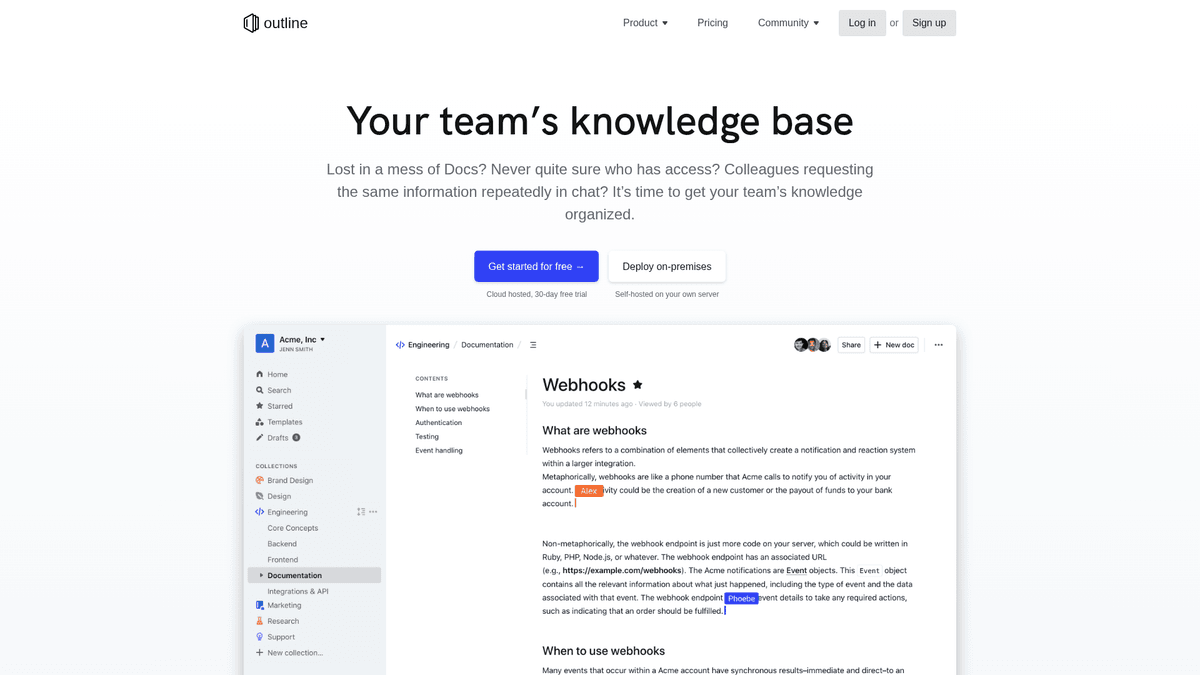
Outline is a modern knowledge base designed for teams that prioritize speed and a clean writing experience. Built with React and Node.js, it avoids the cluttered interfaces typical of traditional enterprise wikis. It bridges the gap between simple markdown editors and full-featured team documentation platforms, offering a hierarchical tree structure that makes organizing complex information intuitive. The project uses a Business Source License (BSL) 1.1, which keeps the source code public and self-hostable while protecting the maintainers' commercial interests.
How it works
The application is designed to be markdown-first. Engineers can write in the syntax they prefer, while the rich-text interface ensures non-technical staff can contribute without a learning curve. Documents are organized into collections, which can represent departments like Engineering, HR, or Marketing. Within these collections, documents are nested in a visible hierarchy. The application relies on a robust tech stack: PostgreSQL for structured data, Redis for caching and real-time collaboration features, and S3-compatible storage for all file attachments and images.
The first hour
When you first deploy, the focus is on connecting your team. After the automated installation, your first task is connecting an identity provider like Google Workspace, Slack, or a custom OIDC server. Once authenticated, you can immediately begin creating your first collections. Importing existing documentation is a major part of the early experience; the platform handles Notion exports, Slab zips, and raw markdown files with high fidelity, allowing you to migrate an entire team's history quickly. You will likely spend the rest of your first hour setting up Slack notifications to keep the team informed of new updates.
Market position
Outline sits between the "everything-app" approach of Notion and the developer-centric nature of tools like Obsidian. It is faster and more focused than Notion, avoiding the bloat of databases and complex blocks in favor of a distraction-free writing experience. Compared to Confluence, it is more modern and easier to navigate, making it a common choice for startups and technical teams who want their documentation to stay as fast as their code.
Co mowia ludzie o Outline
Zobacz, co spolecznosc mysli o Outline
“Switched from Notion to self-hosted Outline. Performance is night and day. The markdown support is actually usable.”
“Outline is the best looking wiki but the auth setup is a pain if you don't want Slack/Google. Once it's running though, it's great.”
“The lack of local auth was a hurdle for my small team, but setting up a simple OIDC provider solved it. Worth it for the speed.”
“It handles images and file uploads perfectly as long as you have your S3 bucket permissions configured correctly.”
“I've been running it on a 2GB VPS for six months with zero issues. The search indexing is remarkably fast even with hundreds of pages.”
“The slash commands and overall interface feel much snappier than Confluence or Notion. It's built for writing, not just storing files.”
Filmy o Outline
Ogladaj samouczki, recenzje i dyskusje o Outline
“Outline to bardzo nowoczesna, szybka i bogata w funkcje baza wiedzy, która działa bardzo płynnie, ponieważ została zbudowana w oparciu o React i Node.js”
“Warto pamiętać, że Outline wymaga dostawcy tożsamości, takiego jak Google, Slack lub OpenID Connect, do obsługi logowania użytkowników”
“Edytor to chyba moja ulubiona część; jest przejrzysty, wspiera markdown i wydaje się niezwykle dopracowany w porównaniu do starszych wiki”
“Będziesz potrzebować kompatybilnego ze S3 rozwiązania pamięci masowej, takiego jak Minio lub AWS S3, na obrazy i załączniki dokumentów”
“Możliwość eksportu wszystkich danych w standardowych formatach takich jak Markdown lub JSON to ogromna zaleta dla długoterminowej przenośności danych”
“Outline kładzie duży nacisk na szybkość i zapewnienie środowiska pisania wolnego od rozpraszaczy dla zespołów technicznych”
“Hierarchiczna struktura drzewa ułatwia organizowanie zagnieżdżonych dokumentów bez gubienia ogólnego układu”
“System uprawnień jest dość solidny, co pozwala na zarządzanie konkretnymi kolekcjami dla różnych działów lub zespołów”
“Wyszukiwanie jest obsługiwane przez Postgres, ale zostało zoptymalizowane tak, aby działać bardzo szybko nawet przy tysiącach dokumentów”
“Obsługa markdown to tutaj nie dodatek na siłę; jest kluczowa dla sposobu wchodzenia w interakcje i tworzenia treści na platformie”
“Outline nie należy do najprostszych rzeczy w samodzielnym hostowaniu ze względu na zależności takie jak Redis, Postgres i wymagania dotyczące magazynu S3”
“Najtrudniejszą częścią dla większości użytkowników będzie poprawna konfiguracja uwierzytelniania OIDC do logowania użytkowników”
“Wykorzystuje edytor współpracy czasu rzeczywistego, dzięki czemu możesz widzieć, jak inni członkowie zespołu piszą, dokładnie tak jak w Google Docs”
“W przypadku lokalnej pamięci masowej możesz użyć Minio, jeśli chcesz trzymać wszystkie dane na własnym VPS zamiast korzystać z dostawcy chmurowego”
“Jeśli chcesz mieć wiki klasy profesjonalnej bez miesięcznych opłat za użytkownika, jest to obecnie najlepszy wybór typu self-hosted”
Przyspiesz swoj workflow z automatyzacja AI
Automatio laczy moc agentow AI, automatyzacji web i inteligentnych integracji, aby pomoc Ci osiagnac wiecej w krotszym czasie.
Porady Pro dla Outline
Wskazówki ekspertów, aby w pełni wykorzystać Outline.
Start with 1GB+ RAM
While it can run on smaller tiers, the combination of Postgres, Redis, and the Node.js backend performs much more reliably on the CX23 plan or higher.
Configure SMTP first
Don't skip the email settings. You won't be able to invite your team or receive system notifications until your SMTP credentials are wired up.
Use MinIO for storage
If you do not want to use AWS S3, a self-hosted MinIO instance is an excellent S3-compatible alternative for storing your images and files locally.
Opinie
Co mowia nasi uzytkownicy
Dolacz do tysiecy zadowolonych uzytkownikow, ktorzy przeksztalcili swoj workflow
Jonathan Kogan
Co-Founder/CEO, rpatools.io
Automatio is one of the most used for RPA Tools both internally and externally. It saves us countless hours of work and we realized this could do the same for other startups and so we choose Automatio for most of our automation needs.
Mohammed Ibrahim
CEO, qannas.pro
I have used many tools over the past 5 years, Automatio is the Jack of All trades.. !! it could be your scraping bot in the morning and then it becomes your VA by the noon and in the evening it does your automations.. its amazing!
Ben Bressington
CTO, AiChatSolutions
Automatio is fantastic and simple to use to extract data from any website. This allowed me to replace a developer and do tasks myself as they only take a few minutes to setup and forget about it. Automatio is a game changer!
Sarah Chen
Head of Growth, ScaleUp Labs
We've tried dozens of automation tools, but Automatio stands out for its flexibility and ease of use. Our team productivity increased by 40% within the first month of adoption.
David Park
Founder, DataDriven.io
The AI-powered features in Automatio are incredible. It understands context and adapts to changes in websites automatically. No more broken scrapers!
Emily Rodriguez
Marketing Director, GrowthMetrics
Automatio transformed our lead generation process. What used to take our team days now happens automatically in minutes. The ROI is incredible.
Jonathan Kogan
Co-Founder/CEO, rpatools.io
Automatio is one of the most used for RPA Tools both internally and externally. It saves us countless hours of work and we realized this could do the same for other startups and so we choose Automatio for most of our automation needs.
Mohammed Ibrahim
CEO, qannas.pro
I have used many tools over the past 5 years, Automatio is the Jack of All trades.. !! it could be your scraping bot in the morning and then it becomes your VA by the noon and in the evening it does your automations.. its amazing!
Ben Bressington
CTO, AiChatSolutions
Automatio is fantastic and simple to use to extract data from any website. This allowed me to replace a developer and do tasks myself as they only take a few minutes to setup and forget about it. Automatio is a game changer!
Sarah Chen
Head of Growth, ScaleUp Labs
We've tried dozens of automation tools, but Automatio stands out for its flexibility and ease of use. Our team productivity increased by 40% within the first month of adoption.
David Park
Founder, DataDriven.io
The AI-powered features in Automatio are incredible. It understands context and adapts to changes in websites automatically. No more broken scrapers!
Emily Rodriguez
Marketing Director, GrowthMetrics
Automatio transformed our lead generation process. What used to take our team days now happens automatically in minutes. The ROI is incredible.
Powiazane Self-Hosted Apps

WordPress
from $9/mo
The world's most popular CMS. Bring your blog, business site, or membership community.

Strapi
from $9/mo
Open-source headless CMS to build powerful APIs with built-in content management.

Ghost
from $9/mo
Modern publishing platform — fast, headless-capable, with a clean editor.

Directus
from $9/mo
Directus is an open source headless CMS that provides an API-first solution for building custom backends.
Często Zadawane Pytania o Outline
Znajdź odpowiedzi na częste pytania o Outline