

How to Scrape HP.com: A Technical Guide to Product & Price Data
Learn how to scrape HP.com for laptop prices, technical specs, and stock availability. This guide covers bypassing Akamai protection and extracting data.
Free to start: 1,000 credits, no card, nothing to install.
About HP
Learn what HP offers and what valuable data can be extracted from it.
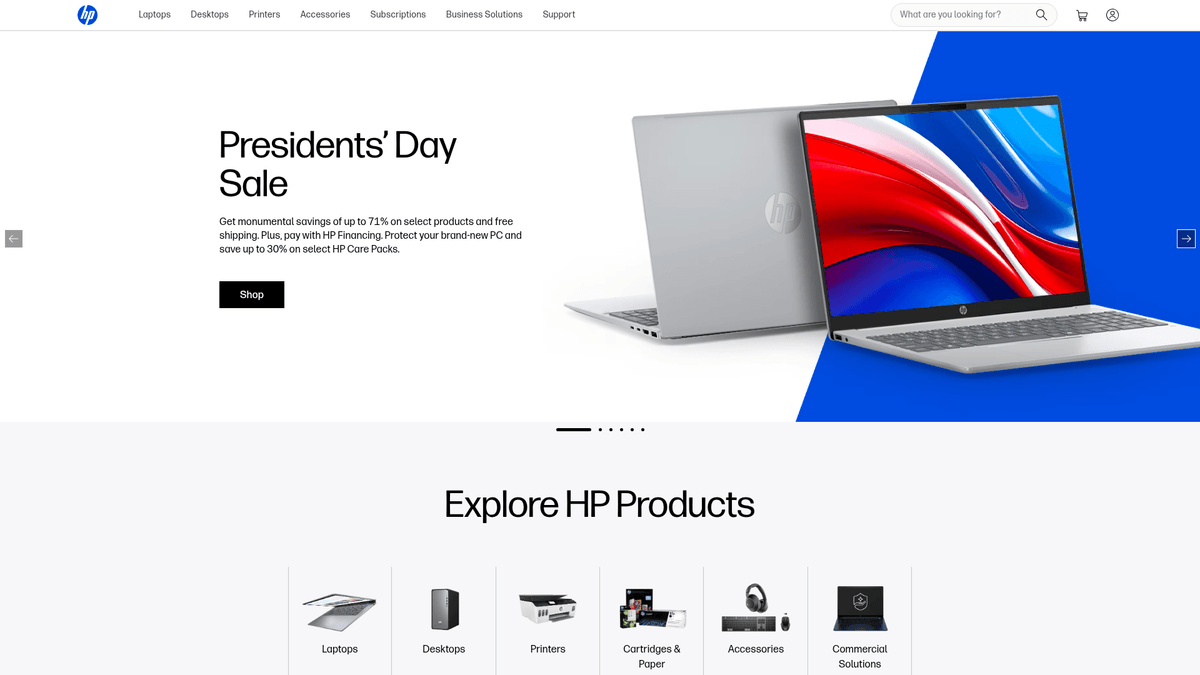
HP.com is the official global e-commerce and support platform for HP Inc., one of the world's largest manufacturers of personal computers, printers, and 3D printing solutions. The website serves as a primary storefront for both individual consumers and large-scale business enterprises, offering a comprehensive catalog of technology products ranging from consumer-grade laptops like the Pavilion and Envy series to professional-grade ZBook and EliteBook workstations.
The platform contains a massive repository of real-time market data, including manufacturer-suggested retail prices (MSRP), current promotional discounts, and highly granular hardware specifications such as processor models, RAM speeds, and display resolutions. This data is highly valuable for market analysts, retail competitors, and procurement specialists who need to monitor technology trends and track MSRP versus actual sales prices.
Why Scrape HP?
Discover the business value and use cases for extracting data from HP.
Real-time Price Monitoring
Stay updated on the latest MSRP changes and seasonal discounts across HP's global storefronts to maintain a competitive pricing edge.
Granular Technical Specifications
Extract highly detailed hardware data, including processor types, RAM speeds, and port configurations, to build a comprehensive technical database.
Inventory and Stock Tracking
Monitor the availability of high-demand enterprise workstations and consumer laptops to identify supply chain patterns or stock outages.
Market Sentiment Analysis
Scrape user reviews and star ratings to gauge customer satisfaction and identify common hardware pain points across different product series.
Competitor Benchmarking
Directly compare HP's hardware price-to-performance ratios against industry rivals like Dell and Lenovo using raw, structured data.
Global Distribution Research
Collect data across various regional subdomains to analyze how HP modifies its product catalog and pricing strategies for different international markets.
Scraping Challenges
Technical challenges you may encounter when scraping HP.
Akamai Bot Manager Protection
HP utilizes sophisticated anti-bot services that employ TLS fingerprinting and behavioral analysis to detect and block automated scraping attempts.
Heavy JavaScript Dependency
The storefront is built with modern frameworks like React, requiring full browser rendering to access data that is not present in the static HTML source.
Geo-Location Redirects
The website automatically redirects users based on their IP address, making it difficult to scrape specific regional data without precisely targeted proxies.
Dynamic Content Loading
Technical specifications and 'Add to Cart' buttons are often loaded dynamically or hidden behind interactive elements that require scripted clicks to reveal.
Frequent Frontend Updates
HP regularly updates its CSS selectors and DOM structure, which can cause traditional scrapers based on static selectors to break frequently.
Scrape HP with AI
No coding required. Extract data in minutes with AI-powered automation.
How It Works
Describe What You Need
Tell the AI what data you want to extract from HP. Just type it in plain language — no coding or selectors needed.
AI Extracts the Data
Our artificial intelligence navigates HP, handles dynamic content, and extracts exactly what you asked for.
Get Your Data
Receive clean, structured data ready to export as CSV, JSON, or send directly to your apps and workflows.
Why Use AI for Scraping
No-Code Web Scrapers for HP
Point-and-click alternatives to AI-powered scraping
Several no-code tools like Browse.ai, Octoparse, Axiom, and ParseHub can help you scrape HP. These tools use visual interfaces to select elements, but they come with trade-offs compared to AI-powered solutions.
Typical Workflow with No-Code Tools
Common Challenges
Learning curve
Understanding selectors and extraction logic takes time
Selectors break
Website changes can break your entire workflow
Dynamic content issues
JavaScript-heavy sites often require complex workarounds
CAPTCHA limitations
Most tools require manual intervention for CAPTCHAs
IP blocking
Aggressive scraping can get your IP banned
Code Examples
import requests
from bs4 import BeautifulSoup

# High-quality headers are mandatory to bypass basic checks
headers = {
    'User-Agent': 'Mozilla/5.0 (Windows NT 10.0; Win64; x64) AppleWebKit/537.36 (KHTML, like Gecko) Chrome/121.0.0.0 Safari/537.36',
    'Accept-Language': 'en-US,en;q=0.9'
}

url = 'https://www.hp.com/us-en/shop/sitesearch?keyword=laptop'

try:
    response = requests.get(url, headers=headers, timeout=15)
    response.raise_for_status()
    # Note: Modern HP search results are rendered via JS,
    # so this may only capture the HTML skeleton.
    soup = BeautifulSoup(response.text, 'html.parser')
    products = soup.find_all('div', class_='product-item')
    for product in products:
        name = product.find('h5').get_text(strip=True)
        print(f'Product: {name}')
except Exception as e:
    print(f'Error: {e}')
When to Use
Best for static HTML pages where content is loaded server-side. The fastest and simplest approach when JavaScript rendering isn't required.
Advantages
- ●Fastest execution (no browser overhead)
- ●Lowest resource consumption
- ●Easy to parallelize with asyncio
- ●Great for APIs and static pages
Limitations
- ●Cannot execute JavaScript
- ●Fails on SPAs and dynamic content
- ●May struggle with complex anti-bot systems
import asyncio
from playwright.async_api import async_playwright

async def scrape_hp():
    async with async_playwright() as p:
        # Launching with stealth or custom UA is often required for HP
        browser = await p.chromium.launch(headless=True)
        context = await browser.new_context(user_agent='Mozilla/5.0 (Windows NT 10.0; Win64; x64) AppleWebKit/537.36')
        page = await context.new_page()

        await page.goto('https://www.hp.com/us-en/shop/sitesearch?keyword=laptop')

        # Wait for dynamic React elements to render
        await page.wait_for_selector('.product-item')
        products = await page.query_selector_all('.product-item')

        for product in products:
            title_el = await product.query_selector('h5')
            price_el = await product.query_selector('.sale-price')
            title = await title_el.inner_text() if title_el else 'N/A'
            price = await price_el.inner_text() if price_el else 'N/A'
            print(f'Found: {title} | Price: {price}')

        await browser.close()

asyncio.run(scrape_hp())
When to Use
Use when content loads dynamically via JavaScript, or when you need to interact with the page (clicks, scrolls, form fills). Handles modern anti-bot detection better.
Advantages
- ●Executes JavaScript like a real browser
- ●Handles SPAs and dynamic content
- ●Better anti-bot evasion with stealth plugins
- ●Can take screenshots and PDFs
Limitations
- ●Slower than HTTP requests
- ●Higher memory/CPU usage
- ●More complex to set up
import scrapy

class HpSpider(scrapy.Spider):
    name = 'hp_spider'
    start_urls = ['https://www.hp.com/us-en/shop/sitesearch?keyword=laptop']

    def parse(self, response):
        # Scrapy alone cannot render JS; use scrapy-playwright middleware in production
        for product in response.css('.product-item'):
            yield {
                'title': product.css('h5::text').get(),
                'price': product.css('.sale-price::text').get(),
                'sku': product.css('.sku-label::text').get()
            }
        # Logic for pagination would go here
        next_page = response.css('a.next::attr(href)').get()
        if next_page:
            yield response.follow(next_page, self.parse)
When to Use
Ideal for large-scale crawling projects that need to scrape thousands of pages. Built-in support for rate limiting, retries, and data pipelines.
Advantages
- ●Built for scale (millions of pages)
- ●Automatic request throttling
- ●Built-in data export pipelines
- ●Middleware system for proxies/headers
Limitations
- ●Steeper learning curve
- ●Overkill for small projects
- ●No native JavaScript rendering
const puppeteer = require('puppeteer');

(async () => {
  const browser = await puppeteer.launch();
  const page = await browser.newPage();

  // Using networkidle2 ensures most dynamic content has loaded
  await page.goto('https://www.hp.com/us-en/shop/sitesearch?keyword=laptop', {
    waitUntil: 'networkidle2'
  });

  const products = await page.evaluate(() => {
    const items = Array.from(document.querySelectorAll('.product-item'));
    return items.map(item => ({
      name: item.querySelector('h5')?.innerText,
      price: item.querySelector('.sale-price')?.innerText
    }));
  });

  console.log(products);
  await browser.close();
})();
When to Use
Choose this if you're in a Node.js/JavaScript ecosystem or need tight integration with frontend tools. Similar capabilities to Playwright.
Advantages
- ●Native JavaScript/TypeScript support
- ●Chrome DevTools Protocol access
- ●Large ecosystem and community
- ●Good for JS-heavy projects
Limitations
- ●Chrome-only (vs Playwright's multi-browser)
- ●Similar overhead to Playwright
- ●Less mature stealth options
What You Can Do With HP Data
Explore practical applications and insights from HP data.
Real-time Dynamic Pricing Engine
Retailers can automatically adjust their own prices based on HP's current official store promotions and MSRP changes.
How to implement:
- 1Scrape HP store prices for specific SKUs every 6 hours.
- 2Detect 'Sale' badges and MSRP drops instantly.
- 3Compare data against current local warehouse inventory levels.
- 4Update the e-commerce pricing engine via API to match or beat prices.
Use Automatio to extract data from HP and build these applications without writing code.
Historical Price Archive
Create a transparency tool for consumers to verify if current HP 'Sale' prices are truly historical lows.
How to implement:
- 1Perform a daily scrape of the top 500 best-selling HP items.
- 2Store SKU, current price, and timestamp in a time-series database.
- 3Calculate historical minimum, maximum, and average pricing for each SKU.
- 4Generate trend lines for a public-facing price comparison dashboard.
Use Automatio to extract data from HP and build these applications without writing code.
Tech Market Trend Analysis
Market analysts can track the adoption and phase-out of specific hardware components like AI-enabled processors.
How to implement:
- 1Crawl all HP laptop categories on a quarterly basis.
- 2Extract processor models, RAM speeds, and NPU availability.
- 3Categorize products based on technical capability tiers (Consumer vs Business).
- 4Visualize the shift towards AI-powered computing in a market report.
Use Automatio to extract data from HP and build these applications without writing code.
MAP Compliance Monitoring
Manufacturers and distributors can monitor if retail partners are adhering to Minimum Advertised Price (MAP) policies.
How to implement:
- 1Scrape HP's official store as the baseline for MSRP.
- 2Cross-reference scraped prices with data from other retail platforms.
- 3Flag instances where retail prices fall below the official HP MSRP.
- 4Generate automated alerts for the compliance team to investigate.
Use Automatio to extract data from HP and build these applications without writing code.
Inventory Management Alerts
Automate procurement by alerting business buyers when specialized workstations come back into stock.
How to implement:
- 1Monitor the 'Add to Cart' button status for specific ZBook or EliteBook SKUs.
- 2Extract stock availability flags from the dynamic page source.
- 3Trigger a webhook notification to the procurement system when status changes to 'In Stock'.
- 4Automate the purchase request process based on immediate availability.
Use Automatio to extract data from HP and build these applications without writing code.
Supercharge your workflow with AI Automation
Automatio combines the power of AI agents, web automation, and smart integrations to help you accomplish more in less time.
What to get right first
Expert advice for successfully extracting data from HP.
Prioritize Residential Proxies
To avoid immediate blocking by Akamai, always use residential proxies that mimic real household connections rather than datacenter IPs.
Inspect Hidden XHR Requests
Use the browser’s developer tools to find internal JSON API endpoints, which often contain cleaner, more structured data than the visual page.
Spoof TLS Fingerprints
Ensure your scraping tool can randomize its TLS handshake to match modern web browsers, as this is a primary detection method for HP's security.
Implement Random Delays
Avoid being flagged by behavioral sensors by introducing randomized wait times between page navigations and element interactions.
Match Geo-IP to Local Stores
When scraping regional versions (e.g., hp.com/uk), ensure your proxies are located in that specific country to avoid being redirected to the US site.
Handle Lazy Loading Elements
Implement auto-scrolling actions in your scraping workflow to ensure that product lists and spec tables are fully triggered and visible in the DOM.
Related Web Scraping
How to Scrape Tata 1mg | 1mg.com Medicine Data Scraper

How to Scrape Carwow: Extract Used Car Data and Prices
Kalodata Scraper: Revenue, Item Sold, Unit Price in a table
eBay Scraper: Titles, Prices and Condition in a table
How to Scrape ThemeForest Web Data

How to Scrape StubHub: The Ultimate Web Scraping Guide
AliExpress Scraper: Prices, Ratings and Sales in a table
Frequently Asked Questions
Find answers to common questions about HP
Is it legal to scrape product data from HP.com?
Scraping publicly available information like product titles and prices for the purpose of market analysis is generally legal. However, you should always review HP's Terms of Service and ensure you are not scraping private user data or disrupting their site performance with excessive request rates.
Does HP have an official API for product prices?
HP does not provide a public REST API for real-time consumer retail prices to the general public. While they have developer portals for printer management and enterprise solutions, retail price monitoring usually requires automated web scraping.
How do I bypass Akamai blocking when scraping HP?
Bypassing Akamai requires a multi-layered approach including the use of residential proxies, headless browser stealth plugins, and header rotation. Tools like Automatio are designed to handle these security layers automatically by mimicking human browsing patterns and using clean IP addresses.
What is the best format to export HP product data into?
JSON is the preferred format for technical specs due to its ability to handle nested data, but CSV is often easier for simple price comparison tasks. Automatio allows you to export into JSON, CSV, or sync directly to Google Sheets for easier analysis.
How often should I scrape HP for price updates?
For standard retail monitoring, once every 24 hours is usually sufficient. During major shopping holidays like Black Friday, you might increase frequency to every 1-4 hours to capture limited-time flash deals and stock fluctuations.
Do I need to be logged in to scrape prices on HP?
Generally, no login is required to see standard consumer prices on HP.com. However, if you are looking for specific corporate, education, or member-only discounts, you would need to implement a login sequence in your scraping workflow.
Can I scrape technical specs hidden behind tabs?
Yes, but your scraper must be able to execute JavaScript and simulate clicks. Many HP product pages hide full technical specifications in secondary tabs or accordion menus that only inject data into the DOM when clicked.
Which proxies work best for HP.com?
Residential proxies are essential for HP.com because datacenter IPs are often blacklisted by Akamai immediately. Residential IPs provide the necessary legitimacy to browse the store without triggering security challenges.