

How to Scrape ThemeForest Web Data
Learn how to scrape ThemeForest to extract WordPress themes, website templates, pricing, and sales data. Power your market research and competitive analysis...
Free to start: 1,000 credits, no card, nothing to install.
About ThemeForest
Learn what ThemeForest offers and what valuable data can be extracted from it.
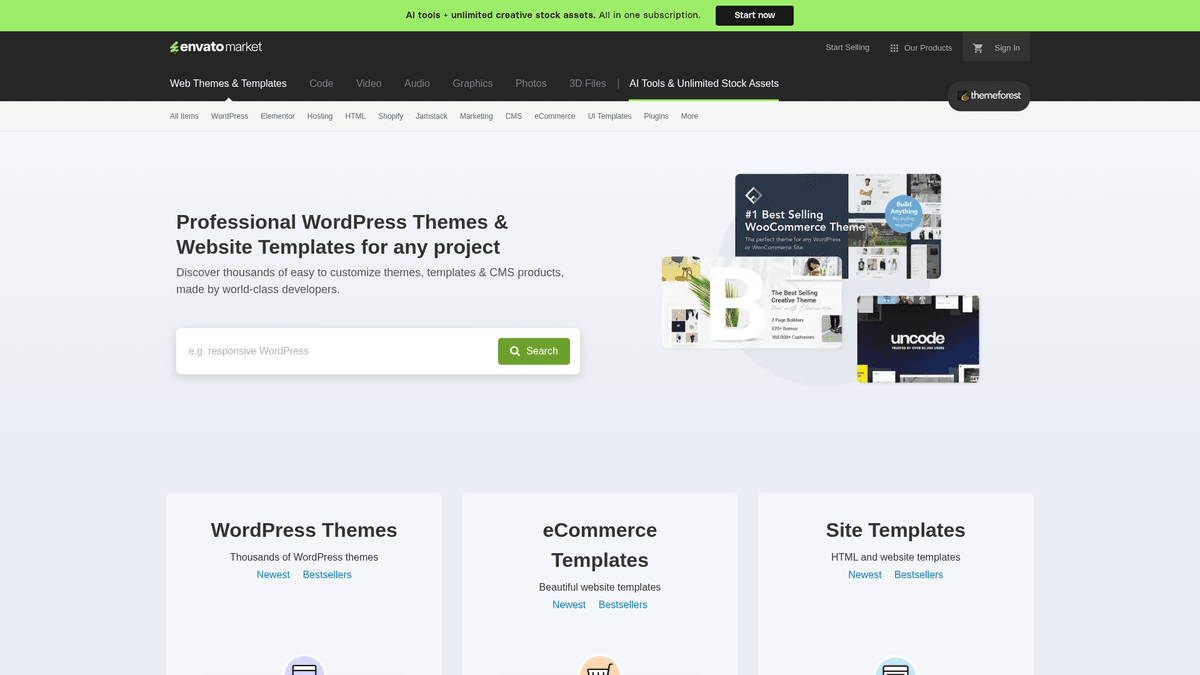
ThemeForest is a digital marketplace part of the Envato Market family, serving as one of the world's largest platforms for buying and selling website templates and CMS themes. It operates as a hub for independent developers to showcase their WordPress themes, HTML5 templates, and marketing assets to a global audience. The platform is highly curated, with every item undergoing a quality review process to ensure it meets professional design and coding standards.
The site contains structured listings for tens of thousands of digital products, featuring rich metadata such as author identity, sales performance, user ratings, and technical specifications. This includes details like software compatibility, layout responsiveness, and integrated plugins, making it a comprehensive repository of the web development industry's state.
Scraping ThemeForest is highly valuable for competitive intelligence and market trend analysis. By aggregating sales and pricing data, businesses can identify high-demand niches, monitor the success of competitors, and discover emerging design trends across the WordPress ecosystem. This data allows developers and agencies to make data-driven decisions about product development and marketing strategies.
Why Scrape ThemeForest?
Discover the business value and use cases for extracting data from ThemeForest.
Market Trend Analysis
Identify which web design styles, frameworks, and CMS platforms are gaining popularity by tracking sales volume and new releases across different categories.
Competitive Pricing Strategy
Monitor the pricing of top-selling themes and individual authors to optimize your own product pricing or to find the best value-for-money templates for clients.
Lead Generation for Agencies
Find popular themes with specific technical gaps and offer specialized customization, maintenance, or SEO services to the large user bases of those specific products.
Sentiment Analysis
Scrape user comments and reviews to understand common pain points, feature requests, and technical issues found in existing templates to build better alternatives.
Portfolio Monitoring
Track the performance of specific power authors or competitor portfolios to see which item updates or new launches are driving the most revenue in real-time.
Tech Stack Intelligence
Extract compatibility data from listings to see how quickly the developer community adopts new versions of WordPress, Bootstrap, or specific page builders like Elementor.
Scraping Challenges
Technical challenges you may encounter when scraping ThemeForest.
Aggressive Cloudflare Protection
ThemeForest utilizes Cloudflare Enterprise settings that detect automated scrapers through JavaScript challenges, TLS fingerprinting, and advanced browser analysis.
Dynamic Content Rendering
Many search filters, sorting options, and metadata fields update content dynamically via AJAX, requiring a browser-based scraping approach to capture all data.
Strict Rate Limiting
Sending too many requests in a short window results in immediate IP bans or temporary blocks monitored by Envato's internal security systems.
Complex and Shifting DOM
The website structure and CSS classes are frequently updated or obfuscated to deter simple scrapers that rely on static selectors.
Scrape ThemeForest with AI
No coding required. Extract data in minutes with AI-powered automation.
How It Works
Describe What You Need
Tell the AI what data you want to extract from ThemeForest. Just type it in plain language — no coding or selectors needed.
AI Extracts the Data
Our artificial intelligence navigates ThemeForest, handles dynamic content, and extracts exactly what you asked for.
Get Your Data
Receive clean, structured data ready to export as CSV, JSON, or send directly to your apps and workflows.
Why Use AI for Scraping
No-Code Web Scrapers for ThemeForest
Point-and-click alternatives to AI-powered scraping
Several no-code tools like Browse.ai, Octoparse, Axiom, and ParseHub can help you scrape ThemeForest. These tools use visual interfaces to select elements, but they come with trade-offs compared to AI-powered solutions.
Typical Workflow with No-Code Tools
Common Challenges
Learning curve
Understanding selectors and extraction logic takes time
Selectors break
Website changes can break your entire workflow
Dynamic content issues
JavaScript-heavy sites often require complex workarounds
CAPTCHA limitations
Most tools require manual intervention for CAPTCHAs
IP blocking
Aggressive scraping can get your IP banned
Code Examples
import requests
from bs4 import BeautifulSoup

# Note: This basic approach may be blocked by Cloudflare
url = 'https://themeforest.net/category/wordpress'
headers = {
    'User-Agent': 'Mozilla/5.0 (Windows NT 10.0; Win64; x64) AppleWebKit/537.36 (KHTML, like Gecko) Chrome/119.0.0.0 Safari/537.36'
}

try:
    response = requests.get(url, headers=headers)
    response.raise_for_status()
    soup = BeautifulSoup(response.text, 'html.parser')
    # Example: Finding item titles in the grid
    items = soup.select('li.search-grid__item')
    for item in items:
        title = item.select_one('h3').text.strip()
        price = item.select_one('.price').text.strip()
        print(f'Theme: {title} | Price: {price}')
except Exception as e:
    print(f'Error scraping ThemeForest: {e}')
When to Use
Best for static HTML pages where content is loaded server-side. The fastest and simplest approach when JavaScript rendering isn't required.
Advantages
- ●Fastest execution (no browser overhead)
- ●Lowest resource consumption
- ●Easy to parallelize with asyncio
- ●Great for APIs and static pages
Limitations
- ●Cannot execute JavaScript
- ●Fails on SPAs and dynamic content
- ●May struggle with complex anti-bot systems
from playwright.sync_api import sync_playwright

def scrape_themeforest():
    with sync_playwright() as p:
        browser = p.chromium.launch(headless=True)
        page = browser.new_page()
        # Navigating to the WordPress category
        page.goto('https://themeforest.net/category/wordpress')
        # Wait for the listing items to load
        page.wait_for_selector('li.search-grid__item')

        items = page.query_selector_all('li.search-grid__item')
        for item in items:
            title = item.query_selector('h3').inner_text()
            sales = item.query_selector('.item-thumbnail__sales').inner_text()
            print(f'Found item: {title} with {sales}')

        browser.close()

scrape_themeforest()
When to Use
Use when content loads dynamically via JavaScript, or when you need to interact with the page (clicks, scrolls, form fills). Handles modern anti-bot detection better.
Advantages
- ●Executes JavaScript like a real browser
- ●Handles SPAs and dynamic content
- ●Better anti-bot evasion with stealth plugins
- ●Can take screenshots and PDFs
Limitations
- ●Slower than HTTP requests
- ●Higher memory/CPU usage
- ●More complex to set up
import scrapy

class ThemeForestSpider(scrapy.Spider):
    name = 'themeforest'
    start_urls = ['https://themeforest.net/category/wordpress']

    def parse(self, response):
        for item in response.css('li.search-grid__item'):
            yield {
                'title': item.css('h3 a::text').get().strip(),
                'price': item.css('.price::text').get(),
                'sales': item.css('.item-thumbnail__sales::text').get(),
                'url': response.urljoin(item.css('h3 a::attr(href)').get())
            }

        # Handling pagination
        next_page = response.css('a.next_page::attr(href)').get()
        if next_page:
            yield response.follow(next_page, self.parse)
When to Use
Ideal for large-scale crawling projects that need to scrape thousands of pages. Built-in support for rate limiting, retries, and data pipelines.
Advantages
- ●Built for scale (millions of pages)
- ●Automatic request throttling
- ●Built-in data export pipelines
- ●Middleware system for proxies/headers
Limitations
- ●Steeper learning curve
- ●Overkill for small projects
- ●No native JavaScript rendering
const puppeteer = require('puppeteer-extra');
const StealthPlugin = require('puppeteer-extra-plugin-stealth');
puppeteer.use(StealthPlugin());

(async () => {
  const browser = await puppeteer.launch({ headless: true });
  const page = await browser.newPage();
  await page.goto('https://themeforest.net/category/wordpress');

  // Wait for product cards to be visible
  await page.waitForSelector('li.search-grid__item');

  const data = await page.evaluate(() => {
    const themes = Array.from(document.querySelectorAll('li.search-grid__item'));
    return themes.map(el => ({
      title: el.querySelector('h3').innerText.trim(),
      price: el.querySelector('.price').innerText.trim()
    }));
  });

  console.log(data);
  await browser.close();
})();
When to Use
Choose this if you're in a Node.js/JavaScript ecosystem or need tight integration with frontend tools. Similar capabilities to Playwright.
Advantages
- ●Native JavaScript/TypeScript support
- ●Chrome DevTools Protocol access
- ●Large ecosystem and community
- ●Good for JS-heavy projects
Limitations
- ●Chrome-only (vs Playwright's multi-browser)
- ●Similar overhead to Playwright
- ●Less mature stealth options
What You Can Do With ThemeForest Data
Explore practical applications and insights from ThemeForest data.
Competitive Pricing Intelligence
Analyze the pricing landscape of specific niches to set competitive prices for your own products.
How to implement:
- 1Scrape prices and sales for top-selling themes in your category.
- 2Calculate the average and median price points.
- 3Track price fluctuations during seasonal sales events.
- 4Adjust your pricing strategy based on market-wide trends.
Use Automatio to extract data from ThemeForest and build these applications without writing code.
Demand Forecasting for New Themes
Identify trending design styles and features before developing a new template.
How to implement:
- 1Scrape the 'Newest' and 'Bestsellers' tabs weekly.
- 2Compare the sales growth rate of new releases across different categories.
- 3Identify features listed in descriptions that appear frequently in top-rated items.
- 4Focus your development on the highest growth categories.
Use Automatio to extract data from ThemeForest and build these applications without writing code.
Lead Generation for Web Customization
Find themes with high sales but specific user complaints to offer specialized support services.
How to implement:
- 1Scrape items with high sales volume but mediocre ratings.
- 2Analyze common complaints in the comment and review sections.
- 3Target advertisements to users of those specific themes.
- 4Offer customization services to address those common technical gaps.
Use Automatio to extract data from ThemeForest and build these applications without writing code.
Content Aggregation for Affiliate Sites
Automatically update your review or comparison site with the latest theme data.
How to implement:
- 1Extract metadata including thumbnails, ratings, and price.
- 2Automate the download of preview images.
- 3Generate affiliate links using the item ID.
- 4Populate your blog or directory with the freshest data.
Use Automatio to extract data from ThemeForest and build these applications without writing code.
Historical Market Research
Study the evolution of web design trends over several years for academic or business reports.
How to implement:
- 1Perform monthly scrapes of all major categories.
- 2Store attributes like 'Software Version' and 'Framework' in a time-series database.
- 3Visualize the decline of older frameworks and the rise of visual builders.
- 4Predict future tech stack requirements based on historical shifts.
Use Automatio to extract data from ThemeForest and build these applications without writing code.
Supercharge your workflow with AI Automation
Automatio combines the power of AI agents, web automation, and smart integrations to help you accomplish more in less time.
What to get right first
Expert advice for successfully extracting data from ThemeForest.
Use Residential Proxies
ThemeForest detects data center IPs easily. Using residential proxies is essential to mimic real user traffic and bypass aggressive IP-based blocking.
Clean Sales Data with Regex
The site often displays sales as '1.2k'. Use regex or formatting tools to convert these into raw numbers for accurate mathematical analysis in your spreadsheets.
Handle Lazy Loading
Ensure your scraper scrolls down the page or waits for specific element selectors, as some metadata and images load only when they enter the viewport.
Rotate TLS Fingerprints
Mimic the TLS handshake of a real modern browser to bypass the sophisticated fingerprinting used by Cloudflare to distinguish bots from humans.
Extract the Unique Item ID
Always scrape the unique Item ID from the URL or metadata. This allows you to track a product consistently even if the author changes the listing title.
Monitor for Structural Updates
Envato frequently updates their front-end; use robust, relative selectors or text-based matching to ensure your scraping logic remains stable over time.
Related Web Scraping

How to Scrape Tata 1mg | 1mg.com Medicine Data Scraper

How to Scrape Carwow: Extract Used Car Data and Prices
Kalodata Scraper: Revenue, Item Sold, Unit Price in a table

How to Scrape HP.com: A Technical Guide to Product & Price Data

eBay Scraper: Titles, Prices and Condition in a table

How to Scrape StubHub: The Ultimate Web Scraping Guide
AliExpress Scraper: Prices, Ratings and Sales in a table
Frequently Asked Questions
Find answers to common questions about ThemeForest
Is it legal to scrape ThemeForest?
Scraping public data like prices, sales counts, and titles is generally legal for market research and personal use. However, you must comply with Envato's Terms of Service and local data privacy laws. You should avoid scraping personal user data or using the content to build a competing marketplace.
Does ThemeForest have an official API?
Yes, Envato Market provides an official API at build.envato.com. It allows structured access to item details, searches, and author statistics, though it has specific rate limits. For many large-scale or real-time monitoring tasks, web scraping can provide more flexibility than the API.
How can I avoid being blocked by Cloudflare on ThemeForest?
To bypass Cloudflare, use a headless browser with a stealth plugin and rotate high-quality residential proxies. It is also important to maintain a reasonable request frequency and use realistic headers that match a standard web browser.
What format is the scraped data exported in?
The data can be exported in various formats depending on your needs. CSV and Excel are best for manual market analysis, while JSON is ideal for integrating the data into custom applications or dashboards.
How often should I scrape for sales data?
For tracking market trends, a weekly scrape is usually sufficient to capture sales growth and new item releases. If you are conducting competitive pricing intelligence, a daily scrape might be more appropriate to catch sudden discounts or promotions.
Which proxies work best for ThemeForest?
Residential proxies are highly recommended over datacenter proxies because they are less likely to be flagged by Cloudflare. Mobile proxies are also very effective but generally more expensive and unnecessary for most ThemeForest scraping tasks.
How do I handle 403 Forbidden errors when scraping?
A 403 error typically means your IP or browser fingerprint has been flagged as a bot. You can resolve this by switching to a different proxy provider and ensuring your scraper is solving the initial JavaScript challenge page correctly.
Can I scrape images and live preview URLs?
Yes, live preview links and thumbnail image URLs are available on the search results and item pages. When scraping, it is better to store the source URL of the image rather than downloading files directly to avoid triggering anti-bot alarms.