

How to Scrape Transportstyrelsen: Swedish Vehicle Registry Guide
Learn how to scrape vehicle technical data, inspection records, and environmental stats from Transportstyrelsen. Access the Swedish vehicle registry safely.
Free to start: 1,000 credits, no card, nothing to install.
About Transportstyrelsen
Learn what Transportstyrelsen offers and what valuable data can be extracted from it.
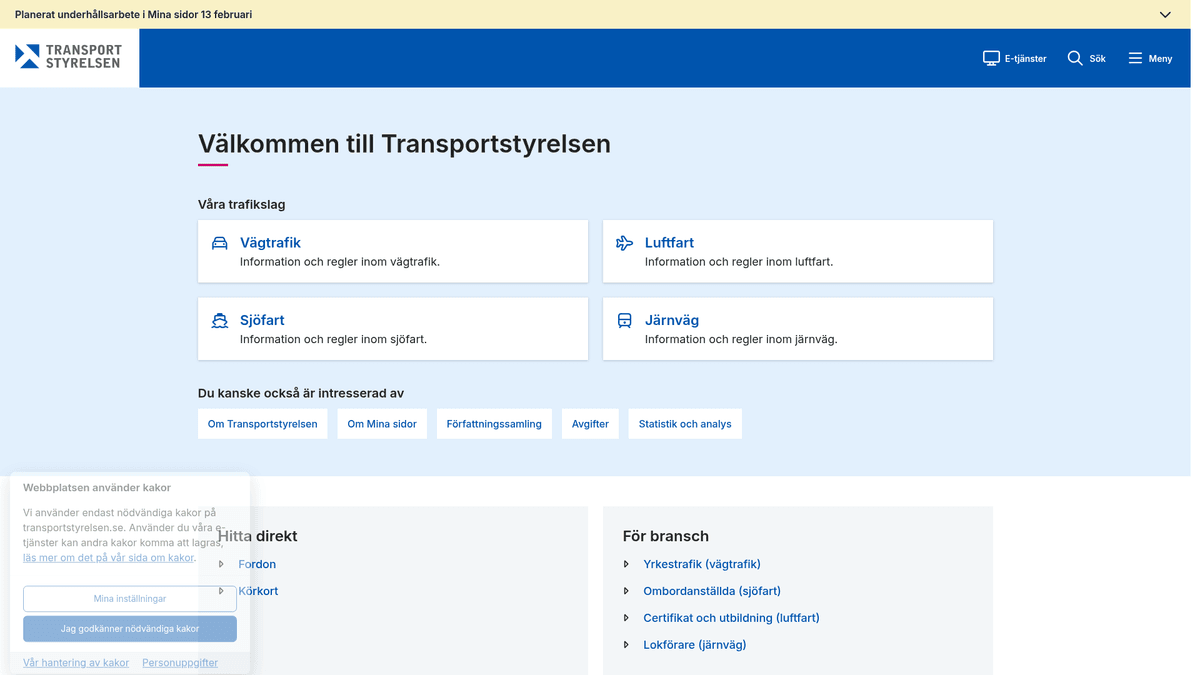
Transportstyrelsen (The Swedish Transport Agency) is the central government authority responsible for the regulation and oversight of road, rail, air, and sea transport in Sweden. One of its most vital public functions is the maintenance of the Swedish Vehicle Registry (Vägtrafikregistret), which contains technical and administrative data for every registered vehicle in the country. This includes details ranging from simple make and model info to complex engine specifications, environmental classifications, and historical inspection outcomes.
For businesses and researchers, the data hosted by Transportstyrelsen is a goldmine for automotive market analysis. Whether you are tracking the rapid adoption of electric vehicles (EVs) in Scandinavia, developing valuation models for used car marketplaces, or monitoring fleet compliance for large logistics operations, this website provides the official source of truth. The site is structured to prioritize safety and public access while maintaining strict privacy standards for sensitive owner information.
Extracting data from this platform allows users to bypass manual entry for thousands of registration numbers. While the technical data is publicly accessible, the site employs sophisticated security measures like Akamai and CAPTCHAs to prevent automated abuse. Successfully scraping this data requires a nuanced approach involving headless browsers and robust session management to navigate the agency's e-services and data portals effectively.
Why Scrape Transportstyrelsen?
Discover the business value and use cases for extracting data from Transportstyrelsen.
Automotive Market Intelligence
Gather detailed technical specifications across the entire Swedish car fleet to identify market trends and the speed of transition to electric mobility.
Dynamic Vehicle Valuation
Feed real-time technical data, including engine power and emission levels, into pricing algorithms to provide accurate valuations for used car marketplaces.
Fleet Compliance Automation
Monitor thousands of vehicles simultaneously for inspection deadlines and tax status to ensure large commercial fleets remain legally compliant without manual checks.
Environmental Policy Research
Extract CO2 emission data and fuel types at scale to evaluate the effectiveness of Swedish environmental regulations and green energy subsidies.
Verification and Fraud Prevention
Verify the authenticity of vehicle information listed on private sales platforms by cross-referencing registration numbers with the official government registry.
Supply Chain and Parts Mapping
Link specific vehicle models to technical engine codes and weight classes to build a precise compatibility engine for automotive spare parts retailers.
Scraping Challenges
Technical challenges you may encounter when scraping Transportstyrelsen.
Sophisticated Bot Detection
The agency utilizes Akamai and Cloudflare protection, which employ behavioral analysis to distinguish between human users and automated scripts.
Regional Access Restrictions
Requests originating from outside of Sweden or from generic data centers are often blocked or subjected to significantly higher CAPTCHA frequencies.
ASP.NET State Management
The search portal relies on complex session tokens like __VIEWSTATE and __EVENTVALIDATION, which must be precisely handled to submit lookup forms successfully.
Dynamic Content Loading
Vehicle technical details are often populated into the DOM via JavaScript after the initial page load, requiring a browser-based scraping approach.
Strict Rate Limiting
The site enforces tight request quotas per session; exceeding these limits leads to immediate IP throttling or temporary blacklisting.
Scrape Transportstyrelsen with AI
No coding required. Extract data in minutes with AI-powered automation.
How It Works
Describe What You Need
Tell the AI what data you want to extract from Transportstyrelsen. Just type it in plain language — no coding or selectors needed.
AI Extracts the Data
Our artificial intelligence navigates Transportstyrelsen, handles dynamic content, and extracts exactly what you asked for.
Get Your Data
Receive clean, structured data ready to export as CSV, JSON, or send directly to your apps and workflows.
Why Use AI for Scraping
No-Code Web Scrapers for Transportstyrelsen
Point-and-click alternatives to AI-powered scraping
Several no-code tools like Browse.ai, Octoparse, Axiom, and ParseHub can help you scrape Transportstyrelsen. These tools use visual interfaces to select elements, but they come with trade-offs compared to AI-powered solutions.
Typical Workflow with No-Code Tools
Common Challenges
Learning curve
Understanding selectors and extraction logic takes time
Selectors break
Website changes can break your entire workflow
Dynamic content issues
JavaScript-heavy sites often require complex workarounds
CAPTCHA limitations
Most tools require manual intervention for CAPTCHAs
IP blocking
Aggressive scraping can get your IP banned
Code Examples
import requests; from bs4 import BeautifulSoup; headers = {'User-Agent': 'Mozilla/5.0'}; url = 'https://www.transportstyrelsen.se/sv/vagtrafik/fordon/sok-uppgifter-om-annat-fordon/'; try: response = requests.get(url, headers=headers); soup = BeautifulSoup(response.text, 'html.parser'); print(f'Page Title: {soup.title.string}'); except Exception as e: print(f'Error: {e}')When to Use
Best for static HTML pages where content is loaded server-side. The fastest and simplest approach when JavaScript rendering isn't required.
Advantages
- ●Fastest execution (no browser overhead)
- ●Lowest resource consumption
- ●Easy to parallelize with asyncio
- ●Great for APIs and static pages
Limitations
- ●Cannot execute JavaScript
- ●Fails on SPAs and dynamic content
- ●May struggle with complex anti-bot systems
from playwright.sync_api import sync_playwright; def scrape_ts(): with sync_playwright() as p: browser = p.chromium.launch(headless=True); page = browser.new_page(); page.goto('https://www.transportstyrelsen.se/sv/vagtrafik/'); page.wait_for_selector('h1'); print(page.title()); browser.close(); scrape_ts()When to Use
Use when content loads dynamically via JavaScript, or when you need to interact with the page (clicks, scrolls, form fills). Handles modern anti-bot detection better.
Advantages
- ●Executes JavaScript like a real browser
- ●Handles SPAs and dynamic content
- ●Better anti-bot evasion with stealth plugins
- ●Can take screenshots and PDFs
Limitations
- ●Slower than HTTP requests
- ●Higher memory/CPU usage
- ●More complex to set up
import scrapy; class TransportSpider(scrapy.Spider): name = 'transport'; start_urls = ['https://www.transportstyrelsen.se/sv/vagtrafik/']; def parse(self, response): yield {'title': response.css('h1::text').get(), 'links': response.css('a::attr(href)').getall()}When to Use
Ideal for large-scale crawling projects that need to scrape thousands of pages. Built-in support for rate limiting, retries, and data pipelines.
Advantages
- ●Built for scale (millions of pages)
- ●Automatic request throttling
- ●Built-in data export pipelines
- ●Middleware system for proxies/headers
Limitations
- ●Steeper learning curve
- ●Overkill for small projects
- ●No native JavaScript rendering
const puppeteer = require('puppeteer'); (async () => { const browser = await puppeteer.launch(); const page = await browser.newPage(); await page.goto('https://www.transportstyrelsen.se/sv/vagtrafik/'); const title = await page.title(); console.log(title); await browser.close(); })();When to Use
Choose this if you're in a Node.js/JavaScript ecosystem or need tight integration with frontend tools. Similar capabilities to Playwright.
Advantages
- ●Native JavaScript/TypeScript support
- ●Chrome DevTools Protocol access
- ●Large ecosystem and community
- ●Good for JS-heavy projects
Limitations
- ●Chrome-only (vs Playwright's multi-browser)
- ●Similar overhead to Playwright
- ●Less mature stealth options
What You Can Do With Transportstyrelsen Data
Explore practical applications and insights from Transportstyrelsen data.
Swedish EV Tracker
Analyze the growth and distribution of electric vehicles across Swedish counties for environmental research.
How to implement:
- 1Scrape registration counts by fuel type from the open data portal
- 2Categorize results by year and municipality
- 3Visualize regional EV density on a heat map
Use Automatio to extract data from Transportstyrelsen and build these applications without writing code.
Car Valuation Engine
Build a tool that estimates used car values based on engine specs and technical attributes from the registry.
How to implement:
- 1Input target registration numbers into the lookup scraper
- 2Extract power, weight, and age attributes
- 3Correlate attributes with market price data points
- 4Generate valuation reports for automotive dealers
Use Automatio to extract data from Transportstyrelsen and build these applications without writing code.
Corporate Fleet Monitor
Automatically track the inspection and tax status of large vehicle fleets to ensure legal compliance.
How to implement:
- 1Upload a batch of fleet registration numbers
- 2Schedule a weekly scan for tax and inspection status
- 3Extract 'Next Inspection' dates for all vehicles
- 4Send automated alerts for vehicles with expired status
Use Automatio to extract data from Transportstyrelsen and build these applications without writing code.
Parts Compatibility Database
Create a database mapping vehicle technical specifications to compatible spare parts.
How to implement:
- 1Scrape engine codes and technical details for common makes
- 2Map registry data to manufacturer part numbers
- 3Update compatibility lists for e-commerce platforms
Use Automatio to extract data from Transportstyrelsen and build these applications without writing code.
Traffic Safety Analytics
Correlate vehicle age and type with safety statistics to identify high-risk vehicle categories.
How to implement:
- 1Extract accident statistics from official datasets
- 2Cross-reference accident data with vehicle technical specs
- 3Apply statistical models to identify safety correlations
Use Automatio to extract data from Transportstyrelsen and build these applications without writing code.
Supercharge your workflow with AI Automation
Automatio combines the power of AI agents, web automation, and smart integrations to help you accomplish more in less time.
What to get right first
Expert advice for successfully extracting data from Transportstyrelsen.
Prioritize Swedish Residential IPs
Always use an exit node located in Sweden; data center IPs are quickly flagged by Akamai's security perimeter as suspicious automated traffic.
Handle ASP.NET Tokens with Care
Ensure your session persists between the initial search page load and the form submission to correctly pass the ViewState and EventValidation tokens.
Implement Random User Interaction
Simulate human-like delays and mouse movements when interacting with the search form to reduce the probability of triggering an interactive CAPTCHA.
Monitor for Site Maintenance
The Swedish Transport Agency often performs maintenance on weekend nights; ensure your scraper has retry logic to handle these scheduled outages.
Use Realistic Browser Fingerprints
Rotate headers such as User-Agent, Sec-Ch-Ua, and Accept-Language to match common Swedish desktop browser configurations.
Leverage Open Data for Statistics
If you only need bulk statistical data rather than specific plate lookups, utilize their EntryScape portal which is more scraper-friendly.
Related Web Scraping
Frequently Asked Questions
Find answers to common questions about Transportstyrelsen
Is it legal to scrape data from Transportstyrelsen?
Vehicle technical data is considered public information in Sweden under the principle of public access (Offentlighetsprincipen). However, you must comply with the website's terms of service and ensure that you are not harvesting personal data for purposes that violate GDPR regulations.
Does Transportstyrelsen have an official API for developers?
Yes, they provide an official Open Data portal via EntryScape that offers datasets in JSON and CSV formats. However, for real-time, plate-specific technical lookups, the public search interface is often the only way to get the most current data for a specific vehicle.
How can I avoid getting blocked while scraping?
The most effective strategy is to use Swedish residential proxies and implement strict rate limiting to mimic a human user's pace. Additionally, using a headless browser that correctly handles cookies and ASP.NET session tokens will significantly reduce the risk of detection.
What is the best format for the scraped vehicle data?
JSON is generally the best format because vehicle records contain nested technical specifications like engine power, emissions, and weights. JSON allows you to maintain this hierarchy, making it easier to integrate the data into valuation models or external databases.
How often should I scrape the registry for fleet monitoring?
Most vehicle data, such as inspection status and tax deadlines, only changes on a monthly or yearly basis. Scraping once a week or even once a month is usually sufficient for fleet compliance, whereas market prices might require more frequent updates.
What proxies work best for this website?
Swedish residential proxies are the gold standard for Transportstyrelsen. Data center proxies are frequently blocked by Akamai bot management, while residential IPs are seen as legitimate traffic from Swedish citizens and are rarely challenged.
Can I scrape vehicle owner information?
No, owner names and addresses are generally not available through the public search tool for 'other vehicles.' Accessing that data typically requires a Swedish BankID for personal authentication or a professional license for legitimate business purposes.
Why is my scraper hitting a CAPTCHA immediately?
This is usually caused by an inconsistent browser fingerprint or the use of a non-Swedish IP address. Akamai's 'Managed Challenge' is triggered when the request headers do not match the expected behavior of a standard web browser or if the IP is on a known blacklist.