

PhotoPrism Self-Hosted, Deploy in One Click
PhotoPrism is a private, AI-powered photo management app that organizes your collection. Deploy it to get your own server, full data ownership, and automatic HTTPS.
Photoprism
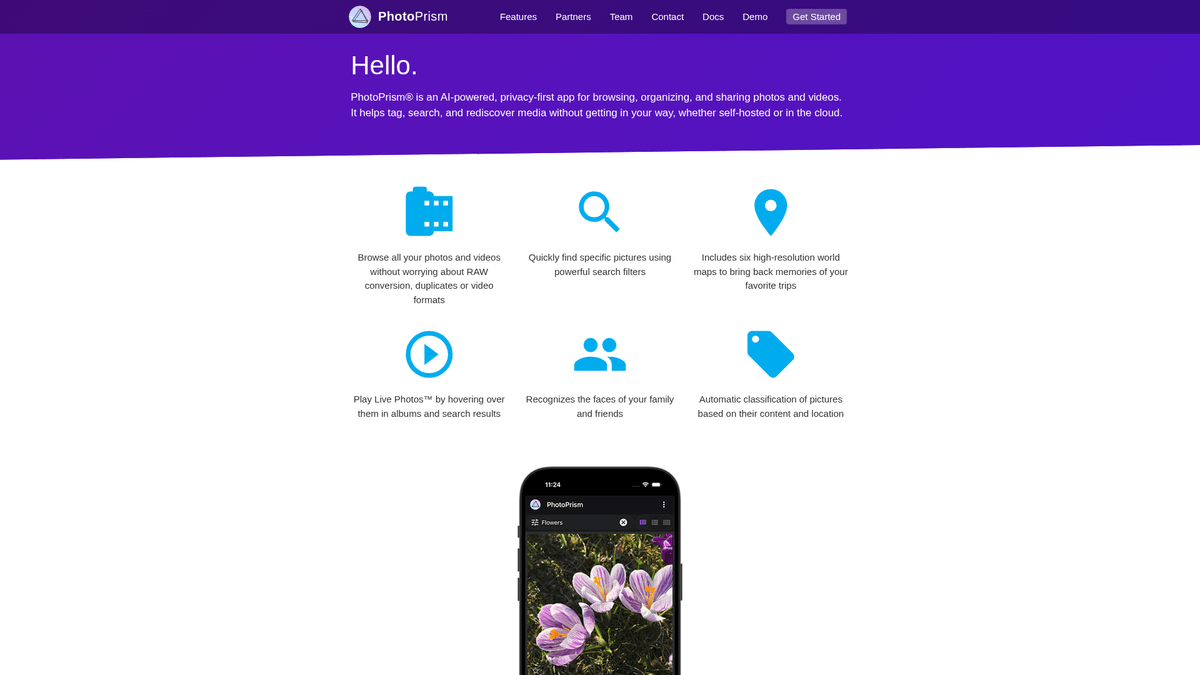
Media & StreamingPhotoPrism® is an AI-Powered Photos App for the Decentralized Web. It makes use of the latest technologies to tag and find pictures automatically without getting in your way.
What you get when you deploy Photoprism
The server we rent for it, what it costs, and what the installer will ask you.
- Server
- CX23 · 2 vCPU · 4 GB RAM
- From
- $9/month
- Setup
- No configuration required
Included with every deployment
- Dedicated server, one app per machine
- HTTPS certificate issued automatically
- Free subdomain, custom domain optional
- Restart, resize, snapshot and restore
The project
Everything this page links to outside Automatio.
Deploy Photoprism in one click
On your own server, with your own data. No terminal, no Docker commands, no certificate setup.
- 1
Pick a size
Start on the smallest server that fits the app. Resize later without reinstalling.
- 2
Press deploy
We rent the server, install the app with Docker, and point a subdomain at it.
- 3
Watch it come up
Provisioning runs unattended and takes a few minutes. When the HTTPS certificate lands, the app is live and your login details are on the deployment page.
Server size
Billed monthly with your Automatio subscription. Destroy the server any time and the charge stops. Every server: 20 TB traffic/month included, then $2.50 per TB.
Key Capabilities
Explore what Automatio can do for this use case
Face Recognition
The app uses TensorFlow to detect and group faces in your library. It learns to recognize people automatically as you name them, building a local biometric index. Unlike cloud services, this data never leaves your server and is not used for advertising profile building.
- 1Powered by TensorFlow machine learning
- 2Private local biometric storage
- 3Automatic grouping of similar faces
- 4Manual face naming and correction
- 5Privacy-first recognition logic
Key Capabilities
- Face Recognition
The app uses TensorFlow to detect and group faces in your library. It learns to recognize people automatically as you name them, building a local biometric index. Unlike cloud services, this data never leaves your server and is not used for advertising profile building.
- Powered by TensorFlow machine learning
- Private local biometric storage
- Automatic grouping of similar faces
- Manual face naming and correction
- Privacy-first recognition logic
- Visual AI Search
It automatically classifies images by content, identifying objects, themes, and colors. You can search for terms like 'mountain' or 'cat' without manual tagging. This engine makes even disorganized folder structures instantly searchable by context and vibe.
- Object and scene detection
- Color-based filtering and search
- Automatic keyword generation
- Vibe and palette classification
- Localized AI processing
- Interactive Map View
By extracting GPS metadata, the software places your photos on an interactive world map. You can zoom into specific cities or regions to relive travel memories through high-resolution thumbnails. It includes privacy-focused geocoding to keep your location data secure.
- GPS metadata extraction
- Interactive map layers
- Location-based filtering
- Privacy-first geocoding
- Travel timeline visualization
- Advanced File Support
The system handles professional RAW files, modern HEIC formats, and high-quality JPEGs. It generates optimized previews on the fly for fast browsing across mobile and desktop. It is designed to be a central hub for both mobile shots and professional DSLR archives.
- RAW, HEIC, and JPEG support
- On-the-fly thumbnail generation
- Video file indexing and playback
- Sidecar XMP file support
- EXIF metadata extraction
Why self-host Photoprism
What to know first
Managed, DIY, or One-Click?
The three realistic ways to run {name}, compared honestly.
| Aspect | Managed SaaS | DIY on a VPS | Automatio one-click |
|---|---|---|---|
| Data Privacy | Shared with provider AI | 100% Private | 100% Private |
| Setup Time | Instant | 1-2 Hours (Manual) | A few minutes |
| SSL/HTTPS | Managed | Manual setup | Automatic |
| Storage Cost | Per GB subscriptions | Flat VPS cost | Flat VPS cost |
Data Privacy
Setup Time
SSL/HTTPS
Storage Cost
Who this is for
People who actually run Photoprism on their own server, and what changes when they do.
a privacy-conscious parent
worried about big tech companies scanning private family photos for data profiling
gives you a secure vault where family memories stay private, local, and fully under your control
- Index ten years of baby photos
- Share a secure link with grandparents
- View holiday photos on a private map
a professional photographer
struggling to organize thousands of RAW files spread across different hard drives
creates a searchable, web-accessible index of your entire archive with high-quality previews
- Search archives by color or object
- Preview RAW files in a browser
- Sync mobile shots via WebDAV
a homelab tinkerer
wants Google Photos features without the privacy trade-offs or recurring monthly fees
replaces proprietary cloud services with a high-performance open source alternative
- Configure Docker-based folder sync
- Run facial recognition on a local VPS
- Expose the library over a private domain
a small non-profit team
spending budget on cloud storage seats for media archives
provides a collaborative photo library with a one-time flat server cost regardless of seat count
- Centralize years of event media
- Create public albums for donors
- Tag volunteers using AI recognition
About This App
What this app does and where it fits.
Private AI Photo Management
PhotoPrism is an open-source photo management application designed to organize and simplify the browsing of large image collections without sacrificing privacy. Built on Go and TensorFlow, it provides the powerful features typically found in proprietary cloud services like Google Photos, such as facial recognition, object detection, and geographical mapping, but runs entirely on hardware you control. It addresses the growing concern over data harvesting in mainstream cloud storage solutions. The project remains independent, ensuring that user data is never used for corporate AI training.
How It Works
At its core, the software indexes your existing photo folders without moving or modifying your original files. It uses machine learning to analyze every image, detecting faces, identifying objects, and even classifying the color palette of a photo. This metadata is stored in a local MariaDB database, allowing for fast searches and dynamic categorization. The application supports a wide range of formats, including JPEG, HEIC, and professional RAW formats. When you browse your library, it serves high-quality, pre-rendered thumbnails to ensure a smooth, lag-free experience even on mobile devices. It also supports WebDAV, allowing you to connect directly via system file explorers.
The First Hour
When you first launch the app, you point it at your photo directory and start the indexing process. Depending on the size of your library, the AI will begin scanning and grouping images. Within the first hour, you will see your photos appearing in the timeline and map views. You can start naming the people identified by the facial recognition engine, which then learns to find them in other shots. It feels like magic to watch a decade of disorganized folders suddenly become a structured archive where you can find 'vacation' or 'sunsets' with a single click. You can also set up a mobile sync tool like PhotoSync to start backing up your phone's camera roll.
PhotoPrism vs. Alternatives
Compared to basic gallery apps, PhotoPrism is significantly more focused on the search and metadata experience, offering better performance and more advanced AI features. While Immich is a popular modern alternative, PhotoPrism is widely considered more mature and stable, with a strong focus on maintaining the integrity of your original file structure and XMP sidecar metadata. It fits perfectly into a self-hosted ecosystem for users who want a professional-grade photo gallery that they can share with family members while knowing their data is safe. Unlike cloud providers, it doesn't lock you into a proprietary ecosystem; your metadata stays with your files.
Community Feedback
See what the community thinks about Photoprism
“I've just installed Photoprism because being able to search through 30+ years of photos with AI assistance sounds really appealing.”
“PhotoPrism has been our family library for a while, but getting photos onto the digital frames around the house was still manual. So I built Framewrk to close that gap.”
“Before they land in PhotoPrism I strip the metadata, GPS, camera serial, manufacturer tags, anything that shouldn't travel with a published photo.”
“My microSD card that runs the OS and photoprism is 16 GB, and it usually gets full after only 2,000 photos get uploaded, which feels incredibly small.”
“我愿称之为自托管界的王炸,这项目真的顶:自己搭个私有相册,手机照片自动备份,再也不用怕网盘跑路.”
“PhotoPrism is widely considered more mature and stable compared to some of the newer alternatives popping up.”
Related Videos
Watch tutorials, reviews, and discussions about Photoprism
“PhotoPrism is an AI-powered photos app for the decentralized web, meaning you can host it yourself and you own your data.”
“One of the standout features is the search; because it uses Google TensorFlow, it can identify objects and faces.”
“The setup uses Docker Compose, which makes it really easy to deploy and manage on your own hardware.”
“It doesn't just store files; it indexes them, so you can keep your existing folder structure if you want.”
“The map view provides a geographical overview of your collection if your photos have GPS metadata.”
“The AI tagging is surprisingly accurate even on older hardware, though more RAM definitely helps.”
“One thing to watch out for is the initial indexing; if you have 100,000 photos, it's going to take a while.”
“It handles RAW files really well, which is a big deal for photographers moving away from Adobe or Google.”
“The interface is clean and responsive, feeling much more like a modern web app than an old file browser.”
“You can set it up to read-only mode if you're worried about the software touching your original masters.”
“The facial recognition works entirely locally, so your biometric data isn't being sent to a third party.”
“I highly recommend using a SSD for the database and sidecar files to keep the UI snappy.”
“Sharing albums with family is straightforward, but user management is a bit more manual than some other apps.”
“It supports WebDAV, so you can easily sync photos from your phone using apps like PhotoSync.”
“The search filters are very powerful, allowing you to filter by camera model, lens, or even specific colors.”
Supercharge your workflow with AI Automation
Automatio combines the power of AI agents, web automation, and smart integrations to help you accomplish more in less time.
What to get right first
The decisions that are painful to change later in Photoprism.
Use SSD Storage
The database and thumbnail cache perform significantly better on solid-state storage. Running on spinning disks will make indexing feel very slow.
Allocate More RAM
Indexing and face recognition are memory-intensive. Ensure your server has at least 4GB of RAM (CX23 tier) for a smooth initial scan of large libraries.
Sync via WebDAV
Use a mobile app like PhotoSync to automatically upload new phone photos to your server via WebDAV for a seamless background backup.
Testimonials
What Our Users Say
Join thousands of satisfied users who have transformed their workflow
Jonathan Kogan
Co-Founder/CEO, rpatools.io
Automatio is one of the most used for RPA Tools both internally and externally. It saves us countless hours of work and we realized this could do the same for other startups and so we choose Automatio for most of our automation needs.
Mohammed Ibrahim
CEO, qannas.pro
I have used many tools over the past 5 years, Automatio is the Jack of All trades.. !! it could be your scraping bot in the morning and then it becomes your VA by the noon and in the evening it does your automations.. its amazing!
Ben Bressington
CTO, AiChatSolutions
Automatio is fantastic and simple to use to extract data from any website. This allowed me to replace a developer and do tasks myself as they only take a few minutes to setup and forget about it. Automatio is a game changer!
Sarah Chen
Head of Growth, ScaleUp Labs
We've tried dozens of automation tools, but Automatio stands out for its flexibility and ease of use. Our team productivity increased by 40% within the first month of adoption.
David Park
Founder, DataDriven.io
The AI-powered features in Automatio are incredible. It understands context and adapts to changes in websites automatically. No more broken scrapers!
Emily Rodriguez
Marketing Director, GrowthMetrics
Automatio transformed our lead generation process. What used to take our team days now happens automatically in minutes. The ROI is incredible.
Jonathan Kogan
Co-Founder/CEO, rpatools.io
Automatio is one of the most used for RPA Tools both internally and externally. It saves us countless hours of work and we realized this could do the same for other startups and so we choose Automatio for most of our automation needs.
Mohammed Ibrahim
CEO, qannas.pro
I have used many tools over the past 5 years, Automatio is the Jack of All trades.. !! it could be your scraping bot in the morning and then it becomes your VA by the noon and in the evening it does your automations.. its amazing!
Ben Bressington
CTO, AiChatSolutions
Automatio is fantastic and simple to use to extract data from any website. This allowed me to replace a developer and do tasks myself as they only take a few minutes to setup and forget about it. Automatio is a game changer!
Sarah Chen
Head of Growth, ScaleUp Labs
We've tried dozens of automation tools, but Automatio stands out for its flexibility and ease of use. Our team productivity increased by 40% within the first month of adoption.
David Park
Founder, DataDriven.io
The AI-powered features in Automatio are incredible. It understands context and adapts to changes in websites automatically. No more broken scrapers!
Emily Rodriguez
Marketing Director, GrowthMetrics
Automatio transformed our lead generation process. What used to take our team days now happens automatically in minutes. The ROI is incredible.
Related Self-Hosted Apps

jellyfin
from $9/mo
Jellyfin is a Free Software Media System that puts you in control of managing and streaming your media.

Navidrome
from $9/mo
Navidrome is a modern music server and streamer compatible with Subsonic/Airsonic. Stream your music collection anywhere.

Immich
from $9/mo
High performance self-hosted photo and video backup solution directly from your mobile phone.

Audiobookshelf
from $9/mo
Audiobookshelf is a self-hosted server designed to manage and play your audiobooks and podcasts. It works best when you have an organized directory structure.
Frequently Asked Questions
Find answers to common questions about Photoprism