
检测到反机器人保护
- Cloudflare
- 企业级WAF和机器人管理。使用JavaScript挑战、验证码和行为分析。需要带隐身设置的浏览器自动化。
- 速率限制
- 限制每个IP/会话在一段时间内的请求数。可通过轮换代理、请求延迟和分布式抓取绕过。
- 浏览器指纹
- 通过浏览器特征识别机器人:canvas、WebGL、字体、插件。需要伪装或真实浏览器配置文件。
- Dynamic CSS Classes
- JavaScript挑战
- 需要执行JavaScript才能访问内容。简单请求会失败;需要Playwright或Puppeteer等无头浏览器。
关于CoinMarketCap
了解CoinMarketCap提供什么以及可以提取哪些有价值的数据。
加密数据的权威机构
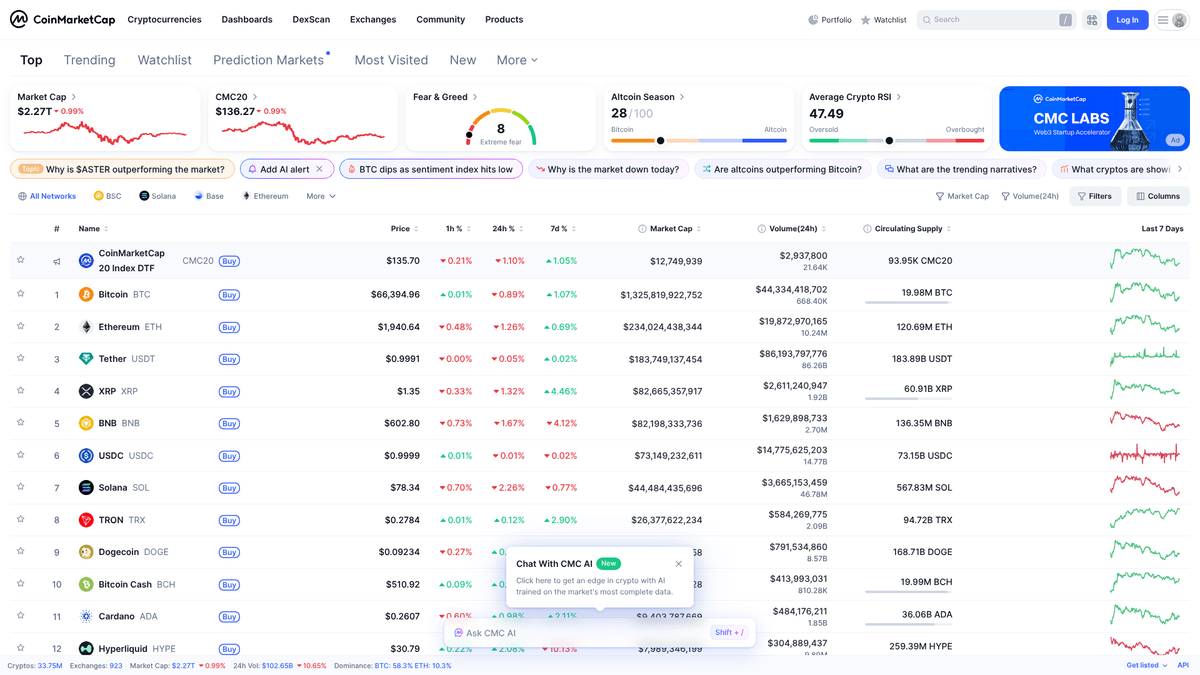
CoinMarketCap 是全球引用最多的加密资产价格追踪网站,提供数千种数字货币的准确实时数据。它成立于 2013 年,通过将全球数百家交易所的数据汇总到一个统一且透明的界面中,成为加密生态系统的关键枢纽。该平台对于追踪市值、交易量和供应指标至关重要。
数据深度与结构
该网站包含高度结构化的加密货币数据,包括排名、历史图表、交易所市场,以及诸如合约地址和社交链接等特定项目信息。对于开发者和投资者而言,这些数据是构建投资组合追踪器、情绪分析工具和自动化交易系统的基础。
为什么抓取至关重要
抓取 CoinMarketCap 非常有价值,因为它提供了零散加密市场的综合视图。通过自动化数据提取,用户可以绕过免费 API 层级的限制,实时监控整个市场的价格波动,并进行深度历史分析,而无需手动输入数据。
为什么要抓取CoinMarketCap?
了解从CoinMarketCap提取数据的商业价值和用例。
用于算法交易机器人的实时价格监控
汇总历史成交量以进行深度市场研究
追踪新币上市和最近添加的项目
为区块链服务提供商进行竞争分析
构建自定义加密投资组合管理工具
基于社区链接和人气进行情绪分析
抓取挑战
抓取CoinMarketCap时可能遇到的技术挑战。
激进的 Cloudflare 机器人管理封锁标准请求
高度依赖 JavaScript 渲染数据表格
定期更改的混淆 CSS 选择器
对 IP 地址的严格速率限制,使高速爬取变得困难
动态内容加载,需要滚动才能触发数据获取
使用AI抓取CoinMarketCap
无需编码。通过AI驱动的自动化在几分钟内提取数据。
工作原理
描述您的需求
告诉AI您想从CoinMarketCap提取什么数据。只需用自然语言输入 — 无需编码或选择器。
AI提取数据
我们的人工智能浏览CoinMarketCap,处理动态内容,精确提取您要求的数据。
获取您的数据
接收干净、结构化的数据,可导出为CSV、JSON,或直接发送到您的应用和工作流程。
为什么使用AI进行抓取
AI让您无需编写代码即可轻松抓取CoinMarketCap。我们的AI驱动平台利用人工智能理解您想要什么数据 — 只需用自然语言描述,AI就会自动提取。
How to scrape with AI:
- 描述您的需求: 告诉AI您想从CoinMarketCap提取什么数据。只需用自然语言输入 — 无需编码或选择器。
- AI提取数据: 我们的人工智能浏览CoinMarketCap,处理动态内容,精确提取您要求的数据。
- 获取您的数据: 接收干净、结构化的数据,可导出为CSV、JSON,或直接发送到您的应用和工作流程。
Why use AI for scraping:
- 自动绕过 Cloudflare 和反机器人保护
- 用于选择复杂动态元素的无代码界面
- 计划执行功能支持一致的数据快照
- 直接将结构化数据导出到 Google 表格或 API
CoinMarketCap的无代码网页抓取工具
AI驱动抓取的点击式替代方案
Browse.ai、Octoparse、Axiom和ParseHub等多种无代码工具可以帮助您在不编写代码的情况下抓取CoinMarketCap。这些工具通常使用可视化界面来选择数据,但可能在处理复杂的动态内容或反爬虫措施时遇到困难。
无代码工具的典型工作流程
常见挑战
学习曲线
理解选择器和提取逻辑需要时间
选择器失效
网站更改可能会破坏整个工作流程
动态内容问题
JavaScript密集型网站需要复杂的解决方案
验证码限制
大多数工具需要手动处理验证码
IP封锁
过于频繁的抓取可能导致IP被封
CoinMarketCap的无代码网页抓取工具
Browse.ai、Octoparse、Axiom和ParseHub等多种无代码工具可以帮助您在不编写代码的情况下抓取CoinMarketCap。这些工具通常使用可视化界面来选择数据,但可能在处理复杂的动态内容或反爬虫措施时遇到困难。
无代码工具的典型工作流程
- 安装浏览器扩展或在平台注册
- 导航到目标网站并打开工具
- 通过点击选择要提取的数据元素
- 为每个数据字段配置CSS选择器
- 设置分页规则以抓取多个页面
- 处理验证码(通常需要手动解决)
- 配置自动运行的计划
- 将数据导出为CSV、JSON或通过API连接
常见挑战
- 学习曲线: 理解选择器和提取逻辑需要时间
- 选择器失效: 网站更改可能会破坏整个工作流程
- 动态内容问题: JavaScript密集型网站需要复杂的解决方案
- 验证码限制: 大多数工具需要手动处理验证码
- IP封锁: 过于频繁的抓取可能导致IP被封
代码示例
import requests
from bs4 import BeautifulSoup

# Header 对于模拟真实浏览器会话至关重要
headers = {
    'User-Agent': 'Mozilla/5.0 (Windows NT 10.0; Win64; x64) AppleWebKit/537.36 (KHTML, like Gecko) Chrome/120.0.0.0 Safari/537.36'
}

def scrape_cmc():
    url = 'https://coinmarketcap.com/'
    try:
        response = requests.get(url, headers=headers)
        response.raise_for_status()
        soup = BeautifulSoup(response.text, 'html.parser')

        # CMC 使用动态类;找到表格是第一步
        table = soup.find('table', class_='cmc-table')
        rows = table.find('tbody').find_all('tr', limit=10)

        for row in rows:
            name = row.find('p', class_='coin-item-name').text if row.find('p', class_='coin-item-name') else 'N/A'
            print(f'资产名称: {name}')
    except Exception as e:
        print(f'错误: {e}')

if __name__ == '__main__':
    scrape_cmc()
使用场景
最适合JavaScript较少的静态HTML页面。非常适合博客、新闻网站和简单的电商产品页面。
优势
- ●执行速度最快(无浏览器开销)
- ●资源消耗最低
- ●易于使用asyncio并行化
- ●非常适合API和静态页面
局限性
- ●无法执行JavaScript
- ●在SPA和动态内容上会失败
- ●可能难以应对复杂的反爬虫系统
如何用代码抓取CoinMarketCap
Python + Requests
import requests
from bs4 import BeautifulSoup
# Header 对于模拟真实浏览器会话至关重要
headers = {
'User-Agent': 'Mozilla/5.0 (Windows NT 10.0; Win64; x64) AppleWebKit/537.36 (KHTML, like Gecko) Chrome/120.0.0.0 Safari/537.36'
}
def scrape_cmc():
url = 'https://coinmarketcap.com/'
try:
response = requests.get(url, headers=headers)
response.raise_for_status()
soup = BeautifulSoup(response.text, 'html.parser')
# CMC 使用动态类;找到表格是第一步
table = soup.find('table', class_='cmc-table')
rows = table.find('tbody').find_all('tr', limit=10)
for row in rows:
name = row.find('p', class_='coin-item-name').text if row.find('p', class_='coin-item-name') else 'N/A'
print(f'资产名称: {name}')
except Exception as e:
print(f'错误: {e}')
if __name__ == '__main__':
scrape_cmc()Python + Playwright
from playwright.sync_api import sync_playwright

def run():
    with sync_playwright() as p:
        # 启动有头浏览器有时有助于调试
        browser = p.chromium.launch(headless=True)
        context = browser.new_context(user_agent='Mozilla/5.0 (Windows NT 10.0; Win64; x64) Chrome/120.0.0.0')
        page = context.new_page()

        page.goto('https://coinmarketcap.com/')

        # 等待动态 React 表格完全渲染
        page.wait_for_selector('table.cmc-table')

        # 使用特定类提取前 10 个代币名称
        coins = page.query_selector_all('.coin-item-name')
        for coin in coins[:10]:
            print(coin.inner_text())

        browser.close()

run()Python + Scrapy
import scrapy

class CoinSpider(scrapy.Spider):
    name = 'coin_spider'
    start_urls = ['https://coinmarketcap.com/']

    def parse(self, response):
        # Scrapy 选择器可以高效处理 CSS 路径
        for row in response.css('table.cmc-table tbody tr'):
            yield {
                'name': row.css('p.coin-item-name::text').get(),
                'symbol': row.css('p.coin-item-symbol::text').get(),
                'price': row.css('div.sc-131cee3c-0 span::text').get()
            }

        # 处理后续页面的基本分页
        next_page = response.css('li.next a::attr(href)').get()
        if next_page:
yield response.follow(next_page, self.parse)Node.js + Puppeteer
const puppeteer = require('puppeteer');

(async () => {
  const browser = await puppeteer.launch();
  const page = await browser.newPage();
  await page.setViewport({ width: 1280, height: 800 });

  // 使用 networkidle2 确保大多数 React 组件已完成加载
  await page.goto('https://coinmarketcap.com/', { waitUntil: 'networkidle2' });

  const data = await page.evaluate(() => {
    const results = [];
    const rows = document.querySelectorAll('table.cmc-table tbody tr');
    rows.forEach((row, index) => {
      if (index < 10) {
        results.push({
          name: row.querySelector('.coin-item-name')?.innerText,
          price: row.querySelector('.sc-131cee3c-0')?.innerText
        });
      }
    });
    return results;
  });

  console.log(data);
  await browser.close();
})();您可以用CoinMarketCap数据做什么
探索CoinMarketCap数据的实际应用和洞察。
自动化套利发现
交易者可以使用数据来识别 CMC 上列出的多个交易所之间的价格差异。
如何实现:
- 1抓取特定代币在所有列出市场中的价格和流动性。
- 2将价格与实时交易所 API 数据进行对比。
- 3当价差足以覆盖交易费用时执行交易。
使用Automatio从CoinMarketCap提取数据,无需编写代码即可构建这些应用。
您可以用CoinMarketCap数据做什么
- 自动化套利发现
交易者可以使用数据来识别 CMC 上列出的多个交易所之间的价格差异。
- 抓取特定代币在所有列出市场中的价格和流动性。
- 将价格与实时交易所 API 数据进行对比。
- 当价差足以覆盖交易费用时执行交易。
- 新币上市情绪分析
研究人员可以追踪新项目,观察社交信号如何与价格走势相关联。
- 每天抓取 CMC 的“最近添加”板块。
- 提取官方项目链接和社交媒体账号。
- 分析前 48 小时的社交媒体增长情况,以预测市场动能。
- 历史市值 modeling
金融分析师可以根据供应指标和随时间变化的市值构建 model。
- 抓取前 100 名加密货币的历史快照。
- 提取流通供应量和总供应量数据。
- 应用回归 model 来预测未来的市值分布。
- 加密领域潜在客户开发
服务提供商可以寻找在营销、法律或技术方面需要帮助的新项目。
- 从新币详情页抓取联系信息或社交链接。
- 按市值或类别(如 DeFi、游戏)筛选项目。
- 通过提取的社交平台联系项目负责人。
抓取CoinMarketCap的专业技巧
成功从CoinMarketCap提取数据的专家建议。
使用高质量的住宅代理以避免 Cloudflare 403 Forbidden 错误。
在页面源码中查找 window.__NEXT_DATA__ 脚本标签以获取原始 JSON 数据。
轮换 User-Agent 字符串和 TLS 指纹以绕过高级机器人检测。
实施 3-10 秒之间的随机休眠间隔,以模拟自然浏览行为。
在非高峰时段进行抓取,以减少遇到激进速率限制的可能性。
使用像 Playwright 这样的无头浏览器来处理繁重的 JavaScript 渲染需求。
相关 Web Scraping
How to Scrape Moon.ly | Step-by-Step NFT Data Extraction Guide
How to Scrape Yahoo Finance: Extract Stock Market Data
How to Scrape Rocket Mortgage: A Comprehensive Guide
How to Scrape Open Collective: Financial and Contributor Data Guide
How to Scrape jup.ag: Jupiter DEX Web Scraper Guide
How to Scrape Indiegogo: The Ultimate Crowdfunding Data Extraction Guide
How to Scrape ICO Drops: Comprehensive Crypto Data Guide
How to Scrape Crypto.com: Comprehensive Market Data Guide
关于CoinMarketCap的常见问题
查找关于CoinMarketCap的常见问题答案