
如何抓取 pump.fun:实时 Solana 数据技术指南
了解如何抓取 pump.fun 以获取实时的 Solana token 发布、market cap 和 bonding curve 数据。构建高频交易机器人和 rug-pull 警报。
检测到反机器人保护
- Cloudflare
- 企业级WAF和机器人管理。使用JavaScript挑战、验证码和行为分析。需要带隐身设置的浏览器自动化。
- 速率限制
- 限制每个IP/会话在一段时间内的请求数。可通过轮换代理、请求延迟和分布式抓取绕过。
- 浏览器指纹
- 通过浏览器特征识别机器人:canvas、WebGL、字体、插件。需要伪装或真实浏览器配置文件。
- WebSockets
关于pump.fun
了解pump.fun提供什么以及可以提取哪些有价值的数据。
Solana Meme 币的中心
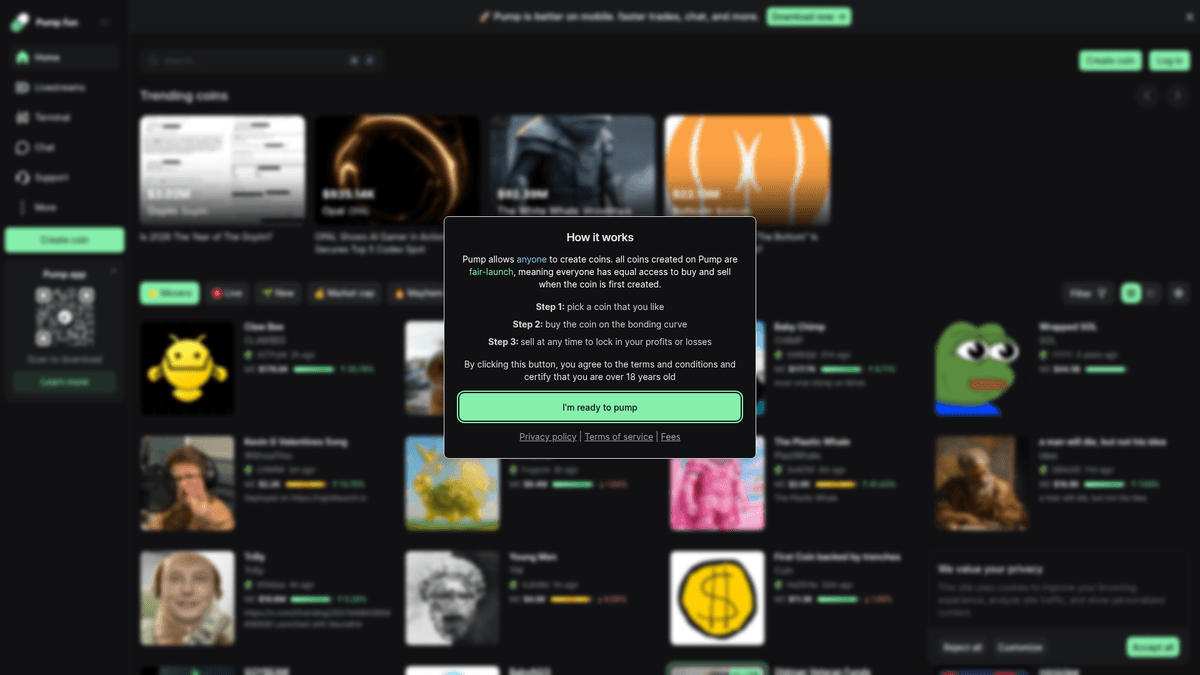
pump.fun 是 Solana 区块链上的一个去中心化金融 (DeFi) 平台,允许用户立即启动 meme 币而无需提供初始流动性。它使用独特的 'bonding curve'(联合曲线)机制,价格随购买人数增加而上涨,一旦达到特定的 market cap 阈值,token 就会迁移到 Raydium 等主流去中心化交易所。该平台已成为 Solana meme 币生态系统的中心,每天承载数千个新 token 的发布。
高频 Token 数据
该网站提供新创建 token、其 market cap、bonding curve 进度以及详细交易历史的实时动态。它还包括社交链接(Twitter/Telegram)、创建者钱包地址以及每个 token 的实时聊天日志。由于每隔几秒就有新项目发布,该网站是一个高频数据源,需要专门的抓取技术才能进行有效监控。
为什么这些数据至关重要
对于构建狙击机器人(sniping bots)、情绪分析工具或 rug-pull 检测服务的加密货币交易者和开发者来说,抓取 pump.fun 极具价值。通过实时提取 token 元数据和持有者行为,用户可以在高动量项目进入主流交易所之前识别它们,并自动化入场。鉴于 meme 币交易的高风险,拥有自动化的数据优势是一项显著的竞争优势。
为什么要抓取pump.fun?
了解从pump.fun提取数据的商业价值和用例。
在 Solana token 创建的毫秒级瞬间识别新发布。
监控 bonding curve 里程碑以预测 Raydium 迁移。
分析创建者钱包历史,识别连环诈骗者或高成功率开发者。
从实时评论流中汇总社区情绪。
基于 market cap 动量构建自动化的离频狙击机器人。
提取社交媒体链接,在 X/Telegram 上进行自动情绪分析。
抓取挑战
抓取pump.fun时可能遇到的技术挑战。
激进的 Cloudflare 防护,包括 403 挑战和 JS 指纹识别。
通过 WebSocket 而非标准 HTTP 请求交付的实时数据更新。
使用 React/Next.js 的极度动态 DOM 结构,无需页面重新加载即可更新。
针对高频请求的严格 IP 速率限制。
极高的延迟敏感性,每一秒对交易优势都至关重要。
使用AI抓取pump.fun
无需编码。通过AI驱动的自动化在几分钟内提取数据。
工作原理
描述您的需求
告诉AI您想从pump.fun提取什么数据。只需用自然语言输入 — 无需编码或选择器。
AI提取数据
我们的人工智能浏览pump.fun,处理动态内容,精确提取您要求的数据。
获取您的数据
接收干净、结构化的数据,可导出为CSV、JSON,或直接发送到您的应用和工作流程。
为什么使用AI进行抓取
AI让您无需编写代码即可轻松抓取pump.fun。我们的AI驱动平台利用人工智能理解您想要什么数据 — 只需用自然语言描述,AI就会自动提取。
How to scrape with AI:
- 描述您的需求: 告诉AI您想从pump.fun提取什么数据。只需用自然语言输入 — 无需编码或选择器。
- AI提取数据: 我们的人工智能浏览pump.fun,处理动态内容,精确提取您要求的数据。
- 获取您的数据: 接收干净、结构化的数据,可导出为CSV、JSON,或直接发送到您的应用和工作流程。
Why use AI for scraping:
- 内置自动绕过 Cloudflare 和浏览器指纹识别的能力。
- 针对复杂的 JavaScript 渲染元素和 token 卡片的无代码设置。
- 基于云端的执行,可 24/7 全天候监控 'New Tokens' 提要。
- 与 Webhooks 直接集成,可立即触发交易机器人。
pump.fun的无代码网页抓取工具
AI驱动抓取的点击式替代方案
Browse.ai、Octoparse、Axiom和ParseHub等多种无代码工具可以帮助您在不编写代码的情况下抓取pump.fun。这些工具通常使用可视化界面来选择数据,但可能在处理复杂的动态内容或反爬虫措施时遇到困难。
无代码工具的典型工作流程
常见挑战
学习曲线
理解选择器和提取逻辑需要时间
选择器失效
网站更改可能会破坏整个工作流程
动态内容问题
JavaScript密集型网站需要复杂的解决方案
验证码限制
大多数工具需要手动处理验证码
IP封锁
过于频繁的抓取可能导致IP被封
pump.fun的无代码网页抓取工具
Browse.ai、Octoparse、Axiom和ParseHub等多种无代码工具可以帮助您在不编写代码的情况下抓取pump.fun。这些工具通常使用可视化界面来选择数据,但可能在处理复杂的动态内容或反爬虫措施时遇到困难。
无代码工具的典型工作流程
- 安装浏览器扩展或在平台注册
- 导航到目标网站并打开工具
- 通过点击选择要提取的数据元素
- 为每个数据字段配置CSS选择器
- 设置分页规则以抓取多个页面
- 处理验证码(通常需要手动解决)
- 配置自动运行的计划
- 将数据导出为CSV、JSON或通过API连接
常见挑战
- 学习曲线: 理解选择器和提取逻辑需要时间
- 选择器失效: 网站更改可能会破坏整个工作流程
- 动态内容问题: JavaScript密集型网站需要复杂的解决方案
- 验证码限制: 大多数工具需要手动处理验证码
- IP封锁: 过于频繁的抓取可能导致IP被封
代码示例
import requests
from bs4 import BeautifulSoup
import json

# 注意:pump.fun 使用了 Cloudflare。此方法针对初始状态的数据块。
url = 'https://pump.fun/board'
headers = {
    'User-Agent': 'Mozilla/5.0 (Windows NT 10.0; Win64; x64) AppleWebKit/537.36 (KHTML, like Gecko) Chrome/119.0.0.0 Safari/537.36'
}

try:
    session = requests.Session()
    response = session.get(url, headers=headers)

    if response.status_code == 200:
        soup = BeautifulSoup(response.text, 'html.parser')
        # 提取包含初始 token 列表的 Next.js 数据块
        next_data = soup.find('script', id='__NEXT_DATA__')
        if next_data:
            data = json.loads(next_data.string)
            print('成功提取初始 token 数据。')
        else:
            print('在静态 HTML 中未发现动态内容。')
    else:
        print(f'被 Cloudflare 拦截?状态码: {response.status_code}')
except Exception as e:
    print(f'错误: {e}')
使用场景
最适合JavaScript较少的静态HTML页面。非常适合博客、新闻网站和简单的电商产品页面。
优势
- ●执行速度最快(无浏览器开销)
- ●资源消耗最低
- ●易于使用asyncio并行化
- ●非常适合API和静态页面
局限性
- ●无法执行JavaScript
- ●在SPA和动态内容上会失败
- ●可能难以应对复杂的反爬虫系统
如何用代码抓取pump.fun
Python + Requests
import requests
from bs4 import BeautifulSoup
import json
# 注意:pump.fun 使用了 Cloudflare。此方法针对初始状态的数据块。
url = 'https://pump.fun/board'
headers = {
'User-Agent': 'Mozilla/5.0 (Windows NT 10.0; Win64; x64) AppleWebKit/537.36 (KHTML, like Gecko) Chrome/119.0.0.0 Safari/537.36'
}
try:
session = requests.Session()
response = session.get(url, headers=headers)
if response.status_code == 200:
soup = BeautifulSoup(response.text, 'html.parser')
# 提取包含初始 token 列表的 Next.js 数据块
next_data = soup.find('script', id='__NEXT_DATA__')
if next_data:
data = json.loads(next_data.string)
print('成功提取初始 token 数据。')
else:
print('在静态 HTML 中未发现动态内容。')
else:
print(f'被 Cloudflare 拦截?状态码: {response.status_code}')
except Exception as e:
print(f'错误: {e}')Python + Playwright
import asyncio
from playwright.async_api import async_playwright

async def scrape_pump_fun():
    async with async_playwright() as p:
        # 建议使用 stealth 设置启动
        browser = await p.chromium.launch(headless=True)
        context = await browser.new_context(
            user_agent='Mozilla/5.0 (Windows NT 10.0; Win64; x64) AppleWebKit/537.36 (KHTML, like Gecko) Chrome/121.0.0.0 Safari/537.36'
        )
        page = await context.new_page()

        # 导航并等待 JS 渲染 token 板块
        await page.goto('https://pump.fun/board', wait_until='networkidle')
        await page.wait_for_selector('.token-card')

        tokens = await page.query_selector_all('.token-card')
        for token in tokens[:5]:
            name = await (await token.query_selector('.name')).inner_text()
            mcap = await (await token.query_selector('.market-cap')).inner_text()
            print(f'Token: {name} | MCAP: {mcap}')

        await browser.close()

asyncio.run(scrape_pump_fun())Python + Scrapy
import scrapy
from scrapy_playwright.page import PageMethod

class PumpFunSpider(scrapy.Spider):
    name = 'pump_spider'

    def start_requests(self):
        yield scrapy.Request(
            url='https://pump.fun/board',
            meta={
                'playwright': True,
                'playwright_page_methods': [
                    PageMethod('wait_for_selector', '.token-card') # 等待 token 卡片加载
                ]
            }
        )

    def parse(self, response):
        for token in response.css('.token-card'):
            yield {
                'name': token.css('.token-name::text').get(),
                'ticker': token.css('.ticker::text').get(),
                'mcap': token.css('.mcap-value::text').get(),
}Node.js + Puppeteer
const puppeteer = require('puppeteer-extra');
const StealthPlugin = require('puppeteer-extra-plugin-stealth');
puppeteer.use(StealthPlugin());

(async () => {
  const browser = await puppeteer.launch({ headless: true });
  const page = await browser.newPage();

  await page.goto('https://pump.fun/board', { waitUntil: 'networkidle2' });

  // 等待 token 卡片动态加载
  await page.waitForSelector('.token-card');

  const data = await page.evaluate(() => {
    const cards = Array.from(document.querySelectorAll('.token-card'));
    return cards.map(card => ({
      name: card.querySelector('.name')?.innerText,
      ticker: card.querySelector('.symbol')?.innerText,
      mcap: card.querySelector('.market-cap')?.innerText
    }));
  });

  console.log(data);
  await browser.close();
})();您可以用pump.fun数据做什么
探索pump.fun数据的实际应用和洞察。
实时 Meme 币狙击手
在平台发布新 token 的瞬间识别并购买有潜力的项目。
如何实现:
- 1设置 WebSocket 抓取程序监听 'coinCreated' 事件。
- 2针对社交链接和创建者信誉应用过滤器。
- 3通过 Solana web3.js 触发购买交易。
- 4监控 bonding curve 进度以制定退出策略。
使用Automatio从pump.fun提取数据,无需编写代码即可构建这些应用。
您可以用pump.fun数据做什么
- 实时 Meme 币狙击手
在平台发布新 token 的瞬间识别并购买有潜力的项目。
- 设置 WebSocket 抓取程序监听 'coinCreated' 事件。
- 针对社交链接和创建者信誉应用过滤器。
- 通过 Solana web3.js 触发购买交易。
- 监控 bonding curve 进度以制定退出策略。
- Rug-Pull 检测仪表板
创建一个根据开发者历史记录向交易者发出潜在欺诈警告的服务。
- 抓取每次新发布的创建者钱包地址。
- 查询历史数据以查看其之前 token 的生命周期。
- 识别由一个开发者控制多个初始钱包的 '捆绑' 发布。
- 通过 Telegram 或 Discord UI 向用户发送警报。
- 基于情绪的趋势分析
可视化当前哪些主题(如 AI、猫、政治)在 Solana 生态系统中占据主导地位。
- 从 'New' 提要中抓取 token 名称和描述。
- 使用自然语言处理进行主题分类。
- 统计 24 小时滚动窗口内每个类别的频率。
- 在仪表板上绘制趋势图以进行市场研究。
- 巨鲸动态追踪器
监控哪些 token 正在被高净值钱包地址囤积。
- 抓取热门 token 的详细交易历史。
- 识别具有大额购买量的重复钱包地址。
- 当这些 '鲸鱼' 进入新 token 发布时设置警报。
- 汇总买卖比率以确定市场强度。
- Bonding Curve 套利
预测 token 何时会迁移到 Raydium,从而捕捉流动性变化带来的机会。
- 实时抓取 'Bonding Curve Progress' 百分比。
- 计算 5 分钟间隔内的增长率。
- 识别接近 100% 阈值的 token。
- 在迁移到 DEX 之前自动入场以利用流动性变化。
抓取pump.fun的专业技巧
成功从pump.fun提取数据的专家建议。
在浏览器的网络(Network)标签页中拦截 WebSocket (WS) 连接;监听 'coinCreated' 事件比抓取 DOM 速度更快。
使用高质量的住宅代理以避免 IP 封禁,尤其是在运行多个并发线程时。
针对 'King of the Hill' 板块进行监控,这些 token 具有较强的动量,很可能很快上线 Raydium。
将创建者的钱包地址与链上数据进行交叉比对,以过滤掉有 rug-pull 历史的开发者。
避免在 Solana 网络拥堵高峰期进行抓取,因为此时网站的数据加载可能会变得不稳定。
监控 __NEXT_DATA__ 脚本标签以获取初始页面状态,从而避免等待复杂的 React 渲染。
相关 Web Scraping
How to Scrape Yahoo Finance: Extract Stock Market Data
How to Scrape Moon.ly | Step-by-Step NFT Data Extraction Guide
How to Scrape Rocket Mortgage: A Comprehensive Guide
How to Scrape Open Collective: Financial and Contributor Data Guide
How to Scrape jup.ag: Jupiter DEX Web Scraper Guide
How to Scrape Indiegogo: The Ultimate Crowdfunding Data Extraction Guide
How to Scrape ICO Drops: Comprehensive Crypto Data Guide
How to Scrape Crypto.com: Comprehensive Market Data Guide
关于pump.fun的常见问题
查找关于pump.fun的常见问题答案