
How to Scrape Goodreads: The Ultimate Web Scraping Guide 2025
Learn how to scrape Goodreads for book data, reviews, and ratings in 2025. This guide covers anti-bot bypasses, Python code examples, and market research use...
Anti-Bot Protection Detected
- Cloudflare
- Enterprise-grade WAF and bot management. Uses JavaScript challenges, CAPTCHAs, and behavioral analysis. Requires browser automation with stealth settings.
- DataDome
- Real-time bot detection with ML models. Analyzes device fingerprint, network signals, and behavioral patterns. Common on e-commerce sites.
- Google reCAPTCHA
- Google's CAPTCHA system. v2 requires user interaction, v3 runs silently with risk scoring. Can be solved with CAPTCHA services.
- Rate Limiting
- Limits requests per IP/session over time. Can be bypassed with rotating proxies, request delays, and distributed scraping.
- IP Blocking
- Blocks known datacenter IPs and flagged addresses. Requires residential or mobile proxies to circumvent effectively.
About Goodreads
Learn what Goodreads offers and what valuable data can be extracted from it.
The World's Largest Social Cataloging Platform
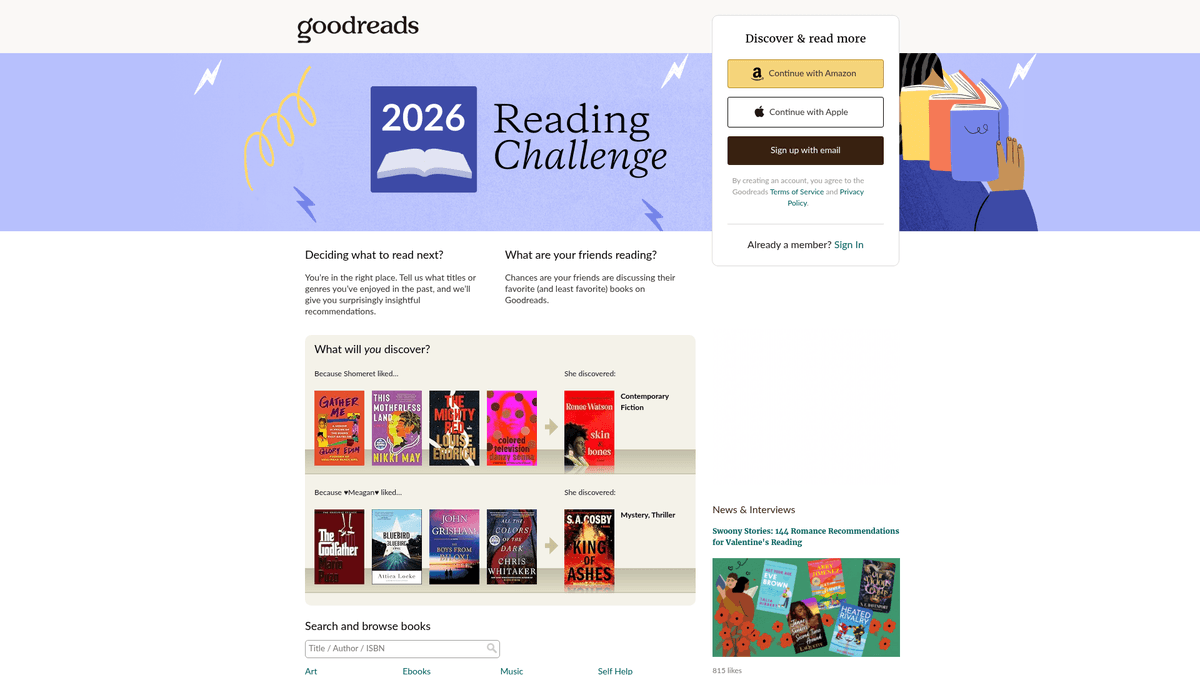
Goodreads is the premier social media platform for book lovers, owned and operated by Amazon. It serves as a massive repository of literary data, featuring millions of book listings, user-generated reviews, annotations, and reading lists. The platform is organized into genres and user-generated 'shelves,' providing deep insights into global reading habits and literary trends.
A Treasure Trove of Literary Data
The platform contains granular data including ISBNs, genres, author bibliographies, and detailed reader sentiments. For businesses and researchers, this data offers deep insights into market trends and consumer preferences. Scraped data from Goodreads is invaluable for publishers, authors, and researchers to perform competitive analysis and identify emerging tropes.
Why Scrape Goodreads Data?
Scraping this site provides access to real-time popularity metrics, competitive analysis for authors, and high-quality datasets for training recommendation systems or conducting academic research in the humanities. It allows users to search its massive database while keeping track of reading progress, offering a unique look at how different demographics interact with books.
Why Scrape Goodreads?
Discover the business value and use cases for extracting data from Goodreads.
Reader Sentiment Analysis
Extract thousands of qualitative reviews to understand why specific tropes or genres are trending among different demographics. This data helps authors and publishers refine their marketing strategies based on actual reader feedback.
Market Trend Forecasting
Monitor the 'Want to Read' shelving velocity of upcoming releases to predict future bestsellers. Identifying these trends early allows retailers and libraries to optimize their inventory and purchasing decisions.
Bibliographic Database Building
Collect accurate metadata including ISBNs, series order, and page counts to build comprehensive literary catalogs. This structured data is essential for library management systems and academic research projects.
Competitive Author Tracking
Track the performance of competing authors in the same genre by analyzing their rating distributions and review counts over time. This provides deep insights into the competitive landscape of the publishing industry.
Training Recommendation Engines
Gather high-quality datasets of user ratings and shelving patterns to train machine learning models. These models can power niche recommendation systems that suggest books based on complex reader preferences.
Author Reputation Monitoring
Help literary agents and authors monitor the long-term reception of a bibliography across its entire lifecycle. Scraping allows for the detection of sudden shifts in public perception or the impact of external marketing campaigns.
Scraping Challenges
Technical challenges you may encounter when scraping Goodreads.
Advanced Anti-Bot Barriers
Goodreads employs Cloudflare and DataDome to detect automated traffic, often resulting in immediate 403 Forbidden errors for standard scripts. Bypassing these requires sophisticated browser fingerprinting and header management.
Dynamic Content Rendering
The modern Goodreads interface is built with React, meaning reviews and detailed book stats are loaded asynchronously via JavaScript. Static HTML parsers will often miss this data entirely without a headless browser.
Unstable CSS Selectors
The site uses obfuscated and frequently changing React class names that make traditional CSS-based scraping unreliable. Relying on these selectors leads to frequent script breakage and maintenance overhead.
Lazy-Loaded Review Sections
To optimize page performance, Goodreads only loads a fraction of reviews initially, requiring a scroll-to-load or pagination interaction. Scrapers must simulate these user actions to capture the full depth of reader feedback.
Aggressive Rate Limiting
Submitting too many requests from a single IP address in a short window triggers automated CAPTCHAs or temporary bans. Maintaining a high-volume crawl requires careful pacing and proxy rotation.
Scrape Goodreads with AI
No coding required. Extract data in minutes with AI-powered automation.
How It Works
Describe What You Need
Tell the AI what data you want to extract from Goodreads. Just type it in plain language — no coding or selectors needed.
AI Extracts the Data
Our artificial intelligence navigates Goodreads, handles dynamic content, and extracts exactly what you asked for.
Get Your Data
Receive clean, structured data ready to export as CSV, JSON, or send directly to your apps and workflows.
Why Use AI for Scraping
AI makes it easy to scrape Goodreads without writing any code. Our AI-powered platform uses artificial intelligence to understand what data you want — just describe it in plain language and the AI extracts it automatically.
How to scrape with AI:
- Describe What You Need: Tell the AI what data you want to extract from Goodreads. Just type it in plain language — no coding or selectors needed.
- AI Extracts the Data: Our artificial intelligence navigates Goodreads, handles dynamic content, and extracts exactly what you asked for.
- Get Your Data: Receive clean, structured data ready to export as CSV, JSON, or send directly to your apps and workflows.
Why use AI for scraping:
- Undetectable Fingerprinting: Automatio uses advanced browser spoofing technology to mimic real human users, successfully navigating past Cloudflare and DataDome protections that block other scrapers.
- Visual Data Mapping: Eliminate the need for complex CSS or XPath selectors by visually clicking on the book data you want to extract. This ensures your scraper remains functional even when site layouts change.
- Native JavaScript Execution: Because it operates as a full browser, Automatio automatically handles React-rendered content and lazy-loading, ensuring every review and rating is captured exactly as seen on screen.
- Automated Proxy Management: Leverage built-in residential proxy rotation to prevent IP blocking. Automatio handles the heavy lifting of switching IPs so your data collection remains uninterrupted at scale.
- Dynamic Content Triggers: Easily configure the scraper to click 'Show More' buttons or scroll to the bottom of the page to trigger dynamic content loading without writing a single line of code.
No-Code Web Scrapers for Goodreads
Point-and-click alternatives to AI-powered scraping
Several no-code tools like Browse.ai, Octoparse, Axiom, and ParseHub can help you scrape Goodreads. These tools use visual interfaces to select elements, but they come with trade-offs compared to AI-powered solutions.
Typical Workflow with No-Code Tools
Common Challenges
Learning curve
Understanding selectors and extraction logic takes time
Selectors break
Website changes can break your entire workflow
Dynamic content issues
JavaScript-heavy sites often require complex workarounds
CAPTCHA limitations
Most tools require manual intervention for CAPTCHAs
IP blocking
Aggressive scraping can get your IP banned
No-Code Web Scrapers for Goodreads
Several no-code tools like Browse.ai, Octoparse, Axiom, and ParseHub can help you scrape Goodreads. These tools use visual interfaces to select elements, but they come with trade-offs compared to AI-powered solutions.
Typical Workflow with No-Code Tools
- Install browser extension or sign up for the platform
- Navigate to the target website and open the tool
- Point-and-click to select data elements you want to extract
- Configure CSS selectors for each data field
- Set up pagination rules to scrape multiple pages
- Handle CAPTCHAs (often requires manual solving)
- Configure scheduling for automated runs
- Export data to CSV, JSON, or connect via API
Common Challenges
- Learning curve: Understanding selectors and extraction logic takes time
- Selectors break: Website changes can break your entire workflow
- Dynamic content issues: JavaScript-heavy sites often require complex workarounds
- CAPTCHA limitations: Most tools require manual intervention for CAPTCHAs
- IP blocking: Aggressive scraping can get your IP banned
Code Examples
import requests
from bs4 import BeautifulSoup

# Target URL for a specific book
url = 'https://www.goodreads.com/book/show/1.Harry_Potter'
# Essential headers to avoid immediate blocking
headers = {'User-Agent': 'Mozilla/5.0 (Windows NT 10.0; Win64; x64) Chrome/119.0.0.0 Safari/537.36'}

try:
    response = requests.get(url, headers=headers, timeout=10)
    response.raise_for_status()
    soup = BeautifulSoup(response.text, 'html.parser')
    # Use data-testid for the modern React-based UI
    title = soup.find('h1', {'data-testid': 'bookTitle'}).text.strip()
    author = soup.find('span', {'data-testid': 'name'}).text.strip()
    print(f'Title: {title}, Author: {author}')
except Exception as e:
    print(f'Scraping failed: {e}')
When to Use
Best for static HTML pages where content is loaded server-side. The fastest and simplest approach when JavaScript rendering isn't required.
Advantages
- ●Fastest execution (no browser overhead)
- ●Lowest resource consumption
- ●Easy to parallelize with asyncio
- ●Great for APIs and static pages
Limitations
- ●Cannot execute JavaScript
- ●Fails on SPAs and dynamic content
- ●May struggle with complex anti-bot systems
How to Scrape Goodreads with Code
Python + Requests
import requests
from bs4 import BeautifulSoup
# Target URL for a specific book
url = 'https://www.goodreads.com/book/show/1.Harry_Potter'
# Essential headers to avoid immediate blocking
headers = {'User-Agent': 'Mozilla/5.0 (Windows NT 10.0; Win64; x64) Chrome/119.0.0.0 Safari/537.36'}
try:
response = requests.get(url, headers=headers, timeout=10)
response.raise_for_status()
soup = BeautifulSoup(response.text, 'html.parser')
# Use data-testid for the modern React-based UI
title = soup.find('h1', {'data-testid': 'bookTitle'}).text.strip()
author = soup.find('span', {'data-testid': 'name'}).text.strip()
print(f'Title: {title}, Author: {author}')
except Exception as e:
print(f'Scraping failed: {e}')Python + Playwright
from playwright.sync_api import sync_playwright

with sync_playwright() as p:
    # Launching a browser is necessary for Cloudflare/JS pages
    browser = p.chromium.launch(headless=True)
    page = browser.new_page()
    page.goto('https://www.goodreads.com/search?q=fantasy')
    # Wait for the specific data attribute to render
    page.wait_for_selector('[data-testid="bookTitle"]')

    books = page.query_selector_all('.bookTitle')
    for book in books:
        print(book.inner_text().strip())

browser.close()Python + Scrapy
import scrapy

class GoodreadsSpider(scrapy.Spider):
    name = 'goodreads_spider'
    start_urls = ['https://www.goodreads.com/list/show/1.Best_Books_Ever']

    def parse(self, response):
        # Target the schema.org markup for more stable selectors
        for book in response.css('tr[itemtype="http://schema.org/Book"]'):
            yield {
                'title': book.css('.bookTitle span::text').get(),
                'author': book.css('.authorName span::text').get(),
                'rating': book.css('.minirating::text').get(),
            }

        # Standard pagination handling
        next_page = response.css('a.next_page::attr(href)').get()
        if next_page:
yield response.follow(next_page, self.parse)Node.js + Puppeteer
const puppeteer = require('puppeteer');

(async () => {
  const browser = await puppeteer.launch();
  const page = await browser.newPage();
  // Goodreads uses modern JS, so we wait for specific components
  await page.goto('https://www.goodreads.com/book/show/1.Harry_Potter');
  await page.waitForSelector('[data-testid="bookTitle"]');

  const data = await page.evaluate(() => ({
    title: document.querySelector('[data-testid="bookTitle"]').innerText,
    author: document.querySelector('[data-testid="name"]').innerText,
    rating: document.querySelector('.RatingStatistics__rating').innerText
  }));

  console.log(data);
  await browser.close();
})();What You Can Do With Goodreads Data
Explore practical applications and insights from Goodreads data.
Predictive Bestseller Analysis
Publishers analyze early review sentiment and shelving velocity to predict upcoming hits.
How to implement:
- 1Monitor 'Want to Read' counts for upcoming books.
- 2Scrape early Advance Reader Copy (ARC) reviews.
- 3Compare sentiment against historical bestseller data.
Use Automatio to extract data from Goodreads and build these applications without writing code.
What You Can Do With Goodreads Data
- Predictive Bestseller Analysis
Publishers analyze early review sentiment and shelving velocity to predict upcoming hits.
- Monitor 'Want to Read' counts for upcoming books.
- Scrape early Advance Reader Copy (ARC) reviews.
- Compare sentiment against historical bestseller data.
- Competitive Author Intelligence
Authors track genre tropes and rating trends to optimize their own writing and marketing.
- Scrape top-rated books in a specific genre shelf.
- Extract recurring tropes from reader reviews.
- Analyze rating velocity post-marketing campaigns.
- Niche Recommendation Engines
Developers build tools to find books matching specific, complex criteria not supported by the main site.
- Scrape user-defined tags and cross-reference them.
- Map ratings to find unique correlations between authors.
- Output results via an API to a web application.
- Sentiment-Based Book Filtering
Researchers use NLP on reviews to categorize books based on emotional impact rather than genre.
- Extract thousands of user reviews for a specific category.
- Run sentiment analysis and keyword extraction.
- Build a dataset for machine learning models.
Supercharge your workflow with AI Automation
Automatio combines the power of AI agents, web automation, and smart integrations to help you accomplish more in less time.
What to get right first
Expert advice for successfully extracting data from Goodreads.
Target data-testid Attributes
Instead of volatile class names, use attributes like [data-testid='bookTitle'] in your selectors. These are specifically designed for testing and are much less likely to change during site updates.
Check for JSON-LD Scripts
Inspect the page source for script tags with type 'application/ld+json'. These often contain clean, pre-structured book metadata that is easier and faster to parse than the visual HTML.
Prioritize Residential Proxies
Avoid using data center IPs, as Goodreads and Amazon frequently blacklist these entire ranges. Residential proxies offer much higher success rates when navigating anti-bot challenges.
Implement Random Delays
Always add a random wait time of 3 to 8 seconds between page loads. This helps stay under the radar of rate-limiting algorithms and reduces the likelihood of triggering reCAPTCHAs.
Scrape Search Result Lists
For high-speed metadata collection, scrape the search result or 'Listopia' pages rather than individual book pages. These lists often contain titles, authors, and ratings for 50+ books on a single page.
Handle Review Truncation
Many long reviews are truncated with a '...more' link. Ensure your scraper is configured to click these expansion links before extracting the text to avoid losing critical feedback data.
Related Web Scraping

How to Scrape Behance: A Step-by-Step Guide for Creative Data Extraction
How to Scrape YouTube: Extract Video Data and Comments in 2025
How to Scrape Social Blade: The Ultimate Analytics Guide
How to Scrape Bento.me | Bento.me Web Scraper
How to Scrape Vimeo: A Guide to Extracting Video Metadata
How to Scrape Imgur: A Comprehensive Guide to Image Data Extraction

How to Scrape Patreon Creator Data and Posts

How to Scrape Bluesky (bsky.app): API and Web Methods
Frequently Asked Questions
Find answers to common questions about Goodreads