
How to Scrape Imgur: A Comprehensive Guide to Image Data Extraction
Discover how to scrape Imgur for viral images, memes, and metadata. Extract titles, tags, and view counts to power your content research and AI training.

Anti-Bot Protection Detected
- Cloudflare
- Enterprise-grade WAF and bot management. Uses JavaScript challenges, CAPTCHAs, and behavioral analysis. Requires browser automation with stealth settings.
- Turnstile
- Rate Limiting
- Limits requests per IP/session over time. Can be bypassed with rotating proxies, request delays, and distributed scraping.
- IP Blocking
- Blocks known datacenter IPs and flagged addresses. Requires residential or mobile proxies to circumvent effectively.
About Imgur
Learn what Imgur offers and what valuable data can be extracted from it.
Overview of Imgur
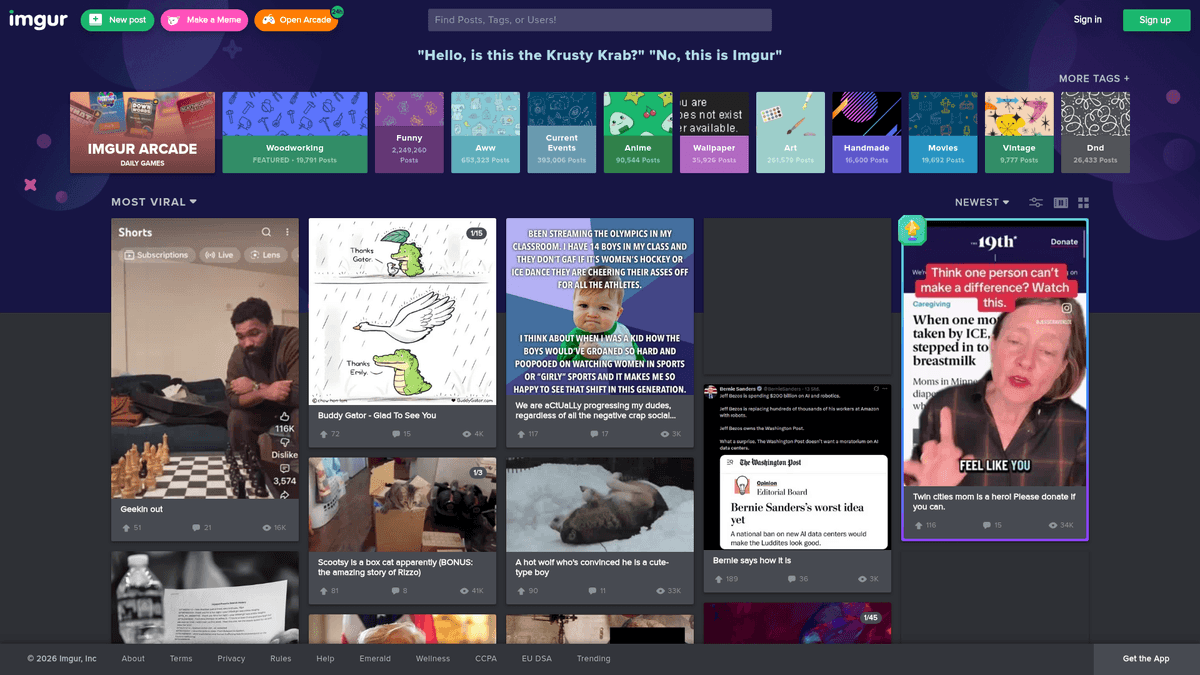
Imgur is a massive American online image sharing and hosting service that has become the backbone of visual culture on sites like Reddit. Launched in 2009, it hosts millions of viral memes, GIFs, and high-quality photography, serving as a primary source for internet trends and digital storytelling.
Data Richness
The platform contains a wealth of structured and unstructured data, including post titles, user-generated descriptions, tags, and engagement metrics like upvotes and view counts. This makes it an invaluable resource for anyone looking to analyze internet culture, track viral growth, or aggregate visual media for specific niches.
Scraping Value
Scraping Imgur data is particularly valuable for sentiment analysis, trend forecasting, and training machine learning models. By extracting metadata associated with trending images, researchers can gain deep insights into what content resonates with global audiences at any given moment.
Why Scrape Imgur?
Discover the business value and use cases for extracting data from Imgur.
Viral Content Detection
Identify trending memes and visual media before they explode on other social networks by tracking view-to-upvote ratios.
AI and Machine Learning Training
Harvest thousands of labeled images and their descriptions to train advanced computer vision and natural language processing models.
Consumer Sentiment Analysis
Extract and analyze user comments on viral posts to understand public perception of global events, brands, or products.
Niche Content Aggregation
Automatically curate high-quality galleries for specific hobbies or interests by filtering for specific tags and engagement thresholds.
Marketing Trend Research
Study the types of visual content (GIFs vs. static images) that achieve the highest engagement rates among specific demographics.
Digital Historical Archiving
Create a permanent record of internet culture by backing up viral media that might otherwise be deleted or lost over time.
Scraping Challenges
Technical challenges you may encounter when scraping Imgur.
Cloudflare WAF Protection
Imgur uses advanced Cloudflare security, which frequently triggers Turnstile challenges and JavaScript puzzles for automated scripts.
Dynamic Infinite Scroll
Content is not loaded all at once; scrapers must simulate user scrolling to trigger the AJAX requests that populate the gallery.
Aggressive Rate Limiting
The platform quickly identifies and throttles IP addresses that make excessive requests to gallery pages or media assets.
Inconsistent Selector Patterns
Imgur periodically updates its front-end code, leading to dynamic class names that can break static CSS-based scrapers.
Server Capacity Throttling
Frequent 'Over Capacity' errors require scrapers to have robust retry logic to handle transient server instability gracefully.
Scrape Imgur with AI
No coding required. Extract data in minutes with AI-powered automation.
How It Works
Describe What You Need
Tell the AI what data you want to extract from Imgur. Just type it in plain language — no coding or selectors needed.
AI Extracts the Data
Our artificial intelligence navigates Imgur, handles dynamic content, and extracts exactly what you asked for.
Get Your Data
Receive clean, structured data ready to export as CSV, JSON, or send directly to your apps and workflows.
Why Use AI for Scraping
AI makes it easy to scrape Imgur without writing any code. Our AI-powered platform uses artificial intelligence to understand what data you want — just describe it in plain language and the AI extracts it automatically.
How to scrape with AI:
- Describe What You Need: Tell the AI what data you want to extract from Imgur. Just type it in plain language — no coding or selectors needed.
- AI Extracts the Data: Our artificial intelligence navigates Imgur, handles dynamic content, and extracts exactly what you asked for.
- Get Your Data: Receive clean, structured data ready to export as CSV, JSON, or send directly to your apps and workflows.
Why use AI for scraping:
- Seamless Anti-Bot Evasion: Automatio manages complex browser fingerprinting and headers to bypass Cloudflare and Turnstile without manual intervention.
- No-Code Dynamic Interaction: Easily configure 'Scroll-to-load' actions and click events to capture thousands of items from infinite-scroll galleries without writing code.
- Automated Data Pipelines: Schedule your Imgur scrapers to run at specific intervals and automatically push the data to Google Sheets, Webhooks, or your own API.
- Visual Selection Engine: Pick specific data points like upvote counts or direct image URLs just by clicking on them in the browser interface.
- Integrated Proxy Management: Utilize built-in residential proxy support to distribute requests across millions of IPs, ensuring you never hit Imgur's rate limits.
No-Code Web Scrapers for Imgur
Point-and-click alternatives to AI-powered scraping
Several no-code tools like Browse.ai, Octoparse, Axiom, and ParseHub can help you scrape Imgur. These tools use visual interfaces to select elements, but they come with trade-offs compared to AI-powered solutions.
Typical Workflow with No-Code Tools
Common Challenges
Learning curve
Understanding selectors and extraction logic takes time
Selectors break
Website changes can break your entire workflow
Dynamic content issues
JavaScript-heavy sites often require complex workarounds
CAPTCHA limitations
Most tools require manual intervention for CAPTCHAs
IP blocking
Aggressive scraping can get your IP banned
No-Code Web Scrapers for Imgur
Several no-code tools like Browse.ai, Octoparse, Axiom, and ParseHub can help you scrape Imgur. These tools use visual interfaces to select elements, but they come with trade-offs compared to AI-powered solutions.
Typical Workflow with No-Code Tools
- Install browser extension or sign up for the platform
- Navigate to the target website and open the tool
- Point-and-click to select data elements you want to extract
- Configure CSS selectors for each data field
- Set up pagination rules to scrape multiple pages
- Handle CAPTCHAs (often requires manual solving)
- Configure scheduling for automated runs
- Export data to CSV, JSON, or connect via API
Common Challenges
- Learning curve: Understanding selectors and extraction logic takes time
- Selectors break: Website changes can break your entire workflow
- Dynamic content issues: JavaScript-heavy sites often require complex workarounds
- CAPTCHA limitations: Most tools require manual intervention for CAPTCHAs
- IP blocking: Aggressive scraping can get your IP banned
Code Examples
import requests
from bs4 import BeautifulSoup

url = 'https://imgur.com/gallery/hot'
# Using headers to mimic a real browser
headers = {
    'User-Agent': 'Mozilla/5.0 (Windows NT 10.0; Win64; x64) AppleWebKit/537.36 (KHTML, like Gecko) Chrome/91.0.4472.124 Safari/537.36'
}

try:
    response = requests.get(url, headers=headers)
    response.raise_for_status()
    soup = BeautifulSoup(response.text, 'html.parser')

    # Example: Print the page title to verify access
    print(f'Page Title: {soup.title.text}')
except requests.exceptions.RequestException as e:
    print(f'Error: {e}')
When to Use
Best for static HTML pages where content is loaded server-side. The fastest and simplest approach when JavaScript rendering isn't required.
Advantages
- ●Fastest execution (no browser overhead)
- ●Lowest resource consumption
- ●Easy to parallelize with asyncio
- ●Great for APIs and static pages
Limitations
- ●Cannot execute JavaScript
- ●Fails on SPAs and dynamic content
- ●May struggle with complex anti-bot systems
How to Scrape Imgur with Code
Python + Requests
import requests
from bs4 import BeautifulSoup
url = 'https://imgur.com/gallery/hot'
# Using headers to mimic a real browser
headers = {
'User-Agent': 'Mozilla/5.0 (Windows NT 10.0; Win64; x64) AppleWebKit/537.36 (KHTML, like Gecko) Chrome/91.0.4472.124 Safari/537.36'
}
try:
response = requests.get(url, headers=headers)
response.raise_for_status()
soup = BeautifulSoup(response.text, 'html.parser')
# Example: Print the page title to verify access
print(f'Page Title: {soup.title.text}')
except requests.exceptions.RequestException as e:
print(f'Error: {e}')Python + Playwright
import asyncio
from playwright.async_api import async_playwright

async def run():
    async with async_playwright() as p:
        # Launching browser with a standard viewport
        browser = await p.chromium.launch(headless=True)
        page = await browser.new_page()

        # Navigate to Imgur
        await page.goto('https://imgur.com/gallery/hot')

        # Wait for the gallery items to load (JS rendered)
        await page.wait_for_selector('.Post-item')

        # Extract data from the first few items
        titles = await page.eval_on_selector_all('.Post-item-title', 'elements => elements.map(e => e.innerText)')
        for title in titles[:5]:
            print(f'Post Title: {title}')

        await browser.close()

asyncio.run(run())Python + Scrapy
import scrapy

class ImgurSpider(scrapy.Spider):
    name = 'imgur'
    start_urls = ['https://imgur.com/gallery/hot']

    def parse(self, response):
        # Scrapy extracts from the initial HTML; note that Imgur loads most content via JS
        for post in response.css('.Post-item'):
            yield {
                'title': post.css('.Post-item-title::text').get(),
                'link': post.css('a::attr(href)').get(),
            }

        # Example logic for finding the next page or API endpoint
# Imgur often uses JSON API endpoints for paginationNode.js + Puppeteer
const puppeteer = require('puppeteer');

(async () => {
  const browser = await puppeteer.launch();
  const page = await browser.newPage();

  // Mimic a desktop browser to reduce blocking risk
  await page.setViewport({ width: 1280, height: 800 });

  await page.goto('https://imgur.com/gallery/hot', { waitUntil: 'networkidle2' });

  // Extract post titles from the gallery
  const titles = await page.evaluate(() => {
    const elements = document.querySelectorAll('.Post-item-title');
    return Array.from(elements).map(el => el.innerText);
  });

  console.log('Found Titles:', titles.slice(0, 5));

  await browser.close();
})();What You Can Do With Imgur Data
Explore practical applications and insights from Imgur data.
Viral Content Aggregator
Create a niche website that automatically republishes trending images from specific Imgur tags.
How to implement:
- 1Identify target tags like #nature or #gaming.
- 2Scrape image URLs and titles daily using automated triggers.
- 3Use webhooks to post the content to your CMS or social media channels.
Use Automatio to extract data from Imgur and build these applications without writing code.
What You Can Do With Imgur Data
- Viral Content Aggregator
Create a niche website that automatically republishes trending images from specific Imgur tags.
- Identify target tags like #nature or #gaming.
- Scrape image URLs and titles daily using automated triggers.
- Use webhooks to post the content to your CMS or social media channels.
- Meme Trend Analysis
Track the lifecycle and popularity of specific memes for digital marketing agencies.
- Scrape post dates and view counts for specific keywords over time.
- Store data in a time-series database for trend visualization.
- Analyze growth and decay patterns of viral engagement.
- Sentiment Monitoring
Analyze user comments to understand public opinion on viral topics or news events.
- Extract comment threads from popular gallery posts.
- Run sentiment analysis algorithms on the text data.
- Generate reports on overall community sentiment.
- Machine Learning Datasets
Build massive datasets of labeled images for training computer vision models.
- Scrape images alongside their tags and descriptions for labeling.
- Filter data for high-resolution quality and specific categories.
- Export to structured JSON or CSV for model training pipelines.
- Digital Asset Archiving
Create a permanent archive of cultural milestones by backing up viral media assets.
- Monitor the 'Hot' and 'Top' sections of the Imgur gallery.
- Download high-quality versions of images and videos.
- Store metadata including original author and date for historical accuracy.
- Brand Mention Tracking
Identify when brands or products appear in viral images and how users react to them.
- Search for brand-related keywords and tags.
- Scrape image content and associated comments.
- Quantify brand exposure and visual sentiment.
Supercharge your workflow with AI Automation
Automatio combines the power of AI agents, web automation, and smart integrations to help you accomplish more in less time.
What to get right first
Expert advice for successfully extracting data from Imgur.
Prioritize Residential Proxies
Datacenter IPs are often blacklisted by Imgur's security; using residential proxies significantly increases your success rate.
Simulate Human Behavior
Add random delays between scrolls and clicks to mimic a real user session and stay under the radar of behavioral analysis bots.
Monitor Internal JSON API
Inspect the network tab to find the underlying JSON endpoints Imgur uses to load its gallery data, as these are often easier to parse than HTML.
Handle Images Gracefully
If downloading high-resolution media, ensure your script handles timeouts and partial downloads to avoid corrupted files.
Rotate User-Agents Regularly
Switch between modern mobile and desktop User-Agent strings to avoid fingerprinting patterns that suggest automated activity.
Implement Intelligent Retries
Configure your scraper to pause and retry when encountering 'Imgur is over capacity' messages to maximize data collection efficiency.
Related Web Scraping

How to Scrape Behance: A Step-by-Step Guide for Creative Data Extraction

How to Scrape YouTube: Extract Video Data and Comments in 2025
How to Scrape Social Blade: The Ultimate Analytics Guide
How to Scrape Bento.me | Bento.me Web Scraper

How to Scrape Vimeo: A Guide to Extracting Video Metadata

How to Scrape Patreon Creator Data and Posts
How to Scrape Goodreads: The Ultimate Web Scraping Guide 2025

How to Scrape Bluesky (bsky.app): API and Web Methods
Frequently Asked Questions
Find answers to common questions about Imgur