
How to Scrape Vimeo: A Guide to Extracting Video Metadata
Master Vimeo scraping to extract video titles, view counts, and creator data. Learn to bypass Akamai anti-bot and use the official Vimeo API effectively.
Anti-Bot Protection Detected
- Akamai Bot Manager
- Advanced bot detection using device fingerprinting, behavior analysis, and machine learning. One of the most sophisticated anti-bot systems.
- Cloudflare
- Enterprise-grade WAF and bot management. Uses JavaScript challenges, CAPTCHAs, and behavioral analysis. Requires browser automation with stealth settings.
- Rate Limiting
- Limits requests per IP/session over time. Can be bypassed with rotating proxies, request delays, and distributed scraping.
- IP Blocking
- Blocks known datacenter IPs and flagged addresses. Requires residential or mobile proxies to circumvent effectively.
- Browser Fingerprinting
- Identifies bots through browser characteristics: canvas, WebGL, fonts, plugins. Requires spoofing or real browser profiles.
About Vimeo
Learn what Vimeo offers and what valuable data can be extracted from it.
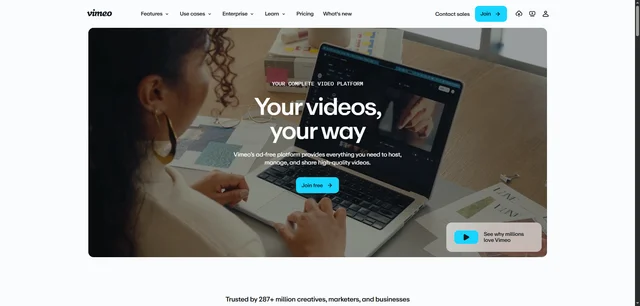
Vimeo is a high-end video hosting and sharing platform designed for creative professionals, filmmakers, and businesses. Unlike mass-market platforms, Vimeo focuses on high-fidelity playback, ad-free environments, and advanced collaboration tools. It serves as a global hub for high-quality content ranging from independent short films and documentaries to corporate webinars and creative portfolios.
The platform contains a wealth of structured media data, including highly specific metadata like Staff Pick status, category tags, user-engagement metrics, and detailed technical video specifications. For researchers and businesses, this data is a goldmine for analyzing creative trends, identifying top-tier talent, and monitoring high-quality video production across the globe.
Scraping Vimeo provides insights into the professional media landscape that are often unavailable on other social platforms. By extracting data from channels, categories, and individual video pages, users can build comprehensive datasets for market analysis, talent recruitment, and competitive content benchmarking in the film and animation industries.
Why Scrape Vimeo?
Discover the business value and use cases for extracting data from Vimeo.
Creative Talent Scouting
Identify and recruit high-tier filmmakers, animators, and editors by monitoring Staff Picks and uploader portfolios.
Market Aesthetic Trends
Analyze trending visual styles, color grading techniques, and cinematography themes to stay ahead of industry standards.
AI Training Datasets
Extract massive amounts of video-text pairs, including detailed descriptions and tags, to train and refine multimodal AI models.
Competitive Intelligence
Monitor how rival brands and production houses use professional video hosting for product launches and corporate storytelling.
Academic Media Research
Gather metadata on independent films and documentaries to study historical shifts in digital media and independent storytelling.
Niche Content Curation
Aggregate high-quality metadata from specific genres to power specialized video galleries, recommendation engines, or creative portals.
Scraping Challenges
Technical challenges you may encounter when scraping Vimeo.
Advanced Bot Protection
Vimeo utilizes Akamai and Cloudflare Bot Management, which employ behavioral analysis and browser fingerprinting to block scrapers.
JavaScript-Heavy Rendering
As a single-page application, Vimeo requires full JavaScript execution to render video grids and metadata, making basic HTTP requests ineffective.
Dynamic Content Loading
Search results and channel pages use infinite scroll or lazy loading, requiring scrapers to simulate user scrolling to capture all available items.
Aggressive IP Throttling
High-frequency requests quickly trigger temporary IP bans or CAPTCHA challenges, especially when using data center IP ranges.
Hidden Data Blobs
Much of the critical video metadata is embedded within large JSON objects inside script tags, rather than being readily available in the HTML DOM.
Scrape Vimeo with AI
No coding required. Extract data in minutes with AI-powered automation.
How It Works
Describe What You Need
Tell the AI what data you want to extract from Vimeo. Just type it in plain language — no coding or selectors needed.
AI Extracts the Data
Our artificial intelligence navigates Vimeo, handles dynamic content, and extracts exactly what you asked for.
Get Your Data
Receive clean, structured data ready to export as CSV, JSON, or send directly to your apps and workflows.
Why Use AI for Scraping
AI makes it easy to scrape Vimeo without writing any code. Our AI-powered platform uses artificial intelligence to understand what data you want — just describe it in plain language and the AI extracts it automatically.
How to scrape with AI:
- Describe What You Need: Tell the AI what data you want to extract from Vimeo. Just type it in plain language — no coding or selectors needed.
- AI Extracts the Data: Our artificial intelligence navigates Vimeo, handles dynamic content, and extracts exactly what you asked for.
- Get Your Data: Receive clean, structured data ready to export as CSV, JSON, or send directly to your apps and workflows.
Why use AI for scraping:
- Bypass Anti-Bot Walls: Automatio natively handles the complex handshakes required to navigate Akamai and Cloudflare protection without manual scripting.
- No-Code Infinite Scroll: Easily set up scrolling behavior using a simple toggle, ensuring you capture every video tile regardless of how long the page is.
- Residential Proxy Integration: Access high-trust residential IPs directly within the platform to avoid the detection associated with standard data center proxies.
- Visual Data Mapping: Point and click on video titles, view counts, and creator names to map them to your database without writing CSS selectors or XPath.
- Direct Spreadsheet Sync: Automatically push your scraped Vimeo data to Google Sheets or via Webhooks for real-time analysis and reporting.
No-Code Web Scrapers for Vimeo
Point-and-click alternatives to AI-powered scraping
Several no-code tools like Browse.ai, Octoparse, Axiom, and ParseHub can help you scrape Vimeo. These tools use visual interfaces to select elements, but they come with trade-offs compared to AI-powered solutions.
Typical Workflow with No-Code Tools
Common Challenges
Learning curve
Understanding selectors and extraction logic takes time
Selectors break
Website changes can break your entire workflow
Dynamic content issues
JavaScript-heavy sites often require complex workarounds
CAPTCHA limitations
Most tools require manual intervention for CAPTCHAs
IP blocking
Aggressive scraping can get your IP banned
No-Code Web Scrapers for Vimeo
Several no-code tools like Browse.ai, Octoparse, Axiom, and ParseHub can help you scrape Vimeo. These tools use visual interfaces to select elements, but they come with trade-offs compared to AI-powered solutions.
Typical Workflow with No-Code Tools
- Install browser extension or sign up for the platform
- Navigate to the target website and open the tool
- Point-and-click to select data elements you want to extract
- Configure CSS selectors for each data field
- Set up pagination rules to scrape multiple pages
- Handle CAPTCHAs (often requires manual solving)
- Configure scheduling for automated runs
- Export data to CSV, JSON, or connect via API
Common Challenges
- Learning curve: Understanding selectors and extraction logic takes time
- Selectors break: Website changes can break your entire workflow
- Dynamic content issues: JavaScript-heavy sites often require complex workarounds
- CAPTCHA limitations: Most tools require manual intervention for CAPTCHAs
- IP blocking: Aggressive scraping can get your IP banned
Code Examples
import requests
from bs4 import BeautifulSoup
import json

# Advanced headers to mimic a real browser
headers = {
    'User-Agent': 'Mozilla/5.0 (Windows NT 10.0; Win64; x64) AppleWebKit/537.36 (KHTML, like Gecko) Chrome/120.0.0.0 Safari/537.36',
    'Accept-Language': 'en-US,en;q=0.9'
}

def scrape_vimeo_video(video_url):
    session = requests.Session()
    response = session.get(video_url, headers=headers)

    if response.status_code == 200:
        soup = BeautifulSoup(response.text, 'html.parser')
        # Search for the configuration blob in script tags
        script_tag = soup.find('script', string=lambda t: t and 'window.vimeo.clip_page_config' in t)
        if script_tag:
            # Logic to extract JSON would go here
            print('Successfully found metadata blob in page source.')
            return True
    print(f'Failed to fetch page: {response.status_code}')
    return False

scrape_vimeo_video('https://vimeo.com/76979871')
When to Use
Best for static HTML pages where content is loaded server-side. The fastest and simplest approach when JavaScript rendering isn't required.
Advantages
- ●Fastest execution (no browser overhead)
- ●Lowest resource consumption
- ●Easy to parallelize with asyncio
- ●Great for APIs and static pages
Limitations
- ●Cannot execute JavaScript
- ●Fails on SPAs and dynamic content
- ●May struggle with complex anti-bot systems
How to Scrape Vimeo with Code
Python + Requests
import requests
from bs4 import BeautifulSoup
import json
# Advanced headers to mimic a real browser
headers = {
'User-Agent': 'Mozilla/5.0 (Windows NT 10.0; Win64; x64) AppleWebKit/537.36 (KHTML, like Gecko) Chrome/120.0.0.0 Safari/537.36',
'Accept-Language': 'en-US,en;q=0.9'
}
def scrape_vimeo_video(video_url):
session = requests.Session()
response = session.get(video_url, headers=headers)
if response.status_code == 200:
soup = BeautifulSoup(response.text, 'html.parser')
# Search for the configuration blob in script tags
script_tag = soup.find('script', string=lambda t: t and 'window.vimeo.clip_page_config' in t)
if script_tag:
# Logic to extract JSON would go here
print('Successfully found metadata blob in page source.')
return True
print(f'Failed to fetch page: {response.status_code}')
return False
scrape_vimeo_video('https://vimeo.com/76979871')Python + Playwright
from playwright.sync_api import sync_playwright

def scrape_vimeo_dynamic():
    with sync_playwright() as p:
        # Launching a headed browser can sometimes help bypass basic bot checks
        browser = p.chromium.launch(headless=True)
        context = browser.new_context(user_agent='Mozilla/5.0 (Windows NT 10.0; Win64; x64) Chrome/119.0.0.0 Safari/537.36')
        page = context.new_page()

        # Navigate to a category page
        page.goto('https://vimeo.com/channels/staffpicks')

        # Wait for video cards to render
        page.wait_for_selector('div[data-testid="video-card"]', timeout=10000)

        # Extract titles
        titles = page.locator('h3').all_inner_texts()
        for title in titles:
            print(f'Found Video: {title}')

        browser.close()

if __name__ == '__main__':
scrape_vimeo_dynamic()Python + Scrapy
import scrapy

class VimeoSpider(scrapy.Spider):
    name = 'vimeo_spider'
    start_urls = ['https://vimeo.com/search?q=animation']

    custom_settings = {
        'USER_AGENT': 'Mozilla/5.0 (Macintosh; Intel Mac OS X 10_15_7) AppleWebKit/537.36 (KHTML, like Gecko) Chrome/118.0.0.0 Safari/537.36',
        'CONCURRENT_REQUESTS': 1,
        'DOWNLOAD_DELAY': 3
    }

    def parse(self, response):
        # Scrapy can parse the JSON inside script tags for more reliable data
        for video in response.css('div.iris_video-vital'):
            yield {
                'title': video.css('a::text').get(),
                'link': response.urljoin(video.css('a::attr(href)').get()),
                'author': video.css('span.author::text').get()
            }

        next_page = response.css('a[rel="next"]::attr(href)').get()
        if next_page:
yield response.follow(next_page, self.parse)Node.js + Puppeteer
const puppeteer = require('puppeteer');

(async () => {
  const browser = await puppeteer.launch({ headless: true });
  const page = await browser.newPage();

  await page.setUserAgent('Mozilla/5.0 (Windows NT 10.0; Win64; x64) Chrome/115.0.0.0 Safari/537.36');

  await page.goto('https://vimeo.com/watch', { waitUntil: 'networkidle2' });

  // Scroll to trigger lazy loading
  await page.evaluate(() => window.scrollBy(0, window.innerHeight));

  const videoData = await page.evaluate(() => {
    const titles = Array.from(document.querySelectorAll('h3'));
    return titles.map(t => t.innerText);
  });

  console.log('Video Titles Scraped:', videoData);

  await browser.close();
})();What You Can Do With Vimeo Data
Explore practical applications and insights from Vimeo data.
Creative Talent Sourcing
Recruitment agencies use Vimeo data to find high-quality videographers by monitoring Staff Pick honors and engagement metrics.
How to implement:
- 1Scrape the 'Staff Picks' and 'Animation' categories daily.
- 2Filter creators based on view-to-like ratios and account age.
- 3Extract creator contact links or social media profiles.
- 4Store data in a CRM for outreach and recruitment.
Use Automatio to extract data from Vimeo and build these applications without writing code.
What You Can Do With Vimeo Data
- Creative Talent Sourcing
Recruitment agencies use Vimeo data to find high-quality videographers by monitoring Staff Pick honors and engagement metrics.
- Scrape the 'Staff Picks' and 'Animation' categories daily.
- Filter creators based on view-to-like ratios and account age.
- Extract creator contact links or social media profiles.
- Store data in a CRM for outreach and recruitment.
- Video Content Benchmarking
Marketing teams analyze competitor performance to refine their own video distribution and keyword strategies.
- Identify competitor channels and URLs.
- Scrape video titles, tags, and engagement counts.
- Correlate specific tags with higher play counts.
- Optimizing internal metadata based on discovered successful patterns.
- Historical Trend Tracking
Academic researchers track the evolution of visual styles by scraping video descriptions and technical data over time.
- Scrape metadata from specific genres like 'Documentary' over a 12-month period.
- Analyze the frequency of specific keywords or camera mentions in descriptions.
- Map the rise and fall of visual trends using upload timestamps.
- Generate reports on the shifting landscape of independent filmmaking.
- On-Demand Price Monitoring
Film distributors monitor the pricing of digital rentals and purchases across the Vimeo On Demand marketplace.
- Scrape the Vimeo On Demand listings for specific genres.
- Extract rental and purchase price points.
- Compare pricing by region and distributor.
- Adjust competitive pricing strategies for new digital releases.
Supercharge your workflow with AI Automation
Automatio combines the power of AI agents, web automation, and smart integrations to help you accomplish more in less time.
What to get right first
Expert advice for successfully extracting data from Vimeo.
Target window._vimeoConfig
Look for the global config object in the page's source code; it often contains clean, structured JSON data that is easier to extract than HTML elements.
Prioritize Residential Proxies
Because Vimeo sits behind Akamai, using residential or mobile proxies is necessary to maintain a high success rate and avoid immediate blocks.
Implement Random Interaction
Add random delays between clicks and varied scrolling speeds to mimic a human user and stay under the radar of behavioral detection systems.
Handle Lazy Loading
Ensure your scraper pauses briefly after scrolling to allow the React-based components to fully load the next set of video cards.
Rotate Browser Fingerprints
Frequently rotate your User-Agent and other header fingerprints to ensure your scraping fleet does not develop a recognizable signature.
Use Off-Peak Scheduling
Schedule large scraping jobs during the target region's night hours to reduce the likelihood of triggering localized rate-limiting spikes.
Related Web Scraping

How to Scrape Behance: A Step-by-Step Guide for Creative Data Extraction
How to Scrape Social Blade: The Ultimate Analytics Guide
How to Scrape YouTube: Extract Video Data and Comments in 2025
How to Scrape Bento.me | Bento.me Web Scraper
How to Scrape Imgur: A Comprehensive Guide to Image Data Extraction

How to Scrape Patreon Creator Data and Posts

How to Scrape Goodreads: The Ultimate Web Scraping Guide 2025

How to Scrape Bluesky (bsky.app): API and Web Methods
Frequently Asked Questions
Find answers to common questions about Vimeo