
How to Scrape Social Blade: The Ultimate Analytics Guide
Learn how to scrape Social Blade for YouTube and Twitch analytics. Extract subscriber growth, view counts, and earnings for market research and vetting.
Anti-Bot Protection Detected
- Cloudflare
- Enterprise-grade WAF and bot management. Uses JavaScript challenges, CAPTCHAs, and behavioral analysis. Requires browser automation with stealth settings.
- Rate Limiting
- Limits requests per IP/session over time. Can be bypassed with rotating proxies, request delays, and distributed scraping.
- IP Blocking
- Blocks known datacenter IPs and flagged addresses. Requires residential or mobile proxies to circumvent effectively.
- Google reCAPTCHA
- Google's CAPTCHA system. v2 requires user interaction, v3 runs silently with risk scoring. Can be solved with CAPTCHA services.
- WAF
About Social Blade
Learn what Social Blade offers and what valuable data can be extracted from it.
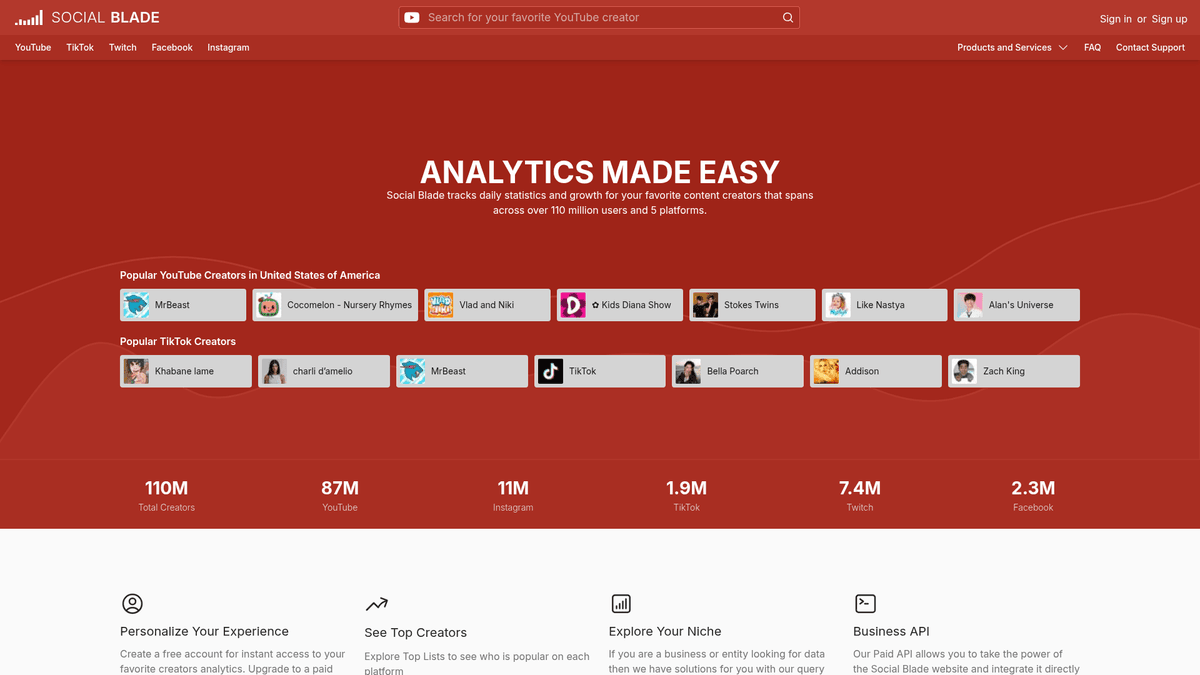
Social Blade is a premier statistics and analytics platform that tracks growth and daily metrics for content creators across major social media networks including YouTube, Twitch, Instagram, Twitter/X, and TikTok. Since its inception in 2008, it has become the gold standard for auditing digital performance, providing a centralized location for users to verify creator authenticity and track global rankings.
The platform aggregates publicly available data into intuitive charts and historical tables, showing a creator's trajectory over days, months, and years. By providing estimated earnings and future projections based on current growth rates, Social Blade offers a deep look into the financial and influential power of millions of digital personalities.
For researchers and marketing professionals, scraping Social Blade is an essential activity for influencer marketing vetting, competitive benchmarking, and trend analysis. It provides the quantitative evidence needed to make data-driven decisions in the creator economy, allowing for the detection of non-organic growth and the identification of rising stars before they reach the mainstream.
Why Scrape Social Blade?
Discover the business value and use cases for extracting data from Social Blade.
Verification of Influencer Growth
Scraping allows brands to audit potential partners by analyzing historical growth to ensure followers and views are organic rather than purchased.
Market Trend Identification
By aggregating data across different channel types, researchers can identify which content categories are gaining the most traction globally.
Lead Generation for Management
Talent agencies can scrape lists of rising stars who have high growth rates but lower subscriber counts to identify potential talent to represent.
Competitive Content Analysis
Creators can monitor their competitors' daily view counts to determine which video topics or streaming schedules yield the highest engagement.
Revenue and CPM Modeling
Extracting estimated earnings data helps financial analysts build models for the creator economy and estimate the market value of specific niches.
Account Performance Benchmarking
Social media managers use scraped data to compare their brand's performance against industry standard grades and rankings.
Scraping Challenges
Technical challenges you may encounter when scraping Social Blade.
Sophisticated Cloudflare Protection
Social Blade employs aggressive Cloudflare WAF checks that can detect and block automated traffic using browser fingerprinting and JS challenges.
Dynamic Content Rendering
The most valuable statistics, including daily growth tables and historical charts, are rendered via JavaScript and require a headless browser to extract.
Strict Rate Limiting Policies
Making too many requests in a short time frame from a single IP address will quickly trigger a 403 Forbidden error or a CAPTCHA wall.
Unpredictable CSS Changes
The site frequently updates its layout and internal ID naming conventions, which can break static CSS and XPath selectors if not monitored.
Scrape Social Blade with AI
No coding required. Extract data in minutes with AI-powered automation.
How It Works
Describe What You Need
Tell the AI what data you want to extract from Social Blade. Just type it in plain language — no coding or selectors needed.
AI Extracts the Data
Our artificial intelligence navigates Social Blade, handles dynamic content, and extracts exactly what you asked for.
Get Your Data
Receive clean, structured data ready to export as CSV, JSON, or send directly to your apps and workflows.
Why Use AI for Scraping
AI makes it easy to scrape Social Blade without writing any code. Our AI-powered platform uses artificial intelligence to understand what data you want — just describe it in plain language and the AI extracts it automatically.
How to scrape with AI:
- Describe What You Need: Tell the AI what data you want to extract from Social Blade. Just type it in plain language — no coding or selectors needed.
- AI Extracts the Data: Our artificial intelligence navigates Social Blade, handles dynamic content, and extracts exactly what you asked for.
- Get Your Data: Receive clean, structured data ready to export as CSV, JSON, or send directly to your apps and workflows.
Why use AI for scraping:
- Automatic Cloudflare Evasion: Automatio's engine is designed to handle the complex JavaScript challenges and browser environment checks required to bypass Cloudflare security.
- Visual Data Extraction: Users can point and click to select complex data structures like the 'Daily Statistics' table without needing to write or maintain code.
- Enterprise-Grade IP Rotation: Integrated residential proxy support allows for high-volume scraping by mimicking real user traffic from locations all over the world.
- Dynamic Loading Support: Automatio naturally waits for charts and AJAX-driven content to fully render, ensuring that no data is missed during the scraping process.
- Automated Historical Tracking: Set a schedule to scrape specific creator profiles every 24 hours to build your own private database of social media growth over time.
No-Code Web Scrapers for Social Blade
Point-and-click alternatives to AI-powered scraping
Several no-code tools like Browse.ai, Octoparse, Axiom, and ParseHub can help you scrape Social Blade. These tools use visual interfaces to select elements, but they come with trade-offs compared to AI-powered solutions.
Typical Workflow with No-Code Tools
Common Challenges
Learning curve
Understanding selectors and extraction logic takes time
Selectors break
Website changes can break your entire workflow
Dynamic content issues
JavaScript-heavy sites often require complex workarounds
CAPTCHA limitations
Most tools require manual intervention for CAPTCHAs
IP blocking
Aggressive scraping can get your IP banned
No-Code Web Scrapers for Social Blade
Several no-code tools like Browse.ai, Octoparse, Axiom, and ParseHub can help you scrape Social Blade. These tools use visual interfaces to select elements, but they come with trade-offs compared to AI-powered solutions.
Typical Workflow with No-Code Tools
- Install browser extension or sign up for the platform
- Navigate to the target website and open the tool
- Point-and-click to select data elements you want to extract
- Configure CSS selectors for each data field
- Set up pagination rules to scrape multiple pages
- Handle CAPTCHAs (often requires manual solving)
- Configure scheduling for automated runs
- Export data to CSV, JSON, or connect via API
Common Challenges
- Learning curve: Understanding selectors and extraction logic takes time
- Selectors break: Website changes can break your entire workflow
- Dynamic content issues: JavaScript-heavy sites often require complex workarounds
- CAPTCHA limitations: Most tools require manual intervention for CAPTCHAs
- IP blocking: Aggressive scraping can get your IP banned
Code Examples
import requests
from bs4 import BeautifulSoup

# Note: Standard requests are likely blocked by Cloudflare WAF.
# You must use a session with realistic browser headers.
url = 'https://socialblade.com/youtube/user/mrbeast'
headers = {
    'User-Agent': 'Mozilla/5.0 (Windows NT 10.0; Win64; x64) AppleWebKit/537.36 (KHTML, like Gecko) Chrome/120.0.0.0 Safari/537.36',
    'Accept-Language': 'en-US,en;q=0.9'
}

try:
    response = requests.get(url, headers=headers)
    if response.status_code == 200:
        soup = BeautifulSoup(response.text, 'html.parser')
        # Extracting the channel name from h1
        name = soup.find('h1').text.strip()
        # Identifying the stats container
        stats = soup.find_all('span', {'style': 'font-weight: 600;'})
        print(f'Channel Name: {name}')
        for stat in stats:
            print(f'Data Point: {stat.text.strip()}')
    else:
        print(f'Blocked by Cloudflare (Status: {response.status_code})')
except Exception as e:
    print(f'An unexpected error occurred: {e}')
When to Use
Best for static HTML pages where content is loaded server-side. The fastest and simplest approach when JavaScript rendering isn't required.
Advantages
- ●Fastest execution (no browser overhead)
- ●Lowest resource consumption
- ●Easy to parallelize with asyncio
- ●Great for APIs and static pages
Limitations
- ●Cannot execute JavaScript
- ●Fails on SPAs and dynamic content
- ●May struggle with complex anti-bot systems
How to Scrape Social Blade with Code
Python + Requests
import requests
from bs4 import BeautifulSoup
# Note: Standard requests are likely blocked by Cloudflare WAF.
# You must use a session with realistic browser headers.
url = 'https://socialblade.com/youtube/user/mrbeast'
headers = {
'User-Agent': 'Mozilla/5.0 (Windows NT 10.0; Win64; x64) AppleWebKit/537.36 (KHTML, like Gecko) Chrome/120.0.0.0 Safari/537.36',
'Accept-Language': 'en-US,en;q=0.9'
}
try:
response = requests.get(url, headers=headers)
if response.status_code == 200:
soup = BeautifulSoup(response.text, 'html.parser')
# Extracting the channel name from h1
name = soup.find('h1').text.strip()
# Identifying the stats container
stats = soup.find_all('span', {'style': 'font-weight: 600;'})
print(f'Channel Name: {name}')
for stat in stats:
print(f'Data Point: {stat.text.strip()}')
else:
print(f'Blocked by Cloudflare (Status: {response.status_code})')
except Exception as e:
print(f'An unexpected error occurred: {e}')Python + Playwright
import asyncio
from playwright.async_api import async_playwright

async def scrape_socialblade():
    async with async_playwright() as p:
        # Launching a headed browser to better handle anti-bot signals
        browser = await p.chromium.launch(headless=True)
        context = await browser.new_context(
            user_agent='Mozilla/5.0 (Windows NT 10.0; Win64; x64) AppleWebKit/537.36 (KHTML, like Gecko) Chrome/120.0.0.0 Safari/537.36'
        )
        page = await context.new_page()

        # Navigate to a creator profile
        await page.goto('https://socialblade.com/twitch/user/ninja', wait_until='networkidle')

        # Wait for the statistics headers to render
        await page.wait_for_selector('#youtube-stats-header-subs')

        data = {
            'channel': await page.inner_text('h1'),
            'followers': await page.inner_text('#youtube-stats-header-subs'),
            'views': await page.inner_text('#youtube-stats-header-views')
        }

        print(data)
        await browser.close()

asyncio.run(scrape_socialblade())Python + Scrapy
import scrapy

class SocialBladeSpider(scrapy.Spider):
    name = 'socialblade_top_list'
    start_urls = ['https://socialblade.com/youtube/top/100/mostsubscribed']

    # Note: Scrapy requires custom middleware or proxies to bypass Cloudflare
    def parse(self, response):
        # Selecting rows from the top 100 list table
        for row in response.css('div[style*="padding: 0px 20px;"]'):
            yield {
                'rank': row.css('div:nth-child(1)::text').get().strip(),
                'grade': row.css('div:nth-child(2) span::text').get(),
                'username': row.css('a::text').get(),
                'subscribers': row.css('div:nth-child(5)::text').get(),
                'views': row.css('div:nth-child(6)::text').get()
            }

        # Handle pagination if more pages exist
# Social Blade typically uses a direct URL structure like /top/100/mostsubscribed/page/2Node.js + Puppeteer
const puppeteer = require('puppeteer-extra');
const StealthPlugin = require('puppeteer-extra-plugin-stealth');
puppeteer.use(StealthPlugin());

(async () => {
  const browser = await puppeteer.launch({ headless: true });
  const page = await browser.newPage();

  // Using Stealth plugin to reduce chance of Cloudflare block
  await page.goto('https://socialblade.com/instagram/user/cristiano', { waitUntil: 'networkidle2' });

  const results = await page.evaluate(() => {
    const header = document.querySelector('h1')?.innerText;
    const followers = document.querySelector('#youtube-stats-header-subs')?.innerText;
    return { header, followers };
  });

  console.log('Scraped Data:', results);
  await browser.close();
})();What You Can Do With Social Blade Data
Explore practical applications and insights from Social Blade data.
Influencer Fraud Detection
Marketing agencies use growth data to spot creators who purchase fake followers by flagging non-organic data spikes.
How to implement:
- 1Scrape daily subscriber growth for a target influencer list for 90 days.
- 2Analyze the data for sudden, massive spikes that don't align with content releases.
- 3Check for 'stair-step' patterns where followers jump and then remain flat.
- 4Compare growth rates with industry averages for creators in the same niche.
Use Automatio to extract data from Social Blade and build these applications without writing code.
What You Can Do With Social Blade Data
- Influencer Fraud Detection
Marketing agencies use growth data to spot creators who purchase fake followers by flagging non-organic data spikes.
- Scrape daily subscriber growth for a target influencer list for 90 days.
- Analyze the data for sudden, massive spikes that don't align with content releases.
- Check for 'stair-step' patterns where followers jump and then remain flat.
- Compare growth rates with industry averages for creators in the same niche.
- Competitive Content Benchmarking
Content creators monitor rival view counts to determine which specific video topics are currently trending.
- Track daily view counts for the top 10 competitors in a specific category.
- Correlate peak view days with specific video upload dates and titles.
- Calculate the average 'views-per-subscriber' ratio to measure audience engagement.
- Identify viral topics and adapt them for your own content calendar.
- Talent Discovery for Agencies
Talent managers identify high-potential 'rising stars' before they hit the mainstream to secure early partnerships.
- Scrape the 'Top 100' lists for niche categories daily.
- Filter for accounts with low total subscribers but high monthly growth percentage.
- Monitor these accounts for sustained week-over-week growth acceleration.
- Flag creators who enter the 'Social Blade Rank' top 50,000 for immediate outreach.
- Ad Revenue Prediction
Media buyers estimate potential return on investment (ROI) for sponsoring specific creators based on earnings data.
- Extract the 'Estimated Monthly Earnings' range for a set of target channels.
- Calculate the average CPM based on the channel's specific niche (e.g., Tech vs. Lifestyle).
- Cross-reference view growth with historical ad rate trends for the current quarter.
- Present a projected ROI report to brand stakeholders before committing budget.
- Brand Safety Auditing
Brands ensure creator stability by analyzing historical data for previous account bans or major engagement drops.
- Scrape the full 3-year historical growth table for a potential brand partner.
- Identify periods of negative growth or deleted videos which may indicate controversy.
- Analyze the 'Social Blade Grade' history for consistent performance levels.
- Validate creator claims about audience reach against actual daily statistics.
Supercharge your workflow with AI Automation
Automatio combines the power of AI agents, web automation, and smart integrations to help you accomplish more in less time.
What to get right first
Expert advice for successfully extracting data from Social Blade.
Utilize Stealth Headless Browsers
When scraping, use a headless browser with a stealth plugin to strip away automation flags that tell Cloudflare you are a bot.
Target the Daily Stats Table
Instead of just getting total counts, target the HTML table for daily stats to get a more granular view of day-to-day performance.
Implement Random Wait Times
Mimic human behavior by adding a randomized delay between 10 and 30 seconds between navigating to different creator profiles.
Rotate Through Multiple User-Agents
Frequently rotate your User-Agent string to include different browser versions and operating systems to avoid fingerprint-based blocking.
Scrape During Off-Peak Hours
Site security is sometimes less sensitive during hours of lower global traffic; try running large crawls during those windows.
Check Mobile User-Agents
Social Blade's mobile version occasionally has different DOM structures and security protocols that might be easier for some scrapers to navigate.
Related Web Scraping

How to Scrape Behance: A Step-by-Step Guide for Creative Data Extraction
How to Scrape YouTube: Extract Video Data and Comments in 2025
How to Scrape Bento.me | Bento.me Web Scraper
How to Scrape Vimeo: A Guide to Extracting Video Metadata
How to Scrape Imgur: A Comprehensive Guide to Image Data Extraction

How to Scrape Patreon Creator Data and Posts
How to Scrape Goodreads: The Ultimate Web Scraping Guide 2025
How to Scrape Bluesky (bsky.app): API and Web Methods
Frequently Asked Questions
Find answers to common questions about Social Blade