
How to Scrape Signal NFX | Investor & VC Database Scraping Guide
Learn how to scrape investor profiles, VC firm data, and lead lists from Signal NFX. Discover technical strategies for fundraising and market research.
Anti-Bot Protection Detected
- Cloudflare
- Enterprise-grade WAF and bot management. Uses JavaScript challenges, CAPTCHAs, and behavioral analysis. Requires browser automation with stealth settings.
- Rate Limiting
- Limits requests per IP/session over time. Can be bypassed with rotating proxies, request delays, and distributed scraping.
- IP Blocking
- Blocks known datacenter IPs and flagged addresses. Requires residential or mobile proxies to circumvent effectively.
- Login Wall
- Google reCAPTCHA
- Google's CAPTCHA system. v2 requires user interaction, v3 runs silently with risk scoring. Can be solved with CAPTCHA services.
About Signal (by NFX)
Learn what Signal (by NFX) offers and what valuable data can be extracted from it.
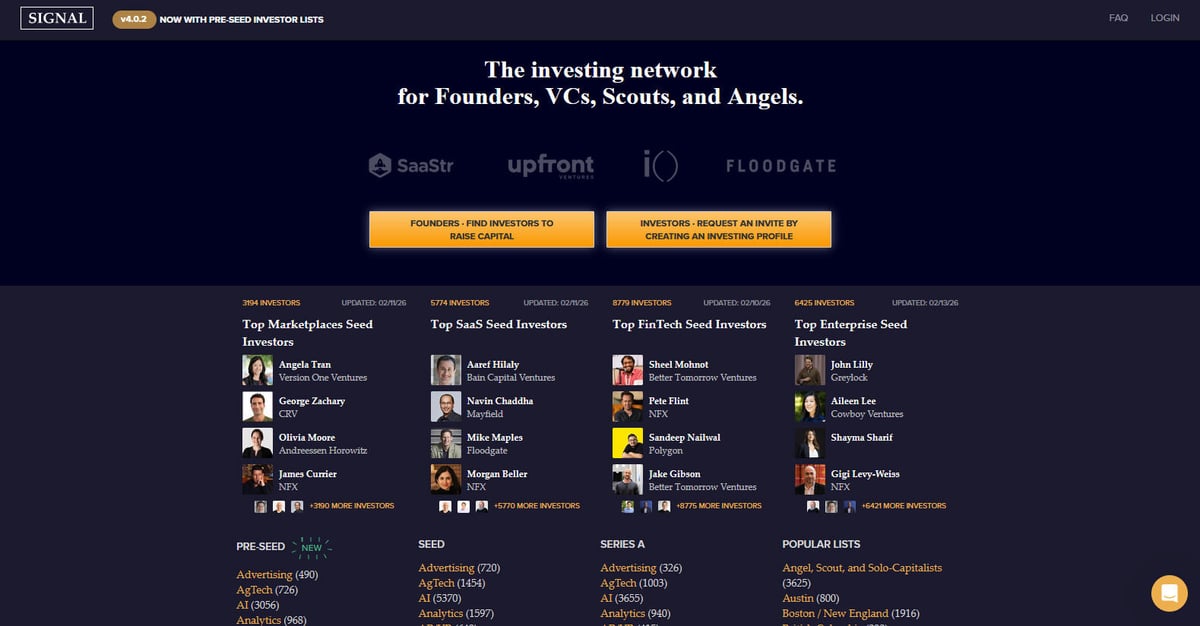
Signal is a powerful investing network specifically designed for founders, VCs, scouts, and angel investors. Created and maintained by NFX, a prominent seed-stage venture capital firm, the platform serves as a massive directory and networking tool to facilitate startup fundraising. It aims to make the venture ecosystem more transparent by mapping the connections between investors and entrepreneurs, effectively replacing manual spreadsheets with a dynamic, data-rich environment.
The platform contains thousands of investor profiles, categorized by their preferred investment stage (from Pre-Seed to Series B), industry sectors like AI, SaaS, and FinTech, and geographic regions. Users can find detailed information about venture capital firms, individual partners, and their specific investment focuses, which is frequently updated to reflect the current market landscape. Each listing typically features an investor's focus, preferred investment stages, specific investment theses, and direct founder introduction preferences.
Scraping Signal is highly valuable for founders who need to build targeted investor lead lists without manually browsing thousands of entries. It also provides critical data for market researchers tracking venture capital trends, competitive intelligence for other VC firms, and data for sales teams targeting the startup ecosystem through relationship and intro mapping.
Why Scrape Signal (by NFX)?
Discover the business value and use cases for extracting data from Signal (by NFX).
Build Investor Pipelines
Founders can extract curated lists of VCs and angel investors that match their specific funding stage and industry sector to streamline the fundraising process.
Analyze Venture Trends
Scraping sector-specific lists allows researchers to identify which industries, such as AI or ClimateTech, are seeing the highest density of active early-stage investment.
B2B Lead Generation
Service providers like legal firms, recruiters, and marketing agencies can identify active venture firms to offer their services to newly funded portfolio companies.
Warm Intro Mapping
By extracting investor relationship data and firm affiliations, entrepreneurs can map out the most effective social paths for securing warm introductions.
Competitive Intelligence
Venture capital firms can monitor the investment focus and team expansions of rival firms to better understand the competitive landscape of the startup ecosystem.
Geographic Market Research
Identify the key financial players and most active investors in specific regions like Israel, Europe, or Latin America for localized market entry strategies.
Scraping Challenges
Technical challenges you may encounter when scraping Signal (by NFX).
Complex Authentication
Signal hides many detailed profiles and full investor lists behind a login wall, requiring scrapers to handle session cookies and automated authentication flows.
Dynamic JS Rendering
The platform relies heavily on modern JavaScript frameworks to load content dynamically via infinite scroll and AJAX, making traditional HTML parsers ineffective.
Aggressive Bot Detection
NFX utilizes Cloudfront and other security layers that monitor for high-frequency requests, common bot fingerprints, and data center IP addresses.
Nested Data Structure
Extracting complete data requires navigating through multiple levels, including firm pages, partner sub-pages, and sector-specific category tags.
Rate Limiting and Throttling
Accessing hundreds of profiles in a short period often triggers temporary IP bans or CAPTCHA challenges meant to prevent large-scale data harvesting.
Scrape Signal (by NFX) with AI
No coding required. Extract data in minutes with AI-powered automation.
How It Works
Describe What You Need
Tell the AI what data you want to extract from Signal (by NFX). Just type it in plain language — no coding or selectors needed.
AI Extracts the Data
Our artificial intelligence navigates Signal (by NFX), handles dynamic content, and extracts exactly what you asked for.
Get Your Data
Receive clean, structured data ready to export as CSV, JSON, or send directly to your apps and workflows.
Why Use AI for Scraping
AI makes it easy to scrape Signal (by NFX) without writing any code. Our AI-powered platform uses artificial intelligence to understand what data you want — just describe it in plain language and the AI extracts it automatically.
How to scrape with AI:
- Describe What You Need: Tell the AI what data you want to extract from Signal (by NFX). Just type it in plain language — no coding or selectors needed.
- AI Extracts the Data: Our artificial intelligence navigates Signal (by NFX), handles dynamic content, and extracts exactly what you asked for.
- Get Your Data: Receive clean, structured data ready to export as CSV, JSON, or send directly to your apps and workflows.
Why use AI for scraping:
- Effortless Login Management: Automatio allows you to visually record the login process and store sessions, enabling the bot to access gated investor data without manual intervention.
- Built-in Infinite Scroll: The tool handles dynamic loading effortlessly, automatically scrolling through lengthy investor lists and capturing data as it appears in the browser.
- Human-Like Interaction: Automatio mimics natural browsing behaviors and integrates with residential proxies to bypass Cloudfront security and avoid detection.
- Visual Data Selection: Users can point and click to select complex data points like investment theses or contact preferences, regardless of the underlying HTML complexity.
- No-Code CRM Sync: Automatically export scraped investor data directly to Google Sheets or CRMs, removing the need for custom scripts to format and transfer data.
No-Code Web Scrapers for Signal (by NFX)
Point-and-click alternatives to AI-powered scraping
Several no-code tools like Browse.ai, Octoparse, Axiom, and ParseHub can help you scrape Signal (by NFX). These tools use visual interfaces to select elements, but they come with trade-offs compared to AI-powered solutions.
Typical Workflow with No-Code Tools
Common Challenges
Learning curve
Understanding selectors and extraction logic takes time
Selectors break
Website changes can break your entire workflow
Dynamic content issues
JavaScript-heavy sites often require complex workarounds
CAPTCHA limitations
Most tools require manual intervention for CAPTCHAs
IP blocking
Aggressive scraping can get your IP banned
No-Code Web Scrapers for Signal (by NFX)
Several no-code tools like Browse.ai, Octoparse, Axiom, and ParseHub can help you scrape Signal (by NFX). These tools use visual interfaces to select elements, but they come with trade-offs compared to AI-powered solutions.
Typical Workflow with No-Code Tools
- Install browser extension or sign up for the platform
- Navigate to the target website and open the tool
- Point-and-click to select data elements you want to extract
- Configure CSS selectors for each data field
- Set up pagination rules to scrape multiple pages
- Handle CAPTCHAs (often requires manual solving)
- Configure scheduling for automated runs
- Export data to CSV, JSON, or connect via API
Common Challenges
- Learning curve: Understanding selectors and extraction logic takes time
- Selectors break: Website changes can break your entire workflow
- Dynamic content issues: JavaScript-heavy sites often require complex workarounds
- CAPTCHA limitations: Most tools require manual intervention for CAPTCHAs
- IP blocking: Aggressive scraping can get your IP banned
Code Examples
import requests
from bs4 import BeautifulSoup

# Signal requires login for full data access. This example uses a session.
session = requests.Session()
url = 'https://signal.nfx.com/investor-lists/top-marketplaces-seed-investors'
headers = {
    'User-Agent': 'Mozilla/5.0 (Windows NT 10.0; Win64; x64) AppleWebKit/537.36 (KHTML, like Gecko) Chrome/91.0.4472.124 Safari/537.36'
}

try:
    # In a real scenario, you would need to POST login credentials here first
    # session.post('https://signal.nfx.com/login', data={'email': '...', 'password': '...'})
    response = session.get(url, headers=headers)
    response.raise_for_status()
    soup = BeautifulSoup(response.text, 'html.parser')

    # Find investor cards in the list
    investors = soup.select('.investor-card')
    for investor in investors:
        name = investor.select_one('.name').get_text(strip=True)
        firm = investor.select_one('.firm-name').get_text(strip=True)
        print(f'Investor: {name} | Firm: {firm}')
except Exception as e:
    print(f'Error scraping Signal: {e}')
When to Use
Best for static HTML pages where content is loaded server-side. The fastest and simplest approach when JavaScript rendering isn't required.
Advantages
- ●Fastest execution (no browser overhead)
- ●Lowest resource consumption
- ●Easy to parallelize with asyncio
- ●Great for APIs and static pages
Limitations
- ●Cannot execute JavaScript
- ●Fails on SPAs and dynamic content
- ●May struggle with complex anti-bot systems
How to Scrape Signal (by NFX) with Code
Python + Requests
import requests
from bs4 import BeautifulSoup
# Signal requires login for full data access. This example uses a session.
session = requests.Session()
url = 'https://signal.nfx.com/investor-lists/top-marketplaces-seed-investors'
headers = {
'User-Agent': 'Mozilla/5.0 (Windows NT 10.0; Win64; x64) AppleWebKit/537.36 (KHTML, like Gecko) Chrome/91.0.4472.124 Safari/537.36'
}
try:
# In a real scenario, you would need to POST login credentials here first
# session.post('https://signal.nfx.com/login', data={'email': '...', 'password': '...'})
response = session.get(url, headers=headers)
response.raise_for_status()
soup = BeautifulSoup(response.text, 'html.parser')
# Find investor cards in the list
investors = soup.select('.investor-card')
for investor in investors:
name = investor.select_one('.name').get_text(strip=True)
firm = investor.select_one('.firm-name').get_text(strip=True)
print(f'Investor: {name} | Firm: {firm}')
except Exception as e:
print(f'Error scraping Signal: {e}')Python + Playwright
from playwright.sync_api import sync_playwright

def scrape_signal():
    with sync_playwright() as p:
        browser = p.chromium.launch(headless=True)
        page = browser.new_page()
        # Navigate to login
        page.goto('https://signal.nfx.com/login')
        page.fill('input[name="email"]', 'your_email@example.com')
        page.fill('input[name="password"]', 'your_password')
        page.click('button:has-text("Log In")')

        # Wait for the listing page to load after login
        page.wait_for_url('**/investors')
        page.goto('https://signal.nfx.com/investor-lists/top-ai-seed-investors')
        page.wait_for_selector('.investor-card')

        # Scroll to load infinite content
        for _ in range(5):
            page.mouse.wheel(0, 4000)
            page.wait_for_timeout(2000)

        investors = page.query_selector_all('.investor-card')
        for investor in investors:
            name = investor.query_selector('.name').inner_text()
            print(f'Found Investor: {name}')

        browser.close()

scrape_signal()Python + Scrapy
import scrapy

class SignalSpider(scrapy.Spider):
    name = 'signal_spider'
    # Note: Requires scrapy-playwright for JavaScript rendering
    start_urls = ['https://signal.nfx.com/investor-lists/top-saas-seed-investors']

    def start_requests(self):
        for url in self.start_urls:
            yield scrapy.Request(url, meta={'playwright': True})

    def parse(self, response):
        for investor in response.css('.investor-card'):
            yield {
                'name': investor.css('.name::text').get(),
                'firm': investor.css('.firm-name::text').get(),
                'link': response.urljoin(investor.css('a::attr(href)').get())
            }

        # Scrapy logic for infinite scroll would require a custom Playwright handler
# to scroll down before passing the response back to parseNode.js + Puppeteer
const puppeteer = require('puppeteer');

(async () => {
  const browser = await puppeteer.launch({ headless: true });
  const page = await browser.newPage();
  await page.setUserAgent('Mozilla/5.0 (Windows NT 10.0; Win64; x64) AppleWebKit/537.36 (KHTML, like Gecko) Chrome/91.0.4472.124 Safari/537.36');

  // Handle Login first
  await page.goto('https://signal.nfx.com/login');
  await page.type('#user_email', 'your_email');
  await page.type('#user_password', 'your_password');
  await page.click('.btn-primary');

  await page.waitForNavigation();
  await page.goto('https://signal.nfx.com/investor-lists/top-fintech-seed-investors');
  await page.waitForSelector('.investor-card');

  const investors = await page.evaluate(() => {
    const items = Array.from(document.querySelectorAll('.investor-card'));
    return items.map(item => ({
      name: item.querySelector('.name')?.innerText.trim(),
      firm: item.querySelector('.firm-name')?.innerText.trim()
    }));
  });

  console.log(investors);
  await browser.close();
})();What You Can Do With Signal (by NFX) Data
Explore practical applications and insights from Signal (by NFX) data.
Fundraising Outreach Automation
Founders can use the data to identify and prioritize investors who are most likely to invest in their specific stage and sector.
How to implement:
- 1Scrape lists of investors in your industry (e.g., 'Top AI Seed Investors').
- 2Filter results by 'Last Updated' to find active participants currently funding.
- 3Export to a CRM like HubSpot or Pipedrive for outreach tracking.
- 4Use the profile links to identify mutual connections for warm introductions.
Use Automatio to extract data from Signal (by NFX) and build these applications without writing code.
What You Can Do With Signal (by NFX) Data
- Fundraising Outreach Automation
Founders can use the data to identify and prioritize investors who are most likely to invest in their specific stage and sector.
- Scrape lists of investors in your industry (e.g., 'Top AI Seed Investors').
- Filter results by 'Last Updated' to find active participants currently funding.
- Export to a CRM like HubSpot or Pipedrive for outreach tracking.
- Use the profile links to identify mutual connections for warm introductions.
- VC Competitive Landscape Analysis
Venture firms can monitor the focus areas and team expansions of other firms to stay competitive in the ecosystem.
- Periodically scrape the 'Firms' section of Signal to track changes.
- Identify which firms are adding new 'Scouts' or 'Angels' to their network.
- Track shifts in investment focus by monitoring changes in sector list counts over time.
- Geographic Expansion Strategy
Companies or investors looking to enter new markets can identify the key financial players in specific regions.
- Scrape region-specific lists like 'LatAm', 'Israel', or 'MENA'.
- Categorize investors by firm type (VC vs Angel) to understand the capital mix.
- Map out the local funding environment to identify potential lead investors for market entry.
- Relationship and Intro Mapping
Analyze social connections to find the path of least resistance for warm introductions to high-profile VCs.
- Extract mutual connection data and social graph info from investor profiles.
- Cross-reference the scraped connections with your own LinkedIn network.
- Prioritize outreach based on the strength of existing network nodes.
- Market Research on Emerging Sectors
Analyze which new industries are gaining the most density in the venture graph to predict the next trend.
- Scrape specific sector tags and counts across different funding stages.
- Calculate the growth of investor interest in specific categories over quarterly intervals.
- Create reports for stakeholders on where the 'smart money' is currently flowing.
Supercharge your workflow with AI Automation
Automatio combines the power of AI agents, web automation, and smart integrations to help you accomplish more in less time.
What to get right first
Expert advice for successfully extracting data from Signal (by NFX).
Target Sector-Specific URLs
Instead of crawling the entire site, use the specific 'Investor List' URLs for sectors like SaaS or Fintech to get pre-categorized, structured data.
Use Residential Proxies
Always route your scraping traffic through high-quality residential proxies to avoid the immediate IP flagging common with data center providers on this platform.
Implement Random Delays
Inject random sleep intervals between 3 and 7 seconds to simulate a human researcher reading the profiles, which helps avoid triggering rate limits.
Reuse Session Cookies
To minimize suspicious activity, maintain your login session across multiple requests rather than logging in and out for every page you scrape.
Monitor Internal XHR Requests
Use browser developer tools to find the background JSON endpoints that populate the investor lists, as these often contain cleaner data than the raw HTML.
Scrape in Off-Peak Hours
Run larger data extraction tasks during weekends or late night hours (in the US Eastern time zone) when the platform's overall traffic and security monitoring may be less restrictive.
Related Web Scraping
How to Scrape The AA (theaa.com): A Technical Guide for Car & Insurance Data
How to Scrape CSS Author: A Comprehensive Web Scraping Guide
How to Scrape Bilregistret.ai: Swedish Vehicle Data Extraction Guide
How to Scrape Biluppgifter.se: Vehicle Data Extraction Guide
How to Scrape Car.info | Vehicle Data & Valuation Extraction Guide
How to Scrape GoAbroad Study Abroad Programs

How to Scrape ResearchGate: Publication and Researcher Data
How to Scrape Statista: The Ultimate Guide to Market Data Extraction
Frequently Asked Questions
Find answers to common questions about Signal (by NFX)