
How to Scrape The AA (theaa.com): A Technical Guide for Car & Insurance Data
Learn how to scrape theaa.com for used car prices, vehicle specs, and insurance data. Master methods to bypass Cloudflare for UK market research.
Anti-Bot Protection Detected
- Cloudflare
- Enterprise-grade WAF and bot management. Uses JavaScript challenges, CAPTCHAs, and behavioral analysis. Requires browser automation with stealth settings.
- Rate Limiting
- Limits requests per IP/session over time. Can be bypassed with rotating proxies, request delays, and distributed scraping.
- IP Blocking
- Blocks known datacenter IPs and flagged addresses. Requires residential or mobile proxies to circumvent effectively.
- JavaScript Challenge
- Requires executing JavaScript to access content. Simple requests fail; need headless browser like Playwright or Puppeteer.
About The AA
Learn what The AA offers and what valuable data can be extracted from it.
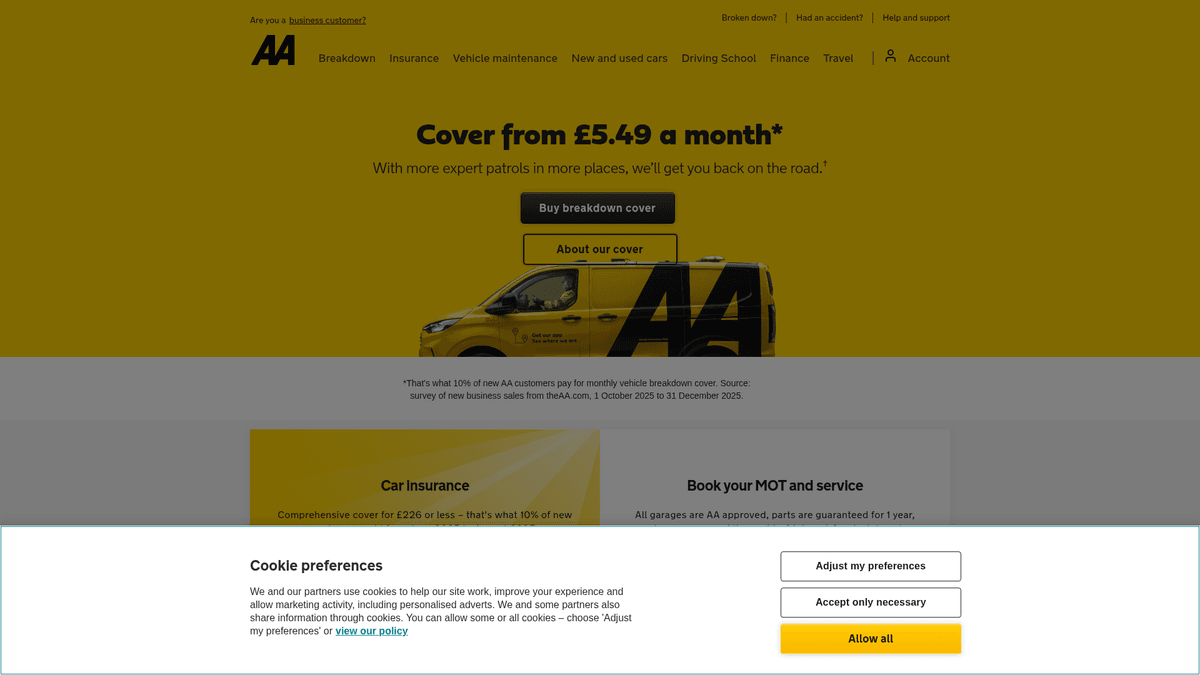
The AA (Automobile Association) is the UK's leading motoring organization, serving millions of members across the country. Beyond its iconic breakdown assistance service, theaa.com has transformed into a comprehensive automotive hub featuring the AA Cars marketplace, vehicle history checks, and insurance quote generators.
This platform is a goldmine for data scrapers looking to analyze the UK automotive market. It hosts structured data for over 100,000 second-hand vehicle listings, including pricing, mileage, and dealer locations. Additionally, the site provides valuable technical specifications and MOT history data that are essential for car valuation and fleet management services.
Scraping The AA allows businesses to perform deep-dive competitive analysis and monitor regional pricing trends. Because the listings are often 'AA Approved,' the data carries a level of trust and verification that is superior to general classified sites, making it a primary source for high-quality UK vehicle data.
Why Scrape The AA?
Discover the business value and use cases for extracting data from The AA.
Real-Time Market Valuation
Extracting thousands of listings allows you to build a high-precision valuation engine based on actual UK dealer pricing rather than estimates.
Inventory Turnover Analysis
By monitoring when listings are added and removed, you can calculate the average 'days-on-lot' for specific makes and models.
Regional Price Benchmarking
Analyze how vehicle prices vary between different UK postcodes to identify geographic arbitrage opportunities or local demand trends.
Dealer Network Intelligence
Aggregate data from AA-approved dealers to identify high-performing sellers and build a comprehensive database of trusted UK automotive businesses.
EV Adoption Tracking
Monitor the volume and price points of electric vs. internal combustion engine vehicles to track the UK's green motoring transition.
Historical Price Monitoring
Track individual vehicle listings over time to observe price drops and negotiate better deals or identify distressed inventory.
Scraping Challenges
Technical challenges you may encounter when scraping The AA.
Sophisticated Cloudflare WAF
The AA employs Cloudflare's advanced protection which can detect and block non-browser traffic and suspicious TLS fingerprints.
JavaScript-Heavy Navigation
Search results and vehicle specifications are often rendered dynamically, requiring a scraper that can execute JavaScript to reveal data.
Geographical IP Restrictions
Requests originating from outside the UK are frequently subjected to higher security challenges or localized content blocks.
Rate Limiting on Search API
The internal API endpoints used for filtering results have strict rate limits that can lead to temporary IP bans if hit too frequently.
Inconsistent Data Fields
Different vehicle types and dealer tiers may have varying HTML structures for technical specs, requiring highly flexible CSS selectors.
Scrape The AA with AI
No coding required. Extract data in minutes with AI-powered automation.
How It Works
Describe What You Need
Tell the AI what data you want to extract from The AA. Just type it in plain language — no coding or selectors needed.
AI Extracts the Data
Our artificial intelligence navigates The AA, handles dynamic content, and extracts exactly what you asked for.
Get Your Data
Receive clean, structured data ready to export as CSV, JSON, or send directly to your apps and workflows.
Why Use AI for Scraping
AI makes it easy to scrape The AA without writing any code. Our AI-powered platform uses artificial intelligence to understand what data you want — just describe it in plain language and the AI extracts it automatically.
How to scrape with AI:
- Describe What You Need: Tell the AI what data you want to extract from The AA. Just type it in plain language — no coding or selectors needed.
- AI Extracts the Data: Our artificial intelligence navigates The AA, handles dynamic content, and extracts exactly what you asked for.
- Get Your Data: Receive clean, structured data ready to export as CSV, JSON, or send directly to your apps and workflows.
Why use AI for scraping:
- Automatic Anti-Bot Handling: Automatio natively handles Cloudflare challenges and JavaScript rendering without requiring complex custom coding or third-party plugins.
- Visual Data Selection: You can visually point and click on car prices, mileage, and dealer info to create a scraper in minutes rather than writing hundreds of lines of code.
- Built-in Proxy Management: The platform provides access to high-quality UK residential proxies, ensuring your scraping activity looks like legitimate local traffic.
- Scheduled Automated Runs: Set your scraper to run every morning to catch new listings and price updates, sending the data directly to your preferred database or sheet.
- Zero Infrastructure Maintenance: Since Automatio is cloud-based, you don't need to manage servers, headless browsers, or IP rotation yourself.
No-Code Web Scrapers for The AA
Point-and-click alternatives to AI-powered scraping
Several no-code tools like Browse.ai, Octoparse, Axiom, and ParseHub can help you scrape The AA. These tools use visual interfaces to select elements, but they come with trade-offs compared to AI-powered solutions.
Typical Workflow with No-Code Tools
Common Challenges
Learning curve
Understanding selectors and extraction logic takes time
Selectors break
Website changes can break your entire workflow
Dynamic content issues
JavaScript-heavy sites often require complex workarounds
CAPTCHA limitations
Most tools require manual intervention for CAPTCHAs
IP blocking
Aggressive scraping can get your IP banned
No-Code Web Scrapers for The AA
Several no-code tools like Browse.ai, Octoparse, Axiom, and ParseHub can help you scrape The AA. These tools use visual interfaces to select elements, but they come with trade-offs compared to AI-powered solutions.
Typical Workflow with No-Code Tools
- Install browser extension or sign up for the platform
- Navigate to the target website and open the tool
- Point-and-click to select data elements you want to extract
- Configure CSS selectors for each data field
- Set up pagination rules to scrape multiple pages
- Handle CAPTCHAs (often requires manual solving)
- Configure scheduling for automated runs
- Export data to CSV, JSON, or connect via API
Common Challenges
- Learning curve: Understanding selectors and extraction logic takes time
- Selectors break: Website changes can break your entire workflow
- Dynamic content issues: JavaScript-heavy sites often require complex workarounds
- CAPTCHA limitations: Most tools require manual intervention for CAPTCHAs
- IP blocking: Aggressive scraping can get your IP banned
Code Examples
import requests
from bs4 import BeautifulSoup

# Set headers to mimic a real browser to avoid instant blocks
headers = {
    'User-Agent': 'Mozilla/5.0 (Windows NT 10.0; Win64; x64) AppleWebKit/537.36 (KHTML, like Gecko) Chrome/120.0.0.0 Safari/537.36',
    'Accept-Language': 'en-GB,en;q=0.9'
}

# Target URL for a specific car make
url = 'https://www.theaa.com/used-cars/audi/a1'

try:
    response = requests.get(url, headers=headers, timeout=10)
    if response.status_code == 200:
        soup = BeautifulSoup(response.text, 'html.parser')
        # Locate listing containers
        listings = soup.find_all('div', class_='listing-item')
        for car in listings:
            title = car.find('h3').get_text(strip=True) if car.find('h3') else 'N/A'
            price = car.find('strong').get_text(strip=True) if car.find('strong') else 'N/A'
            print(f'Model: {title} | Price: {price}')
    else:
        print(f'Blocked: {response.status_code}')
except Exception as e:
    print(f'Error occurred: {e}')
When to Use
Best for static HTML pages where content is loaded server-side. The fastest and simplest approach when JavaScript rendering isn't required.
Advantages
- ●Fastest execution (no browser overhead)
- ●Lowest resource consumption
- ●Easy to parallelize with asyncio
- ●Great for APIs and static pages
Limitations
- ●Cannot execute JavaScript
- ●Fails on SPAs and dynamic content
- ●May struggle with complex anti-bot systems
How to Scrape The AA with Code
Python + Requests
import requests
from bs4 import BeautifulSoup
# Set headers to mimic a real browser to avoid instant blocks
headers = {
'User-Agent': 'Mozilla/5.0 (Windows NT 10.0; Win64; x64) AppleWebKit/537.36 (KHTML, like Gecko) Chrome/120.0.0.0 Safari/537.36',
'Accept-Language': 'en-GB,en;q=0.9'
}
# Target URL for a specific car make
url = 'https://www.theaa.com/used-cars/audi/a1'
try:
response = requests.get(url, headers=headers, timeout=10)
if response.status_code == 200:
soup = BeautifulSoup(response.text, 'html.parser')
# Locate listing containers
listings = soup.find_all('div', class_='listing-item')
for car in listings:
title = car.find('h3').get_text(strip=True) if car.find('h3') else 'N/A'
price = car.find('strong').get_text(strip=True) if car.find('strong') else 'N/A'
print(f'Model: {title} | Price: {price}')
else:
print(f'Blocked: {response.status_code}')
except Exception as e:
print(f'Error occurred: {e}')Python + Playwright
import asyncio
from playwright.async_api import async_playwright

async def scrape_aa():
    async with async_playwright() as p:
        # Launch a headed browser if debugging, otherwise headless
        browser = await p.chromium.launch(headless=True)
        page = await browser.new_page()

        # Navigate to a listing page
        await page.goto('https://www.theaa.com/used-cars/bmw/3-series')

        # Wait for the listing items to render via JS
        await page.wait_for_selector('.listing-item')

        # Extract data from the page context
        cars = await page.eval_on_selector_all('.listing-item', """
            elements => elements.map(el => ({
                title: el.querySelector('h3')?.innerText,
                price: el.querySelector('strong')?.innerText,
                mileage: el.querySelector('.mileage')?.innerText
            }))
        """)

        for car in cars:
            print(car)

        await browser.close()

asyncio.run(scrape_aa())Python + Scrapy
import scrapy

class AACarsSpider(scrapy.Spider):
    name = 'aa_spider'
    allowed_domains = ['theaa.com']
    start_urls = ['https://www.theaa.com/used-cars/ford/fiesta']

    def parse(self, response):
        # Iterate through listing blocks
        for car in response.css('.listing-item'):
            yield {
                'make_model': car.css('h3::text').get(),
                'price': car.css('strong::text').get(),
                'details': car.css('ul.listing-details li::text').getall()
            }

        # Handle pagination links
        next_page = response.css('a.next-pagination::attr(href)').get()
        if next_page:
yield response.follow(next_page, self.parse)Node.js + Puppeteer
const puppeteer = require('puppeteer');

(async () => {
  const browser = await puppeteer.launch();
  const page = await browser.newPage();

  // Mask the bot profile with a common User-Agent
  await page.setUserAgent('Mozilla/5.0 (Windows NT 10.0; Win64; x64) AppleWebKit/537.36');

  await page.goto('https://www.theaa.com/used-cars/brands');

  // Extract car brand links for crawling
  const brands = await page.evaluate(() => {
    return Array.from(document.querySelectorAll('a[href^="/used-cars/"]'))
                .map(a => a.innerText.trim())
                .filter(text => text.length > 0);
  });

  console.log('Available Brands:', brands);
  await browser.close();
})();What You Can Do With The AA Data
Explore practical applications and insights from The AA data.
Regional Car Price Index
Enables market analysts to identify geographic price disparities for identical used car models across the UK.
How to implement:
- 1Scrape identical models across multiple UK city-specific filters.
- 2Calculate median prices and depreciation rates per region.
- 3Visualize the disparities using heatmapping software.
Use Automatio to extract data from The AA and build these applications without writing code.
What You Can Do With The AA Data
- Regional Car Price Index
Enables market analysts to identify geographic price disparities for identical used car models across the UK.
- Scrape identical models across multiple UK city-specific filters.
- Calculate median prices and depreciation rates per region.
- Visualize the disparities using heatmapping software.
- Fleet Maintenance Compliance
Automates the tracking of MOT and tax status for company fleets to ensure legal roadworthiness.
- Feed a list of vehicle registrations into an automated scraper.
- Extract MOT expiry and tax status from the AA verification tool.
- Trigger internal alerts 30 days before any document expiry.
- Insurance Competitive Analysis
Insurance firms can use estimate data to adjust their own risk and pricing models in real-time.
- Scrape insurance quote estimates for a variety of car types and driver profiles.
- Map the correlation between vehicle specs and premium costs.
- Adjust internal pricing algorithms based on competitor positioning.
- Dealer Inventory Monitoring
Car dealerships track competitor stock levels and pricing to optimize their own sales strategy.
- Set up daily scrapes of specific local dealerships listed on the AA.
- Track how long specific vehicles remain 'in stock' before being sold.
- Adjust trade-in offers based on local supply and demand trends.
Supercharge your workflow with AI Automation
Automatio combines the power of AI agents, web automation, and smart integrations to help you accomplish more in less time.
What to get right first
Expert advice for successfully extracting data from The AA.
Use UK Residential Proxies
To avoid being flagged by The AA's security filters, always route your requests through UK-based residential IP addresses.
Trigger Lazy-Loaded Content
Vehicle specifications and images often load as you scroll; ensure your scraper simulates human scrolling behavior to capture all data.
Parse JSON-LD Metadata
Check the HTML source for 'application/ld+json' tags which often contain clean, structured vehicle data that is easier to parse than raw HTML.
Randomize Request Intervals
Avoid a fixed scraping cadence; instead, use random delays between 3 to 8 seconds to mimic a real human browsing the marketplace.
Rotate Browser Fingerprints
Regularly change your User-Agent and screen resolution headers to prevent being fingerprinted as a single bot entity.
Target Brand-Specific URLs
Rather than scraping the global search, target brand or model-specific URLs (e.g., /used-cars/ford) to manage smaller, more reliable batches.
Related Web Scraping
How to Scrape CSS Author: A Comprehensive Web Scraping Guide
How to Scrape Bilregistret.ai: Swedish Vehicle Data Extraction Guide
How to Scrape Biluppgifter.se: Vehicle Data Extraction Guide
How to Scrape Car.info | Vehicle Data & Valuation Extraction Guide
How to Scrape GoAbroad Study Abroad Programs

How to Scrape ResearchGate: Publication and Researcher Data
How to Scrape Statista: The Ultimate Guide to Market Data Extraction
How to Scrape Weebly Websites: Extract Data from Millions of Sites
Frequently Asked Questions
Find answers to common questions about The AA