
How to Scrape Trustpilot: Extract Reviews & Ratings (2025)
Master Trustpilot scraping to monitor brand reputation. Learn to extract review text, star ratings, and TrustScores while bypassing Cloudflare blocks.
Anti-Bot Protection Detected
- Cloudflare
- Enterprise-grade WAF and bot management. Uses JavaScript challenges, CAPTCHAs, and behavioral analysis. Requires browser automation with stealth settings.
- Cloudflare
- Enterprise-grade WAF and bot management. Uses JavaScript challenges, CAPTCHAs, and behavioral analysis. Requires browser automation with stealth settings.
- Rate Limiting
- Limits requests per IP/session over time. Can be bypassed with rotating proxies, request delays, and distributed scraping.
- IP Blocking
- Blocks known datacenter IPs and flagged addresses. Requires residential or mobile proxies to circumvent effectively.
- Browser Fingerprinting
- Identifies bots through browser characteristics: canvas, WebGL, fonts, plugins. Requires spoofing or real browser profiles.
- Google reCAPTCHA
- Google's CAPTCHA system. v2 requires user interaction, v3 runs silently with risk scoring. Can be solved with CAPTCHA services.
About Trustpilot
Learn what Trustpilot offers and what valuable data can be extracted from it.
The Global Standard for Customer Feedback
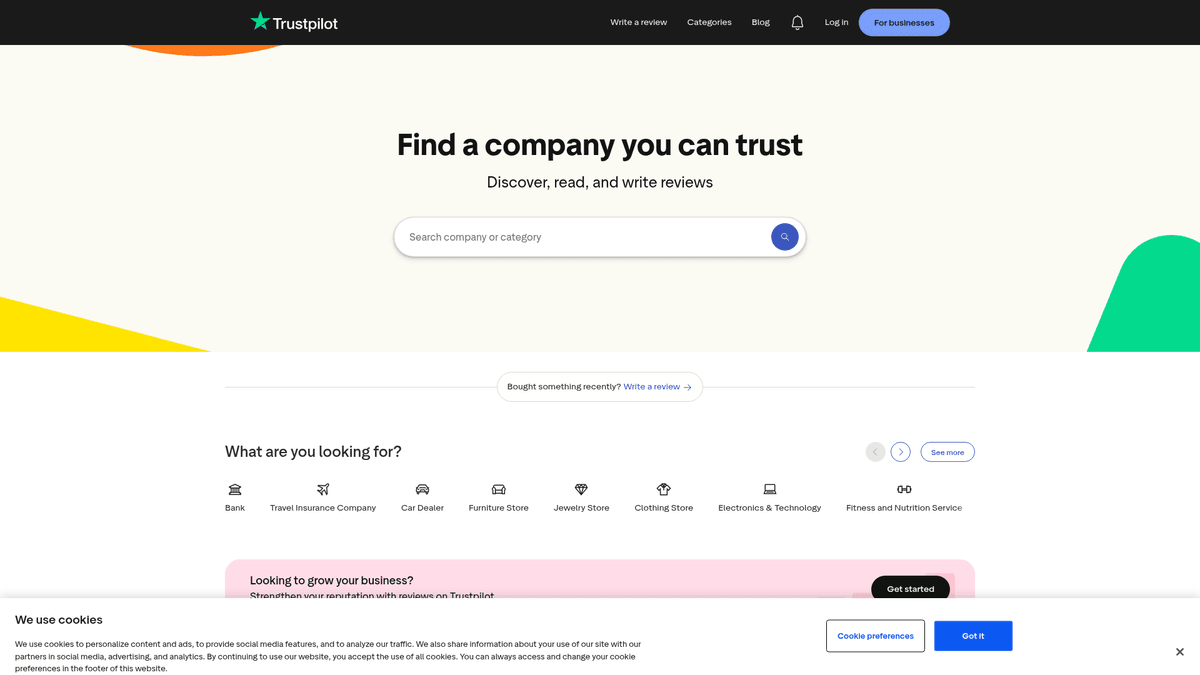
Trustpilot is a leading global review platform that serves as a bridge between businesses and consumers through genuine feedback. Founded in 2007 and headquartered in Denmark, it provides a transparent space for people to share their buying and service experiences with millions of companies across a vast range of industries. The platform has become one of the most trusted resources for online shoppers and a critical tool for businesses to manage their online presence.
High-Value Qualitative Data
The website hosts a wealth of data including company TrustScores, categorized business listings, and detailed, timestamped user reviews. Each review often includes a star rating, a specific title, detailed text description, and the reviewer's verification status. This structured and qualitative data provides a comprehensive view of customer satisfaction and brand performance over time.
Why Scrape Trustpilot?
Scraping Trustpilot allows businesses and researchers to aggregate thousands of individual experiences into structured datasets for large-scale analysis. This data is invaluable for monitoring brand reputation, performing sentiment analysis, tracking competitor performance, and identifying emerging market trends. By automating data collection, organizations can gain real-time insights into customer pain points and service excellence.
Why Scrape Trustpilot?
Discover the business value and use cases for extracting data from Trustpilot.
Real-Time Reputation Management
Monitor brand sentiment across global markets to identify and address negative feedback before it impacts conversion rates.
Competitor Weakness Discovery
Analyze competitor reviews to find recurring customer complaints and use those insights to improve your own product's value proposition.
High-Intent Lead Generation
Identify users who leave 1-star reviews for competitors as warm leads who are actively looking for a more reliable alternative.
Sentiment Analysis for NLP
Extract massive datasets of authentic human language to train machine learning models for industry-specific sentiment and emotion detection.
Market Trend Identification
Scrape category-wide data to observe shifts in consumer expectations and service standards across different industries in real-time.
Dynamic Social Proof Integration
Automate the collection of your latest 5-star reviews to display them as live social proof on your checkout and landing pages.
Scraping Challenges
Technical challenges you may encounter when scraping Trustpilot.
Advanced Anti-Bot Mitigation
Trustpilot uses Cloudflare and Turnstile challenges that frequently block standard automated requests and headless browsers.
Deep Pagination Restrictions
The platform often limits review visibility or triggers login walls for users attempting to navigate deep into search results beyond the initial pages.
Volatile Frontend Structure
Frequent updates to the website's React-based DOM structure and dynamic class names can break fragile, selector-based scraping scripts.
Strict Rate Limiting
Sending requests too rapidly from the same IP range will trigger Error 1015, resulting in temporary or permanent IP bans.
Scrape Trustpilot with AI
No coding required. Extract data in minutes with AI-powered automation.
How It Works
Describe What You Need
Tell the AI what data you want to extract from Trustpilot. Just type it in plain language — no coding or selectors needed.
AI Extracts the Data
Our artificial intelligence navigates Trustpilot, handles dynamic content, and extracts exactly what you asked for.
Get Your Data
Receive clean, structured data ready to export as CSV, JSON, or send directly to your apps and workflows.
Why Use AI for Scraping
AI makes it easy to scrape Trustpilot without writing any code. Our AI-powered platform uses artificial intelligence to understand what data you want — just describe it in plain language and the AI extracts it automatically.
How to scrape with AI:
- Describe What You Need: Tell the AI what data you want to extract from Trustpilot. Just type it in plain language — no coding or selectors needed.
- AI Extracts the Data: Our artificial intelligence navigates Trustpilot, handles dynamic content, and extracts exactly what you asked for.
- Get Your Data: Receive clean, structured data ready to export as CSV, JSON, or send directly to your apps and workflows.
Why use AI for scraping:
- Native Turnstile Solving: Automatio handles complex Cloudflare challenges and Turnstile checks automatically, ensuring your scrapers don't get stuck on bot detection screens.
- Point-and-Click Interface: Map out complex review data—including ratings, reviewer locations, and company replies—using a visual interface without writing any code.
- Headless Browser Handling: It manages the full JavaScript rendering process, ensuring all dynamic review content and star ratings are fully loaded before extraction begins.
- Smart Proxy Integration: Easily rotate through high-quality residential proxies within the tool to mimic real user behavior and stay hidden from anti-scraping systems.
- Automated Update Schedules: Set your Trustpilot scrapers to run on a daily or weekly schedule to keep your data warehouses and sentiment dashboards updated automatically.
No-Code Web Scrapers for Trustpilot
Point-and-click alternatives to AI-powered scraping
Several no-code tools like Browse.ai, Octoparse, Axiom, and ParseHub can help you scrape Trustpilot. These tools use visual interfaces to select elements, but they come with trade-offs compared to AI-powered solutions.
Typical Workflow with No-Code Tools
Common Challenges
Learning curve
Understanding selectors and extraction logic takes time
Selectors break
Website changes can break your entire workflow
Dynamic content issues
JavaScript-heavy sites often require complex workarounds
CAPTCHA limitations
Most tools require manual intervention for CAPTCHAs
IP blocking
Aggressive scraping can get your IP banned
No-Code Web Scrapers for Trustpilot
Several no-code tools like Browse.ai, Octoparse, Axiom, and ParseHub can help you scrape Trustpilot. These tools use visual interfaces to select elements, but they come with trade-offs compared to AI-powered solutions.
Typical Workflow with No-Code Tools
- Install browser extension or sign up for the platform
- Navigate to the target website and open the tool
- Point-and-click to select data elements you want to extract
- Configure CSS selectors for each data field
- Set up pagination rules to scrape multiple pages
- Handle CAPTCHAs (often requires manual solving)
- Configure scheduling for automated runs
- Export data to CSV, JSON, or connect via API
Common Challenges
- Learning curve: Understanding selectors and extraction logic takes time
- Selectors break: Website changes can break your entire workflow
- Dynamic content issues: JavaScript-heavy sites often require complex workarounds
- CAPTCHA limitations: Most tools require manual intervention for CAPTCHAs
- IP blocking: Aggressive scraping can get your IP banned
Code Examples
import requests
from bs4 import BeautifulSoup

# Using a custom session to simulate a real browser
def scrape_trustpilot(slug):
    url = f'https://www.trustpilot.com/review/{slug}'
    headers = {
        'User-Agent': 'Mozilla/5.0 (Windows NT 10.0; Win64; x64) AppleWebKit/537.36 (KHTML, like Gecko) Chrome/119.0.0.0 Safari/537.36'
    }

    response = requests.get(url, headers=headers)
    if response.status_code == 200:
        soup = BeautifulSoup(response.text, 'html.parser')
        reviews = []
        # Selector for review containers (note: classes change often)
        for card in soup.select('section.styles_reviewCard__hc_vR'):
            data = {
                'title': card.select_one('h2').text if card.select_one('h2') else None,
                'rating': card.select_one('div.star-rating_starRating__Bdb_f img')['alt'] if card.select_one('img') else None,
                'text': card.select_one('p[data-service-review-text-typography]').text if card.select_one('p') else None
            }
            reviews.append(data)
        return reviews
    return None

# Example usage
print(scrape_trustpilot('www.apple.com'))
When to Use
Best for static HTML pages where content is loaded server-side. The fastest and simplest approach when JavaScript rendering isn't required.
Advantages
- ●Fastest execution (no browser overhead)
- ●Lowest resource consumption
- ●Easy to parallelize with asyncio
- ●Great for APIs and static pages
Limitations
- ●Cannot execute JavaScript
- ●Fails on SPAs and dynamic content
- ●May struggle with complex anti-bot systems
How to Scrape Trustpilot with Code
Python + Requests
import requests
from bs4 import BeautifulSoup
# Using a custom session to simulate a real browser
def scrape_trustpilot(slug):
url = f'https://www.trustpilot.com/review/{slug}'
headers = {
'User-Agent': 'Mozilla/5.0 (Windows NT 10.0; Win64; x64) AppleWebKit/537.36 (KHTML, like Gecko) Chrome/119.0.0.0 Safari/537.36'
}
response = requests.get(url, headers=headers)
if response.status_code == 200:
soup = BeautifulSoup(response.text, 'html.parser')
reviews = []
# Selector for review containers (note: classes change often)
for card in soup.select('section.styles_reviewCard__hc_vR'):
data = {
'title': card.select_one('h2').text if card.select_one('h2') else None,
'rating': card.select_one('div.star-rating_starRating__Bdb_f img')['alt'] if card.select_one('img') else None,
'text': card.select_one('p[data-service-review-text-typography]').text if card.select_one('p') else None
}
reviews.append(data)
return reviews
return None
# Example usage
print(scrape_trustpilot('www.apple.com'))Python + Playwright
import asyncio
from playwright.async_api import async_playwright

async def run():
    async with async_playwright() as p:
        browser = await p.chromium.launch(headless=True)
        context = await browser.new_context(user_agent='Mozilla/5.0')
        page = await context.new_page()

        await page.goto('https://www.trustpilot.com/review/www.apple.com')

        # Wait for dynamic content to load
        await page.wait_for_selector('section.styles_reviewCard__hc_vR')

        reviews = await page.evaluate('''() => {
            return Array.from(document.querySelectorAll('section.styles_reviewCard__hc_vR')).map(card => ({
                author: card.querySelector('span.typography_appearance-default__S8ne3')?.innerText,
                rating: card.querySelector('.star-rating_starRating__Bdb_f img')?.alt,
                date: card.querySelector('time')?.getAttribute('datetime')
            }));
        }''')

        print(reviews)
        await browser.close()

asyncio.run(run())Python + Scrapy
import scrapy

class TrustpilotSpider(scrapy.Spider):
    name = 'trustpilot'
    start_urls = ['https://www.trustpilot.com/review/www.apple.com']

    def parse(self, response):
        for review in response.css('section.styles_reviewCard__hc_vR'):
            yield {
                'author': review.css('span.typography_appearance-default__S8ne3::text').get(),
                'rating': review.css('div.star-rating_starRating__Bdb_f img::attr(alt)').get(),
                'title': review.css('h2.styles_reviewTitle__m9_V_::text').get(),
                'date': review.css('time::attr(datetime)').get()
            }

        next_page = response.css('a[name="pagination-button-next"]::attr(href)').get()
        if next_page:
yield response.follow(next_page, self.parse)Node.js + Puppeteer
const puppeteer = require('puppeteer-extra');
const StealthPlugin = require('puppeteer-extra-plugin-stealth');
puppeteer.use(StealthPlugin());

(async () => {
  const browser = await puppeteer.launch({ headless: true });
  const page = await browser.newPage();
  await page.goto('https://www.trustpilot.com/review/www.apple.com', { waitUntil: 'networkidle2' });

  const data = await page.evaluate(() => {
    const items = document.querySelectorAll('section.styles_reviewCard__hc_vR');
    return Array.from(items).map(item => ({
      title: item.querySelector('h2')?.innerText,
      body: item.querySelector('p')?.innerText
    }));
  });

  console.log(data);
  await browser.close();
})();What You Can Do With Trustpilot Data
Explore practical applications and insights from Trustpilot data.
Brand Health Monitoring
Companies use real-time review data to track customer sentiment and respond to negative feedback before it goes viral.
How to implement:
- 1Set up a daily scraper for your company's Trustpilot profile.
- 2Analyze the 'Body Text' for sentiment polarity using an NLP tool.
- 3Trigger automatic alerts for any 1-star or 2-star reviews received.
Use Automatio to extract data from Trustpilot and build these applications without writing code.
What You Can Do With Trustpilot Data
- Brand Health Monitoring
Companies use real-time review data to track customer sentiment and respond to negative feedback before it goes viral.
- Set up a daily scraper for your company's Trustpilot profile.
- Analyze the 'Body Text' for sentiment polarity using an NLP tool.
- Trigger automatic alerts for any 1-star or 2-star reviews received.
- Competitive Market Gap Analysis
Identify what customers hate about your competitors to position your product as the superior alternative.
- Scrape reviews for the top 5 competitors in your industry category.
- Extract the most common negative keywords and phrases.
- Develop marketing copy that specifically addresses those pain points as your strengths.
- B2B Lead Generation
Agencies find businesses with low scores to offer reputation management or improved customer service solutions.
- Scrape Trustpilot categories for companies with a TrustScore below 3.0.
- Filter for companies with high review volume, indicating an active but unhappy customer base.
- Extract business URLs and cross-reference with LinkedIn for decision-maker contact info.
- Product Roadmap Prioritization
Product managers use qualitative feedback to decide which features to build or bugs to fix next.
- Scrape all reviews from the last 6 months for a specific product.
- Categorize feedback into 'Feature Request', 'Bug Report', or 'Usability Issue'.
- Rank categories by volume to prioritize the development backlog.
- Dynamic Social Proof
E-commerce sites display live, verified reviews on their own product pages to increase conversion rates.
- Schedule a periodic scrape to fetch the latest 5-star reviews.
- Save the reviewer name, rating, and quote to a central database.
- Display these reviews on your website's checkout page via a custom API.
Supercharge your workflow with AI Automation
Automatio combines the power of AI agents, web automation, and smart integrations to help you accomplish more in less time.
What to get right first
Expert advice for successfully extracting data from Trustpilot.
Target Hidden JSON-LD
Extract data from the 'application/ld+json' script tags in the page source; this structured data is more reliable than scraping the visible HTML.
Exclusively Use Residential Proxies
Data center IPs are easily flagged by Trustpilot's security layers. Residential proxies provide the legitimacy needed for high-volume extraction.
Implement Randomized Delays
Add sleep timers between 5 and 15 seconds between page loads to mimic a human browsing pattern and avoid triggering rate limits.
Rotate User Agents and TLS
Ensure your scraper rotates User-Agent strings and matches the TLS fingerprints of modern browsers to avoid detection by advanced bot filters.
Filter for Verified Reviews
When scraping for market research, focus on reviews with the 'Verified' badge to ensure your dataset contains authentic customer experiences.
Monitor for CSS Changes
Trustpilot updates its UI regularly. Periodically check your visual selectors to ensure they still map to the correct review elements.
Related Web Scraping

How to Scrape The AA (theaa.com): A Technical Guide for Car & Insurance Data
How to Scrape CSS Author: A Comprehensive Web Scraping Guide
How to Scrape Bilregistret.ai: Swedish Vehicle Data Extraction Guide
How to Scrape Biluppgifter.se: Vehicle Data Extraction Guide
How to Scrape Car.info | Vehicle Data & Valuation Extraction Guide

How to Scrape GoAbroad Study Abroad Programs

How to Scrape ResearchGate: Publication and Researcher Data
How to Scrape Statista: The Ultimate Guide to Market Data Extraction
Frequently Asked Questions
Find answers to common questions about Trustpilot