
How to Scrape whatsmydns.net: A Complete Guide to DNS Data
Learn how to scrape global DNS propagation data from whatsmydns.net. Extract real-time A, MX, CNAME, and TXT records from worldwide servers automatically.
Anti-Bot Protection Detected
- Cloudflare
- Enterprise-grade WAF and bot management. Uses JavaScript challenges, CAPTCHAs, and behavioral analysis. Requires browser automation with stealth settings.
- Rate Limiting
- Limits requests per IP/session over time. Can be bypassed with rotating proxies, request delays, and distributed scraping.
- JavaScript Challenge
- Requires executing JavaScript to access content. Simple requests fail; need headless browser like Playwright or Puppeteer.
- User-Agent Filtering
- Turnstile
About whatsmydns.net
Learn what whatsmydns.net offers and what valuable data can be extracted from it.
Global DNS Propagation Infrastructure
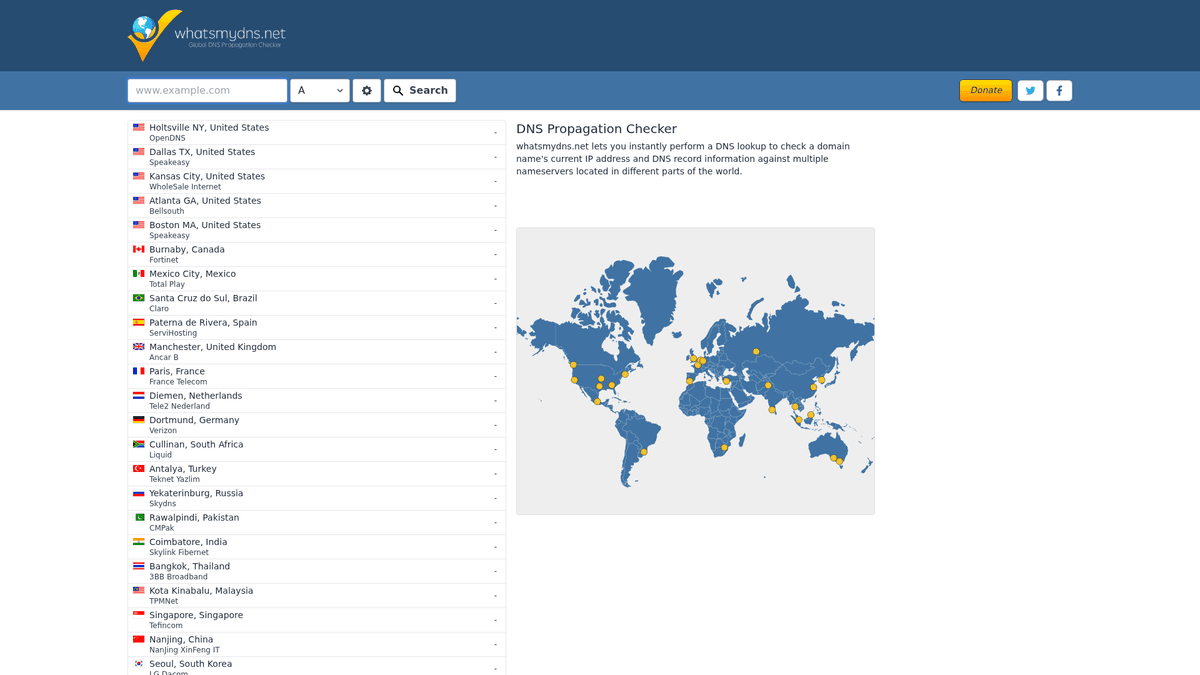
whatsmydns.net is a premier online utility designed for system administrators and developers to track DNS propagation across the globe. By querying dozens of DNS servers located in various geographic regions, it provides a comprehensive view of how a domain resolves for users in different countries. This visibility is essential for ensuring that DNS changes, such as IP migrations or mail server updates, have been successfully applied worldwide.
Comprehensive DNS Record Tracking
The platform supports a wide array of DNS record types, including A, AAAA, CNAME, MX, NS, PTR, SOA, and TXT. For each query, the site returns a detailed list of server locations, the resolved values, and the status of the propagation. This data is critical for troubleshooting technical issues that only appear in specific regions due to ISP caching or misconfigured local resolvers.
Strategic Data Value
Scraping this data allows organizations to automate technical audits and monitor infrastructure health. Instead of manually checking propagation, businesses can build automated systems that verify record accuracy every few minutes. This is particularly valuable during high-stakes events like website migrations or security updates where any delay in DNS updates can lead to downtime or service interruption for a subset of global users.
Why Scrape whatsmydns.net?
Discover the business value and use cases for extracting data from whatsmydns.net.
Global Infrastructure Monitoring
Continuously monitor your domain's health across international servers to ensure consistent accessibility and identify regional DNS outages instantly. This proactive approach helps technical teams resolve local connectivity issues before they impact a larger user base.
Automated Migration Verification
Track the propagation of new IP addresses or nameservers during a server move, ensuring all global nodes update correctly before decommissioning old assets. It provides a data-backed confirmation that the cutover was successful worldwide.
Brand Security Auditing
Monitor critical records like SPF, DKIM, and DMARC to prevent email spoofing and detect unauthorized changes that could compromise your brand's reputation. Regular scraping helps identify DNS hijacking attempts in specific geographic zones.
Competitive Intelligence
Analyze the hosting, CDN, and email infrastructure choices of competitors by scraping their MX and CNAME records across various geographic regions. This allows market researchers to map out the tech stacks used by industry leaders.
CDN Strategy Optimization
Verify that your Content Delivery Network is routing traffic to the correct edge locations globally, allowing for data-driven adjustments to your caching strategy. This ensures that users always receive content from the fastest possible server.
Troubleshooting Regional Latency
Identify specific resolvers or geographic zones where DNS resolution is failing or returning stale records, helping to diagnose complex network performance issues. It is an essential tool for debugging errors that only appear in certain countries.
Scraping Challenges
Technical challenges you may encounter when scraping whatsmydns.net.
Advanced Cloudflare Protection
The site uses Cloudflare's security layer, including Turnstile and browser fingerprinting, which requires sophisticated automation to bypass without being flagged. Simple HTTP requests will almost always be blocked by the challenge wall.
Asynchronous Result Loading
Data points are not available in the source HTML and load at different times via background AJAX calls, making static scrapers completely ineffective. The scraper must wait for each global node to report its status before extracting the values.
Aggressive Rate Limiting
Rapid, automated queries from a single IP address quickly trigger temporary bans or CAPTCHAs, necessitating the use of high-quality proxy rotation. This requires careful management of request headers and timing to mimic human behavior.
Real-time Data Volatility
DNS propagation is a fluid process where results can change within seconds, requiring fast extraction and timestamping for accurate analysis. Keeping track of these changes over time requires a robust database architecture.
Complex Selector Logic
The results table utilizes specific status icons, such as green checks or red crosses, that must be correctly parsed alongside text values to determine resolution success. This requires precise CSS or XPath targeting to interpret the visual status correctly.
Scrape whatsmydns.net with AI
No coding required. Extract data in minutes with AI-powered automation.
How It Works
Describe What You Need
Tell the AI what data you want to extract from whatsmydns.net. Just type it in plain language — no coding or selectors needed.
AI Extracts the Data
Our artificial intelligence navigates whatsmydns.net, handles dynamic content, and extracts exactly what you asked for.
Get Your Data
Receive clean, structured data ready to export as CSV, JSON, or send directly to your apps and workflows.
Why Use AI for Scraping
AI makes it easy to scrape whatsmydns.net without writing any code. Our AI-powered platform uses artificial intelligence to understand what data you want — just describe it in plain language and the AI extracts it automatically.
How to scrape with AI:
- Describe What You Need: Tell the AI what data you want to extract from whatsmydns.net. Just type it in plain language — no coding or selectors needed.
- AI Extracts the Data: Our artificial intelligence navigates whatsmydns.net, handles dynamic content, and extracts exactly what you asked for.
- Get Your Data: Receive clean, structured data ready to export as CSV, JSON, or send directly to your apps and workflows.
Why use AI for scraping:
- Built-in Stealth Engine: Automatio natively handles Cloudflare challenges and browser fingerprinting, allowing you to focus on data extraction rather than bot-bypass technicalities. This significantly reduces the technical overhead needed to start scraping.
- Visual AJAX Interaction: The no-code visual editor lets you easily set 'Wait for Element' actions to ensure every global server result is fully loaded before scraping begins. This ensures 100% data accuracy even when some servers respond slower than others.
- Global Proxy Integration: Easily rotate through residential or datacenter proxies to avoid rate limits and simulate lookups from various international IP addresses. This helps in maintaining a high success rate for large-scale domain audits.
- Event-Driven Scheduling: Set up automated triggers to check DNS propagation every hour during a migration window, sending the data directly to your preferred database or sheet. This allows for hands-off monitoring during critical infrastructure updates.
- Data Harmonization: Automatically clean and format varied record types, such as MX priorities or TXT strings, into a structured JSON or CSV format ready for immediate technical analysis. This saves hours of manual data cleaning and reorganization.
No-Code Web Scrapers for whatsmydns.net
Point-and-click alternatives to AI-powered scraping
Several no-code tools like Browse.ai, Octoparse, Axiom, and ParseHub can help you scrape whatsmydns.net. These tools use visual interfaces to select elements, but they come with trade-offs compared to AI-powered solutions.
Typical Workflow with No-Code Tools
Common Challenges
Learning curve
Understanding selectors and extraction logic takes time
Selectors break
Website changes can break your entire workflow
Dynamic content issues
JavaScript-heavy sites often require complex workarounds
CAPTCHA limitations
Most tools require manual intervention for CAPTCHAs
IP blocking
Aggressive scraping can get your IP banned
No-Code Web Scrapers for whatsmydns.net
Several no-code tools like Browse.ai, Octoparse, Axiom, and ParseHub can help you scrape whatsmydns.net. These tools use visual interfaces to select elements, but they come with trade-offs compared to AI-powered solutions.
Typical Workflow with No-Code Tools
- Install browser extension or sign up for the platform
- Navigate to the target website and open the tool
- Point-and-click to select data elements you want to extract
- Configure CSS selectors for each data field
- Set up pagination rules to scrape multiple pages
- Handle CAPTCHAs (often requires manual solving)
- Configure scheduling for automated runs
- Export data to CSV, JSON, or connect via API
Common Challenges
- Learning curve: Understanding selectors and extraction logic takes time
- Selectors break: Website changes can break your entire workflow
- Dynamic content issues: JavaScript-heavy sites often require complex workarounds
- CAPTCHA limitations: Most tools require manual intervention for CAPTCHAs
- IP blocking: Aggressive scraping can get your IP banned
Code Examples
import requests
from bs4 import BeautifulSoup

# Note: Direct requests may be blocked by Cloudflare
url = 'https://www.whatsmydns.net/'
headers = {
    'User-Agent': 'Mozilla/5.0 (Windows NT 10.0; Win64; x64) Chrome/119.0.0.0 Safari/537.36',
    'Accept': 'text/html,application/xhtml+xml,xml;q=0.9,image/avif,image/webp,*/*;q=0.8'
}

def check_dns_static():
    try:
        # Accessing the homepage to get the session/cookies
        session = requests.Session()
        response = session.get(url, headers=headers)
        if response.status_code == 200:
            soup = BeautifulSoup(response.text, 'html.parser')
            # Static scraping is limited as results load via JS
            print('Page loaded successfully. JS rendering required for results.')
        else:
            print(f'Blocked: HTTP {response.status_code}')
    except Exception as e:
        print(f'Error: {e}')

check_dns_static()
When to Use
Best for static HTML pages where content is loaded server-side. The fastest and simplest approach when JavaScript rendering isn't required.
Advantages
- ●Fastest execution (no browser overhead)
- ●Lowest resource consumption
- ●Easy to parallelize with asyncio
- ●Great for APIs and static pages
Limitations
- ●Cannot execute JavaScript
- ●Fails on SPAs and dynamic content
- ●May struggle with complex anti-bot systems
How to Scrape whatsmydns.net with Code
Python + Requests
import requests
from bs4 import BeautifulSoup
# Note: Direct requests may be blocked by Cloudflare
url = 'https://www.whatsmydns.net/'
headers = {
'User-Agent': 'Mozilla/5.0 (Windows NT 10.0; Win64; x64) Chrome/119.0.0.0 Safari/537.36',
'Accept': 'text/html,application/xhtml+xml,xml;q=0.9,image/avif,image/webp,*/*;q=0.8'
}
def check_dns_static():
try:
# Accessing the homepage to get the session/cookies
session = requests.Session()
response = session.get(url, headers=headers)
if response.status_code == 200:
soup = BeautifulSoup(response.text, 'html.parser')
# Static scraping is limited as results load via JS
print('Page loaded successfully. JS rendering required for results.')
else:
print(f'Blocked: HTTP {response.status_code}')
except Exception as e:
print(f'Error: {e}')
check_dns_static()Python + Playwright
from playwright.sync_api import sync_playwright

def scrape_whatsmydns():
    with sync_playwright() as p:
        browser = p.chromium.launch(headless=True)
        page = browser.new_page()

        # Use the hash-based URL to trigger a specific DNS lookup
        page.goto('https://www.whatsmydns.net/#A/google.com')

        # Wait for the results table to populate with data
        page.wait_for_selector('.results-table tr', timeout=15000)

        # Extract the results
        rows = page.query_selector_all('.results-table tr')
        for row in rows:
            location = row.query_selector('.location').inner_text()
            result_val = row.query_selector('.value').inner_text()
            print(f'[{location}] Resolved to: {result_val}')

        browser.close()

scrape_whatsmydns()Python + Scrapy
import scrapy
from scrapy_playwright.page import PageMethod

class DNSPropagationSpider(scrapy.Spider):
    name = 'dns_spider'

    def start_requests(self):
        # Scrapy-Playwright handles the JS rendering
        yield scrapy.Request(
            'https://www.whatsmydns.net/#A/example.com',
            meta={
                'playwright': True,
                'playwright_page_methods': [
                    PageMethod('wait_for_selector', '.results-table tr')
                ]
            }
        )

    def parse(self, response):
        # Iterate through the table rows extracted via Playwright
        for row in response.css('.results-table tr'):
            yield {
                'location': row.css('.location::text').get(),
                'result': row.css('.value::text').get()
}Node.js + Puppeteer
const puppeteer = require('puppeteer');

(async () => {
  const browser = await puppeteer.launch();
  const page = await browser.newPage();

  // Navigate directly to the DNS check URL
  await page.goto('https://www.whatsmydns.net/#MX/microsoft.com', { waitUntil: 'networkidle2' });

  // Wait for dynamic server rows to load
  await page.waitForSelector('.results-table tr');

  const data = await page.evaluate(() => {
    const rows = Array.from(document.querySelectorAll('.results-table tr'));
    return rows.map(row => ({
      location: row.querySelector('.location')?.innerText.trim(),
      value: row.querySelector('.value')?.innerText.trim()
    }));
  });

  console.log(data);
  await browser.close();
})();What You Can Do With whatsmydns.net Data
Explore practical applications and insights from whatsmydns.net data.
Global Uptime Monitoring
IT managers can ensure that their services are accessible worldwide without manual checks.
How to implement:
- 1Schedule a scrape of critical domains every 30 minutes
- 2Compare scraped IP addresses against a master list of authorized IPs
- 3Trigger an automated alert via Webhook if a mismatch is detected in any region
Use Automatio to extract data from whatsmydns.net and build these applications without writing code.
What You Can Do With whatsmydns.net Data
- Global Uptime Monitoring
IT managers can ensure that their services are accessible worldwide without manual checks.
- Schedule a scrape of critical domains every 30 minutes
- Compare scraped IP addresses against a master list of authorized IPs
- Trigger an automated alert via Webhook if a mismatch is detected in any region
- CDN Usage Mapping
Marketing researchers can identify which content delivery networks competitors are using based on CNAME records.
- Scrape CNAME records for a list of top 500 industry domains
- Cross-reference the target domains with known CDN providers (e.g., Cloudflare, Akamai)
- Generate a report on market share trends for infrastructure providers
- Zero-Downtime Migration Verification
DevOps teams can confirm full propagation before decommissioning old infrastructure.
- Execute a DNS change and lower the TTL values
- Scrape whatsmydns.net every 5 minutes during the migration window
- Decommission the old server only when 100% of global nodes report the new IP
- Security Threat Detection
Security analysts can detect DNS poisoning or unauthorized changes to MX records.
- Monitor TXT and MX records for high-value corporate domains
- Scrape propagation status to find regions being served 'stale' or malicious data
- Identify specific geographic regions where DNS hijacking might be occurring
- Historical DNS Record Analysis
Researchers can build a dataset of how DNS records change over time for academic or legal audits.
- Crawl records daily and store the results in a SQL database
- Track shifts in provider IP ranges over months or years
- Visualize the speed of propagation for different DNS providers using historical time-to-finish metrics
Supercharge your workflow with AI Automation
Automatio combines the power of AI agents, web automation, and smart integrations to help you accomplish more in less time.
What to get right first
Expert advice for successfully extracting data from whatsmydns.net.
Leverage URL Hash Parameters
Navigate directly to specific record types and domains by manipulating the URL hash, such as using #MX/domain.com, to skip manual form filling. This approach significantly speeds up the scraping process for batch domain checks.
Implement Dynamic Wait Times
Some global resolvers take longer to respond than others; set a flexible timeout of 10-15 seconds to capture results from slower regions like South America or Asia. Short timeouts will result in incomplete data sets.
Extract the Status Class
Don't just scrape the IP address; also extract the CSS class of the status icon to programmatically distinguish between a successful resolution and a timeout. This is vital for accurately reporting the propagation percentage.
Rotate User-Agent Strings
Frequently rotate between modern desktop and mobile User-Agents to mimic real human behavior and further reduce the risk of fingerprint-based detection. This makes your automation indistinguishable from a standard user.
Monitor Internal API Requests
Inspect the browser's Network tab to identify the JSON endpoints used by the site's AJAX calls, which can sometimes be queried directly for faster data retrieval. Using these endpoints can bypass the need for full page renders.
Use Residential Proxies
To avoid being identified as a data-center bot, use residential proxies which offer higher trust scores and are less likely to trigger aggressive Cloudflare blocks. They provide the most stable connection for long-duration scraping sessions.
Related Web Scraping
How to Scrape Bilregistret.ai: Swedish Vehicle Data Extraction Guide
How to Scrape CSS Author: A Comprehensive Web Scraping Guide
How to Scrape Biluppgifter.se: Vehicle Data Extraction Guide

How to Scrape The AA (theaa.com): A Technical Guide for Car & Insurance Data
How to Scrape Car.info | Vehicle Data & Valuation Extraction Guide

How to Scrape GoAbroad Study Abroad Programs

How to Scrape ResearchGate: Publication and Researcher Data
How to Scrape Statista: The Ultimate Guide to Market Data Extraction
Frequently Asked Questions
Find answers to common questions about whatsmydns.net