
Imgurをスクレイピングする方法:画像データ抽出の包括的ガイド
バイラル画像、ミーム、メタデータを取得するためにImgurをスクレイピングする方法を解説。タイトル、タグ、閲覧数を抽出して、コンテンツ研究やAIトレーニングを強化しましょう。

ボット対策検出
- Cloudflare
- エンタープライズ級のWAFとボット管理。JavaScriptチャレンジ、CAPTCHA、行動分析を使用。ステルス設定でのブラウザ自動化が必要。
- Turnstile
- レート制限
- 時間あたりのIP/セッションごとのリクエストを制限。ローテーションプロキシ、リクエスト遅延、分散スクレイピングで回避可能。
- IPブロック
- 既知のデータセンターIPとフラグ付きアドレスをブロック。効果的に回避するにはレジデンシャルまたはモバイルプロキシが必要。
Imgurについて
Imgurが提供するものと抽出可能な貴重なデータを発見してください。
Imgurの概要
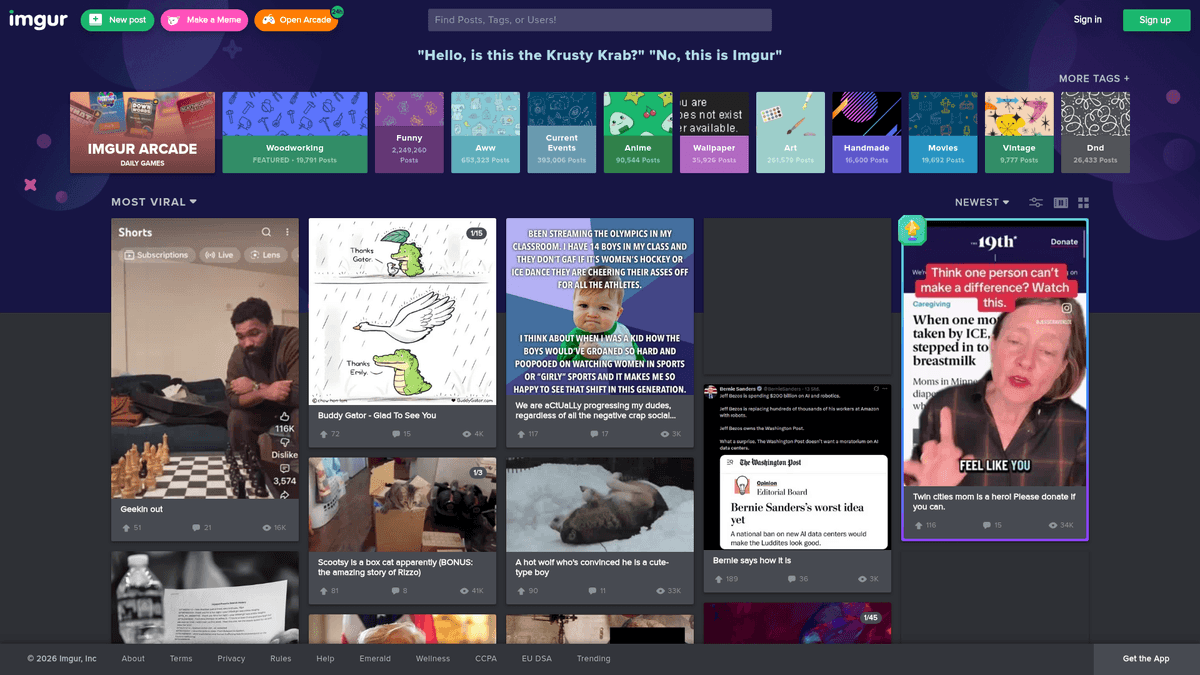
Imgurは、Redditなどのサイトにおける視覚文化のバックボーンとなっている、アメリカの巨大なオンライン画像共有・ホスティングサービスです。2009年に開始され、数百万ものバイラルミーム、GIF、高品質な写真をホストしており、インターネットのトレンドやデジタルストーリーテリングの主要な情報源として機能しています。
データの豊富さ
このプラットフォームには、投稿タイトル、ユーザー作成の説明、タグ、さらにupvotesや閲覧数といったエンゲージメント指標など、構造化および非構造化データが豊富に含まれています。これにより、インターネット文化の分析、バイラルな成長の追跡、特定のニッチ分野のビジュアルメディア収集を行う人々にとって、非常に価値のあるリソースとなっています。
スクレイピングの価値
Imgurデータのスクレイピングは、センチメント分析、トレンド予測、およびmachine learningモデルのトレーニングに特に役立ちます。トレンド画像に関連付けられたメタデータを抽出することで、研究者はその時々に世界中の視聴者の共感を得ているコンテンツについて深い洞察を得ることができます。
なぜImgurをスクレイピングするのか?
Imgurからのデータ抽出のビジネス価値とユースケースを発見してください。
ソーシャルメディア管理のためのバイラルコンテンツ発見
市場調査および消費者センチメント分析
インターネット上のミームとトレンドの歴史的分析
コンピュータービジョンおよびmachine learningモデルのトレーニング
ニッチなコンテンツアグリゲーターやギャラリーミラーの構築
ビジュアルエンゲージメントトレンドの競合監視
スクレイピングの課題
Imgurのスクレイピング時に遭遇する可能性のある技術的課題。
強力なCloudflareアンチボットシールド
動的なコンテンツ読み込みのためのJavaScriptへの高い依存度
IPおよびセッションヘッダーに基づくrate limiting
CSSセレクターを無効にする頻繁なUI変更
大規模なギャラリーにおけるinfinite scrollページネーションの処理
ImgurをAIでスクレイピング
コーディング不要。AI搭載の自動化で数分でデータを抽出。
仕組み
必要なものを記述
Imgurから抽出したいデータをAIに伝えてください。自然言語で入力するだけ — コードやセレクターは不要です。
AIがデータを抽出
人工知能がImgurをナビゲートし、動的コンテンツを処理し、あなたが求めたものを正確に抽出します。
データを取得
CSV、JSONでエクスポートしたり、アプリやワークフローに直接送信できる、クリーンで構造化されたデータを受け取ります。
なぜスクレイピングにAIを使うのか
AIを使えば、コードを書かずにImgurを簡単にスクレイピングできます。人工知能搭載のプラットフォームが必要なデータを理解します — 自然言語で記述するだけで、AIが自動的に抽出します。
How to scrape with AI:
- 必要なものを記述: Imgurから抽出したいデータをAIに伝えてください。自然言語で入力するだけ — コードやセレクターは不要です。
- AIがデータを抽出: 人工知能がImgurをナビゲートし、動的コンテンツを処理し、あなたが求めたものを正確に抽出します。
- データを取得: CSV、JSONでエクスポートしたり、アプリやワークフローに直接送信できる、クリーンで構造化されたデータを受け取ります。
Why use AI for scraping:
- CloudflareやCAPTCHAの課題を自動的に処理
- 複雑な動的セレクターに対応するノーコードインターフェース
- 組み込みのクラウド実行とスケジューリング機能
- infinite scrollやページネーションを容易に管理
- Google Sheetsや様々なAPIとの直接連携
Imgur用ノーコードWebスクレイパー
AI搭載スクレイピングのポイント&クリック代替手段
Browse.ai、Octoparse、Axiom、ParseHubなどのノーコードツールは、コードを書かずにImgurをスクレイピングするのに役立ちます。これらのツールは視覚的なインターフェースを使用してデータを選択しますが、複雑な動的コンテンツやアンチボット対策には苦戦する場合があります。
ノーコードツールでの一般的なワークフロー
一般的な課題
学習曲線
セレクタと抽出ロジックの理解に時間がかかる
セレクタの破損
Webサイトの変更によりワークフロー全体が壊れる可能性がある
動的コンテンツの問題
JavaScript多用サイトは複雑な回避策が必要
CAPTCHAの制限
ほとんどのツールはCAPTCHAに手動介入が必要
IPブロック
過度なスクレイピングはIPのブロックにつながる可能性がある
Imgur用ノーコードWebスクレイパー
Browse.ai、Octoparse、Axiom、ParseHubなどのノーコードツールは、コードを書かずにImgurをスクレイピングするのに役立ちます。これらのツールは視覚的なインターフェースを使用してデータを選択しますが、複雑な動的コンテンツやアンチボット対策には苦戦する場合があります。
ノーコードツールでの一般的なワークフロー
- ブラウザ拡張機能をインストールするかプラットフォームに登録する
- ターゲットWebサイトに移動してツールを開く
- ポイント&クリックで抽出するデータ要素を選択する
- 各データフィールドのCSSセレクタを設定する
- 複数ページをスクレイピングするためのページネーションルールを設定する
- CAPTCHAに対処する(多くの場合手動解決が必要)
- 自動実行のスケジュールを設定する
- データをCSV、JSONにエクスポートするかAPIで接続する
一般的な課題
- 学習曲線: セレクタと抽出ロジックの理解に時間がかかる
- セレクタの破損: Webサイトの変更によりワークフロー全体が壊れる可能性がある
- 動的コンテンツの問題: JavaScript多用サイトは複雑な回避策が必要
- CAPTCHAの制限: ほとんどのツールはCAPTCHAに手動介入が必要
- IPブロック: 過度なスクレイピングはIPのブロックにつながる可能性がある
コード例
import requests
from bs4 import BeautifulSoup

url = 'https://imgur.com/gallery/hot'
# Using headers to mimic a real browser
headers = {
    'User-Agent': 'Mozilla/5.0 (Windows NT 10.0; Win64; x64) AppleWebKit/537.36 (KHTML, like Gecko) Chrome/91.0.4472.124 Safari/537.36'
}

try:
    response = requests.get(url, headers=headers)
    response.raise_for_status()
    soup = BeautifulSoup(response.text, 'html.parser')

    # Example: Print the page title to verify access
    print(f'Page Title: {soup.title.text}')
except requests.exceptions.RequestException as e:
    print(f'Error: {e}')
いつ使うか
JavaScriptが最小限の静的HTMLページに最適。ブログ、ニュースサイト、シンプルなEコマース製品ページに理想的。
メリット
- ●最速の実行(ブラウザオーバーヘッドなし)
- ●最小限のリソース消費
- ●asyncioで簡単に並列化
- ●APIと静的ページに最適
制限事項
- ●JavaScriptを実行できない
- ●SPAや動的コンテンツで失敗
- ●複雑なアンチボットシステムで苦戦する可能性
コードでImgurをスクレイピングする方法
Python + Requests
import requests
from bs4 import BeautifulSoup
url = 'https://imgur.com/gallery/hot'
# Using headers to mimic a real browser
headers = {
'User-Agent': 'Mozilla/5.0 (Windows NT 10.0; Win64; x64) AppleWebKit/537.36 (KHTML, like Gecko) Chrome/91.0.4472.124 Safari/537.36'
}
try:
response = requests.get(url, headers=headers)
response.raise_for_status()
soup = BeautifulSoup(response.text, 'html.parser')
# Example: Print the page title to verify access
print(f'Page Title: {soup.title.text}')
except requests.exceptions.RequestException as e:
print(f'Error: {e}')Python + Playwright
import asyncio
from playwright.async_api import async_playwright

async def run():
    async with async_playwright() as p:
        # Launching browser with a standard viewport
        browser = await p.chromium.launch(headless=True)
        page = await browser.new_page()

        # Navigate to Imgur
        await page.goto('https://imgur.com/gallery/hot')

        # Wait for the gallery items to load (JS rendered)
        await page.wait_for_selector('.Post-item')

        # Extract data from the first few items
        titles = await page.eval_on_selector_all('.Post-item-title', 'elements => elements.map(e => e.innerText)')
        for title in titles[:5]:
            print(f'Post Title: {title}')

        await browser.close()

asyncio.run(run())Python + Scrapy
import scrapy

class ImgurSpider(scrapy.Spider):
    name = 'imgur'
    start_urls = ['https://imgur.com/gallery/hot']

    def parse(self, response):
        # Scrapy extracts from the initial HTML; note that Imgur loads most content via JS
        for post in response.css('.Post-item'):
            yield {
                'title': post.css('.Post-item-title::text').get(),
                'link': post.css('a::attr(href)').get(),
            }

        # Example logic for finding the next page or API endpoint
# Imgur often uses JSON API endpoints for paginationNode.js + Puppeteer
const puppeteer = require('puppeteer');

(async () => {
  const browser = await puppeteer.launch();
  const page = await browser.newPage();

  // Mimic a desktop browser to reduce blocking risk
  await page.setViewport({ width: 1280, height: 800 });

  await page.goto('https://imgur.com/gallery/hot', { waitUntil: 'networkidle2' });

  // Extract post titles from the gallery
  const titles = await page.evaluate(() => {
    const elements = document.querySelectorAll('.Post-item-title');
    return Array.from(elements).map(el => el.innerText);
  });

  console.log('Found Titles:', titles.slice(0, 5));

  await browser.close();
})();Imgurデータで何ができるか
Imgurデータからの実用的なアプリケーションとインサイトを探索してください。
バイラルコンテンツアグリゲーター
特定のImgurタグからトレンド画像を自動的に再公開するニッチなWebサイトを作成します。
実装方法:
- 1「#nature」や「#gaming」などのターゲットとなるタグを特定します。
- 2自動実行トリガーを使用して、画像のURLとタイトルを毎日スクレイピングします。
- 3webhooksを使用して、コンテンツをCMSやソーシャルメディアチャンネルに投稿します。
Automatioを使用してImgurからデータを抽出し、コードを書かずにこれらのアプリケーションを構築しましょう。
Imgurデータで何ができるか
- バイラルコンテンツアグリゲーター
特定のImgurタグからトレンド画像を自動的に再公開するニッチなWebサイトを作成します。
- 「#nature」や「#gaming」などのターゲットとなるタグを特定します。
- 自動実行トリガーを使用して、画像のURLとタイトルを毎日スクレイピングします。
- webhooksを使用して、コンテンツをCMSやソーシャルメディアチャンネルに投稿します。
- ミームトレンド分析
デジタルマーケティング会社向けに、特定のミームのライフサイクルと人気を追跡します。
- 特定のキーワードについて、投稿日と閲覧数を時系列でスクレイピングします。
- トレンドの視覚化のために、データをタイムシリーズデータベースに保存します。
- バイラルなエンゲージメントの成長と減衰のパターンを分析します。
- センチメントモニタリング
ユーザーのコメントを分析して、バイラルなトピックやニュースイベントに対する世論を理解します。
- 人気のギャラリー投稿からコメントスレッドを抽出します。
- テキストデータに対してセンチメント分析アルゴリズムを実行します。
- コミュニティ全体のセンチメントに関するレポートを生成します。
- Machine Learningデータセット
コンピュータービジョンモデルのトレーニング用に、ラベル付き画像の大規模なデータセットを構築します。
- ラベリングのために、画像とそれに付随するタグや説明をスクレイピングします。
- 高解像度の品質や特定のカテゴリでデータをフィルタリングします。
- モデルのトレーニングパイプライン用に構造化されたJSONやCSVにエクスポートします。
- デジタルアセットアーカイブ
バイラルメディア資産をバックアップすることで、文化的なマイルストーンの永久的なアーカイブを作成します。
- Imgurギャラリーの「Hot」および「Top」セクションを監視します。
- 画像やビデオの高品質バージョンをダウンロードします。
- 歴史的な正確性のために、元の投稿者や日付を含むメタデータを保存します。
- ブランドメンション追跡
ブランドや製品がバイラル画像にいつ登場し、ユーザーがそれらにどのように反応しているかを特定します。
- ブランドに関連するキーワードやタグを検索します。
- 画像コンテンツと関連するコメントをスクレイピングします。
- ブランドの露出量とビジュアル的なセンチメントを定量化します。
ワークフローを強化する AI自動化
AutomatioはAIエージェント、ウェブ自動化、スマート統合のパワーを組み合わせ、より短時間でより多くのことを達成するお手伝いをします。
Imgurスクレイピングのプロのヒント
Imgurからデータを正常に抽出するための専門家のアドバイス。
IPベースのrate limitingを回避するために、rotating residential proxiesを使用してください。
Imgurはinfinite scrollを採用しています。スクレイパーがスクロールをシミュレートして追加コンテンツを読み込むように設定してください。
大量のデータ抽出には、web scrapingよりも安定している公式のImgur APIを活用してください。
ブラウザのネットワークタブを監視して、UIの表示に使用されている内部のJSONエンドポイントを特定してください。
User-Agentをランダム化し、実際の人間のような操作パターンを模倣するheadless browsersを使用してください。
アンチボットのアラームを作動させないよう、リクエスト間には常に遅延を入れてください。
関連 Web Scraping

How to Scrape Behance: A Step-by-Step Guide for Creative Data Extraction
How to Scrape YouTube: Extract Video Data and Comments in 2025
How to Scrape Social Blade: The Ultimate Analytics Guide
How to Scrape Bento.me | Bento.me Web Scraper

How to Scrape Vimeo: A Guide to Extracting Video Metadata

How to Scrape Patreon Creator Data and Posts
How to Scrape Goodreads: The Ultimate Web Scraping Guide 2025

How to Scrape Bluesky (bsky.app): API and Web Methods
Imgurについてのよくある質問
Imgurに関するよくある質問への回答を見つけてください