

How to Scrape Healthline: The Ultimate Health & Medical Data Guide
Learn how to scrape medically reviewed articles, symptoms, and drug data from Healthline. Extract high-quality medical information for research and analysis.
Free to start: 1,000 credits, no card, nothing to install.
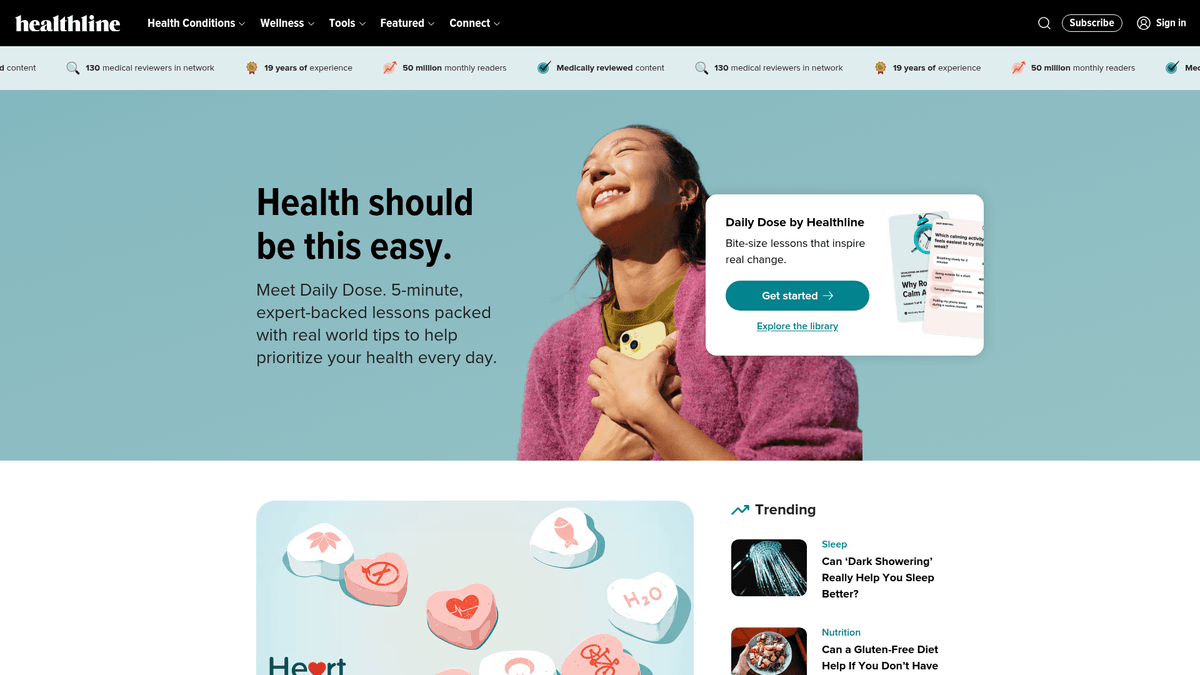
About Healthline
Learn what Healthline offers and what valuable data can be extracted from it.
Healthline is a leading digital health information platform owned by Healthline Media, an RVO Health company. It provides comprehensive, expert-reviewed content covering thousands of health conditions, wellness topics, and medical news stories. The platform is designed to make health information accessible and actionable for a global audience by breaking down complex medical jargon into understandable guidance.
The website contains a massive repository of structured data, including condition directories, drug specifications, symptom lists, and product reviews. Every article is written by health journalists and reviewed by a dedicated team of medical professionals (doctors, nurses, and specialists) to ensure the highest standards of accuracy and reliability. This makes it one of the most trusted sources of health data on the internet.
Scraping Healthline is exceptionally valuable for healthcare researchers, pharmaceutical companies, and health-tech developers. The data extracted can be used to build medical knowledge bases, monitor healthcare trends, conduct market research on wellness products, and provide high-quality training data for AI-based health assistants and diagnostic tools.
Why Scrape Healthline?
Discover the business value and use cases for extracting data from Healthline.
Training Health-Specific LLMs
Extract expert-reviewed medical text and clinical guides to fine-tune AI models for highly accurate, evidence-based healthcare responses.
Pharmaceutical Market Analysis
Monitor drug information, side effects, and patient guidance across a massive database of medications to track industry shifts.
Nutrition and Wellness Trends
Analyze frequently updated wellness topics and diet trends to inform health-focused content strategy or new product development.
Health Product Price Monitoring
Track prices and reviews for recommended supplements and health tech across the e-commerce links provided in their 'Best Of' reviews.
Academic Medical Research
Aggregate large-scale, medically vetted data for systematic reviews, epidemiological studies, or public health education projects.
Competitive Content Auditing
Study how the world's leading health portal structures its medically reviewed content to optimize your own site's SEO and authority.
Scraping Challenges
Technical challenges you may encounter when scraping Healthline.
Cloudflare Bot Management
Healthline utilizes aggressive Cloudflare security that frequently triggers CAPTCHAs and 403 errors when it detects automated traffic.
Dynamic JavaScript Rendering
The site's modern tech stack requires full JavaScript execution to render critical content sections and interactive medical tools.
Varied Article Templates
Different content categories, such as drug directories vs. lifestyle blogs, use unique HTML structures that require flexible scraping logic.
Sophisticated Rate Limiting
High-frequency requests from a single IP address are quickly flagged, necessitating advanced proxy rotation to maintain access.
Scrape Healthline with AI
No coding required. Extract data in minutes with AI-powered automation.
How It Works
Describe What You Need
Tell the AI what data you want to extract from Healthline. Just type it in plain language — no coding or selectors needed.
AI Extracts the Data
Our artificial intelligence navigates Healthline, handles dynamic content, and extracts exactly what you asked for.
Get Your Data
Receive clean, structured data ready to export as CSV, JSON, or send directly to your apps and workflows.
Why Use AI for Scraping
No-Code Web Scrapers for Healthline
Point-and-click alternatives to AI-powered scraping
Several no-code tools like Browse.ai, Octoparse, Axiom, and ParseHub can help you scrape Healthline. These tools use visual interfaces to select elements, but they come with trade-offs compared to AI-powered solutions.
Typical Workflow with No-Code Tools
Common Challenges
Learning curve
Understanding selectors and extraction logic takes time
Selectors break
Website changes can break your entire workflow
Dynamic content issues
JavaScript-heavy sites often require complex workarounds
CAPTCHA limitations
Most tools require manual intervention for CAPTCHAs
IP blocking
Aggressive scraping can get your IP banned
Code Examples
import requests
from bs4 import BeautifulSoup

url = 'https://www.healthline.com/health/gerd'
headers = {
    'User-Agent': 'Mozilla/5.0 (Windows NT 10.0; Win64; x64) AppleWebKit/537.36 (KHTML, like Gecko) Chrome/91.0.4472.124 Safari/537.36'
}

try:
    # Sending request with custom headers to avoid basic blocks
    response = requests.get(url, headers=headers)
    response.raise_for_status()

    soup = BeautifulSoup(response.text, 'html.parser')
    title = soup.find('h1').get_text(strip=True) if soup.find('h1') else 'No Title'
    print(f'Article Title: {title}')

    # Extracting sections
    sections = soup.find_all(['h2', 'h3'])
    for s in sections:
        print(f'Heading: {s.text}')
except Exception as e:
    print(f'Error: {e}')
When to Use
Best for static HTML pages where content is loaded server-side. The fastest and simplest approach when JavaScript rendering isn't required.
Advantages
- ●Fastest execution (no browser overhead)
- ●Lowest resource consumption
- ●Easy to parallelize with asyncio
- ●Great for APIs and static pages
Limitations
- ●Cannot execute JavaScript
- ●Fails on SPAs and dynamic content
- ●May struggle with complex anti-bot systems
import asyncio
from playwright.async_api import async_playwright

async def scrape():
    async with async_playwright() as p:
        # Launching headless browser with stealth settings
        browser = await p.chromium.launch(headless=True)
        page = await browser.new_page()

        # Navigating to a condition page
        await page.goto('https://www.healthline.com/health/gerd', wait_until='networkidle')

        # Extracting data using JavaScript evaluation
        data = await page.evaluate('''() => {
            return {
                title: document.querySelector('h1')?.innerText,
                intro: document.querySelector('p')?.innerText,
                reviewer: document.querySelector('.css-1p2092a')?.innerText
            };
        }''')

        print(data)
        await browser.close()

asyncio.run(scrape())
When to Use
Use when content loads dynamically via JavaScript, or when you need to interact with the page (clicks, scrolls, form fills). Handles modern anti-bot detection better.
Advantages
- ●Executes JavaScript like a real browser
- ●Handles SPAs and dynamic content
- ●Better anti-bot evasion with stealth plugins
- ●Can take screenshots and PDFs
Limitations
- ●Slower than HTTP requests
- ●Higher memory/CPU usage
- ●More complex to set up
import scrapy

class HealthlineSpider(scrapy.Spider):
    name = 'healthline'
    start_urls = ['https://www.healthline.com/directory/topics']

    def parse(self, response):
        # Finding links to condition articles
        for link in response.css('a.css-1m17l36::attr(href)').getall():
            yield response.follow(link, self.parse_article)

    def parse_article(self, response):
        yield {
            'title': response.css('h1::text').get(),
            'author': response.css('.css-1p2092a::text').get(),
            'body': response.css('div.article-body p::text').getall(),
            'last_updated': response.css('time::attr(datetime)').get()
        }
When to Use
Ideal for large-scale crawling projects that need to scrape thousands of pages. Built-in support for rate limiting, retries, and data pipelines.
Advantages
- ●Built for scale (millions of pages)
- ●Automatic request throttling
- ●Built-in data export pipelines
- ●Middleware system for proxies/headers
Limitations
- ●Steeper learning curve
- ●Overkill for small projects
- ●No native JavaScript rendering
const puppeteer = require('puppeteer');

(async () => {
  const browser = await puppeteer.launch();
  const page = await browser.newPage();

  // Setting User-Agent to mimic a real browser
  await page.setUserAgent('Mozilla/5.0 (Windows NT 10.0; Win64; x64) AppleWebKit/537.36 (KHTML, like Gecko) Chrome/95.0.4638.69 Safari/537.36');

  await page.goto('https://www.healthline.com/health/gerd', { waitUntil: 'networkidle2' });

  const data = await page.evaluate(() => {
    return {
      title: document.querySelector('h1')?.innerText,
      headers: Array.from(document.querySelectorAll('h2')).map(h => h.innerText),
      medicalReviewer: document.querySelector('.css-1p2092a')?.innerText
    };
  });

  console.log(data);
  await browser.close();
})();
When to Use
Choose this if you're in a Node.js/JavaScript ecosystem or need tight integration with frontend tools. Similar capabilities to Playwright.
Advantages
- ●Native JavaScript/TypeScript support
- ●Chrome DevTools Protocol access
- ●Large ecosystem and community
- ●Good for JS-heavy projects
Limitations
- ●Chrome-only (vs Playwright's multi-browser)
- ●Similar overhead to Playwright
- ●Less mature stealth options
What You Can Do With Healthline Data
Explore practical applications and insights from Healthline data.
Medical Knowledge Base Creation
Building a structured database of symptoms and treatments for diagnostic support apps.
How to implement:
- 1Crawl condition directory pages to find all health topics
- 2Extract symptom lists, treatment protocols, and risk factors
- 3Map conditions to established medical codes for interoperability
- 4Set up a monthly update cycle to maintain clinical accuracy
Use Automatio to extract data from Healthline and build these applications without writing code.
Public Health Trend Analysis
Analyzing news cycles to identify emerging health concerns and medical trends.
How to implement:
- 1Scrape the 'Health News' section daily for new articles
- 2Extract article titles and calculate frequency of specific health keywords
- 3Apply sentiment analysis to health advice and news reports
- 4Visualize the growth of specific health topics over a yearly period
Use Automatio to extract data from Healthline and build these applications without writing code.
Supplement Price Monitoring
Tracking prices and reviews for vitamins and supplements mentioned in buyer's guides.
How to implement:
- 1Navigate to 'Product Reviews' categories for specific supplements
- 2Extract product names, prices, and star ratings from review lists
- 3Track price fluctuations across different vendor links provided
- 4Export the data to a competitive pricing dashboard for e-commerce
Use Automatio to extract data from Healthline and build these applications without writing code.
AI Model Fine-Tuning
Using high-quality reviewed content to train medical LLMs and health chatbots.
How to implement:
- 1Bulk scrape medical articles and condition FAQ sections
- 2Clean HTML tags and remove advertising or navigation elements
- 3Format the extracted text into question-answer pairs
- 4Feed the structured dataset into training pipelines for health AI
Use Automatio to extract data from Healthline and build these applications without writing code.
Supercharge your workflow with AI Automation
Automatio combines the power of AI agents, web automation, and smart integrations to help you accomplish more in less time.
What to get right first
Expert advice for successfully extracting data from Healthline.
Leverage JSON-LD Tags
Target the 'application/ld+json' script tags to extract clean metadata like author names, publish dates, and headlines without HTML noise.
Use Premium Residential Proxies
Employ high-quality residential IPs to avoid the fingerprinting and reputation checks that often block standard data center proxies.
Extract Scientific Citations
Always capture the reference links at the bottom of articles to maintain a clear trail of the evidence-based sources used for each claim.
Implement Random Interactions
Configure your scraper to simulate human-like scrolling and randomized mouse movements to lower the risk of being flagged as a bot.
Utilize XML Sitemaps
Identify new content and updated pages efficiently by crawling the site's sitemap.xml files rather than navigating complex categories.
Related Web Scraping
Frequently Asked Questions
Find answers to common questions about Healthline
Is it legal to scrape Healthline.com?
Scraping publicly available health data for personal research or internal analysis is generally legal, but you must respect copyright laws. You should avoid republishing their content verbatim and ensure your scraping frequency does not negatively impact their server performance.
Does Healthline provide an official API?
No, Healthline does not offer a public API for content extraction. Developers must rely on custom web scraping solutions or enter into commercial data partnerships with RVO Health to get structured feeds.
How do I prevent getting blocked while scraping?
The most effective way to prevent blocks is to use rotating residential proxies and maintain a human-like request speed. Additionally, using a tool that can solve CAPTCHAs and mimic real browser fingerprints is essential for high-volume extraction.
What is the best data format for Healthline data?
JSON is the preferred format because it easily accommodates the nested nature of medical articles, such as lists of symptoms, multiple reviewers, and reference arrays. It allows for much more complex data relationships than a flat CSV file.
How often should I scrape Healthline for updates?
Medical content is typically reviewed on a monthly or quarterly basis rather than daily. A monthly scrape is usually sufficient to capture updates, though the 'Health News' section may require weekly checks.
Do I need JavaScript enabled to scrape the content?
Yes, Healthline's front-end architecture depends heavily on JavaScript to display the full article body and interactive elements. A headless browser like Playwright or Puppeteer is necessary to ensure you don't miss any data.
Can I scrape specific tools like the Pill Identifier?
Scraping interactive tools is possible but complex, as it requires simulating user inputs like selecting colors or shapes. You will need a more advanced automation setup that can interact with the DOM rather than just parsing HTML.
What are the most valuable data fields to extract?
Aside from the main text, you should prioritize extracting the 'Medical Reviewer' name, their credentials, the 'Last Updated' date, and the list of scientific citations. These fields provide the necessary context for the data's authority and freshness.