

How to Scrape Web Designer News
Learn how to scrape Web Designer News to extract trending design stories, source URLs, and timestamps.
Free to start: 1,000 credits, no card, nothing to install.
About Web Designer News
Learn what Web Designer News offers and what valuable data can be extracted from it.
Overview of Web Designer News
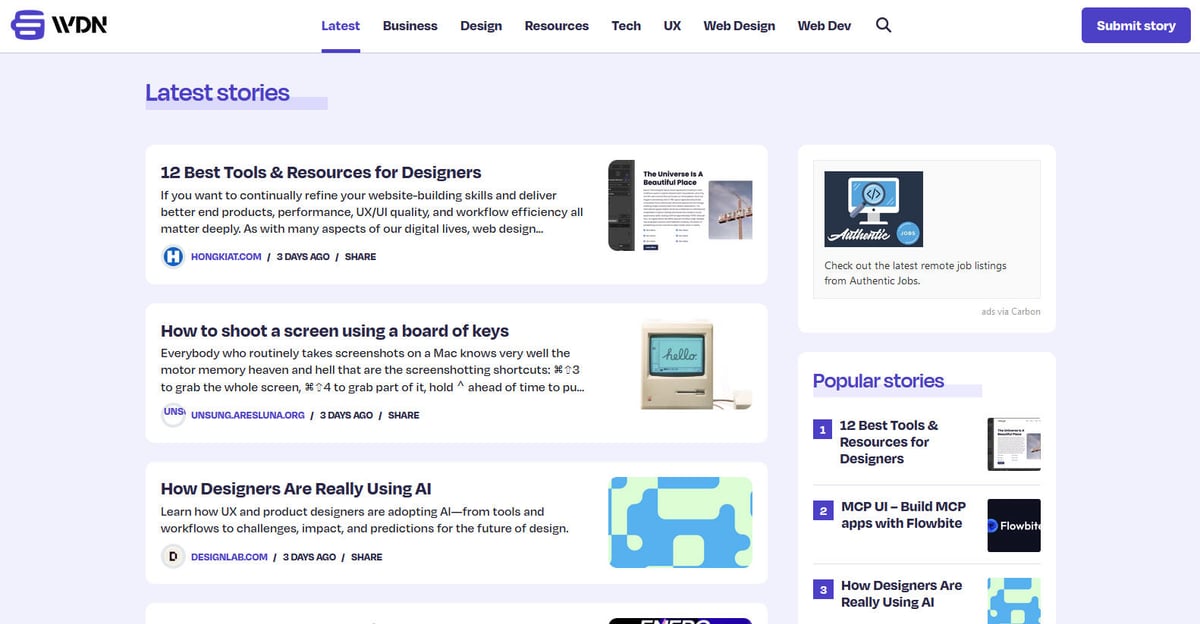
Web Designer News is a premier community-driven news aggregator specifically curated for the web design and development ecosystem. Since its inception, the platform has functioned as a central hub where professionals discover a hand-picked selection of the most relevant news stories, tutorials, tools, and resources from across the internet. It covers a wide spectrum of topics including UX design, business strategy, technology updates, and graphic design, presented in a clean, chronological feed.
Website Architecture and Data Potential
The website's architecture is built on WordPress, featuring a highly structured layout that organizes content into specific categories like 'Web Design', 'Web Dev', 'UX', and 'Resources'. Because it aggregates data from thousands of individual blogs and journals into a single, searchable interface, it serves as a high-quality filter for industry intelligence. This structure makes it an ideal target for web scraping, as it provides access to a pre-vetted stream of high-value industry data without the need to crawl hundreds of separate domains.
Why Scrape Web Designer News?
Discover the business value and use cases for extracting data from Web Designer News.
Real-time Trend Discovery
Spot emerging design frameworks, UI libraries, and prototyping tools the moment they gain traction in the professional community.
Automated Content Curation
Keep your own design blog, newsletter, or social media channels updated by aggregating the highest-quality stories vetted by industry editors.
Market Intelligence
Identify which design agencies and software companies are consistently producing viral or editorially-selected content to understand market leaders.
SEO and Keyword Research
Analyze the headlines and snippets of trending stories to identify the most relevant keywords and topics capturing the industry's attention.
Historical Industry Archiving
Build a long-term database of web design evolution to track how specific styles, coding standards, and technologies fluctuate in popularity over years.
B2B Lead Generation
Discover new startups and agencies being featured on the platform to identify potential partners or clients in the creative technology space.
Scraping Challenges
Technical challenges you may encounter when scraping Web Designer News.
Internal Tracking Redirects
The website uses internal '/go/' links for outbound traffic, meaning a scraper must follow redirects to extract the actual source URL.
Relative Date Parsing
Timestamps are often displayed in relative formats like '5 hours ago', requiring custom logic to convert them into standardized ISO date formats.
Data Consistency Issues
Some posts feature full descriptive snippets and categories while others only provide a title, making it difficult to maintain a uniform database structure.
Server-Side Rate Limiting
The Nginx-based infrastructure can detect and throttle high-frequency requests, necessitating the use of delays and rotating headers to avoid IP blocks.
Scrape Web Designer News with AI
No coding required. Extract data in minutes with AI-powered automation.
How It Works
Describe What You Need
Tell the AI what data you want to extract from Web Designer News. Just type it in plain language — no coding or selectors needed.
AI Extracts the Data
Our artificial intelligence navigates Web Designer News, handles dynamic content, and extracts exactly what you asked for.
Get Your Data
Receive clean, structured data ready to export as CSV, JSON, or send directly to your apps and workflows.
Why Use AI for Scraping
No-Code Web Scrapers for Web Designer News
Point-and-click alternatives to AI-powered scraping
Several no-code tools like Browse.ai, Octoparse, Axiom, and ParseHub can help you scrape Web Designer News. These tools use visual interfaces to select elements, but they come with trade-offs compared to AI-powered solutions.
Typical Workflow with No-Code Tools
Common Challenges
Learning curve
Understanding selectors and extraction logic takes time
Selectors break
Website changes can break your entire workflow
Dynamic content issues
JavaScript-heavy sites often require complex workarounds
CAPTCHA limitations
Most tools require manual intervention for CAPTCHAs
IP blocking
Aggressive scraping can get your IP banned
Code Examples
import requests
from bs4 import BeautifulSoup

headers = {'User-Agent': 'Mozilla/5.0 (Windows NT 10.0; Win64; x64) AppleWebKit/537.36 (KHTML, like Gecko) Chrome/91.0.4472.124 Safari/537.36'}
url = 'https://webdesignernews.com/'

try:
    # Send request to the main page
    response = requests.get(url, headers=headers)
    response.raise_for_status()
    soup = BeautifulSoup(response.text, 'html.parser')

    # Locate post containers
    posts = soup.find_all('div', class_='single-post')

    for post in posts:
        title = post.find('h3').get_text(strip=True)
        # Check if source site name exists
        source = post.find('span', class_='site_name').get_text(strip=True) if post.find('span', class_='site_name') else 'Unknown'
        link = post.find('h3').find('a')['href']
        print(f'Title: {title} | Source: {source} | Link: {link}')
except Exception as e:
    print(f'An error occurred: {e}')
When to Use
Best for static HTML pages where content is loaded server-side. The fastest and simplest approach when JavaScript rendering isn't required.
Advantages
- ●Fastest execution (no browser overhead)
- ●Lowest resource consumption
- ●Easy to parallelize with asyncio
- ●Great for APIs and static pages
Limitations
- ●Cannot execute JavaScript
- ●Fails on SPAs and dynamic content
- ●May struggle with complex anti-bot systems
from playwright.sync_api import sync_playwright

def scrape_wdn():
    with sync_playwright() as p:
        # Launch headless browser
        browser = p.chromium.launch(headless=True)
        page = browser.new_page()
        page.goto('https://webdesignernews.com/')

        # Wait for the post elements to load
        page.wait_for_selector('.single-post')

        posts = page.query_selector_all('.single-post')
        for post in posts:
            title_el = post.query_selector('h3 a')
            if title_el:
                title = title_el.inner_text()
                link = title_el.get_attribute('href')
                print(f'Scraped: {title} - {link}')

        browser.close()

scrape_wdn()
When to Use
Use when content loads dynamically via JavaScript, or when you need to interact with the page (clicks, scrolls, form fills). Handles modern anti-bot detection better.
Advantages
- ●Executes JavaScript like a real browser
- ●Handles SPAs and dynamic content
- ●Better anti-bot evasion with stealth plugins
- ●Can take screenshots and PDFs
Limitations
- ●Slower than HTTP requests
- ●Higher memory/CPU usage
- ●More complex to set up
import scrapy

class WdnSpider(scrapy.Spider):
    name = 'wdn_spider'
    start_urls = ['https://webdesignernews.com/']

    def parse(self, response):
        # Extract each post in the feed
        for post in response.css('.single-post'):
            yield {
                'title': post.css('h3 a::text').get(),
                'source': post.css('.site_name::text').get(),
                'link': post.css('h3 a::attr(href)').get()
            }

        # Handle pagination by finding the 'Next' link
        next_page = response.css('a.next::attr(href)').get()
        if next_page:
            yield response.follow(next_page, self.parse)
When to Use
Ideal for large-scale crawling projects that need to scrape thousands of pages. Built-in support for rate limiting, retries, and data pipelines.
Advantages
- ●Built for scale (millions of pages)
- ●Automatic request throttling
- ●Built-in data export pipelines
- ●Middleware system for proxies/headers
Limitations
- ●Steeper learning curve
- ●Overkill for small projects
- ●No native JavaScript rendering
const puppeteer = require('puppeteer');

(async () => {
  const browser = await puppeteer.launch();
  const page = await browser.newPage();
  await page.goto('https://webdesignernews.com/', { waitUntil: 'domcontentloaded' });

  // Evaluate the page to extract data fields
  const results = await page.evaluate(() => {
    const items = Array.from(document.querySelectorAll('.single-post'));
    return items.map(item => ({
      title: item.querySelector('h3 a') ? item.querySelector('h3 a').innerText : null,
      source: item.querySelector('.site_name') ? item.querySelector('.site_name').innerText : null,
      link: item.querySelector('h3 a') ? item.querySelector('h3 a').href : null
    }));
  });

  console.log(results);
  await browser.close();
})();
When to Use
Choose this if you're in a Node.js/JavaScript ecosystem or need tight integration with frontend tools. Similar capabilities to Playwright.
Advantages
- ●Native JavaScript/TypeScript support
- ●Chrome DevTools Protocol access
- ●Large ecosystem and community
- ●Good for JS-heavy projects
Limitations
- ●Chrome-only (vs Playwright's multi-browser)
- ●Similar overhead to Playwright
- ●Less mature stealth options
What You Can Do With Web Designer News Data
Explore practical applications and insights from Web Designer News data.
Automated Design News Feed
Create a live, curated news channel for professional design teams via Slack or Discord.
How to implement:
- 1Scrape top-rated stories every 4 hours.
- 2Filter results by relevant category tags like 'UX' or 'Web Dev'.
- 3Send extracted titles and summaries to a messaging webhook.
- 4Archive the data to track long-term industry tool popularity.
Use Automatio to extract data from Web Designer News and build these applications without writing code.
Design Tool Trend Tracker
Identify which design software or libraries are gaining the most community traction.
How to implement:
- 1Extract titles and excerpts from the 'Resources' category archive.
- 2Perform keyword frequency analysis on specific terms (e.g., 'Figma', 'React').
- 3Compare mention growth month-over-month to identify rising stars.
- 4Export visual reports for marketing or product strategy teams.
Use Automatio to extract data from Web Designer News and build these applications without writing code.
Competitor Backlink Monitoring
Identify which blogs or agencies are successfully placing content on major hubs.
How to implement:
- 1Scrape the 'Source Website Name' field for all historical listings.
- 2Aggregate mention counts per external domain to see who is featured most.
- 3Analyze the types of content that get accepted for better outreach.
- 4Identify potential collaboration partners in the design space.
Use Automatio to extract data from Web Designer News and build these applications without writing code.
Machine Learning Training Dataset
Use the curated snippets and summaries to train technical summarization models.
How to implement:
- 1Scrape 10,000+ story titles and corresponding excerpt summaries.
- 2Clean the text data to remove internal tracking parameters and HTML.
- 3Use the title as the target and the excerpt as input for fine-tuning.
- 4Test the model on new, unscoped design articles for performance.
Use Automatio to extract data from Web Designer News and build these applications without writing code.
Supercharge your workflow with AI Automation
Automatio combines the power of AI agents, web automation, and smart integrations to help you accomplish more in less time.
What to get right first
Expert advice for successfully extracting data from Web Designer News.
Utilize the REST API
Access the site's WordPress REST API at /wp-json/wp/v2/posts for a cleaner, structured JSON feed that is faster to process than raw HTML.
Monitor the Sidebar
Scrape the 'Popular' and 'Recent' sidebar sections to prioritize high-engagement content for your curation or analysis.
Rotate Browser Headers
Always use realistic User-Agent strings and rotate them to mimic different browser types, reducing the risk of being flagged by Nginx security.
Extract Category Metadata
Target the specific CSS classes for post categories to enable deep filtering and topical analysis in your final dataset.
Handle Lazy Images
Thumbnail images may use lazy-loading; ensure your scraper targets the 'data-src' or 'srcset' attributes to avoid missing visual assets.
Implement Request Delays
A simple 2-3 second delay between requests ensures you don't overwhelm the server and helps your scraping activity remain undetected.
Related Web Scraping
Frequently Asked Questions
Find answers to common questions about Web Designer News
Is it legal to scrape Web Designer News?
Scraping public headlines, snippets, and links for personal use or transformative research is generally permitted. However, you should avoid scraping at high speeds that might disrupt the service and never republish full articles or large portions of the site's content commercially.
Does Web Designer News have an official API?
Yes, as a WordPress site, it provides a standard REST API located at webdesignernews.com/wp-json/. This is the most efficient method for developers to retrieve post data in a structured format without parsing HTML.
How can I avoid getting blocked while scraping?
To prevent being blocked, you should implement a crawl delay of several seconds between requests and use rotating proxies or User-Agents. Since the site uses basic server-side filtering, appearing like a regular browser user is usually sufficient.
What format can I export the scraped data to?
Using modern scraping tools like Automatio, you can export the data into various formats including CSV, JSON, and XML. You can also sync it directly to Google Sheets or send it to other apps via webhooks.
Do I need a headless browser to scrape this site?
No, Web Designer News renders its primary content server-side, so basic HTTP clients like Python Requests or BeautifulSoup will work. However, a headless browser can be helpful if you need to resolve complex internal redirects or capture lazy-loaded images.
How often should I scrape the website for new content?
The editors update the site daily, so a once-per-day or twice-per-day scraping schedule is typically sufficient. For high-priority news monitoring, you could scrape every few hours during peak business times.
How do I get the original article URL instead of the internal link?
You must configure your scraper to follow 301 and 302 redirects. When the scraper visits the internal '/go/' URL, it will be redirected to the actual source article, which you can then capture from the final URL bar.
Can I scrape the upvote and view counts?
Yes, the engagement data like upvotes is visible on the listing pages and individual post pages. These can be targeted with specific CSS selectors to track which design stories are most popular.