

How to Scrape Substack Newsletters and Posts
Learn how to scrape Substack newsletters and posts for market research. Extract author data, subscriber counts, and engagement metrics from the leading...
Free to start: 1,000 credits, no card, nothing to install.
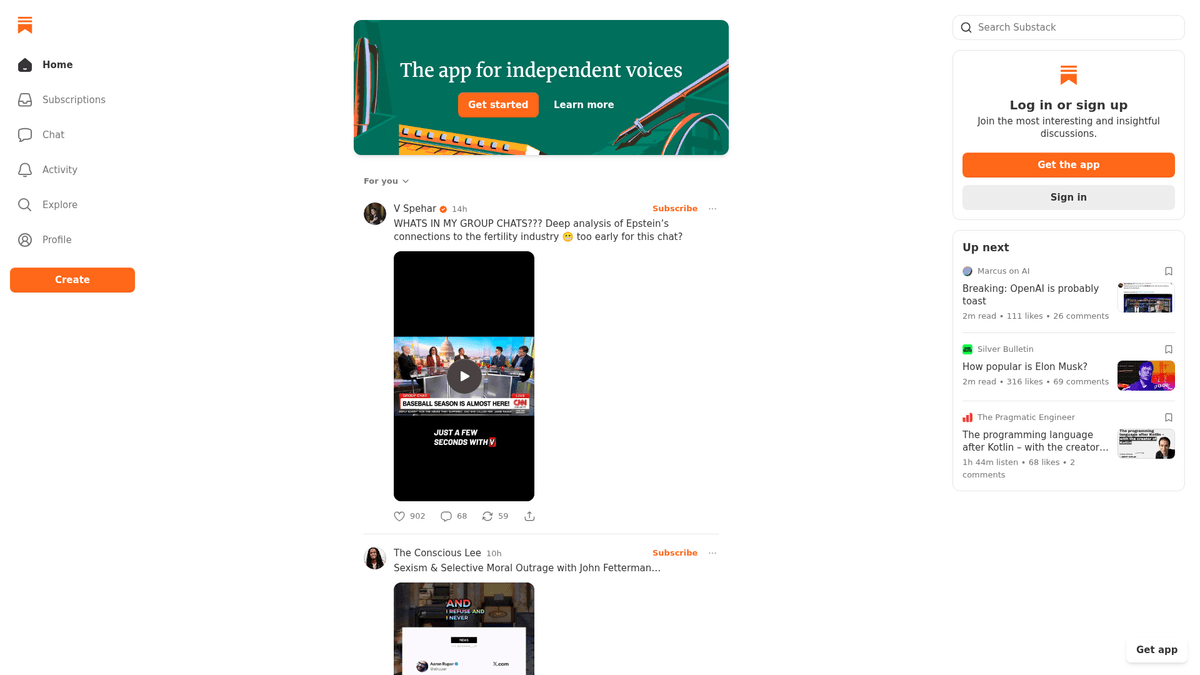
About Substack
Learn what Substack offers and what valuable data can be extracted from it.
Independent Publishing Hub
Substack is a prominent American platform that provides the infrastructure for writers to publish, monetize, and manage subscription newsletters. It has become a central hub for independent journalism, expert analysis, and niche content, allowing creators to bypass traditional media gatekeepers and build direct relationships with their audience through email and the web.
Valuable Data Insights
Each publication typically features an archive of posts, author biographies, and community engagement metrics like likes and comments. This wealth of expert-driven content is highly valuable for organizations seeking specialized insights that are often not available in mainstream news cycles. It is a goldmine for qualitative and quantitative analysis.
Market Relevance
Scraping Substack data is particularly useful for tracking market trends, performing sentiment analysis on high-intent communities, and identifying key influencers within specific industries. The platform hosts thousands of publications ranging from politics and finance to technology and creative writing.
Why Scrape Substack?
Discover the business value and use cases for extracting data from Substack.
Niche Content Aggregation
Consolidate long-form journalism and expert opinions from multiple publications into a single, searchable knowledge base for your organization.
Market Sentiment Analysis
Analyze comments and engagement metrics across specialized communities to gauge public reaction to specific news events or industry trends.
Influencer and Expert Discovery
Identify rising writers and industry thought leaders by tracking subscriber growth and engagement levels across the platform's directory.
Competitive Content Strategy
Monitor the publishing frequency, article length, and engagement patterns of rival newsletters to optimize your own editorial calendar.
Investment Intelligence
Extract financial data and market forecasts from high-tier economic newsletters to inform investment strategies and risk management.
Lead Generation
Find and reach out to authors or highly active community members who are influential within specific technical or business niches.
Scraping Challenges
Technical challenges you may encounter when scraping Substack.
Cloudflare Bot Detection
Substack employs Cloudflare's security layer, which can trigger CAPTCHAs or block automated requests that don't mimic human browser behavior.
Dynamic React Rendering
The platform heavily uses React, meaning the content is loaded dynamically and requires a headless browser to render the full HTML.
Infinite Scrolling Archives
Publication archives load more posts as you scroll, requiring sophisticated automation logic to capture historical data without missing entries.
Strict Rate Limiting
Rapidly requesting multiple publication pages from a single IP address can lead to temporary blocks and 429 'Too Many Requests' errors.
Internal API Security
While data is often served via internal JSON endpoints, these frequently require specific headers and tokens that change periodically.
Scrape Substack with AI
No coding required. Extract data in minutes with AI-powered automation.
How It Works
Describe What You Need
Tell the AI what data you want to extract from Substack. Just type it in plain language — no coding or selectors needed.
AI Extracts the Data
Our artificial intelligence navigates Substack, handles dynamic content, and extracts exactly what you asked for.
Get Your Data
Receive clean, structured data ready to export as CSV, JSON, or send directly to your apps and workflows.
Why Use AI for Scraping
No-Code Web Scrapers for Substack
Point-and-click alternatives to AI-powered scraping
Several no-code tools like Browse.ai, Octoparse, Axiom, and ParseHub can help you scrape Substack. These tools use visual interfaces to select elements, but they come with trade-offs compared to AI-powered solutions.
Typical Workflow with No-Code Tools
Common Challenges
Learning curve
Understanding selectors and extraction logic takes time
Selectors break
Website changes can break your entire workflow
Dynamic content issues
JavaScript-heavy sites often require complex workarounds
CAPTCHA limitations
Most tools require manual intervention for CAPTCHAs
IP blocking
Aggressive scraping can get your IP banned
Code Examples
import requests
from bs4 import BeautifulSoup
import json

url = 'https://example.substack.com/archive'
headers = {'User-Agent': 'Mozilla/5.0 (Windows NT 10.0; Win64; x64) Chrome/119.0.0.0'}

try:
    response = requests.get(url, headers=headers)
    response.raise_for_status()
    soup = BeautifulSoup(response.text, 'html.parser')
    posts = soup.find_all('div', class_='post-preview')
    for post in posts:
        title = post.find('a', class_='post-preview-title').text.strip()
        print(f'Post Found: {title}')
except Exception as e:
    print(f'Error: {e}')
When to Use
Best for static HTML pages where content is loaded server-side. The fastest and simplest approach when JavaScript rendering isn't required.
Advantages
- ●Fastest execution (no browser overhead)
- ●Lowest resource consumption
- ●Easy to parallelize with asyncio
- ●Great for APIs and static pages
Limitations
- ●Cannot execute JavaScript
- ●Fails on SPAs and dynamic content
- ●May struggle with complex anti-bot systems
import asyncio
from playwright.async_api import async_playwright

async def scrape_substack():
    async with async_playwright() as p:
        browser = await p.chromium.launch(headless=True)
        page = await browser.new_page()
        await page.goto('https://example.substack.com/archive')
        await page.wait_for_selector('.post-preview')
        for _ in range(3):
            await page.mouse.wheel(0, 1000)
            await asyncio.sleep(2)
        posts = await page.query_selector_all('.post-preview')
        for post in posts:
            title = await post.inner_text('.post-preview-title')
            print({'title': title})
        await browser.close()

asyncio.run(scrape_substack())
When to Use
Use when content loads dynamically via JavaScript, or when you need to interact with the page (clicks, scrolls, form fills). Handles modern anti-bot detection better.
Advantages
- ●Executes JavaScript like a real browser
- ●Handles SPAs and dynamic content
- ●Better anti-bot evasion with stealth plugins
- ●Can take screenshots and PDFs
Limitations
- ●Slower than HTTP requests
- ●Higher memory/CPU usage
- ●More complex to set up
import scrapy

class SubstackSpider(scrapy.Spider):
    name = 'substack'
    start_urls = ['https://example.substack.com/archive']

    def parse(self, response):
        for post in response.css('div.post-preview'):
            yield {
                'title': post.css('a.post-preview-title::text').get(),
                'url': post.css('a.post-preview-title::attr(href)').get(),
                'date': post.css('time::attr(datetime)').get()
            }
When to Use
Ideal for large-scale crawling projects that need to scrape thousands of pages. Built-in support for rate limiting, retries, and data pipelines.
Advantages
- ●Built for scale (millions of pages)
- ●Automatic request throttling
- ●Built-in data export pipelines
- ●Middleware system for proxies/headers
Limitations
- ●Steeper learning curve
- ●Overkill for small projects
- ●No native JavaScript rendering
const puppeteer = require('puppeteer');

(async () => {
  const browser = await puppeteer.launch();
  const page = await browser.newPage();
  await page.goto('https://example.substack.com/archive');
  await page.waitForSelector('.post-preview');
  const posts = await page.evaluate(() => {
    return Array.from(document.querySelectorAll('.post-preview')).map(item => ({
      title: item.querySelector('.post-preview-title')?.innerText,
      link: item.querySelector('.post-preview-title')?.href
    }));
  });
  console.log(posts);
  await browser.close();
})();
When to Use
Choose this if you're in a Node.js/JavaScript ecosystem or need tight integration with frontend tools. Similar capabilities to Playwright.
Advantages
- ●Native JavaScript/TypeScript support
- ●Chrome DevTools Protocol access
- ●Large ecosystem and community
- ●Good for JS-heavy projects
Limitations
- ●Chrome-only (vs Playwright's multi-browser)
- ●Similar overhead to Playwright
- ●Less mature stealth options
What You Can Do With Substack Data
Explore practical applications and insights from Substack data.
Niche Trend Analysis
Marketers can track a collection of top Substacks in specific industries like AI or Crypto to identify emerging topics and public sentiment.
How to implement:
- 1Select 15-20 top-tier Substack publications in a target industry.
- 2Scrape all post titles, content, and category tags weekly.
- 3Run keyword frequency analysis to identify rising topics.
- 4Generate a market momentum report for internal stakeholders.
Use Automatio to extract data from Substack and build these applications without writing code.
Influencer Outreach & Recruitment
Brand partnership teams can identify rising writers in the newsletter space to offer sponsorship or collaborative deals.
How to implement:
- 1Search Substack's directory for specific niche keywords.
- 2Scrape author names, bios, and approximate subscriber counts.
- 3Extract social media links from author profile pages.
- 4Filter candidates by engagement metrics and initiate contact.
Use Automatio to extract data from Substack and build these applications without writing code.
Competitive Content Strategy
Digital publishers can analyze which content formats perform best for their direct competitors.
How to implement:
- 1Scrape the full archive of a direct competitor's Substack publication.
- 2Correlate 'Likes' and 'Comments' counts with post length.
- 3Identify 'outlier' posts that received significantly higher engagement.
- 4Adjust internal content calendars based on high-performing verified formats.
Use Automatio to extract data from Substack and build these applications without writing code.
Sentiment Monitoring
Researchers can analyze comment sections to understand how specialized communities react to specific news or product launches.
How to implement:
- 1Scrape comments from high-engagement posts related to a specific brand.
- 2Apply NLP sentiment analysis to categorize audience reactions.
- 3Track sentiment shifts over time relative to major industry announcements.
- 4Deliver insights to PR teams for rapid response planning.
Use Automatio to extract data from Substack and build these applications without writing code.
Supercharge your workflow with AI Automation
Automatio combines the power of AI agents, web automation, and smart integrations to help you accomplish more in less time.
What to get right first
Expert advice for successfully extracting data from Substack.
Target Archive Pages
For historical data, always navigate to the publication's /archive page as it provides the most consistent structure for listing past posts.
Use Residential Proxies
To bypass strict Cloudflare checks, use high-quality residential proxies that make your traffic appear as legitimate home users.
Leverage Embedded JSON
Look for the window._substackData variable in the HTML source code, which often contains structured JSON for the entire page's content.
Implement Random Delays
Avoid pattern detection by introducing randomized wait times of 5-15 seconds between page loads or scrolling actions.
Monitor for Pop-ups
Substack frequently shows subscription or app-download overlays; ensure your automation is configured to close these before scraping.
Rotate User Agents
Constantly change your User-Agent string to represent different modern browsers and operating systems to stay below the radar.
Related Web Scraping

Frequently Asked Questions
Find answers to common questions about Substack
Is it legal to scrape Substack?
Scraping publicly available content from Substack for personal research or internal analysis is generally considered legal, provided you comply with copyright laws. However, you must respect the site's robots.txt directives and avoid bypassing paywalls or redistributing content for commercial gain without permission.
Does Substack have an official API for developers?
Substack does not offer a comprehensive public API for the general public. While there is a limited 'Developer API' for specific partners, most scrapers rely on browser automation or reverse-engineering the internal API endpoints used by the website's front-end.
How to avoid getting blocked while scraping Substack?
The most effective strategy is to use residential proxies and implement realistic human behaviors like variable scrolling and wait times. Using tools that handle JavaScript rendering and rotate browser fingerprints will significantly reduce the risk of detection by Cloudflare.
What format is the scraped Substack data usually in?
Scraped data is most commonly saved in JSON format because it handles the hierarchical structure of posts, authors, and comments effectively. CSV and Google Sheets are also popular options for researchers who need to perform quick statistical analysis on publication growth or article counts.
How often should I scrape a Substack publication?
For most use cases, scraping once a day or once a week is sufficient to capture new posts. If you are monitoring high-frequency publications or market-sensitive financial newsletters, you may want to set up a daily schedule during peak publishing hours.
What proxies work best for Substack?
Residential proxies are highly recommended because they are less likely to be flagged as bots compared to data center proxies. Rotating your IP address after every few publication pages helps maintain a high success rate and avoids triggering 429 rate limit errors.
Can I scrape subscriber-only or paywalled content?
Scraping paywalled content requires a valid subscription and the use of session cookies within your scraping script. While technically possible with browser automation, you must ensure your activity remains within the boundaries of your subscription agreement and terms of use.
Is JavaScript required for scraping Substack?
Yes, Substack is a single-page application built with modern frameworks that require JavaScript execution to display content. Simple HTML parsers will often only see a loading state, making headless browser automation essential for successful data extraction.