

How to Scrape Indiegogo: The Ultimate Crowdfunding Data Extraction Guide
Learn how to scrape Indiegogo campaign data, funding goals, and backer stats. Extract real-time crowdfunding insights for market research and trend analysis.
Free to start: 1,000 credits, no card, nothing to install.
About Indiegogo
Learn what Indiegogo offers and what valuable data can be extracted from it.
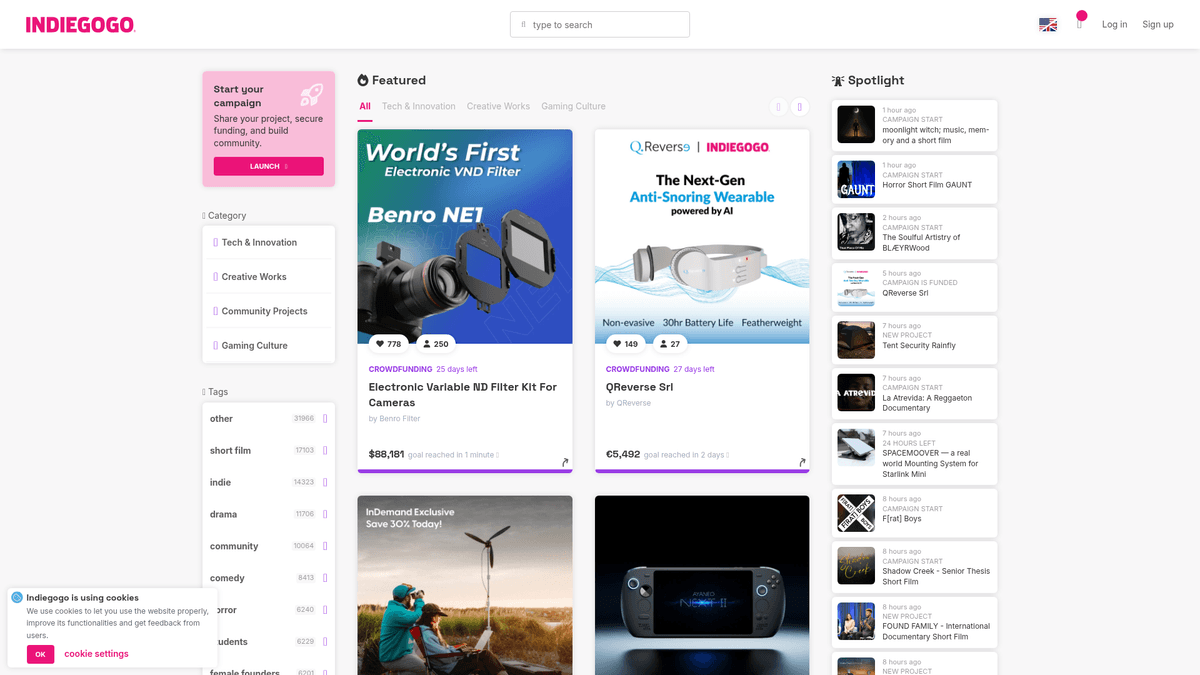
Indiegogo is a premier global crowdfunding platform that serves as a launchpad for entrepreneurs and creators to fund innovative tech, design, and creative projects. Since its launch in 2008, it has facilitated millions of dollars in funding across thousands of active campaigns, ranging from high-tech consumer electronics to independent films.
The platform is a massive repository of structured data, including funding progress, backer counts, project timelines, and detailed product specifications. It also features a robust community section with updates and comments, providing qualitative data on consumer sentiment and market demand for new concepts.
Scraping Indiegogo is highly valuable for market researchers, venture capitalists, and product developers. By aggregating data on successful vs. failed projects, businesses can identify emerging trends, conduct competitive analysis on similar product categories, and gauge price sensitivity among early adopters before products hit traditional retail markets.
Why Scrape Indiegogo?
Discover the business value and use cases for extracting data from Indiegogo.
Market Trend Identification
Scraping Indiegogo allows you to identify emerging tech and design trends by tracking which product categories receive the most funding and engagement before they hit mainstream markets.
Competitive Pricing Intelligence
Extract data on perk tiers and pricing structures to understand how successful competitors position their products and what price points resonate best with early adopters.
Investment Lead Generation
Venture capitalists and angel investors can monitor projects that reach their funding goals rapidly, identifying high-potential startups for early-stage investment opportunities.
Product Sourcing for E-commerce
Retailers and distributors can use scraped data to find innovative products early in their lifecycle, enabling them to secure distribution rights before competitors.
Customer Sentiment Analysis
By extracting comments and updates, businesses can perform sentiment analysis to understand common user pain points and desired features in specific product niches.
Historical Benchmarking
Building a database of past campaigns helps new creators predict their own success by comparing their metrics against thousands of historical project outcomes.
Scraping Challenges
Technical challenges you may encounter when scraping Indiegogo.
Aggressive Cloudflare Protection
Indiegogo uses sophisticated anti-bot measures that can trigger JS challenges or CAPTCHAs, blocking automated scripts that don't mimic real browser behavior.
JavaScript-Dependent Rendering
The website is a React-based Single Page Application, meaning data is loaded dynamically and isn't available in the initial HTML source, requiring a headless browser to extract.
Infinite Scroll Complexity
Search and category pages utilize infinite scrolling or 'Load More' buttons, which requires specific interaction logic to ensure all projects are loaded before extraction begins.
Data Variability by Phase
Campaigns change layout and data fields when transitioning from 'Crowdfunding' to 'InDemand' or 'Closed' status, making it difficult to maintain consistent selectors.
Rate Limiting and IP Bans
Frequent requests to project pages can lead to temporary IP blacklisting, necessitating the use of rotated residential proxies to maintain a high success rate.
Scrape Indiegogo with AI
No coding required. Extract data in minutes with AI-powered automation.
How It Works
Describe What You Need
Tell the AI what data you want to extract from Indiegogo. Just type it in plain language — no coding or selectors needed.
AI Extracts the Data
Our artificial intelligence navigates Indiegogo, handles dynamic content, and extracts exactly what you asked for.
Get Your Data
Receive clean, structured data ready to export as CSV, JSON, or send directly to your apps and workflows.
Why Use AI for Scraping
No-Code Web Scrapers for Indiegogo
Point-and-click alternatives to AI-powered scraping
Several no-code tools like Browse.ai, Octoparse, Axiom, and ParseHub can help you scrape Indiegogo. These tools use visual interfaces to select elements, but they come with trade-offs compared to AI-powered solutions.
Typical Workflow with No-Code Tools
Common Challenges
Learning curve
Understanding selectors and extraction logic takes time
Selectors break
Website changes can break your entire workflow
Dynamic content issues
JavaScript-heavy sites often require complex workarounds
CAPTCHA limitations
Most tools require manual intervention for CAPTCHAs
IP blocking
Aggressive scraping can get your IP banned
Code Examples
import requests
from bs4 import BeautifulSoup
import json

# Indiegogo uses React; Requests is best for pulling metadata from JSON-LD scripts
def scrape_indiegogo_static(url):
    headers = {
        'User-Agent': 'Mozilla/5.0 (Windows NT 10.0; Win64; x64) AppleWebKit/537.36 (KHTML, like Gecko) Chrome/119.0.0.0 Safari/537.36'
    }

    response = requests.get(url, headers=headers)
    if response.status_code == 200:
        soup = BeautifulSoup(response.text, 'html.parser')
        # Locate structured data scripts
        script = soup.find('script', type='application/ld+json')
        if script:
            data = json.loads(script.string)
            print(f"Project: {data.get('name')}")
            return data
    return None

# Example usage:
# scrape_indiegogo_static('https://www.indiegogo.com/projects/example-project')
When to Use
Best for static HTML pages where content is loaded server-side. The fastest and simplest approach when JavaScript rendering isn't required.
Advantages
- ●Fastest execution (no browser overhead)
- ●Lowest resource consumption
- ●Easy to parallelize with asyncio
- ●Great for APIs and static pages
Limitations
- ●Cannot execute JavaScript
- ●Fails on SPAs and dynamic content
- ●May struggle with complex anti-bot systems
from playwright.sync_api import sync_playwright

def scrape_indiegogo_dynamic(url):
    with sync_playwright() as p:
        # Launching browser with a clean context
        browser = p.chromium.launch(headless=True)
        page = browser.new_page()

        # Navigate and wait for React to hydrate the components
        page.goto(url, wait_until='networkidle')

        # Specific selector for the funding amount
        page.wait_for_selector('.i-project-raise-amount')

        results = {
            "title": page.inner_text('h1'),
            "funding": page.inner_text('.i-project-raise-amount'),
            "backers": page.inner_text('.i-project-raise-backers')
        }

        print(results)
        browser.close()

# Example usage:
# scrape_indiegogo_dynamic('https://www.indiegogo.com/projects/example-project')
When to Use
Use when content loads dynamically via JavaScript, or when you need to interact with the page (clicks, scrolls, form fills). Handles modern anti-bot detection better.
Advantages
- ●Executes JavaScript like a real browser
- ●Handles SPAs and dynamic content
- ●Better anti-bot evasion with stealth plugins
- ●Can take screenshots and PDFs
Limitations
- ●Slower than HTTP requests
- ●Higher memory/CPU usage
- ●More complex to set up
import scrapy
from scrapy_playwright.page import PageMethod

class IndiegogoSpider(scrapy.Spider):
    name = 'indiegogo_spider'

    def start_requests(self):
        # Use scrapy-playwright to handle the dynamic content
        yield scrapy.Request(
            'https://www.indiegogo.com/explore/all',
            meta={
                "playwright": True,
                "playwright_page_methods": [
                    PageMethod("wait_for_selector", ".discoverableCard-base"),
                ],
            }
        )

    def parse(self, response):
        for card in response.css('.discoverableCard-base'):
            yield {
                'name': card.css('.discoverableCard-title::text').get(),
                'raised': card.css('.discoverableCard-formattedAmount::text').get(),
                'url': response.urljoin(card.css('a::attr(href)').get())
            }
When to Use
Ideal for large-scale crawling projects that need to scrape thousands of pages. Built-in support for rate limiting, retries, and data pipelines.
Advantages
- ●Built for scale (millions of pages)
- ●Automatic request throttling
- ●Built-in data export pipelines
- ●Middleware system for proxies/headers
Limitations
- ●Steeper learning curve
- ●Overkill for small projects
- ●No native JavaScript rendering
const puppeteer = require('puppeteer');

async function scrapeIndiegogo(url) {
    const browser = await puppeteer.launch({ headless: true });
    const page = await browser.newPage();

    // Set custom user agent to bypass basic bot detection
    await page.setUserAgent('Mozilla/5.0 (Windows NT 10.0; Win64; x64) Chrome/120.0.0.0');

    await page.goto(url, { waitUntil: 'networkidle2' });

    const data = await page.evaluate(() => {
        return {
            projectTitle: document.querySelector('h1')?.innerText,
            amountRaised: document.querySelector('.i-project-raise-amount')?.innerText,
            percentFunded: document.querySelector('.i-project-raise-percent')?.innerText
        };
    });

    console.log(data);
    await browser.close();
}

// scrapeIndiegogo('https://www.indiegogo.com/projects/example-project');
When to Use
Choose this if you're in a Node.js/JavaScript ecosystem or need tight integration with frontend tools. Similar capabilities to Playwright.
Advantages
- ●Native JavaScript/TypeScript support
- ●Chrome DevTools Protocol access
- ●Large ecosystem and community
- ●Good for JS-heavy projects
Limitations
- ●Chrome-only (vs Playwright's multi-browser)
- ●Similar overhead to Playwright
- ●Less mature stealth options
What You Can Do With Indiegogo Data
Explore practical applications and insights from Indiegogo data.
Trend Forecasting
Identify which product categories (e.g., sustainable tech or AI gadgets) are gaining the most traction.
How to implement:
- 1Scrape project categories and weekly funding growth rates.
- 2Identify projects that reach 50% funding within their first 48 hours.
- 3Analyze keyword frequency in project taglines to spot emerging buzzwords.
Use Automatio to extract data from Indiegogo and build these applications without writing code.
Pricing Strategy Research
Companies can benchmark their own product pricing against successful crowdfunding tiers.
How to implement:
- 1Extract all perk/reward price points from top-funded projects.
- 2Compare the 'Early Bird' discount percentage across similar categories.
- 3Analyze the ratio of backer counts to specific price tiers to find the 'sweet spot' for pricing.
Use Automatio to extract data from Indiegogo and build these applications without writing code.
VC & Investment Scouting
Investors can find high-potential startups before they seek traditional Series A funding.
How to implement:
- 1Set up a daily scraper for projects that have exceeded $100k in funding.
- 2Filter for projects with high social media engagement or backer comment activity.
- 3Export founder profiles and external links to perform deeper due diligence.
Use Automatio to extract data from Indiegogo and build these applications without writing code.
Supply Chain Lead Gen
Manufacturing and shipping companies can find new clients who have just secured production capital.
How to implement:
- 1Monitor the 'Tech' and 'Hardware' categories for successfully funded projects.
- 2Scrape the project location to match with local fulfillment capabilities.
- 3Use the extracted founder names to initiate outreach for manufacturing partnerships.
Use Automatio to extract data from Indiegogo and build these applications without writing code.
Supercharge your workflow with AI Automation
Automatio combines the power of AI agents, web automation, and smart integrations to help you accomplish more in less time.
What to get right first
Expert advice for successfully extracting data from Indiegogo.
Inspect Network XHR Traffic
Before scraping the DOM, check the Network tab in your browser for internal GraphQL calls which often return clean JSON data that is easier and faster to parse.
Utilize JSON-LD Scripts
Look for the application/ld+json script tags in the page source; they contain highly structured metadata about the project, creator, and currency that is less likely to change.
Use Residential Proxies
To avoid being flagged by Cloudflare, use high-quality residential proxies that route traffic through real home devices, making your scraper indistinguishable from a human visitor.
Capture Multi-Currency Data
Indiegogo supports many currencies; always ensure you scrape the currency symbol or ISO code along with the numerical value to ensure your data remains accurate for global analysis.
Implement Random Delays
Avoid a predictable scraping pattern by introducing random 'sleep' intervals between 3 and 8 seconds to prevent triggering Indiegogo’s rate-limiting algorithms.
Rotate User Agents Regularly
Switch between various modern desktop and mobile User-Agent strings to reduce the risk of fingerprinting-based blocks from the platform's security layers.
Scrape During Off-Peak Hours
Running large-scale extraction jobs during low-traffic periods for Indiegogo's primary markets can result in faster response times and fewer security challenges.
Related Web Scraping
Yahoo Finance Scraper: Prices, Change and Volume in a table
How to Scrape Rocket Mortgage: A Comprehensive Guide
How to Scrape Open Collective: Financial and Contributor Data Guide
How to Scrape jup.ag: Jupiter DEX Web Scraper Guide
How to Scrape ICO Drops: Comprehensive Crypto Data Guide
How to Scrape Crypto.com: Comprehensive Market Data Guide
How to Scrape Coinpaprika: Crypto Market Data Extraction Guide
How to Scrape CoinMarketCap: A Complete Web Scraping Guide
Frequently Asked Questions
Find answers to common questions about Indiegogo
Is it legal to scrape Indiegogo?
Scraping publicly available data from Indiegogo for research or competitive analysis is generally considered legal under fair use. However, you should always respect privacy laws, avoid extracting personal backer information, and ensure your scraping frequency does not disrupt the website's performance.
Does Indiegogo have an official public API?
Indiegogo has a partner API, but it is not freely accessible for general public scraping or bulk data extraction. Most developers and researchers find that web scraping or monitoring internal XHR endpoints is the most effective way to retrieve comprehensive project data.
How can I avoid getting blocked by Indiegogo?
To avoid blocks, use a headless browser that executes JavaScript and mimics human behavior, such as mouse movements and scrolling. Additionally, employing a rotating pool of residential proxies and setting realistic delays between requests is essential to bypass Cloudflare protection.
What format can I export Indiegogo data into?
Using tools like Automatio or custom scripts, you can export Indiegogo data into structured formats like CSV, JSON, or Excel. JSON is particularly useful for campaigns because it can handle nested data like multiple perk tiers and their respective pricing.
How often should I scrape Indiegogo campaigns?
For active projects, daily scraping is usually sufficient to track funding progress and backer growth. If you are conducting long-term market research, weekly or monthly snapshots of completed campaigns may be more appropriate for identifying broader industry trends.
Can I scrape the names and contact info of backers?
While the total number of backers is public, Indiegogo does not display full contact information for all backers for privacy reasons. You can sometimes scrape public profiles of the most recent backers, but bulk extraction of backer personal data is restricted and often violates platform policies.
What proxies work best for Indiegogo?
Residential proxies are the most effective for Indiegogo because they use IP addresses assigned to real households, which are less likely to be flagged by Cloudflare than datacenter proxies. This is especially important for scraping many project pages in a single session.
Does Indiegogo require login to see project data?
No, almost all relevant campaign data, including descriptions, funding totals, and perks, is visible to the public without an account. Only creator-side analytics and personal contribution history require a logged-in session, which makes it easier to scrape for general research.