

How to Scrape Open Collective: Financial and Contributor Data Guide
Learn how to scrape Open Collective for financial transactions, contributor lists, and project funding data. Extract transparent insights for market research.
Free to start: 1,000 credits, no card, nothing to install.
About Open Collective
Learn what Open Collective offers and what valuable data can be extracted from it.
About Open Collective
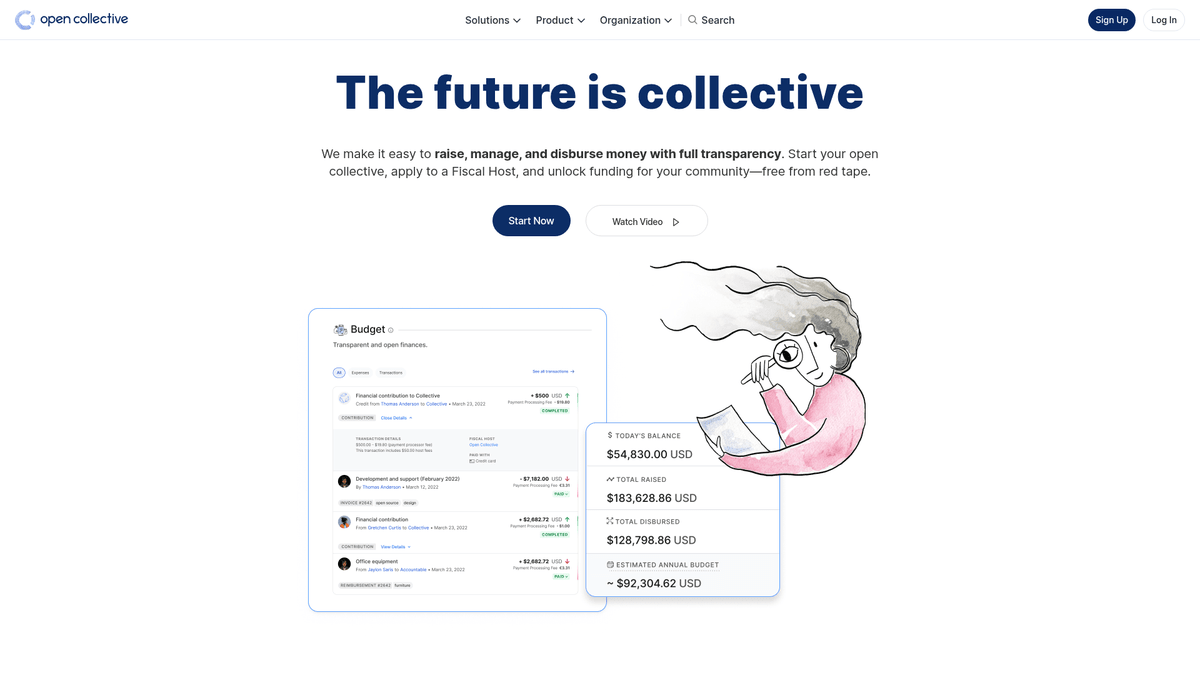
Open Collective is a unique financial and legal platform designed to provide transparency for community-led organizations, open-source software projects, and neighborhood associations. By acting as a decentralized funding tool, it allows 'collectives' to raise money and manage expenses without the need for a formal legal entity, often utilizing fiscal hosts for administrative support. Major tech projects like Babel and Webpack rely on this platform to manage their community-funded ecosystems.
The platform is renowned for its radical transparency. Every transaction, whether a donation from a major corporation or a small expense for a community meetup, is logged and publicly visible. This provides a wealth of data regarding the financial health and spending habits of some of the world's most critical open-source dependencies.
Scraping Open Collective is highly valuable for organizations looking to perform market research on the open-source economy. It allows users to identify corporate sponsorship leads, track developer funding trends, and audit the financial sustainability of critical software projects. The data serves as a direct window into the flow of capital within the global developer community.
Why Scrape Open Collective?
Discover the business value and use cases for extracting data from Open Collective.
Analyze Open Source Sustainability
Track the financial health and long-term viability of critical tech infrastructure projects like Webpack, Babel, and Logseq.
Corporate Sponsorship Prospecting
Identify organizations that already sponsor open-source software to build a targeted list of potential leads for your own initiatives.
Financial Transparency Audits
Monitor how decentralized groups and community collectives allocate their funds to ensure accountability for donors and stakeholders.
Market Trend Discovery
Evaluate which categories—such as tech, environmental activism, or education—are receiving the highest growth in community funding.
Contributor & Influencer Research
Discover top individual and corporate contributors within specific niches to find key influencers for outreach or recruitment.
Grant Impact Tracking
Aggregate data on how large grants are disbursed across multiple projects to measure the real-world impact of philanthropic spending.
Scraping Challenges
Technical challenges you may encounter when scraping Open Collective.
JavaScript-Heavy Rendering
Open Collective is built as a modern web application that requires full JavaScript execution to render financial ledgers and contributor lists.
Complex GraphQL Architecture
The site fetches data through deeply nested GraphQL queries, making traditional HTML parsing less efficient than monitoring API responses.
Dynamic Loading Patterns
Transaction histories and member lists often use infinite scrolling or 'Load More' buttons that require event-driven automation to fully extract.
Cloudflare & Rate Limiting
High-frequency scraping can trigger Cloudflare's Web Application Firewall (WAF) or result in temporary IP bans due to strict global rate limits.
Nested Data Structures
Information about fiscal hosts, collectives, and expenses is distributed across different page layers, requiring complex multi-step navigation.
Scrape Open Collective with AI
No coding required. Extract data in minutes with AI-powered automation.
How It Works
Describe What You Need
Tell the AI what data you want to extract from Open Collective. Just type it in plain language — no coding or selectors needed.
AI Extracts the Data
Our artificial intelligence navigates Open Collective, handles dynamic content, and extracts exactly what you asked for.
Get Your Data
Receive clean, structured data ready to export as CSV, JSON, or send directly to your apps and workflows.
Why Use AI for Scraping
No-Code Web Scrapers for Open Collective
Point-and-click alternatives to AI-powered scraping
Several no-code tools like Browse.ai, Octoparse, Axiom, and ParseHub can help you scrape Open Collective. These tools use visual interfaces to select elements, but they come with trade-offs compared to AI-powered solutions.
Typical Workflow with No-Code Tools
Common Challenges
Learning curve
Understanding selectors and extraction logic takes time
Selectors break
Website changes can break your entire workflow
Dynamic content issues
JavaScript-heavy sites often require complex workarounds
CAPTCHA limitations
Most tools require manual intervention for CAPTCHAs
IP blocking
Aggressive scraping can get your IP banned
Code Examples
import requests

# The Open Collective GraphQL endpoint
url = 'https://api.opencollective.com/graphql/v2'

# GraphQL query to get basic info about a collective
query = '''
query {
  collective(slug: "webpack") {
    name
    stats {
      totalAmountReceived { value }
      balance { value }
    }
  }
}
'''

headers = {'Content-Type': 'application/json'}

try:
    # Sending POST request to the API
    response = requests.post(url, json={'query': query}, headers=headers)
    response.raise_for_status()
    data = response.json()

    # Extracting and printing the name and balance
    collective = data['data']['collective']
    print(f"Name: {collective['name']}")
    print(f"Balance: {collective['stats']['balance']['value']}")
except Exception as e:
    print(f"An error occurred: {e}")
When to Use
Best for static HTML pages where content is loaded server-side. The fastest and simplest approach when JavaScript rendering isn't required.
Advantages
- ●Fastest execution (no browser overhead)
- ●Lowest resource consumption
- ●Easy to parallelize with asyncio
- ●Great for APIs and static pages
Limitations
- ●Cannot execute JavaScript
- ●Fails on SPAs and dynamic content
- ●May struggle with complex anti-bot systems
from playwright.sync_api import sync_playwright

def scrape_opencollective():
    with sync_playwright() as p:
        # Launching browser with JS support
        browser = p.chromium.launch(headless=True)
        page = browser.new_page()
        page.goto('https://opencollective.com/discover')

        # Wait for collective cards to load
        page.wait_for_selector('.CollectiveCard')

        # Extract data from the DOM
        collectives = page.query_selector_all('.CollectiveCard')
        for c in collectives:
            name = c.query_selector('h2').inner_text()
            print(f'Found project: {name}')

        browser.close()

scrape_opencollective()
When to Use
Use when content loads dynamically via JavaScript, or when you need to interact with the page (clicks, scrolls, form fills). Handles modern anti-bot detection better.
Advantages
- ●Executes JavaScript like a real browser
- ●Handles SPAs and dynamic content
- ●Better anti-bot evasion with stealth plugins
- ●Can take screenshots and PDFs
Limitations
- ●Slower than HTTP requests
- ●Higher memory/CPU usage
- ●More complex to set up
import scrapy
import json

class OpenCollectiveSpider(scrapy.Spider):
    name = 'opencollective'
    start_urls = ['https://opencollective.com/webpack']

    def parse(self, response):
        # Open Collective uses Next.js; data is often inside a script tag
        next_data = response.xpath('//script[@id="__NEXT_DATA__"]/text()').get()
        if next_data:
            parsed_data = json.loads(next_data)
            collective = parsed_data['props']['pageProps']['collective']

            yield {
                'name': collective.get('name'),
                'balance': collective.get('stats', {}).get('balance'),
                'currency': collective.get('currency')
            }
When to Use
Ideal for large-scale crawling projects that need to scrape thousands of pages. Built-in support for rate limiting, retries, and data pipelines.
Advantages
- ●Built for scale (millions of pages)
- ●Automatic request throttling
- ●Built-in data export pipelines
- ●Middleware system for proxies/headers
Limitations
- ●Steeper learning curve
- ●Overkill for small projects
- ●No native JavaScript rendering
const puppeteer = require('puppeteer');

(async () => {
  const browser = await puppeteer.launch();
  const page = await browser.newPage();
  await page.goto('https://opencollective.com/discover');

  // Wait for the dynamic content to load
  await page.waitForSelector('.CollectiveCard');

  // Map over elements to extract names
  const data = await page.evaluate(() => {
    return Array.from(document.querySelectorAll('.CollectiveCard')).map(el => ({
      name: el.querySelector('h2').innerText
    }));
  });

  console.log(data);
  await browser.close();
})();
When to Use
Choose this if you're in a Node.js/JavaScript ecosystem or need tight integration with frontend tools. Similar capabilities to Playwright.
Advantages
- ●Native JavaScript/TypeScript support
- ●Chrome DevTools Protocol access
- ●Large ecosystem and community
- ●Good for JS-heavy projects
Limitations
- ●Chrome-only (vs Playwright's multi-browser)
- ●Similar overhead to Playwright
- ●Less mature stealth options
What You Can Do With Open Collective Data
Explore practical applications and insights from Open Collective data.
Open Source Growth Forecasting
Identify trending technologies by tracking financial growth rates of specific collective categories.
How to implement:
- 1Extract monthly revenue for top projects in specific tags
- 2Calculate compound annual growth rates (CAGR)
- 3Visualize project funding health to predict tech adoption
Use Automatio to extract data from Open Collective and build these applications without writing code.
Lead Generation for SaaS
Identify well-funded projects that may need developer tools, hosting, or professional services.
How to implement:
- 1Filter collectives by budget and total amount raised
- 2Extract project descriptions and external website URLs
- 3Verify the tech stack through linked GitHub repositories
Use Automatio to extract data from Open Collective and build these applications without writing code.
Corporate Philanthropy Audit
Track where major corporations are spending their open-source contribution budgets.
How to implement:
- 1Scrape contributor lists for top projects
- 2Filter for organizational profiles vs individual profiles
- 3Aggregate contribution amounts by corporate entity
Use Automatio to extract data from Open Collective and build these applications without writing code.
Community Impact Research
Analyze how decentralized groups distribute their funds to understand social impact.
How to implement:
- 1Scrape the full transaction ledger for a specific collective
- 2Categorize expenses (travel, salaries, hardware)
- 3Generate reports on resource allocation within community groups
Use Automatio to extract data from Open Collective and build these applications without writing code.
Developer Recruitment Pipeline
Find active leaders in specific ecosystems based on their community management and contribution history.
How to implement:
- 1Scrape member lists of key technical collectives
- 2Cross-reference contributors with their public social profiles
- 3Identify active maintainers for high-level outreach
Use Automatio to extract data from Open Collective and build these applications without writing code.
Supercharge your workflow with AI Automation
Automatio combines the power of AI agents, web automation, and smart integrations to help you accomplish more in less time.
What to get right first
Expert advice for successfully extracting data from Open Collective.
Extract via URL Slugs
The easiest way to target specific collectives is to use their unique URL slugs which can be harvested from the main discover page.
Check for __NEXT_DATA__
The page source often contains a script tag with the ID __NEXT_DATA__ that holds pre-rendered JSON, which can be faster than scraping the UI.
Use 'data-cy' Selectors
Target the 'data-cy' attributes in your selectors, as these are testing IDs that remain stable even when CSS classes change during site updates.
Monitor XHR Requests
Use browser developer tools to find the direct GraphQL endpoint calls, as these provide the cleanest data structure for financial transactions.
Implement Random Delays
Add randomized wait times between 2 and 6 seconds to mimic natural browsing and stay under the radar of automated bot detection.
Leverage Official Documentation
Review the Open Collective GraphQL API documentation to understand the naming conventions for different financial data fields.
Related Web Scraping
Yahoo Finance Scraper: Prices, Change and Volume in a table
How to Scrape Rocket Mortgage: A Comprehensive Guide
How to Scrape jup.ag: Jupiter DEX Web Scraper Guide
How to Scrape Indiegogo: The Ultimate Crowdfunding Data Extraction Guide
How to Scrape ICO Drops: Comprehensive Crypto Data Guide
How to Scrape Crypto.com: Comprehensive Market Data Guide
How to Scrape Coinpaprika: Crypto Market Data Extraction Guide
How to Scrape CoinMarketCap: A Complete Web Scraping Guide
Frequently Asked Questions
Find answers to common questions about Open Collective
Is it legal to scrape data from Open Collective?
Yes, scraping Open Collective is legal as long as you are accessing public information meant for transparency. The platform is built on the principle of open finances, but you should still respect their robots.txt and avoid scraping private PII.
Does Open Collective have an official API?
Yes, Open Collective provides a comprehensive GraphQL v2 API. While it is the preferred method for developers, it has strict rate limits that may require an API key for higher-volume data extraction.
How can I avoid getting blocked while scraping?
To avoid blocks, use high-quality residential proxies and rotate your user agents regularly. Additionally, keep your request speed low to avoid triggering the Cloudflare rate limiter which protects their web frontend.
What format will the extracted data be in?
Using tools like Automatio or custom scripts, you can export the data into CSV, JSON, or Excel. This allows for easy integration with financial modeling software or corporate CRM systems.
How often does the financial data on the site update?
The data is updated in real-time as transactions occur. For general research, scraping once per day or once per week is typically sufficient to track budget trends and project health.
What proxies work best for Open Collective?
Residential proxies are recommended because they are less likely to be flagged by Cloudflare than datacenter proxies. If you are scraping a small number of pages, a standard VPN or rotating proxy service may suffice.
Can I scrape contributor contact information?
Open Collective does not publicly display private email addresses or phone numbers. However, you can scrape links to public profiles, websites, and social media handles to find contact routes elsewhere.
Do I need an account to scrape public collectives?
No, most information regarding projects, budgets, and public expenses can be accessed without being logged in. Some sensitive organizational settings or private expense details remain hidden even with an account.