

NocoDB Self-Hosted: One-Click Deploy on Your Own VPS
NocoDB transforms existing databases into collaborative spreadsheets. Deploying with Automatio gives you a dedicated server with no per-user fees and automated HTTPS in minutes.
NocoDB
Automation & WorkflowsNocoDB is an opensource Airtable alternative that turns any MySQL, PostgreSQL, SQL Server, SQLite & MariaDB into a smart spreadsheet.
What you get when you deploy NocoDB
The server we rent for it, what it costs, and what the installer will ask you.
- Server
- CX23 · 2 vCPU · 4 GB RAM
- From
- $9/month
- Setup
- No configuration required
Included with every deployment
- Dedicated server, one app per machine
- HTTPS certificate issued automatically
- Free subdomain, custom domain optional
- Restart, resize, snapshot and restore
The project
Everything this page links to outside Automatio.
Deploy NocoDB in one click
On your own server, with your own data. No terminal, no Docker commands, no certificate setup.
- 1
Pick a size
Start on the smallest server that fits the app. Resize later without reinstalling.
- 2
Press deploy
We rent the server, install the app with Docker, and point a subdomain at it.
- 3
Watch it come up
Provisioning runs unattended and takes a few minutes. When the HTTPS certificate lands, the app is live and your login details are on the deployment page.
Server size
Billed monthly with your Automatio subscription. Destroy the server any time and the charge stops. Every server: 20 TB traffic/month included, then $2.50 per TB.
Key Capabilities
Explore what Automatio can do for this use case
Grid View Interface
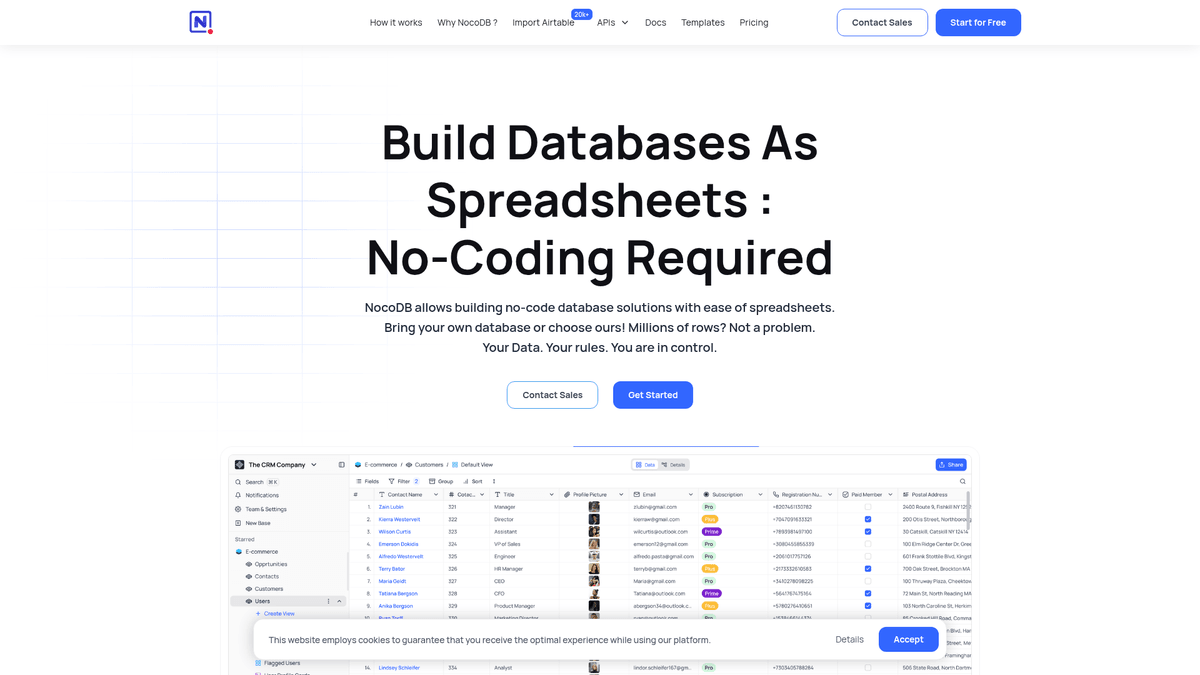
This core interface provides a spreadsheet experience for interacting with relational databases without writing SQL queries. You can perform standard operations like creating, reading, and updating rows through a grid that feels familiar to any business user.
- 1Supports MySQL and PostgreSQL
- 2Inline cell editing
- 3Bulk data operations
- 4Advanced sorting and filtering
- 5Multi-field edit functionality
Key Capabilities
- Grid View Interface
This core interface provides a spreadsheet experience for interacting with relational databases without writing SQL queries. You can perform standard operations like creating, reading, and updating rows through a grid that feels familiar to any business user.
- Supports MySQL and PostgreSQL
- Inline cell editing
- Bulk data operations
- Advanced sorting and filtering
- Multi-field edit functionality
- Multi-View Layouts
The platform visualizes data through interactive layouts designed for different team workflows. These views allow you to manage project progress, browse visual assets, or capture data directly from end-users via public web forms.
- Drag-and-drop Kanban boards
- Public and private form sharing
- Responsive gallery views
- Date-based calendar layouts
- Mobile-responsive display
- Direct DB Connection
It connects to your existing infrastructure rather than importing data into proprietary storage. This architecture lets developers build a no-code UI on top of live production data without creating duplicate records or sync overhead.
- Connect to external Postgres/MySQL
- Zero-copy data management
- Schema visualization via ERD
- Real-time SQL synchronization
- Support for MariaDB and SQL Server
- Programmatic API
Every table created within the platform automatically generates structured endpoints for external integration. This enables you to build custom frontends or connect to third-party automation services using standard web protocols.
- Auto-generated Swagger documentation
- REST API for all operations
- Event-driven webhook triggers
- JWT and Social Auth support
- Official NocoDB SDK support
Why self-host NocoDB
What to know first
Managed, DIY, or One-Click?
The three realistic ways to run {name}, compared honestly.
| Aspect | Managed SaaS | DIY on a VPS | Automatio one-click |
|---|---|---|---|
| Setup speed | Instant | 30-60 minutes | ~15 minutes |
| Server ownership | Shared cloud | Dedicated VPS | Dedicated VPS |
| Maintenance | Automatic | Manual updates | One-click updates |
| Cost shape | Per user and per row | Fixed server cost | Fixed server cost |
| Data privacy | Multi-tenant | Private server | Private server |
Setup speed
Server ownership
Maintenance
Cost shape
Data privacy
Who this is for
People who actually run NocoDB on their own server, and what changes when they do.
a solo founder
Paying $20 per month for every user on basic project tracking.
Running this on your own server gives you a custom CRM without monthly seat limits.
- Build lead capture forms
- Track product roadmap items
- Manage early-stage investor lists
a freelancer billing hourly
Needs to share project data with clients without them seeing other records.
You can create isolated, password-protected gallery views for specific client project files.
- Share design asset galleries
- Track billable tasks in Kanban
- Export monthly reporting data
a developer building an MVP
Needs a GUI for their Postgres database while building a new frontend.
It provides a live spreadsheet interface for production data plus auto-generated REST APIs.
- Edit production data without SQL
- Test API endpoints via Swagger
- Visualize database relationships
a data researcher
Managing survey responses that exceed standard spreadsheet limits.
Self-hosting removes row caps, allowing for millions of records in one workspace without upgrade prompts.
- Import massive CSV survey results
- Run complex data filters
- Share anonymized public results
About This App
What this app does and where it fits.
The bridge between SQL and no-code
NocoDB is an open-source platform that addresses the gap between powerful relational databases and the user-friendly interface of a spreadsheet. Launched in 2021, the project quickly became a popular alternative to proprietary tools like Airtable. It was built specifically to counter the issues of vendor lock-in, data silos, and the high per-seat costs that typically plague modern SaaS data tools.
Connecting to existing data
Unlike traditional spreadsheet apps that store data in proprietary formats, the platform acts as a smart interface layer for your existing SQL infrastructure. It functions as a lens: you connect it to a database, such as PostgreSQL or MySQL, and it automatically maps the existing tables into a spreadsheet-style grid. This architecture is useful for businesses that already have production databases but need to give non-technical team members a way to manage that data without writing manual SQL queries.
The first hour: from raw tables to Kanban
The initial experience involves connecting your first data source. Once linked, you can begin creating collaborative views. The Grid view handles standard data entry, while specialized views like Kanban and Calendar allow you to transform raw records into a project management system. For developers, the app automatically generates REST APIs and Swagger documentation for every table, making it a functional tool for rapidly prototyping application backends.
A technical alternative
While the software aims for ease of use, it remains a tool for those who appreciate technical control. It uses standard database terminology and exposes relational concepts like one-to-many and many-to-many links directly in the UI. By sitting between a raw database manager like pgAdmin and a polished consumer tool, it provides the efficiency of professional database management with the accessibility of a collaborative workspace. Because it is self-hosted, you retain the ability to run high-volume queries and imports that would trigger rate limits or cost overruns on hosted platforms.
Community Feedback
See what the community thinks about NocoDB
“My reason for self hosting NocoDB is privacy and also rate-limiting.”
“This application feels very much more technical in nature... having to rely on web hooks for automations.”
“I characterized the setup process as relatively straightforward for technical users.”
“NocoDB is no longer strictly open source. More and more features have become cloud-only in their commercial tier.”
“The views are going to be available regardless of the pricing plan that you're on, you're not limited.”
“I've built project workflows to make self-hosting a simple process. Any project should be a few clicks from deploy.”
Related Videos
Watch tutorials, reviews, and discussions about NocoDB
“NocoDB allows you to take your existing database and turn it into a smart spreadsheet.”
“Deployment is straightforward using Docker Compose, which is the recommended path.”
“NocoDB is useful if you want to build an internal tool without writing a frontend.”
Supercharge your workflow with AI Automation
Automatio combines the power of AI agents, web automation, and smart integrations to help you accomplish more in less time.
What to get right first
The decisions that are painful to change later in NocoDB.
Postgres for production
While SQLite is fine for testing, always use a PostgreSQL database for real multi-user workloads to ensure data resilience and performance.
Monitor memory usage
Importing millions of rows or running complex rollups can spike RAM. Use at least 8GB RAM (CX33 size) for production datasets to prevent crashes.
Configure SMTP first
Set up your SMTP provider immediately after installation, as user invites and password resets cannot function without it.
Testimonials
What Our Users Say
Join thousands of satisfied users who have transformed their workflow
Jonathan Kogan
Co-Founder/CEO, rpatools.io
Automatio is one of the most used for RPA Tools both internally and externally. It saves us countless hours of work and we realized this could do the same for other startups and so we choose Automatio for most of our automation needs.
Mohammed Ibrahim
CEO, qannas.pro
I have used many tools over the past 5 years, Automatio is the Jack of All trades.. !! it could be your scraping bot in the morning and then it becomes your VA by the noon and in the evening it does your automations.. its amazing!
Ben Bressington
CTO, AiChatSolutions
Automatio is fantastic and simple to use to extract data from any website. This allowed me to replace a developer and do tasks myself as they only take a few minutes to setup and forget about it. Automatio is a game changer!
Sarah Chen
Head of Growth, ScaleUp Labs
We've tried dozens of automation tools, but Automatio stands out for its flexibility and ease of use. Our team productivity increased by 40% within the first month of adoption.
David Park
Founder, DataDriven.io
The AI-powered features in Automatio are incredible. It understands context and adapts to changes in websites automatically. No more broken scrapers!
Emily Rodriguez
Marketing Director, GrowthMetrics
Automatio transformed our lead generation process. What used to take our team days now happens automatically in minutes. The ROI is incredible.
Jonathan Kogan
Co-Founder/CEO, rpatools.io
Automatio is one of the most used for RPA Tools both internally and externally. It saves us countless hours of work and we realized this could do the same for other startups and so we choose Automatio for most of our automation needs.
Mohammed Ibrahim
CEO, qannas.pro
I have used many tools over the past 5 years, Automatio is the Jack of All trades.. !! it could be your scraping bot in the morning and then it becomes your VA by the noon and in the evening it does your automations.. its amazing!
Ben Bressington
CTO, AiChatSolutions
Automatio is fantastic and simple to use to extract data from any website. This allowed me to replace a developer and do tasks myself as they only take a few minutes to setup and forget about it. Automatio is a game changer!
Sarah Chen
Head of Growth, ScaleUp Labs
We've tried dozens of automation tools, but Automatio stands out for its flexibility and ease of use. Our team productivity increased by 40% within the first month of adoption.
David Park
Founder, DataDriven.io
The AI-powered features in Automatio are incredible. It understands context and adapts to changes in websites automatically. No more broken scrapers!
Emily Rodriguez
Marketing Director, GrowthMetrics
Automatio transformed our lead generation process. What used to take our team days now happens automatically in minutes. The ROI is incredible.
Related Self-Hosted Apps

n8n
from $9/mo
Visual workflow automation with 400+ integrations. Self-hosted Zapier alternative.

Windmill
from $9/mo
A developer platform to build production-grade workflows and internal apps. Open-source alternative to Airplane, Retool, and GitHub Actions.

Home Assistant
from $9/mo
Open source home automation that puts local control and privacy first.

Activepieces
from $9/mo
Open-source no-code business automation tool. An alternative to Zapier, Make.com, and Tray.
Frequently Asked Questions
Find answers to common questions about NocoDB