

Windmill Self-Hosted, Deploy in One Click
Windmill turns scripts into powerful workflows and internal UIs. Deploying it on your own server gives you full data ownership, automated HTTPS, and zero maintenance overhead.
Windmill
Automation & WorkflowsA developer platform to build production-grade workflows and internal apps. Open-source alternative to Airplane, Retool, and GitHub Actions.
What you get when you deploy Windmill
The server we rent for it, what it costs, and what the installer will ask you.
- Server
- CX23 · 2 vCPU · 4 GB RAM
- From
- $9/month
- Setup
- No configuration required
Included with every deployment
- Dedicated server, one app per machine
- HTTPS certificate issued automatically
- Free subdomain, custom domain optional
- Restart, resize, snapshot and restore
The project
Everything this page links to outside Automatio.
Deploy Windmill in one click
On your own server, with your own data. No terminal, no Docker commands, no certificate setup.
- 1
Pick a size
Start on the smallest server that fits the app. Resize later without reinstalling.
- 2
Press deploy
We rent the server, install the app with Docker, and point a subdomain at it.
- 3
Watch it come up
Provisioning runs unattended and takes a few minutes. When the HTTPS certificate lands, the app is live and your login details are on the deployment page.
Server size
Billed monthly with your Automatio subscription. Destroy the server any time and the charge stops. Every server: 20 TB traffic/month included, then $2.50 per TB.
Key Capabilities
Explore what Automatio can do for this use case
Multi-language scripting
Windmill treats code as the primary building block of automation. You can write scripts in TypeScript, Python, Go, Bash, or SQL and expose them as reusable nodes. Every script automatically generates its own UI form based on its arguments, allowing non-technical users to trigger complex logic without touching the code.
- 1Supports Bun and Deno for TypeScript
- 2Python dependency management via uv
- 3Native SQL execution for PostgreSQL and Snowflake
- 4Direct Bash and PowerShell support for system tasks
- 5Version control for every script saved to the instance
Key Capabilities
- Multi-language scripting
Windmill treats code as the primary building block of automation. You can write scripts in TypeScript, Python, Go, Bash, or SQL and expose them as reusable nodes. Every script automatically generates its own UI form based on its arguments, allowing non-technical users to trigger complex logic without touching the code.
- Supports Bun and Deno for TypeScript
- Python dependency management via uv
- Native SQL execution for PostgreSQL and Snowflake
- Direct Bash and PowerShell support for system tasks
- Version control for every script saved to the instance
- Visual workflow engine
You can chain your scripts into complex Directed Acyclic Graphs (DAGs) using a visual editor. The engine handles retries, error branching, and parallel execution at scale. Because it uses a high-performance Rust core, it maintains lower latency than traditional Node.js-based automation tools during high-concurrency bursts.
- Drag-and-drop flow designer
- Parallel for-each loops and branching logic
- Wait steps for human-in-the-loop approvals
- Automatic state management between steps
- Support for nesting sub-flows inside larger workflows
- Low-code app builder
The platform includes an editor to build dashboards and admin panels that sit on top of your scripts. You can drag components like tables, buttons, and charts onto a canvas and bind them to your automation results. It removes the need to write frontend boilerplate for internal tools.
- Library of 50+ UI components
- Real-time data binding to script outputs
- Custom CSS and styling for brand consistency
- Role-based access control for specific app views
- Deployment of standalone apps for end-users
- Resource and secret management
Centralize your API keys, database credentials, and configurations in a secure vault. Windmill allows you to define custom Resource Types, making it easy to swap between production and staging keys or manage complex LLM prompts globally without hardcoding them into scripts.
- AES-256 encryption for secrets at rest
- Custom schema definitions for different resource types
- Environment variable isolation between workspaces
- Global credential sharing across teams
- Prompt management system for AI-driven flows
Why self-host Windmill
What to know first
Managed, DIY, or One-Click?
The three realistic ways to run {name}, compared honestly.
| Aspect | Managed SaaS | DIY on a VPS | Automatio one-click |
|---|---|---|---|
| Execution Cost | Per-task or per-minute fees | Zero (Hardware cost only) | Zero (Flat server fee) |
| Deployment | Instant sign-up | 1-2 hours of manual Docker config | ~15 minutes automated |
| HTTPS/SSL | Included | Manual Certbot setup | Fully automated |
| Data Privacy | Stored on vendor servers | 100% Private | 100% Private |
| Maintenance | Zero | High (Manual updates) | Low (Automated patching) |
Execution Cost
Deployment
HTTPS/SSL
Data Privacy
Maintenance
Who this is for
People who actually run Windmill on their own server, and what changes when they do.
an AI-first developer
Tired of proprietary AI wrappers and restrictive SaaS execution limits.
You get a professional-grade orchestration engine that syncs with your local CLI and supports the Model Context Protocol.
- Sync local Python scripts to your server
- Build custom AI agents that execute system commands
- Debug complex LLM flows via your favorite IDE
a marketing ops specialist
Manually updating prompts across dozens of different automation flows.
Manage every prompt as a single Resource that updates every connected flow instantly across your entire workspace.
- Centralize YouTube reply and content prompts
- A/B test different LLM models globally
- Automate multi-platform content distribution
a solo agency founder
Per-seat and per-execution pricing killing profit margins on client work.
Host all client automations on one instance using isolated workspaces and give them custom white-labeled admin panels.
- Onboard new client workspaces in seconds
- Create custom database management UIs
- Automate recurring client reporting tasks
a homelab tinkerer
No-code tools do not support local network protocols or custom scripts.
Total control over hardware access and local service integration without needing to open firewall ports to the cloud.
- Automate media server metadata cleanup
- Sync local file archives to S3 storage
- Run scheduled system maintenance scripts
About This App
What this app does and where it fits.
The developer alternative to no-code
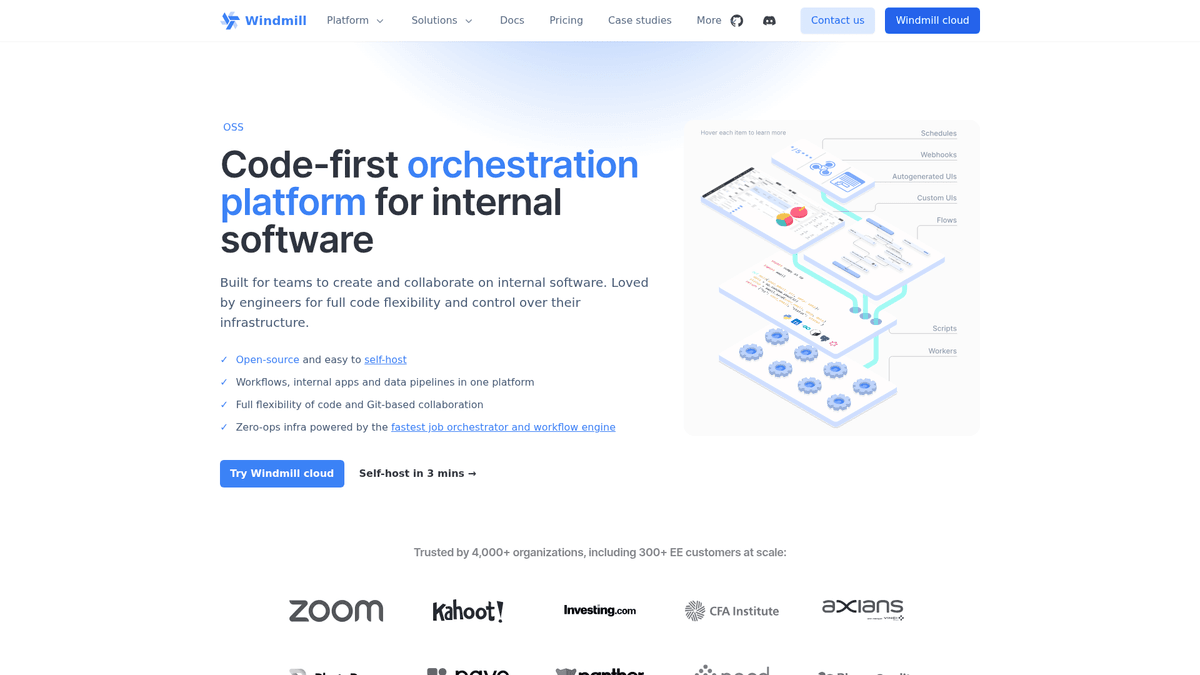
Windmill is a high-performance developer platform designed to replace tools like Retool, n8n, and Temporal. While most automation platforms focus on visual nodes that perform simple HTTP requests, Windmill centers the experience around pure code. It allows engineers to write scripts in mainstream languages and instantly turns those scripts into reusable building blocks for workflows or internal UIs. This code-first philosophy ensures you never hit a wall when a visual node doesn't support a specific feature.
Scripts as building blocks
The core of the platform is the script. Every script you save automatically generates its own UI based on the arguments it takes. If a Python script requires an email and a count, Windmill builds that form for you. These scripts are then chained together in the Flow Builder, a visual DAG editor that handles the heavy lifting of orchestration including retries, error handling, parallel loops, and state management. Unlike Node.js-based tools, its Rust-based core handles thousands of concurrent tasks with minimal overhead.
The resource ecosystem
One of the most powerful features is the Resource system. Instead of hardcoding API keys inside flows, you define them as external resources. This is particularly useful for AI-driven workflows where you might want to store LLM prompts, model choices, and temperature settings as resources that can be updated globally. This architectural separation between logic and configuration is what makes the platform suitable for professional automation.
AI-powered development
The platform integrates deeply with modern AI development. With support for the Model Context Protocol (MCP) and a robust CLI, developers can use tools like Claude or Cursor to build and debug their flows locally. You can describe an entire automation to an AI, which then uses the API to create the folders, scripts, and schedules for you. This bridge between local IDEs and a production-ready execution engine makes it a standard choice for teams building custom AI agents and internal business logic.
Community Feedback
See what the community thinks about Windmill
“Windmill is basically what happens when you let engineers build an automation tool. It doesn't treat you like a child; it just gives you a high-performance environment to run code.”
“I moved from n8n because sub-workflows were a pain to manage. In Windmill, a script is just a script, and I can call it from anywhere.”
“The learning curve is steeper than Zapier, but the ceiling is much higher. If you know even basic Python, you'll never go back.”
“Windmill quickly became crucial at Photoroom... made chatops and iterations over scripts incredibly easy.”
“Today, Windmill ranks among the most stable components of our infrastructure.”
“The quick setup through Docker Compose and intuitive UI allowed us to get started immediately.”
Related Videos
Watch tutorials, reviews, and discussions about Windmill
“Windmill is a developer platform to build production-grade workflows and internal apps.”
“It's built in Rust, which makes it extremely fast and lightweight compared to Node-based tools.”
“You write scripts in Python, TypeScript, Go, PHP, or even Bash, and they become building blocks.”
“The platform automatically generates a UI for your scripts based on the arguments you define.”
“It's a powerful open-source alternative to proprietary services like Airplane or Retool.”
“The self-hosted version gives you total control over your execution environment and data.”
“You can use the Flow builder to chain scripts together with full type safety between steps.”
“The resource system handles your secrets and database connections securely across the workspace.”
“Scheduling complex workflows is as simple as adding a cron expression in the dashboard.”
“The performance overhead is significantly lower than almost any other automation tool I have tested.”
“Windmill focuses on letting developers write pure code instead of clicking through limited visual blocks.”
“Deploying the platform is straightforward using their official Docker Compose setup.”
“The app builder is useful for creating quick dashboards that your internal teams can actually use.”
“Version control for your scripts is built directly into the platform workspace.”
“It integrates with existing CI/CD pipelines, allowing you to sync scripts from a Git repository.”
Supercharge your workflow with AI Automation
Automatio combines the power of AI agents, web automation, and smart integrations to help you accomplish more in less time.
What to get right first
The decisions that are painful to change later in Windmill.
Use custom resource types
Don't just store API keys as strings. Create custom Resource Types for things like Prompt Sets to keep your AI configurations organized and type-safe.
Enable MCP for AI coding
Enable the Model Context Protocol server in your settings. This allows AI tools like Claude to write, test, and deploy scripts directly to your server.
Monitor RAM for Python
If you are running heavy data processing in Python, keep an eye on memory usage. Workers can be intensive when importing large libraries like Pandas.
Testimonials
What Our Users Say
Join thousands of satisfied users who have transformed their workflow
Jonathan Kogan
Co-Founder/CEO, rpatools.io
Automatio is one of the most used for RPA Tools both internally and externally. It saves us countless hours of work and we realized this could do the same for other startups and so we choose Automatio for most of our automation needs.
Mohammed Ibrahim
CEO, qannas.pro
I have used many tools over the past 5 years, Automatio is the Jack of All trades.. !! it could be your scraping bot in the morning and then it becomes your VA by the noon and in the evening it does your automations.. its amazing!
Ben Bressington
CTO, AiChatSolutions
Automatio is fantastic and simple to use to extract data from any website. This allowed me to replace a developer and do tasks myself as they only take a few minutes to setup and forget about it. Automatio is a game changer!
Sarah Chen
Head of Growth, ScaleUp Labs
We've tried dozens of automation tools, but Automatio stands out for its flexibility and ease of use. Our team productivity increased by 40% within the first month of adoption.
David Park
Founder, DataDriven.io
The AI-powered features in Automatio are incredible. It understands context and adapts to changes in websites automatically. No more broken scrapers!
Emily Rodriguez
Marketing Director, GrowthMetrics
Automatio transformed our lead generation process. What used to take our team days now happens automatically in minutes. The ROI is incredible.
Jonathan Kogan
Co-Founder/CEO, rpatools.io
Automatio is one of the most used for RPA Tools both internally and externally. It saves us countless hours of work and we realized this could do the same for other startups and so we choose Automatio for most of our automation needs.
Mohammed Ibrahim
CEO, qannas.pro
I have used many tools over the past 5 years, Automatio is the Jack of All trades.. !! it could be your scraping bot in the morning and then it becomes your VA by the noon and in the evening it does your automations.. its amazing!
Ben Bressington
CTO, AiChatSolutions
Automatio is fantastic and simple to use to extract data from any website. This allowed me to replace a developer and do tasks myself as they only take a few minutes to setup and forget about it. Automatio is a game changer!
Sarah Chen
Head of Growth, ScaleUp Labs
We've tried dozens of automation tools, but Automatio stands out for its flexibility and ease of use. Our team productivity increased by 40% within the first month of adoption.
David Park
Founder, DataDriven.io
The AI-powered features in Automatio are incredible. It understands context and adapts to changes in websites automatically. No more broken scrapers!
Emily Rodriguez
Marketing Director, GrowthMetrics
Automatio transformed our lead generation process. What used to take our team days now happens automatically in minutes. The ROI is incredible.
Related Self-Hosted Apps

n8n
from $9/mo
Visual workflow automation with 400+ integrations. Self-hosted Zapier alternative.

NocoDB
from $9/mo
NocoDB is an opensource Airtable alternative that turns any MySQL, PostgreSQL, SQL Server, SQLite & MariaDB into a smart spreadsheet.

Home Assistant
from $9/mo
Open source home automation that puts local control and privacy first.

Activepieces
from $9/mo
Open-source no-code business automation tool. An alternative to Zapier, Make.com, and Tray.
Frequently Asked Questions
Find answers to common questions about Windmill