
APOGEE Stratospheric Scrollytelling Template
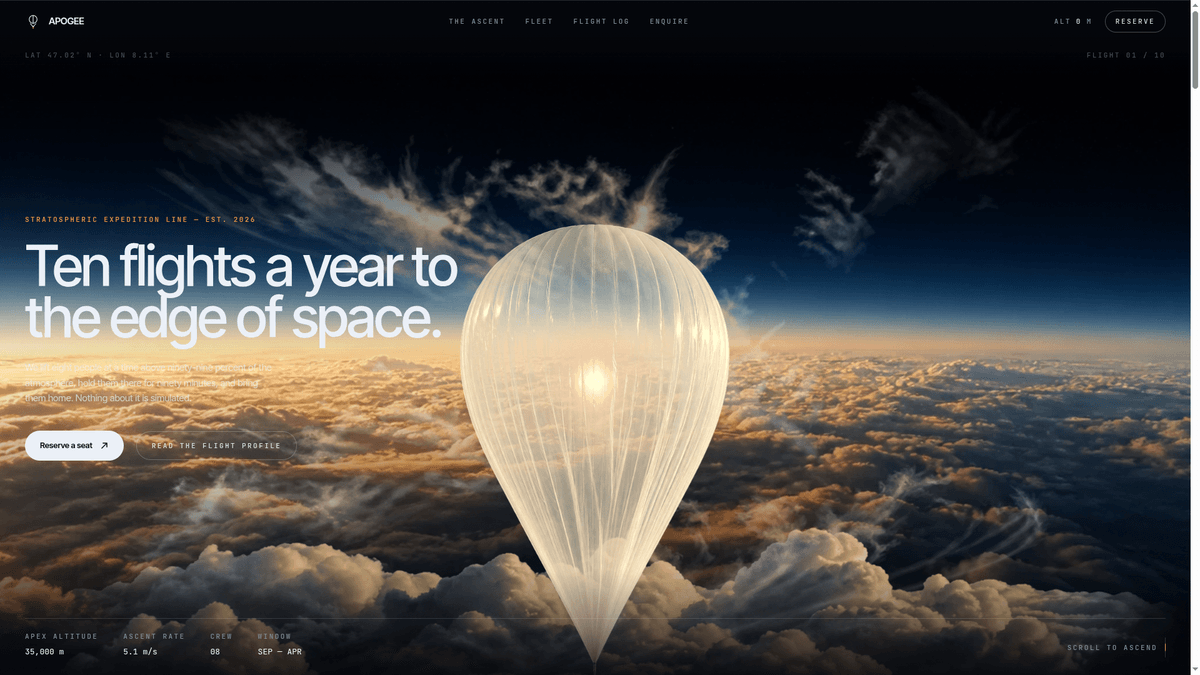
A vertical scrollytelling landing page featuring background transitions and live telemetry counters. Cloning puts the source in your workspace to change by describing it.
What's inside APOGEE — Stratospheric Scroll Experience
The parts this template already ships, and what each one is for.
Scroll-driven ascent physics
The page uses vertical scroll triggers to transition through atmospheric layers, moving from the cloud base to the edge of space. It creates a narrative flow where the user controls the speed of the journey.
- 1Layered background image transitions
- 2Scroll-synchronized stage indicators
- 3Smooth scroll-to-ascend interactions
- 4Fixed narrative overlay sections
What's inside APOGEE — Stratospheric Scroll Experience
- Scroll-driven ascent physics
The page uses vertical scroll triggers to transition through atmospheric layers, moving from the cloud base to the edge of space. It creates a narrative flow where the user controls the speed of the journey.
- Layered background image transitions
- Scroll-synchronized stage indicators
- Smooth scroll-to-ascend interactions
- Fixed narrative overlay sections
- Dynamic telemetry counters
Integrated data displays update in real-time as the visitor interacts with the page. These counters track technical metrics like altitude, crew capacity, and mission speed to add scientific credibility.
- Animated altitude meter to 35,000m
- Real-time ascent rate percentage
- Metric and imperial unit support
- Automatic counter reset on scroll back
- Boarding lead capture
A focused call-to-action module appears at the end of the scroll experience to convert high-intent visitors. It is designed specifically for early-access waitlists and quarterly release notifications.
- Minimalist email submission field
- Responsive form layout for mobile
- Connection points for external APIs
- Customizable confirmation text
Make it yours
The first things people change. Say any of these in the chat and it gets done.
Switch to deep sea theme
Replace the space images with ocean depths and change the altitude counter to a descent depth meter in meters.
Connect email waitlist
Wire the boarding form to my Mailchimp account and update the success message to mention a spring launch.
Add product specifications
Replace the crew capacity tracker with a battery life indicator that updates as the user scrolls through the specs.
Change scroll sensitivity
Slow down the ascent animation so the atmospheric transitions take twice as much scrolling to complete.
About this template
What it is for, and who should skip it.
What you would actually use this for
You open this template on a Tuesday to build a high-impact teaser for a hardware launch or a scientific research project. It is effective for situations where you need to explain technical specifications in a specific narrative order, such as a satellite deployment, a new drone release, or a complex software service launch. You would use it for a waitlist page where the visitor needs to experience the product's scale before they reach the signup form.
What you would change first
You will likely swap the atmospheric imagery for your own brand assets and update the telemetry numbers to reflect your specific data points. Most users ask the chat to change the Boarding section text to match their own launch schedule and connect the lead capture form to a service like Mailchimp or a custom webhook. You can also adjust the scroll speed if the ascent feels too fast for the amount of text you have.
When to skip it
Skip this if you need a standard multi-page website or a blog with a search function. It is not designed for high-density text or e-commerce storefronts with many items. If your visitor needs to find a specific piece of information quickly without scrolling through a narrative, a standard landing page template is a better fit.
Supercharge your workflow with AI Automation
Automatio combines the power of AI agents, web automation, and smart integrations to help you accomplish more in less time.
Related Template Gallery
Skeuomorphic control panel, hardware dashboard template
A skeuomorphic hardware control panel with thermal monitors and tactile toggles. Clone it to your workspace to customize components by chatting with t...
Black Hole 404, Three.js Interactive Error Page Template
A Three.js 404 page featuring a WebGL2 black hole with real-time physics metrics. Clone it to your workspace to customize the cosmic visuals by chatti...
Fluxora, Cinematic Scroll SaaS Landing Page Template
Build a high-end SaaS site with cinematic GSAP animations and editorial type. Clone this template to your workspace and edit the motion by chatting.
TerraUnits Recreated, 3D Globe Bidding Template
Claim territory on a 3D interactive globe and display your brand link in this TerraUnits Recreated template. Clone it to your workspace and edit via c...
Black Hole 404, Three.js Error Page Template
An interactive Three.js black hole 404 error page. Clone this template into your workspace to customize the cosmic visuals and links using the AI chat...
3D 8-Ball Pool, Game Landing Page Template
Launch your brand with this 3D 8-ball pool template. It features an atmospheric club design that you can clone and edit by chatting in your workspace.
LowWorld 3D Territory World Map Template
LowWorld is a 3D interactive globe where users buy dots to claim territory. Clone it to your workspace to customize the map and pricing via chat instr...
Seismic Command Center, Free Earthquake Monitor Template
Monitor global seismic activity with a 3D orbital globe and live USGS feeds. Clone this template to your workspace to customize the dashboard via chat...
Before you clone
The practical questions, answered.