

Marginalia, Long-Form Writing App Template
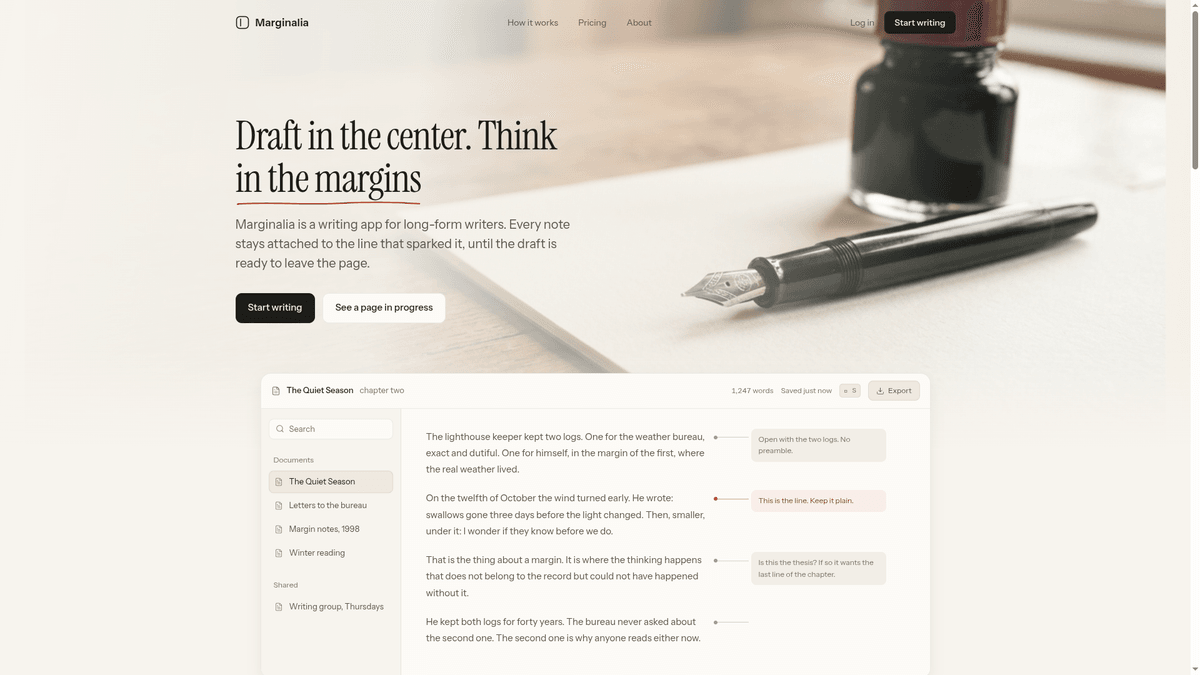
A distraction-free editor with a dual-layer layout for prose and margin notes. Cloning puts the source in your workspace to change by describing your vision in the chat.
What's inside Marginalia
The parts this template already ships, and what each one is for.
Sentence-level anchoring
Notes are pinned directly to the lines that inspired them. This ensures that research and feedback never lose their context as the manuscript grows or changes.
- 1Dynamic scroll repositioning
- 2Active line highlighting
- 3Contextual note visibility
- 4Sentence-aware markers
What's inside Marginalia
- Sentence-level anchoring
Notes are pinned directly to the lines that inspired them. This ensures that research and feedback never lose their context as the manuscript grows or changes.
- Dynamic scroll repositioning
- Active line highlighting
- Contextual note visibility
- Sentence-aware markers
- Dual-layer workspace
The interface separates the core draft from the thinking process. You get a clean manuscript view for writing and a marginalia rail for organization.
- Hidden note toggle
- Independent margin rail
- Focus mode editor
- Cream paper aesthetic
- Smart export engine
Choose exactly what leaves the editor when the draft is done. You can ship a clean manuscript to editors or a fully annotated version to peers.
- PDF with margin notes
- Markdown export support
- Plain text manuscript mode
- Metadata exclusion toggle
Make it yours
The first things people change. Say any of these in the chat and it gets done.
Add progress tracking
Add a daily word count goal bar to the header that changes color when I hit my writing target.
Change the theme
Switch the editor font to a monospaced typewriter style and use a dark charcoal background.
Set plan limits
Update the free tier to allow five active drafts and link the Writer plan button to my Stripe checkout.
Build a focus timer
Insert a 25-minute Pomodoro timer into the top toolbar to help me manage my writing sessions.
About this template
What it is for, and who should skip it.
What you would actually use this for
You would open this template on a Tuesday morning to begin drafting a complex research paper or a long-form novel chapter. It is specifically designed for writers who need to keep citations, character notes, or technical observations pinned to specific claims without cluttering the actual document. An academic might use it to store peer feedback directly next to the relevant paragraph, while a novelist could keep character backstory notes anchored to specific dialogue lines.
What you would change first
The first thing most users do is set up persistent storage. The template defaults to local device saving, so you would likely ask to connect a database to keep your drafts synced across devices, which is a paid-plan feature. You should also update the pricing page to reflect your specific subscription model and swap the placeholder story for a guided tour of your own product features.
When to skip it
Skip this if you are building a tool that requires real-time multiplayer collaboration like Google Docs, or if your app is primarily for short-form content like social media posts. The layout is optimized for focused, deep-work writing sessions and is not suitable for data-heavy dashboarding or complex project management with kanban boards.
Supercharge your workflow with AI Automation
Automatio combines the power of AI agents, web automation, and smart integrations to help you accomplish more in less time.
Related Template Gallery
Skeuomorphic control panel, hardware dashboard template
A skeuomorphic hardware control panel with thermal monitors and tactile toggles. Clone it to your workspace to customize components by chatting with t...
LowWorld 3D Territory World Map Template
LowWorld is a 3D interactive globe where users buy dots to claim territory. Clone it to your workspace to customize the map and pricing via chat instr...
APOGEE Stratospheric Scrollytelling Template
Clone the APOGEE scrollytelling template to build an immersive landing page. It features vertical ascent animations and a lead capture form you edit b...
Black Hole 404, Three.js Interactive Error Page Template
A Three.js 404 page featuring a WebGL2 black hole with real-time physics metrics. Clone it to your workspace to customize the cosmic visuals by chatti...
Fluxora, Cinematic Scroll SaaS Landing Page Template
Build a high-end SaaS site with cinematic GSAP animations and editorial type. Clone this template to your workspace and edit the motion by chatting.
TerraUnits Recreated, 3D Globe Bidding Template
Claim territory on a 3D interactive globe and display your brand link in this TerraUnits Recreated template. Clone it to your workspace and edit via c...
Black Hole 404, Three.js Error Page Template
An interactive Three.js black hole 404 error page. Clone this template into your workspace to customize the cosmic visuals and links using the AI chat...
3D 8-Ball Pool, Game Landing Page Template
Launch your brand with this 3D 8-ball pool template. It features an atmospheric club design that you can clone and edit by chatting in your workspace.
Before you clone
The practical questions, answered.