
How to Scrape CoinCatapult: The Ultimate Guide to Crypto Data
Learn how to extract project names, vote counts, contract addresses, and launch dates from CoinCatapult. Perfect for DeFi research and project lead generation.
Anti-Bot Protection Detected
- Cloudflare
- Enterprise-grade WAF and bot management. Uses JavaScript challenges, CAPTCHAs, and behavioral analysis. Requires browser automation with stealth settings.
- Rate Limiting
- Limits requests per IP/session over time. Can be bypassed with rotating proxies, request delays, and distributed scraping.
- IP Blocking
- Blocks known datacenter IPs and flagged addresses. Requires residential or mobile proxies to circumvent effectively.
- JavaScript Challenge
- Requires executing JavaScript to access content. Simple requests fail; need headless browser like Playwright or Puppeteer.
About CoinCatapult
Learn what CoinCatapult offers and what valuable data can be extracted from it.
The Launchpad for DeFi Discovery
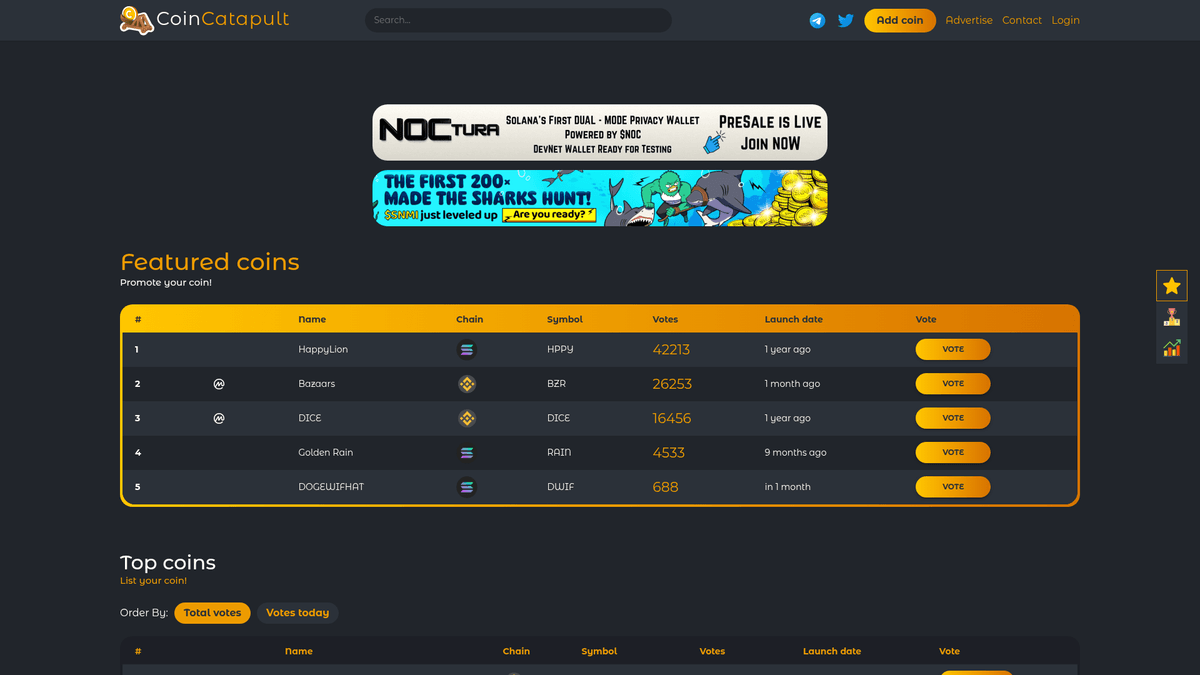
CoinCatapult is a popular cryptocurrency listing and community voting platform dedicated to early-stage DeFi projects. It serves as a digital hub where developers list new tokens to gain visibility, while traders use the platform to discover high-potential "gems" through community-driven vote counts and popularity rankings.
Comprehensive Listing Data
The platform hosts thousands of listings across various blockchain networks including Solana, Binance Smart Chain, and Ethereum. Each entry provides critical metadata such as launch status, real-time vote totals, and social links, making it a primary source for tracking the velocity of new token launches.
Why the Data Matters
Scraping CoinCatapult is highly valuable for crypto market researchers, marketing agencies, and blockchain developers. By extracting this data, users can identify trending niches, monitor the competitive landscape of different chains, and generate leads for security auditing or marketing services targeted at new project owners.
Why Scrape CoinCatapult?
Discover the business value and use cases for extracting data from CoinCatapult.
Early Project Discovery
Identify new token launches and emerging DeFi projects before they gain mainstream visibility on major platforms like CoinMarketCap.
Vote Velocity Analysis
Monitor real-time community voting patterns to quantify project hype and social interest, which often correlates with market momentum.
High-Quality Lead Generation
Extract official project websites and verified social media links to build a comprehensive database of active blockchain developers and marketing teams.
Blockchain Ecosystem Trends
Analyze which networks like Solana, Base, or BSC are currently seeing the most active project submissions and community engagement.
Historical Growth Tracking
Compare early-stage voting metrics with later price performance to develop predictive models for successful cryptocurrency project launches.
Market Sentiment Monitoring
Aggregate daily vote counts to gauge the overall sentiment of the 'degen' trading community across different market cycles.
Scraping Challenges
Technical challenges you may encounter when scraping CoinCatapult.
Cloudflare Anti-Bot Walls
The website employs Cloudflare protection which can detect and block standard automated requests through browser fingerprinting and JS challenges.
JavaScript-Rendered Data
Critical information such as real-time vote counts and certain listing details are loaded via JavaScript, requiring a browser-based scraping approach.
Aggressive Rate Limiting
Making frequent requests from a single IP address will result in temporary or permanent bans due to the platform's focus on preventing vote manipulation.
Dynamic Element Selectors
The table structure and CSS selectors can change periodically, requiring regular maintenance of custom scraping scripts to ensure data accuracy.
Pagination and Load Actions
The use of 'Load More' buttons or complex pagination requires automation that can simulate user clicks to retrieve the full list of project history.
Scrape CoinCatapult with AI
No coding required. Extract data in minutes with AI-powered automation.
How It Works
Describe What You Need
Tell the AI what data you want to extract from CoinCatapult. Just type it in plain language — no coding or selectors needed.
AI Extracts the Data
Our artificial intelligence navigates CoinCatapult, handles dynamic content, and extracts exactly what you asked for.
Get Your Data
Receive clean, structured data ready to export as CSV, JSON, or send directly to your apps and workflows.
Why Use AI for Scraping
AI makes it easy to scrape CoinCatapult without writing any code. Our AI-powered platform uses artificial intelligence to understand what data you want — just describe it in plain language and the AI extracts it automatically.
How to scrape with AI:
- Describe What You Need: Tell the AI what data you want to extract from CoinCatapult. Just type it in plain language — no coding or selectors needed.
- AI Extracts the Data: Our artificial intelligence navigates CoinCatapult, handles dynamic content, and extracts exactly what you asked for.
- Get Your Data: Receive clean, structured data ready to export as CSV, JSON, or send directly to your apps and workflows.
Why use AI for scraping:
- Seamless Cloudflare Bypass: Automatio effectively navigates complex security layers and JS challenges without requiring the user to write sophisticated bypass logic.
- Visual No-Code Selection: Quickly map crypto data fields like token symbols and contract addresses using a simple point-and-click interface.
- Advanced Proxy Rotation: Integrated residential proxy management ensures that scraping requests are distributed across multiple high-reputation IPs to avoid detection.
- Real-Time Scheduling: Configure bots to run at specific intervals, such as every 15 minutes, to capture sudden spikes in project voting or new listing arrivals.
- Automated Action Chains: Easily set up complex sequences that click 'Load More', navigate to project details, and extract contact info in a single workflow.
No-Code Web Scrapers for CoinCatapult
Point-and-click alternatives to AI-powered scraping
Several no-code tools like Browse.ai, Octoparse, Axiom, and ParseHub can help you scrape CoinCatapult. These tools use visual interfaces to select elements, but they come with trade-offs compared to AI-powered solutions.
Typical Workflow with No-Code Tools
Common Challenges
Learning curve
Understanding selectors and extraction logic takes time
Selectors break
Website changes can break your entire workflow
Dynamic content issues
JavaScript-heavy sites often require complex workarounds
CAPTCHA limitations
Most tools require manual intervention for CAPTCHAs
IP blocking
Aggressive scraping can get your IP banned
No-Code Web Scrapers for CoinCatapult
Several no-code tools like Browse.ai, Octoparse, Axiom, and ParseHub can help you scrape CoinCatapult. These tools use visual interfaces to select elements, but they come with trade-offs compared to AI-powered solutions.
Typical Workflow with No-Code Tools
- Install browser extension or sign up for the platform
- Navigate to the target website and open the tool
- Point-and-click to select data elements you want to extract
- Configure CSS selectors for each data field
- Set up pagination rules to scrape multiple pages
- Handle CAPTCHAs (often requires manual solving)
- Configure scheduling for automated runs
- Export data to CSV, JSON, or connect via API
Common Challenges
- Learning curve: Understanding selectors and extraction logic takes time
- Selectors break: Website changes can break your entire workflow
- Dynamic content issues: JavaScript-heavy sites often require complex workarounds
- CAPTCHA limitations: Most tools require manual intervention for CAPTCHAs
- IP blocking: Aggressive scraping can get your IP banned
Code Examples
import requests
from bs4 import BeautifulSoup

# CoinCatapult requires a real browser User-Agent
headers = {
    'User-Agent': 'Mozilla/5.0 (Windows NT 10.0; Win64; x64) AppleWebKit/537.36 (KHTML, like Gecko) Chrome/91.0.4472.124 Safari/537.36'
}

url = 'https://coincatapult.com/'

try:
    response = requests.get(url, headers=headers)
    # Check for Cloudflare/Block status
    response.raise_for_status()

    soup = BeautifulSoup(response.text, 'html.parser')
    # Select rows from the main listing table
    rows = soup.select('table tbody tr')

    for row in rows:
        cols = row.find_all('td')
        if len(cols) > 5:
            name = cols[2].get_text(strip=True)
            symbol = cols[4].get_text(strip=True)
            votes = cols[5].get_text(strip=True)
            print(f'Project: {name} | Symbol: {symbol} | Votes: {votes}')
except Exception as e:
    print(f'An error occurred: {e}')
When to Use
Best for static HTML pages where content is loaded server-side. The fastest and simplest approach when JavaScript rendering isn't required.
Advantages
- ●Fastest execution (no browser overhead)
- ●Lowest resource consumption
- ●Easy to parallelize with asyncio
- ●Great for APIs and static pages
Limitations
- ●Cannot execute JavaScript
- ●Fails on SPAs and dynamic content
- ●May struggle with complex anti-bot systems
How to Scrape CoinCatapult with Code
Python + Requests
import requests
from bs4 import BeautifulSoup
# CoinCatapult requires a real browser User-Agent
headers = {
'User-Agent': 'Mozilla/5.0 (Windows NT 10.0; Win64; x64) AppleWebKit/537.36 (KHTML, like Gecko) Chrome/91.0.4472.124 Safari/537.36'
}
url = 'https://coincatapult.com/'
try:
response = requests.get(url, headers=headers)
# Check for Cloudflare/Block status
response.raise_for_status()
soup = BeautifulSoup(response.text, 'html.parser')
# Select rows from the main listing table
rows = soup.select('table tbody tr')
for row in rows:
cols = row.find_all('td')
if len(cols) > 5:
name = cols[2].get_text(strip=True)
symbol = cols[4].get_text(strip=True)
votes = cols[5].get_text(strip=True)
print(f'Project: {name} | Symbol: {symbol} | Votes: {votes}')
except Exception as e:
print(f'An error occurred: {e}')Python + Playwright
from playwright.sync_api import sync_playwright

def scrape_coincatapult():
    with sync_playwright() as p:
        # Launching with a real browser head can help bypass basic checks
        browser = p.chromium.launch(headless=True)
        page = browser.new_page()

        # Navigate to the site
        page.goto('https://coincatapult.com/', wait_until='networkidle')

        # Wait for the table to render
        page.wait_for_selector('table')

        # Extract data using Javascript evaluation
        coins = page.evaluate("""() => {
            const rows = Array.from(document.querySelectorAll('table tbody tr'));
            return rows.map(row => {
                const tds = row.querySelectorAll('td');
                return {
                    name: tds[2]?.innerText.trim(),
                    chain: tds[3]?.querySelector('img')?.alt || 'Unknown',
                    votes: tds[5]?.innerText.trim()
                };
            });
        }""")

        for coin in coins:
            print(coin)

        browser.close()

if __name__ == '__main__':
scrape_coincatapult()Python + Scrapy
import scrapy

class CoinSpider(scrapy.Spider):
    name = 'coincatapult_spider'
    start_urls = ['https://coincatapult.com/']

    def parse(self, response):
        # Iterate through table rows using CSS selectors
        for row in response.css('table tbody tr'):
            yield {
                'name': row.css('td:nth-child(3)::text').get(),
                'symbol': row.css('td:nth-child(5)::text').get(),
                'votes': row.css('td:nth-child(6)::text').get(),
                'launch_date': row.css('td:nth-child(7)::text').get()
            }

        # Basic pagination handling if a 'Next' link exists
        next_page = response.css('ul.pagination li.next a::attr(href)').get()
        if next_page:
yield response.follow(next_page, self.parse)Node.js + Puppeteer
const puppeteer = require('puppeteer');

(async () => {
    const browser = await puppeteer.launch({ headless: true });
    const page = await browser.newPage();

    // Set a realistic viewport
    await page.setViewport({ width: 1280, height: 800 });

    // Go to CoinCatapult
    await page.goto('https://coincatapult.com/', { waitUntil: 'networkidle2' });

    const data = await page.evaluate(() => {
        const results = [];
        const rows = document.querySelectorAll('table tbody tr');
        rows.forEach(row => {
            const cells = row.querySelectorAll('td');
            if (cells.length >= 6) {
                results.push({
                    name: cells[2].innerText.trim(),
                    chain: cells[3].querySelector('img')?.alt || 'N/A',
                    votes: cells[5].innerText.trim()
                });
            }
        });
        return results;
    });

    console.log(data);
    await browser.close();
})();What You Can Do With CoinCatapult Data
Explore practical applications and insights from CoinCatapult data.
Real-time Whale Alerts
Automated system that notifies traders when a project gains massive vote momentum in a short period.
How to implement:
- 1Scrape the 'Votes Today' column every 30 minutes.
- 2Compare current votes with the previous scrape's data.
- 3Trigger an alert if a project's vote count increases by more than 50% in one hour.
Use Automatio to extract data from CoinCatapult and build these applications without writing code.
What You Can Do With CoinCatapult Data
- Real-time Whale Alerts
Automated system that notifies traders when a project gains massive vote momentum in a short period.
- Scrape the 'Votes Today' column every 30 minutes.
- Compare current votes with the previous scrape's data.
- Trigger an alert if a project's vote count increases by more than 50% in one hour.
- Crypto Marketing Outreach
Identify new DeFi project owners who may need professional marketing or listing services.
- Extract Telegram and Twitter links from the 'New Coins' section daily.
- Categorize projects by blockchain (e.g., SOL, ETH) to target specific communities.
- Send personalized outreach messages to the project's official social channels.
- Ecosystem Health Reports
Generate reports showing which blockchain networks (Solana vs. BSC) are attracting more developers.
- Scrape all project listings and their associated blockchain network.
- Count the number of new launches per network on a monthly basis.
- Visualize the growth trends to identify which ecosystem is dominating the 'degen' market.
- Pre-Launch Lead Generation
Find projects in the 'Presale' or 'Launch Date' status to offer smart contract auditing services.
- Filter scraping results for projects where the 'Launch Date' is in the future.
- Extract the contract address (if listed) or social contact info.
- Provide audit quotes to developers before they go live on mainnet.
Supercharge your workflow with AI Automation
Automatio combines the power of AI agents, web automation, and smart integrations to help you accomplish more in less time.
What to get right first
Expert advice for successfully extracting data from CoinCatapult.
Prioritize Residential Proxies
Since CoinCatapult acts as a community voting platform, it is highly sensitive to datacenter IPs; using residential proxies is essential for high success rates.
Implement Random Delays
Avoid a predictable scraping pattern by introducing random sleep intervals between 5 and 20 seconds to mimic natural human browsing behavior.
Monitor the 'New' Category
Focus your scraper on the 'New' section to identify projects the moment they are listed, giving you a competitive edge in project auditing or investment.
Scrape Detail Pages for Contracts
The homepage provides a summary, but the verified contract addresses are found on individual detail pages; always configure your bot to follow these links.
Check Mobile User Agents
Using mobile browser User-Agents can sometimes result in lighter page loads and fewer security challenges compared to desktop footprints.
Cross-Reference With Social Links
Extract Telegram and Twitter URLs alongside vote counts to verify the legitimacy of the project's community engagement levels.
Related Web Scraping
How to Scrape Biluppgifter.se: Vehicle Data Extraction Guide

How to Scrape CSS Author: A Comprehensive Web Scraping Guide

How to Scrape Bilregistret.ai: Swedish Vehicle Data Extraction Guide

How to Scrape The AA (theaa.com): A Technical Guide for Car & Insurance Data
How to Scrape Car.info | Vehicle Data & Valuation Extraction Guide

How to Scrape GoAbroad Study Abroad Programs

How to Scrape ResearchGate: Publication and Researcher Data
How to Scrape Statista: The Ultimate Guide to Market Data Extraction
Frequently Asked Questions
Find answers to common questions about CoinCatapult