
如何抓取 CoinBrain:加密数据提取指南
掌握 CoinBrain 网页抓取,从 Ethereum、BNB 等多个网络的 300 多万个 tokens 中提取实时加密货币价格、流动性和市值。
检测到反机器人保护
- Cloudflare
- 企业级WAF和机器人管理。使用JavaScript挑战、验证码和行为分析。需要带隐身设置的浏览器自动化。
- JavaScript挑战
- 需要执行JavaScript才能访问内容。简单请求会失败;需要Playwright或Puppeteer等无头浏览器。
- 速率限制
- 限制每个IP/会话在一段时间内的请求数。可通过轮换代理、请求延迟和分布式抓取绕过。
- IP封锁
- 封锁已知的数据中心IP和标记地址。需要住宅或移动代理才能有效绕过。
关于CoinBrain
了解CoinBrain提供什么以及可以提取哪些有价值的数据。
全面的加密货币分析
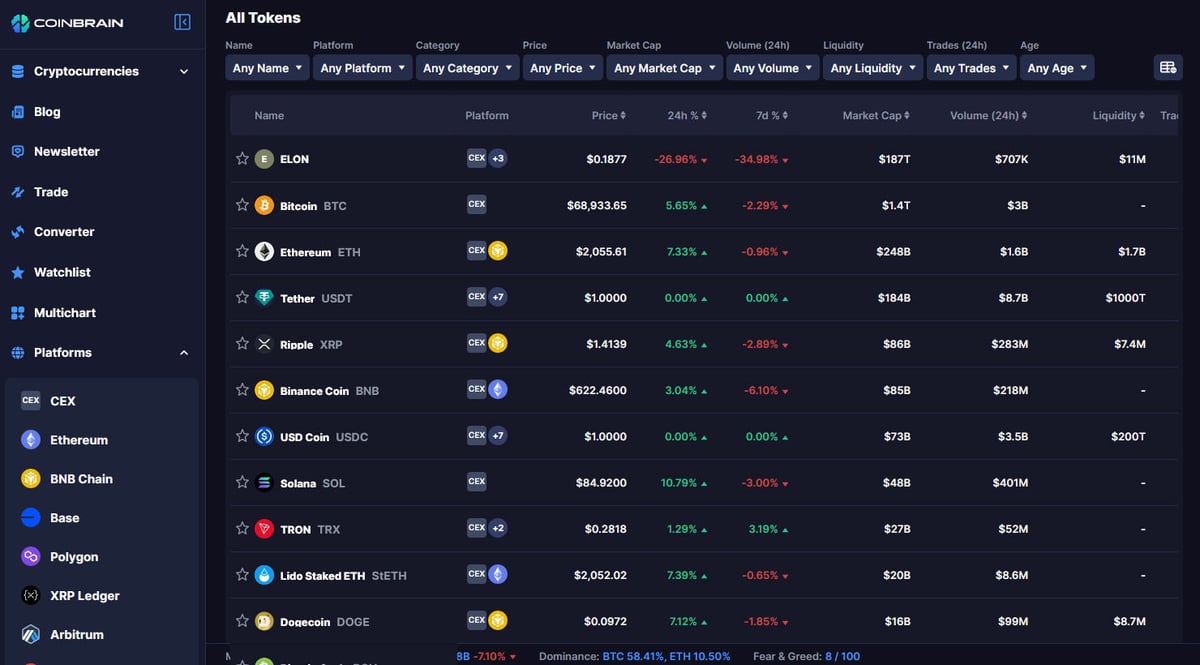
CoinBrain 是一个专为交易者设计的下一代加密货币分析平台,用于识别“隐藏的宝石”和趋势 tokens。它将传统的市场数据与替代的链上洞察相结合,通过多链支持提供去中心化金融 (DeFi) 领域的全景视图。
数据深度与可见性
该平台跟踪多个区块链上的数百万个 tokens,提供交易历史、流动性分析和安全检查等工具。对于抓取者来说,这些数据对于构建交易机器人、市场监控器或需要高保真链上数据的舆情分析工具具有不可估量的价值。
专业交易洞察
通过索引 BNB 和 Ethereum 区块链上的项目,CoinBrain 成为 Web3 开发者和投资者的重要资源。该平台的自动安全评分和流动性追踪为竞争性市场研究和算法交易策略提供了坚实的基础。
为什么要抓取CoinBrain?
了解从CoinBrain提取数据的商业价值和用例。
针对去中心化交易所之间的套利机会进行高频价格监控。
在主流交易所上线之前,发现新发行的 token 和趋势项目。
分析流动性池,用于 rug-pull 检测和风险评估。
在单个仪表盘中跟踪多链市场趋势和开发者活动。
为构建专业的加密货币资产组合管理工具进行数据聚合。
抓取挑战
抓取CoinBrain时可能遇到的技术挑战。
处理 Cloudflare Turnstile 挑战和初始安全验证。
管理通过 React 和 Next.js 框架渲染的动态内容。
处理大型 token 列表数据集的无限滚动机制。
在保持实时准确性的同时,遵守官方 API 的 rate limits。
使用AI抓取CoinBrain
无需编码。通过AI驱动的自动化在几分钟内提取数据。
工作原理
描述您的需求
告诉AI您想从CoinBrain提取什么数据。只需用自然语言输入 — 无需编码或选择器。
AI提取数据
我们的人工智能浏览CoinBrain,处理动态内容,精确提取您要求的数据。
获取您的数据
接收干净、结构化的数据,可导出为CSV、JSON,或直接发送到您的应用和工作流程。
为什么使用AI进行抓取
AI让您无需编写代码即可轻松抓取CoinBrain。我们的AI驱动平台利用人工智能理解您想要什么数据 — 只需用自然语言描述,AI就会自动提取。
How to scrape with AI:
- 描述您的需求: 告诉AI您想从CoinBrain提取什么数据。只需用自然语言输入 — 无需编码或选择器。
- AI提取数据: 我们的人工智能浏览CoinBrain,处理动态内容,精确提取您要求的数据。
- 获取您的数据: 接收干净、结构化的数据,可导出为CSV、JSON,或直接发送到您的应用和工作流程。
Why use AI for scraping:
- 无需编码即可构建复杂的加密数据提取器。
- 自动处理 Cloudflare 和反爬虫挑战。
- 云端执行允许在没有本地资源的情况下进行 24/7 价格监控。
- 定时运行以捕捉动荡加密市场中的快速价格波动。
- 轻松导出到 Google Sheets 或 API,以便立即进行机器人集成。
CoinBrain的无代码网页抓取工具
AI驱动抓取的点击式替代方案
Browse.ai、Octoparse、Axiom和ParseHub等多种无代码工具可以帮助您在不编写代码的情况下抓取CoinBrain。这些工具通常使用可视化界面来选择数据,但可能在处理复杂的动态内容或反爬虫措施时遇到困难。
无代码工具的典型工作流程
常见挑战
学习曲线
理解选择器和提取逻辑需要时间
选择器失效
网站更改可能会破坏整个工作流程
动态内容问题
JavaScript密集型网站需要复杂的解决方案
验证码限制
大多数工具需要手动处理验证码
IP封锁
过于频繁的抓取可能导致IP被封
CoinBrain的无代码网页抓取工具
Browse.ai、Octoparse、Axiom和ParseHub等多种无代码工具可以帮助您在不编写代码的情况下抓取CoinBrain。这些工具通常使用可视化界面来选择数据,但可能在处理复杂的动态内容或反爬虫措施时遇到困难。
无代码工具的典型工作流程
- 安装浏览器扩展或在平台注册
- 导航到目标网站并打开工具
- 通过点击选择要提取的数据元素
- 为每个数据字段配置CSS选择器
- 设置分页规则以抓取多个页面
- 处理验证码(通常需要手动解决)
- 配置自动运行的计划
- 将数据导出为CSV、JSON或通过API连接
常见挑战
- 学习曲线: 理解选择器和提取逻辑需要时间
- 选择器失效: 网站更改可能会破坏整个工作流程
- 动态内容问题: JavaScript密集型网站需要复杂的解决方案
- 验证码限制: 大多数工具需要手动处理验证码
- IP封锁: 过于频繁的抓取可能导致IP被封
代码示例
import requests
from bs4 import BeautifulSoup

headers = {
    "User-Agent": "Mozilla/5.0 (Windows NT 10.0; Win64; x64) AppleWebKit/537.36 (KHTML, like Gecko) Chrome/91.0.4472.124 Safari/537.36"
}

def scrape_coinbrain(url):
    # 使用 session 管理 cookies 以帮助通过基础检查
    session = requests.Session()
    try:
        response = session.get(url, headers=headers)
        if response.status_code == 200:
            soup = BeautifulSoup(response.text, 'html.parser')
            # 注意:选择器可能是动态的,请始终验证当前的 DOM
            price = soup.select_one('.token-price-selector')
            print(f'Price: {price.text.strip() if price else "Not Found"}')
        else:
            print(f'Blocked or Error: {response.status_code}')
    except Exception as e:
        print(f'Error: {e}')

scrape_coinbrain("https://coinbrain.com/coins/eth-0x...")
使用场景
最适合JavaScript较少的静态HTML页面。非常适合博客、新闻网站和简单的电商产品页面。
优势
- ●执行速度最快(无浏览器开销)
- ●资源消耗最低
- ●易于使用asyncio并行化
- ●非常适合API和静态页面
局限性
- ●无法执行JavaScript
- ●在SPA和动态内容上会失败
- ●可能难以应对复杂的反爬虫系统
如何用代码抓取CoinBrain
Python + Requests
import requests
from bs4 import BeautifulSoup
headers = {
"User-Agent": "Mozilla/5.0 (Windows NT 10.0; Win64; x64) AppleWebKit/537.36 (KHTML, like Gecko) Chrome/91.0.4472.124 Safari/537.36"
}
def scrape_coinbrain(url):
# 使用 session 管理 cookies 以帮助通过基础检查
session = requests.Session()
try:
response = session.get(url, headers=headers)
if response.status_code == 200:
soup = BeautifulSoup(response.text, 'html.parser')
# 注意:选择器可能是动态的,请始终验证当前的 DOM
price = soup.select_one('.token-price-selector')
print(f'Price: {price.text.strip() if price else "Not Found"}')
else:
print(f'Blocked or Error: {response.status_code}')
except Exception as e:
print(f'Error: {e}')
scrape_coinbrain("https://coinbrain.com/coins/eth-0x...")Python + Playwright
from playwright.sync_api import sync_playwright

def run(playwright):
    browser = playwright.chromium.launch(headless=True)
    context = browser.new_context(user_agent="Mozilla/5.0 (Windows NT 10.0; Win64; x64) AppleWebKit/537.36")
    page = context.new_page()
    page.goto("https://coinbrain.com/trending")

    # 等待动态 token 元素出现
    page.wait_for_selector('.coin-row')

    coins = page.query_selector_all('.coin-row')
    for coin in coins[:5]:
        name = coin.query_selector('.coin-name').inner_text()
        price = coin.query_selector('.coin-price').inner_text()
        print(f'Token: {name}, Price: {price}')

    browser.close()

with sync_playwright() as pw:
run(pw)Python + Scrapy
import scrapy

class CoinbrainSpider(scrapy.Spider):
    name = 'coinbrain_spider'
    start_urls = ['https://coinbrain.com/new-coins']

    def parse(self, response):
        # 建议使用 Scrapy-Playwright 中间件进行 JS 执行
        for coin in response.css('.coin-list-item'):
            yield {
                'name': coin.css('.name::text').get(),
                'symbol': coin.css('.symbol::text').get(),
                'price': coin.css('.price::text').get(),
            }

        next_page = response.css('a.next-page::attr(href)').get()
        if next_page:
yield response.follow(next_page, self.parse)Node.js + Puppeteer
const puppeteer = require('puppeteer');

(async () => {
  const browser = await puppeteer.launch({ headless: true });
  const page = await browser.newPage();
  await page.setUserAgent('Mozilla/5.0 (Windows NT 10.0; Win64; x64) AppleWebKit/537.36');
  await page.goto('https://coinbrain.com/trending');

  // 等待 React 激活并加载数据
  await page.waitForSelector('.token-list');

  const data = await page.evaluate(() => {
    const items = document.querySelectorAll('.token-row');
    return Array.from(items).map(item => ({
      name: item.querySelector('.name')?.innerText,
      price: item.querySelector('.price')?.innerText
    }));
  });

  console.log(data);
  await browser.close();
})();您可以用CoinBrain数据做什么
探索CoinBrain数据的实际应用和洞察。
DeFi 套利机器人
交易者可以使用实时价格数据来发现链际差异并执行获利兑换。
如何实现:
- 1在不同的区块链网络中抓取同一个 token 的价格。
- 2识别大于交易费用的价格差异。
- 3当满足条件时,通过 DEX 聚合器 API 触发兑换。
- 4记录所有成功交易以进行性能分析。
使用Automatio从CoinBrain提取数据,无需编写代码即可构建这些应用。
您可以用CoinBrain数据做什么
- DeFi 套利机器人
交易者可以使用实时价格数据来发现链际差异并执行获利兑换。
- 在不同的区块链网络中抓取同一个 token 的价格。
- 识别大于交易费用的价格差异。
- 当满足条件时,通过 DEX 聚合器 API 触发兑换。
- 记录所有成功交易以进行性能分析。
- 新代币狙击手
投资者可以监控“新币 (New Coins)”板块,在项目被索引后立即进行投资。
- 设置脚本每 60 秒抓取一次最新上线的 tokens。
- 根据 CoinBrain 安全评分和流动性筛选 tokens。
- 向 Discord 或 Telegram 频道发送自动警报。
- 分析持有人分布以识别潜在的 rug-pull 风险。
- 市场情绪仪表盘
分析师可以汇总价格变化和成交量,以确定哪些链正在获得关注。
- 抓取前 500 名 tokens 的 24 小时成交量和价格变化。
- 按区块链(Ethereum、BNB、Base 等)对数据进行分类。
- 可视化生态系统之间的资本净流动。
- 发布每日报告以提供加密社区洞察。
- 用于 machine learning 的历史价格分析
研究人员可以收集数据来训练 machine learning model,用于加密货币价格预测。
- 安排每日抓取 token 价格和市值。
- 将数据存储在 InfluxDB 或 PostgreSQL 等时序数据库中。
- 将价格波动与链上流动性变化关联起来。
- 训练回归 model 以识别价格飙升前的模式。
抓取CoinBrain的专业技巧
成功从CoinBrain提取数据的专家建议。
优先使用官方 API 获取 ticker 和交易历史,以避免因页面结构变化导致的破坏性变更。
轮换住宅代理以绕过 Cloudflare 基于 IP 的 rate limiting。
使用持久化浏览器上下文,以便在通过安全验证后保留 cookies。
直接通过开发者工具监控 '/api/v1/ticker' 终点以获取纯净的 JSON 数据。
实施“等待选择器 (wait for selector)”策略,而不是使用固定的休眠时间。
安排在低流量时段进行抓取,以降低被检测的风险。
相关 Web Scraping
How to Scrape Yahoo Finance: Extract Stock Market Data
How to Scrape Moon.ly | Step-by-Step NFT Data Extraction Guide

How to Scrape Rocket Mortgage: A Comprehensive Guide
How to Scrape Open Collective: Financial and Contributor Data Guide
How to Scrape jup.ag: Jupiter DEX Web Scraper Guide
How to Scrape Indiegogo: The Ultimate Crowdfunding Data Extraction Guide
How to Scrape ICO Drops: Comprehensive Crypto Data Guide
How to Scrape Crypto.com: Comprehensive Market Data Guide
关于CoinBrain的常见问题
查找关于CoinBrain的常见问题答案