
How to Scrape LivePiazza: Philadelphia Real Estate Scraper
Learn how to scrape LivePiazza.com to extract luxury apartment prices, availability, and floor plans. Monitor the Philadelphia real estate market with AI.
Anti-Bot Protection Detected
- Cloudflare
- Enterprise-grade WAF and bot management. Uses JavaScript challenges, CAPTCHAs, and behavioral analysis. Requires browser automation with stealth settings.
- Rate Limiting
- Limits requests per IP/session over time. Can be bypassed with rotating proxies, request delays, and distributed scraping.
- Browser Fingerprinting
- Identifies bots through browser characteristics: canvas, WebGL, fonts, plugins. Requires spoofing or real browser profiles.
- JavaScript Challenge
- Requires executing JavaScript to access content. Simple requests fail; need headless browser like Playwright or Puppeteer.
About The Piazza
Learn what The Piazza offers and what valuable data can be extracted from it.
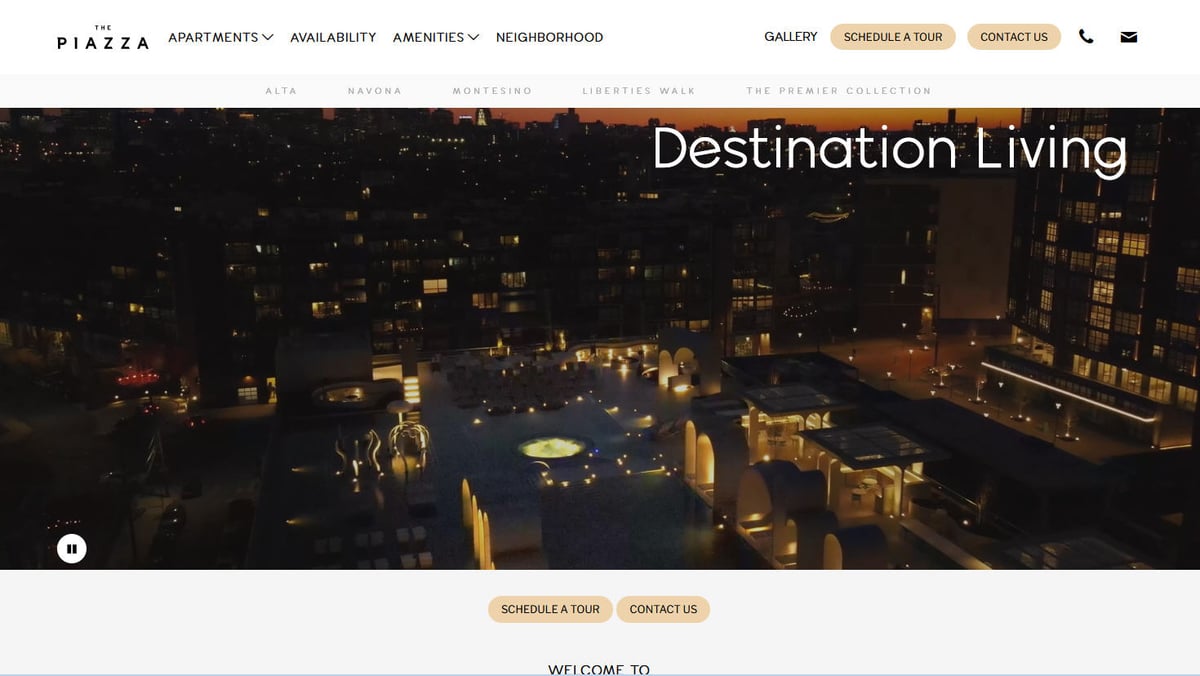
The Piazza, managed by Post Brothers, is a prominent residential and retail development in the Northern Liberties neighborhood of Philadelphia. It features four distinct luxury communities—Alta, Navona, Montesino, and Liberties Walk—offering a 'city-within-a-city' experience with high-end amenities and modern design.
The website functions as a real-time portal for prospective residents, displaying current rental rates, specific unit availability dates, and detailed interior finish options. For data scientists and real estate analysts, LivePiazza represents a critical data source for understanding the luxury multi-family market in one of the fastest-growing urban corridors in the Northeast.
Scraping this data allows for high-frequency monitoring of pricing trends, occupancy levels, and the effectiveness of various rental incentives offered by large-scale property developers.
Why Scrape The Piazza?
Discover the business value and use cases for extracting data from The Piazza.
Real-Time Market Benchmarking
Analyze luxury rental trends in Philadelphia by tracking current rates across Alta, Navona, and Montesino properties.
Supply and Demand Monitoring
Track unit availability over time to calculate occupancy rates and understand neighborhood absorption levels.
Rental Concession Tracking
Monitor promotional offers like 'free rent' to determine the net effective rent compared to the gross listed price.
Competitive Strategy Research
Evaluate how Post Brothers adjusts pricing for specific floor plans or interior finishes relative to market demand.
Lead Generation for Services
Identify upcoming unit availability to target movers, interior designers, and local furniture retailers with timed marketing.
Investment Analysis
Collect historical pricing data to assist investors in determining the ROI of luxury amenities and urban developments.
Scraping Challenges
Technical challenges you may encounter when scraping The Piazza.
Cloudflare Protection
The site uses aggressive Cloudflare WAF which triggers JS challenges and blocks requests from standard HTTP libraries.
Dynamic Content Rendering
Listing tables and interactive maps are rendered via React, requiring a headless browser to execute JavaScript for data extraction.
XHR Data Injections
Pricing and availability are often injected via internal API calls that use session-based tokens, which can expire during a crawl.
Lazy-Loaded Assets
High-quality floor plan images and unit photos are lazy-loaded, necessitating scroll triggers to ensure all media is captured.
Frequent Schema Changes
The property management backend frequently updates its DOM structure, which can break static selectors if not handled dynamically.
Scrape The Piazza with AI
No coding required. Extract data in minutes with AI-powered automation.
How It Works
Describe What You Need
Tell the AI what data you want to extract from The Piazza. Just type it in plain language — no coding or selectors needed.
AI Extracts the Data
Our artificial intelligence navigates The Piazza, handles dynamic content, and extracts exactly what you asked for.
Get Your Data
Receive clean, structured data ready to export as CSV, JSON, or send directly to your apps and workflows.
Why Use AI for Scraping
AI makes it easy to scrape The Piazza without writing any code. Our AI-powered platform uses artificial intelligence to understand what data you want — just describe it in plain language and the AI extracts it automatically.
How to scrape with AI:
- Describe What You Need: Tell the AI what data you want to extract from The Piazza. Just type it in plain language — no coding or selectors needed.
- AI Extracts the Data: Our artificial intelligence navigates The Piazza, handles dynamic content, and extracts exactly what you asked for.
- Get Your Data: Receive clean, structured data ready to export as CSV, JSON, or send directly to your apps and workflows.
Why use AI for scraping:
- Seamless Anti-Bot Bypass: Automatio handles Cloudflare challenges and browser fingerprinting automatically, ensuring uninterrupted access to pricing data.
- Visual Selection Tool: Easily map data fields from complex residence tables using a point-and-click interface without writing custom CSS or XPath.
- Automated Scheduling: Set the scraper to run daily to capture high-frequency price fluctuations and new unit releases without manual intervention.
- Dynamic Script Execution: Perfectly renders React-based content, allowing you to scrape data from interactive elements that traditional scrapers miss.
- No-Code Data Integration: Sync your extracted real estate data directly to Google Sheets or CRMs via Webhooks for immediate market analysis.
No-Code Web Scrapers for The Piazza
Point-and-click alternatives to AI-powered scraping
Several no-code tools like Browse.ai, Octoparse, Axiom, and ParseHub can help you scrape The Piazza. These tools use visual interfaces to select elements, but they come with trade-offs compared to AI-powered solutions.
Typical Workflow with No-Code Tools
Common Challenges
Learning curve
Understanding selectors and extraction logic takes time
Selectors break
Website changes can break your entire workflow
Dynamic content issues
JavaScript-heavy sites often require complex workarounds
CAPTCHA limitations
Most tools require manual intervention for CAPTCHAs
IP blocking
Aggressive scraping can get your IP banned
No-Code Web Scrapers for The Piazza
Several no-code tools like Browse.ai, Octoparse, Axiom, and ParseHub can help you scrape The Piazza. These tools use visual interfaces to select elements, but they come with trade-offs compared to AI-powered solutions.
Typical Workflow with No-Code Tools
- Install browser extension or sign up for the platform
- Navigate to the target website and open the tool
- Point-and-click to select data elements you want to extract
- Configure CSS selectors for each data field
- Set up pagination rules to scrape multiple pages
- Handle CAPTCHAs (often requires manual solving)
- Configure scheduling for automated runs
- Export data to CSV, JSON, or connect via API
Common Challenges
- Learning curve: Understanding selectors and extraction logic takes time
- Selectors break: Website changes can break your entire workflow
- Dynamic content issues: JavaScript-heavy sites often require complex workarounds
- CAPTCHA limitations: Most tools require manual intervention for CAPTCHAs
- IP blocking: Aggressive scraping can get your IP banned
Code Examples
import requests
from bs4 import BeautifulSoup

# Note: This direct request will likely fail due to Cloudflare
# A proxy or bypass solution like cloudscraper is recommended
url = 'https://www.livepiazza.com/residences'
headers = {
    'User-Agent': 'Mozilla/5.0 (Windows NT 10.0; Win64; x64) AppleWebKit/537.36 (KHTML, like Gecko) Chrome/121.0.0.0 Safari/537.36',
    'Accept-Language': 'en-US,en;q=0.9'
}

def fetch_piazza():
    try:
        response = requests.get(url, headers=headers, timeout=10)
        if response.status_code == 200:
            soup = BeautifulSoup(response.text, 'html.parser')
            # Example selector for residence cards
            for card in soup.select('.residence-card'):
                name = card.select_one('.residence-name').text.strip()
                price = card.select_one('.price-value').text.strip()
                print(f'Community: {name} | Price: {price}')
        else:
            print(f'Blocked by Anti-Bot: Status {response.status_code}')
    except Exception as e:
        print(f'Error: {e}')

fetch_piazza()
When to Use
Best for static HTML pages where content is loaded server-side. The fastest and simplest approach when JavaScript rendering isn't required.
Advantages
- ●Fastest execution (no browser overhead)
- ●Lowest resource consumption
- ●Easy to parallelize with asyncio
- ●Great for APIs and static pages
Limitations
- ●Cannot execute JavaScript
- ●Fails on SPAs and dynamic content
- ●May struggle with complex anti-bot systems
How to Scrape The Piazza with Code
Python + Requests
import requests
from bs4 import BeautifulSoup
# Note: This direct request will likely fail due to Cloudflare
# A proxy or bypass solution like cloudscraper is recommended
url = 'https://www.livepiazza.com/residences'
headers = {
'User-Agent': 'Mozilla/5.0 (Windows NT 10.0; Win64; x64) AppleWebKit/537.36 (KHTML, like Gecko) Chrome/121.0.0.0 Safari/537.36',
'Accept-Language': 'en-US,en;q=0.9'
}
def fetch_piazza():
try:
response = requests.get(url, headers=headers, timeout=10)
if response.status_code == 200:
soup = BeautifulSoup(response.text, 'html.parser')
# Example selector for residence cards
for card in soup.select('.residence-card'):
name = card.select_one('.residence-name').text.strip()
price = card.select_one('.price-value').text.strip()
print(f'Community: {name} | Price: {price}')
else:
print(f'Blocked by Anti-Bot: Status {response.status_code}')
except Exception as e:
print(f'Error: {e}')
fetch_piazza()Python + Playwright
import asyncio
from playwright.async_api import async_playwright

async def scrape_live_piazza():
    async with async_playwright() as p:
        # Launching with a specific user agent to mimic a real browser
        browser = await p.chromium.launch(headless=True)
        context = await browser.new_context(user_agent='Mozilla/5.0 (Windows NT 10.0; Win64; x64) AppleWebKit/537.36')
        page = await context.new_page()

        await page.goto('https://www.livepiazza.com/alta/')

        # Wait for the dynamic unit table to load
        await page.wait_for_selector('.unit-row', timeout=15000)

        units = await page.query_selector_all('.unit-row')
        for unit in units:
            unit_id = await (await unit.query_selector('.unit-id')).inner_text()
            rent = await (await unit.query_selector('.unit-rent')).inner_text()
            print(f'Unit: {unit_id.strip()} | Rent: {rent.strip()}')

        await browser.close()

asyncio.run(scrape_live_piazza())Python + Scrapy
import scrapy

class PiazzaSpider(scrapy.Spider):
    name = 'piazza_spider'
    start_urls = ['https://www.livepiazza.com/communities']

    def parse(self, response):
        # Scrapy requires a JS-rendering middleware (like Scrapy-Playwright) for this site
        for building in response.css('.building-section'):
            yield {
                'building_name': building.css('h3.name::text').get(),
                'link': building.css('a.explore-btn::attr(href)').get(),
                'starting_price': building.css('.starting-from::text').get()
            }

        # Example of pagination following
        next_page = response.css('a.next-page::attr(href)').get()
        if next_page:
yield response.follow(next_page, self.parse)Node.js + Puppeteer
const puppeteer = require('puppeteer-extra');
const StealthPlugin = require('puppeteer-extra-plugin-stealth');
puppeteer.use(StealthPlugin());

(async () => {
  const browser = await puppeteer.launch({ headless: true });
  const page = await browser.newPage();

  await page.goto('https://www.livepiazza.com/montesino', { waitUntil: 'networkidle2' });

  // Wait for the residences container to render
  await page.waitForSelector('.residences-container');

  const apartmentData = await page.evaluate(() => {
    const rows = Array.from(document.querySelectorAll('.apartment-listing'));
    return rows.map(row => ({
      type: row.querySelector('.plan-type').innerText,
      sqft: row.querySelector('.sqft').innerText,
      available: row.querySelector('.availability').innerText
    }));
  });

  console.log(apartmentData);
  await browser.close();
})();What You Can Do With The Piazza Data
Explore practical applications and insights from The Piazza data.
Real-Time Rent Index
Create a live dashboard tracking the average rent per square foot for luxury apartments in Northern Liberties.
How to implement:
- 1Extract daily pricing for all studio, 1BR, and 2BR units.
- 2Normalize pricing by square footage to create a PPSF metric.
- 3Visualize the trend line over a 90-day period.
Use Automatio to extract data from The Piazza and build these applications without writing code.
What You Can Do With The Piazza Data
- Real-Time Rent Index
Create a live dashboard tracking the average rent per square foot for luxury apartments in Northern Liberties.
- Extract daily pricing for all studio, 1BR, and 2BR units.
- Normalize pricing by square footage to create a PPSF metric.
- Visualize the trend line over a 90-day period.
- Concession Strategy Analysis
Analyze how property managers use 'Free Rent' incentives to fill vacancies in specific buildings.
- Scrape the 'Promotions' field for every listed unit.
- Cross-reference promotions with the number of days a unit has been listed.
- Determine the 'tipping point' where developers increase incentives.
- Investment Feasibility Studies
Use the data to justify or reject new luxury developments in the immediate area based on current supply and demand.
- Aggregate the total number of available units across Alta, Navona, and Montesino.
- Segment availability by 'move-in date' to forecast supply absorption.
- Compare Piazza pricing against city-wide luxury averages.
- Lead Gen for Movers
Identify high-volume move-in windows to target marketing for local moving and cleaning services.
- Filter scraped listings for 'Available Now' or specific upcoming dates.
- Target buildings with the highest upcoming availability.
- Align advertising spend with the highest predicted turnover periods.
Supercharge your workflow with AI Automation
Automatio combines the power of AI agents, web automation, and smart integrations to help you accomplish more in less time.
What to get right first
Expert advice for successfully extracting data from The Piazza.
Use Philadelphia Proxies
Utilizing residential proxies located in the Philadelphia area reduces the risk of being flagged as a suspicious bot by regional filters.
Wait for Table Hydration
Implement a 'wait for element' condition for the residence list to ensure the React application has fully hydrated before data extraction.
Monitor Network Logs
Identify the internal JSON endpoints used by the site's property management software to extract structured data more efficiently.
Parse Promotion Text
Always extract the text in the 'Specials' or 'Promotions' field to accurately calculate the net rent after concessions.
Scroll for Media Extraction
Configure your scraper to scroll to the bottom of listing pages to trigger the loading of all floor plan images and unit photos.
Rotate User Agents
Switch between various modern desktop browser fingerprints to avoid detection based on repeated identical header signatures.
Related Web Scraping
How to Scrape Century 21 Property Listings
How to Scrape Homes.com: Real Estate Data Extraction Guide
How to Scrape Century 21: A Technical Real Estate Guide
How to Scrape HotPads: A Complete Guide to Extracting Rental Data

How to Scrape Sacramento Delta Property Management
How to Scrape Locations Hawaii | Locations Hawaii Web Scraper
How to Scrape RE/MAX (remax.com) Real Estate Listings
How to Scrape Apartments Near Me | Real Estate Data Scraper
Frequently Asked Questions
Find answers to common questions about The Piazza