

How to Scrape AirlineQuality.com (Skytrax) Reviews
Learn how to scrape airline and airport reviews from AirlineQuality.com. Extract ratings, passenger sentiment, and seat data for market research.
Free to start: 1,000 credits, no card, nothing to install.
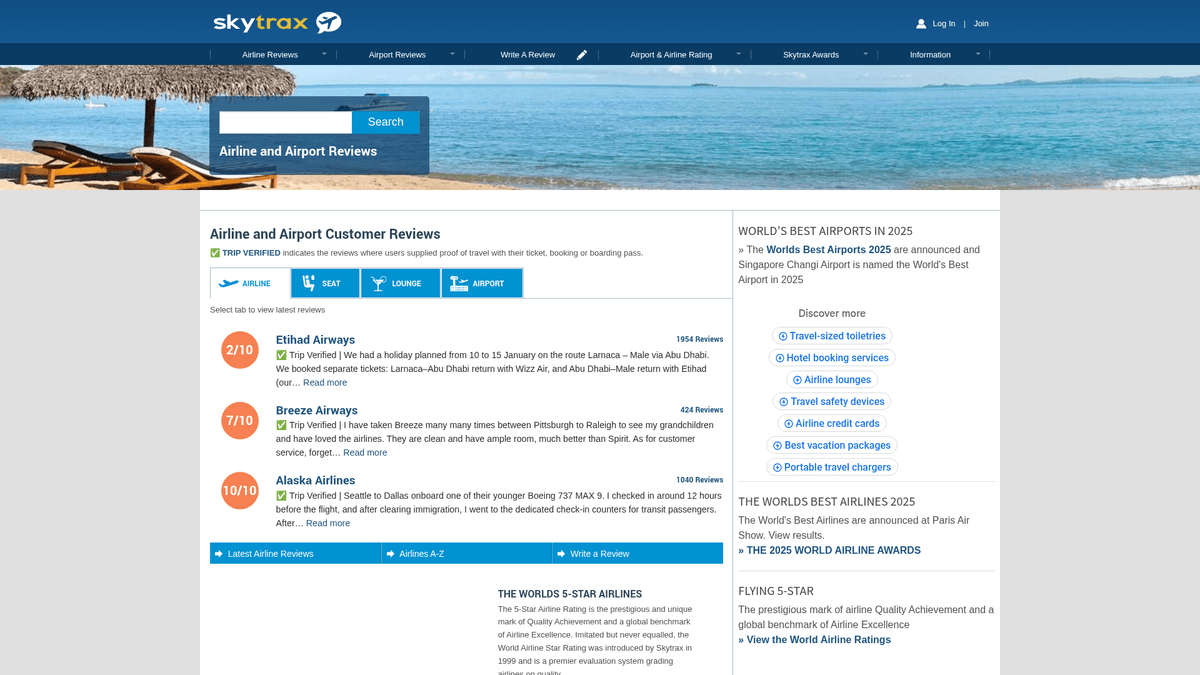
About AirlineQuality (Skytrax)
Learn what AirlineQuality (Skytrax) offers and what valuable data can be extracted from it.
Overview of AirlineQuality.com
AirlineQuality.com, operated by Skytrax, is the leading global platform for airline and airport customer reviews. It serves as a primary source for the World Airline Awards and contains millions of data points regarding traveler experiences across over 600 airlines and 500 airports worldwide.
Data and Insights
The website provides detailed feedback on specific cabin classes (Economy, Premium Economy, Business, First), seat comfort, staff service, and ground handling. This data is critical for aviation analysts and market researchers who need to monitor brand reputation and service performance metrics.
Strategic Value
Scraping this data allows companies to perform sentiment analysis at scale, benchmark competitors, and identify common pain points in the passenger journey that can be addressed through service improvements or targeted marketing.
Why Scrape AirlineQuality (Skytrax)?
Discover the business value and use cases for extracting data from AirlineQuality (Skytrax).
Competitive Benchmarking
Directly compare your airline's service ratings against major competitors to identify specific areas for operational improvement.
Passenger Sentiment Analysis
Perform deep NLP analysis on thousands of passenger reviews to understand evolving travel trends and customer expectations.
Aircraft Performance Insights
Correlate passenger comfort ratings with specific aircraft models like the Airbus A350 or Boeing 787 to inform fleet procurement strategies.
Airport Service Monitoring
Monitor feedback on airport lounges, terminal cleanliness, and staff service to identify the best and worst-performing hubs globally.
Market Research and Reporting
Aggregate global airline data to create comprehensive industry reports or data-driven content for travel blogs and news outlets.
Scraping Challenges
Technical challenges you may encounter when scraping AirlineQuality (Skytrax).
Cloudflare Protection
The website employs Cloudflare security which can block standard HTTP requests that do not mimic realistic browser behavior.
Nested Star Ratings
Service categories like 'Food' or 'Seat Comfort' use visual star icons instead of text, requiring logic to count HTML elements for numeric values.
Dynamic Rate Limiting
Aggressive scraping without sufficient delays will lead to temporary IP bans or the presentation of CAPTCHA challenges.
Data Inconsistency
Reviewers often skip sub-ratings, meaning your scraper must be flexible enough to handle missing fields without breaking the data structure.
Scrape AirlineQuality (Skytrax) with AI
No coding required. Extract data in minutes with AI-powered automation.
How It Works
Describe What You Need
Tell the AI what data you want to extract from AirlineQuality (Skytrax). Just type it in plain language — no coding or selectors needed.
AI Extracts the Data
Our artificial intelligence navigates AirlineQuality (Skytrax), handles dynamic content, and extracts exactly what you asked for.
Get Your Data
Receive clean, structured data ready to export as CSV, JSON, or send directly to your apps and workflows.
Why Use AI for Scraping
No-Code Web Scrapers for AirlineQuality (Skytrax)
Point-and-click alternatives to AI-powered scraping
Several no-code tools like Browse.ai, Octoparse, Axiom, and ParseHub can help you scrape AirlineQuality (Skytrax). These tools use visual interfaces to select elements, but they come with trade-offs compared to AI-powered solutions.
Typical Workflow with No-Code Tools
Common Challenges
Learning curve
Understanding selectors and extraction logic takes time
Selectors break
Website changes can break your entire workflow
Dynamic content issues
JavaScript-heavy sites often require complex workarounds
CAPTCHA limitations
Most tools require manual intervention for CAPTCHAs
IP blocking
Aggressive scraping can get your IP banned
Code Examples
import requests
from bs4 import BeautifulSoup

# Targeting British Airways reviews
url = "https://www.airlinequality.com/airline-reviews/british-airways/"
headers = {
    "User-Agent": "Mozilla/5.0 (Windows NT 10.0; Win64; x64) Chrome/119.0.0.0 Safari/537.36"
}

try:
    response = requests.get(url, headers=headers)
    response.raise_for_status()
    soup = BeautifulSoup(response.content, 'html.parser')

    # Find all review containers
    reviews = soup.find_all('article', itemprop="review")

    for review in reviews:
        title = review.find('h2', class_='text_header').text.strip()
        rating = review.find('span', itemprop="ratingValue").text if review.find('span', itemprop="ratingValue") else "N/A"
        body = review.find('div', class_='text_content').text.strip()

        print(f"Title: {title} | Rating: {rating}")
        print(f"Review: {body[:100]}...
")
except Exception as e:
    print(f"Error: {e}")
When to Use
Best for static HTML pages where content is loaded server-side. The fastest and simplest approach when JavaScript rendering isn't required.
Advantages
- ●Fastest execution (no browser overhead)
- ●Lowest resource consumption
- ●Easy to parallelize with asyncio
- ●Great for APIs and static pages
Limitations
- ●Cannot execute JavaScript
- ●Fails on SPAs and dynamic content
- ●May struggle with complex anti-bot systems
from playwright.sync_api import sync_playwright

def scrape_reviews():
    with sync_playwright() as p:
        # Launch browser to handle JS/Cloudflare
        browser = p.chromium.launch(headless=True)
        context = browser.new_context()
        page = context.new_page()

        # Navigate to target airline page
        page.goto("https://www.airlinequality.com/airline-reviews/british-airways/")

        # Wait for review articles to appear
        page.wait_for_selector('article[itemprop="review"]')

        reviews = page.locator('article[itemprop="review"]').all()
        for review in reviews:
            header = review.locator('.text_header').inner_text()
            text = review.locator('.text_content').inner_text()
            print(f"Processing: {header}")

        browser.close()

if __name__ == "__main__":
    scrape_reviews()
When to Use
Use when content loads dynamically via JavaScript, or when you need to interact with the page (clicks, scrolls, form fills). Handles modern anti-bot detection better.
Advantages
- ●Executes JavaScript like a real browser
- ●Handles SPAs and dynamic content
- ●Better anti-bot evasion with stealth plugins
- ●Can take screenshots and PDFs
Limitations
- ●Slower than HTTP requests
- ●Higher memory/CPU usage
- ●More complex to set up
import scrapy

class SkytraxSpider(scrapy.Spider):
    name = 'skytrax'
    start_urls = ['https://www.airlinequality.com/airline-reviews/british-airways/?pagesize=100']

    def parse(self, response):
        for review in response.css('article.review-stats'):
            yield {
                'title': review.css('h2.text_header::text').get(),
                'rating': review.css('span[itemprop="ratingValue"]::text').get(),
                'text': review.css('div.text_content::text').get(),
                'recommended': review.xpath("//td[contains(@class, 'review-rating-header') and text()='Recommended']/following-sibling::td/text()").get()
            }

        next_page = response.css('article.pagination li:last-child a::attr(href)').get()
        if next_page:
            yield response.follow(next_page, self.parse)
When to Use
Ideal for large-scale crawling projects that need to scrape thousands of pages. Built-in support for rate limiting, retries, and data pipelines.
Advantages
- ●Built for scale (millions of pages)
- ●Automatic request throttling
- ●Built-in data export pipelines
- ●Middleware system for proxies/headers
Limitations
- ●Steeper learning curve
- ●Overkill for small projects
- ●No native JavaScript rendering
const puppeteer = require('puppeteer');

(async () => {
  const browser = await puppeteer.launch();
  const page = await browser.newPage();

  await page.goto('https://www.airlinequality.com/airline-reviews/british-airways/');

  const reviews = await page.evaluate(() => {
    const items = Array.from(document.querySelectorAll('article[itemprop="review"]'));
    return items.map(item => ({
      title: item.querySelector('.text_header')?.innerText,
      score: item.querySelector('span[itemprop="ratingValue"]')?.innerText,
      content: item.querySelector('.text_content')?.innerText
    }));
  });

  console.log(reviews);
  await browser.close();
})();
When to Use
Choose this if you're in a Node.js/JavaScript ecosystem or need tight integration with frontend tools. Similar capabilities to Playwright.
Advantages
- ●Native JavaScript/TypeScript support
- ●Chrome DevTools Protocol access
- ●Large ecosystem and community
- ●Good for JS-heavy projects
Limitations
- ●Chrome-only (vs Playwright's multi-browser)
- ●Similar overhead to Playwright
- ●Less mature stealth options
What You Can Do With AirlineQuality (Skytrax) Data
Explore practical applications and insights from AirlineQuality (Skytrax) data.
Aviation Competitive Benchmarking
Airlines can analyze competitor reviews to identify where rivals are outperforming them in service quality.
How to implement:
- 1Scrape reviews for the top 5 competitors in a specific region.
- 2Calculate mean ratings for 'Seat Comfort' and 'Cabin Staff'.
- 3Generate a gap analysis report for internal stakeholders.
Use Automatio to extract data from AirlineQuality (Skytrax) and build these applications without writing code.
Passenger Pain Point Identification
Product designers can use review text to find common complaints about specific aircraft models.
How to implement:
- 1Scrape all reviews that mention a specific aircraft (e.g., 'Boeing 777').
- 2Perform keyword extraction for terms like 'cramped', 'legroom', or 'uncomfortable'.
- 3Map complaints to specific seat types (Economy vs Business).
Use Automatio to extract data from AirlineQuality (Skytrax) and build these applications without writing code.
Historical Performance Monitoring
Investors can track an airline's reputation over time to predict future financial performance based on customer loyalty.
How to implement:
- 1Scrape historical reviews over a 3-year period.
- 2Aggregate the 'Recommended' percentage by quarter.
- 3Correlate the satisfaction score with the airline's stock price or revenue data.
Use Automatio to extract data from AirlineQuality (Skytrax) and build these applications without writing code.
B2B Lead Gen for Caterers
In-flight catering companies can identify airlines with poor 'Food & Beverage' ratings to offer their services.
How to implement:
- 1Filter the dataset for airlines with food ratings below 3 stars.
- 2Extract the specific routes where food complaints are most frequent.
- 3Present the data to the airline's procurement team as a business case.
Use Automatio to extract data from AirlineQuality (Skytrax) and build these applications without writing code.
Travel Blog Content Generation
Travel media sites can create automated 'Best/Worst' lists for airports and airlines based on recent verified data.
How to implement:
- 1Aggregate the monthly ratings for the top 50 international airports.
- 2Calculate the 'Most Improved' based on year-over-year rating changes.
- 3Publish data-driven rankings to drive organic traffic.
Use Automatio to extract data from AirlineQuality (Skytrax) and build these applications without writing code.
Supercharge your workflow with AI Automation
Automatio combines the power of AI agents, web automation, and smart integrations to help you accomplish more in less time.
What to get right first
Expert advice for successfully extracting data from AirlineQuality (Skytrax).
Boost Page Size
Append '?pagesize=100' to any airline review URL to load more data per page and significantly reduce the total number of requests.
Check Verification Tags
Always capture the 'Trip Verified' status as a separate field to differentiate between high-confidence reviews and general feedback.
Respect Crawl Delays
Set a delay of at least 5 seconds between requests to comply with the site's robots.txt and maintain a long-term scraping connection.
Target Table Rows
Extract sub-ratings by targeting the 'review-ratings' table rows to ensure you correctly map labels to their corresponding star counts.
Use Residential Proxies
To avoid being identified as a bot, use residential proxies which provide IP addresses that appear as legitimate household connections.
Related Web Scraping
Frequently Asked Questions
Find answers to common questions about AirlineQuality (Skytrax)
Is it legal to scrape AirlineQuality.com?
Scraping publicly available reviews for personal research or internal analysis is generally acceptable, but commercial redistribution may violate their Terms of Service. Always ensure you are not causing a performance degradation on their servers by scraping too aggressively.
Does AirlineQuality (Skytrax) have an official API?
No, there is no public API available for AirlineQuality.com. Most developers and researchers rely on web scraping tools to extract and structure this data for their own databases.
How can I avoid getting blocked by Skytrax?
The key is to mimic human behavior by using rotating residential proxies, realistic user-agents, and implementing a delay between page loads. Avoid scraping thousands of pages in a single, rapid burst from one IP address.
What format is the scraped data exported in?
Data is typically exported in CSV or JSON formats. CSV is ideal for basic analysis in Excel, while JSON is better suited for maintaining the nested structure of individual category star ratings.
How often should I update my scraped data?
Since major airlines receive new reviews daily, a weekly or bi-weekly scraping schedule is usually sufficient to capture the latest passenger sentiment and service trends.
Which proxies work best for this website?
Residential proxies are highly recommended because they are less likely to be flagged by Cloudflare compared to datacenter IPs. This ensures a much higher success rate for long-running scraping tasks.
Can I scrape reviews for specific aircraft types?
Yes, you can extract the 'Aircraft' field from the review summary table. This allows you to filter and analyze satisfaction scores specifically for planes like the A380 or B777.
How do I handle the 'Trip Verified' status in the text?
You can use a simple regex or string split function to remove the 'Trip Verified |' or 'Not Verified |' prefix from the start of the review content for cleaner text analysis.