

How to Scrape Booking.com: A Comprehensive Web Scraping Guide
Learn how to scrape Booking.com for hotel prices, availability, reviews, and amenities. Discover the best tools and strategies to extract valuable travel data.
Free to start: 1,000 credits, no card, nothing to install.
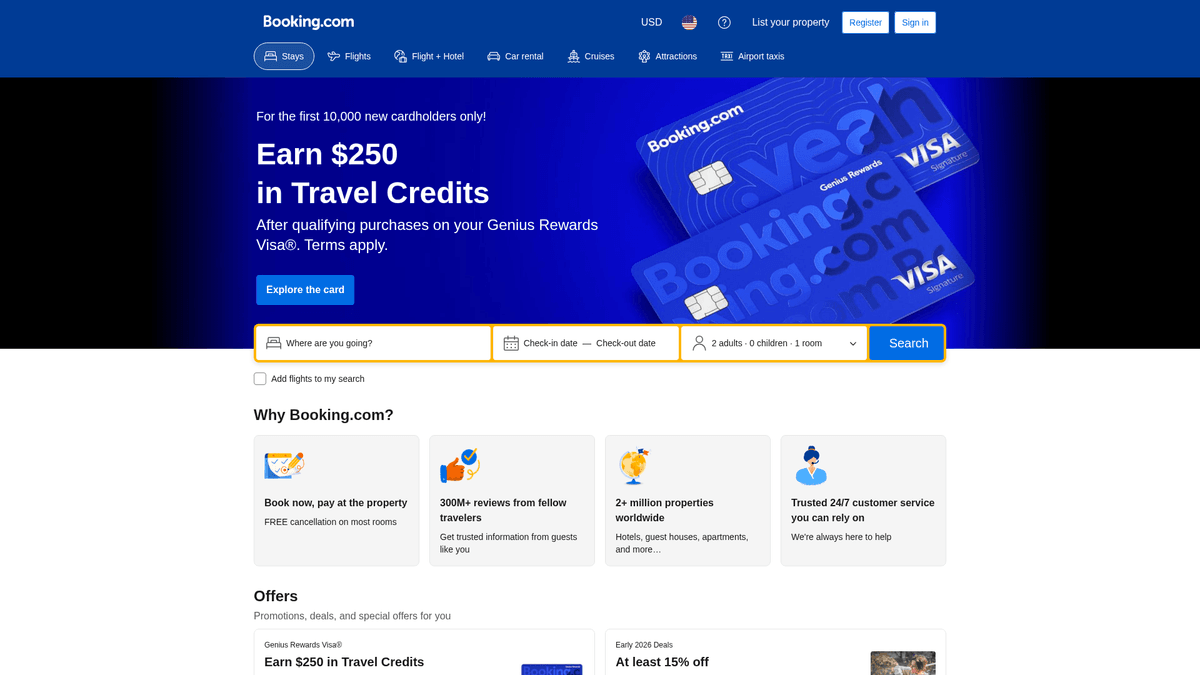
About Booking.com
Learn what Booking.com offers and what valuable data can be extracted from it.
The Global Travel Leader
Booking.com is one of the world's leading digital travel companies, providing a platform for users to book accommodations, flights, car rentals, and attractions. It operates in over 40 languages and offers more than 28 million listings, making it the primary repository for global travel data. From luxury hotels to unique homes and apartments, the platform covers virtually every destination on Earth.
Wealth of Structured Data
The website contains a massive amount of structured information including property names, real-time pricing, geographical coordinates, user reviews, and detailed amenity lists. This data is updated constantly, reflecting the highly dynamic nature of the travel industry. For researchers and businesses, Booking.com serves as a primary source for market intelligence and consumer behavior analysis.
Business Value of Booking Data
Scraping this data is invaluable for competitive benchmarking, pricing optimization, and sentiment analysis. By extracting hotel rates and availability across different regions, companies can build predictive models for travel demand or create aggregator services that help travelers find the best deals in real-time.
Why Scrape Booking.com?
Discover the business value and use cases for extracting data from Booking.com.
Competitive Price Intelligence
Monitor hotel rates in real-time to adjust your own pricing strategy and maintain a competitive edge in local markets.
Customer Sentiment Analysis
Extract thousands of guest reviews to identify recurring service issues or common praise for specific property types.
Market Inventory Tracking
Identify new property listings and vacation rentals across different geographic regions to map out market supply trends.
Price Parity Auditing
Automate the verification of room rates across multiple platforms to ensure your properties are compliant with OTA agreements.
B2B Lead Generation
Identify properties that might benefit from specific hospitality services like professional photography, software, or cleaning.
Historical Demand Forecasting
Collect seasonal pricing and availability data to build predictive models for future travel demand surges.
Scraping Challenges
Technical challenges you may encounter when scraping Booking.com.
Enterprise-Grade Anti-Bot Protection
Booking.com utilizes sophisticated security layers like Akamai and PerimeterX that can detect and block automated crawlers instantly.
Dynamic JavaScript Rendering
Most pricing data and search results are loaded dynamically via AJAX, requiring a browser-based scraper to correctly view the content.
Geo-Targeted Pricing Variations
The website displays different prices based on the user's IP location, making high-quality residential proxies mandatory for accuracy.
Frequent Structural Updates
Regular A/B testing means HTML class names and layouts change often, which can easily break traditional CSS-based scraping scripts.
Scrape Booking.com with AI
No coding required. Extract data in minutes with AI-powered automation.
How It Works
Describe What You Need
Tell the AI what data you want to extract from Booking.com. Just type it in plain language — no coding or selectors needed.
AI Extracts the Data
Our artificial intelligence navigates Booking.com, handles dynamic content, and extracts exactly what you asked for.
Get Your Data
Receive clean, structured data ready to export as CSV, JSON, or send directly to your apps and workflows.
Why Use AI for Scraping
No-Code Web Scrapers for Booking.com
Point-and-click alternatives to AI-powered scraping
Several no-code tools like Browse.ai, Octoparse, Axiom, and ParseHub can help you scrape Booking.com. These tools use visual interfaces to select elements, but they come with trade-offs compared to AI-powered solutions.
Typical Workflow with No-Code Tools
Common Challenges
Learning curve
Understanding selectors and extraction logic takes time
Selectors break
Website changes can break your entire workflow
Dynamic content issues
JavaScript-heavy sites often require complex workarounds
CAPTCHA limitations
Most tools require manual intervention for CAPTCHAs
IP blocking
Aggressive scraping can get your IP banned
Code Examples
import requests
from bs4 import BeautifulSoup

# Booking.com blocks simple requests; headers and cookies are critical.
url = 'https://www.booking.com/searchresults.html?ss=London'
headers = {
    'User-Agent': 'Mozilla/5.0 (Windows NT 10.0; Win64; x64) AppleWebKit/537.36 (KHTML, like Gecko) Chrome/119.0.0.0 Safari/537.36',
    'Accept-Language': 'en-US,en;q=0.9',
    'Accept': 'text/html,application/xhtml+xml,application/xml;q=0.9,image/avif,image/webp,*/*;q=0.8'
}

try:
    response = requests.get(url, headers=headers)
    response.raise_for_status()
    soup = BeautifulSoup(response.content, 'html.parser')
    # Selectors may change frequently; data-testid is usually more stable
    hotels = soup.find_all('div', {'data-testid': 'property-card'})
    for hotel in hotels:
        name = hotel.find('div', {'data-testid': 'title'}).text.strip()
        print(f'Hotel Found: {name}')
except Exception as e:
    print(f'Error occurred during scraping: {e}')
When to Use
Best for static HTML pages where content is loaded server-side. The fastest and simplest approach when JavaScript rendering isn't required.
Advantages
- ●Fastest execution (no browser overhead)
- ●Lowest resource consumption
- ●Easy to parallelize with asyncio
- ●Great for APIs and static pages
Limitations
- ●Cannot execute JavaScript
- ●Fails on SPAs and dynamic content
- ●May struggle with complex anti-bot systems
import asyncio
from playwright.async_api import async_playwright

async def scrape_booking():
    async with async_playwright() as p:
        # Use a non-headless browser or stealth plugins to avoid detection
        browser = await p.chromium.launch(headless=True)
        context = await browser.new_context(user_agent='Mozilla/5.0 (Windows NT 10.0; Win64; x64) ...')
        page = await context.new_page()

        await page.goto('https://www.booking.com/searchresults.html?ss=Paris', wait_until='networkidle')

        # Wait for the property cards to load dynamically
        await page.wait_for_selector('[data-testid="property-card"]')

        hotels = await page.query_selector_all('[data-testid="property-card"]')
        for hotel in hotels:
            title_el = await hotel.query_selector('[data-testid="title"]')
            title = await title_el.inner_text() if title_el else 'N/A'
            print(f'Name: {title}')

        await browser.close()

asyncio.run(scrape_booking())
When to Use
Use when content loads dynamically via JavaScript, or when you need to interact with the page (clicks, scrolls, form fills). Handles modern anti-bot detection better.
Advantages
- ●Executes JavaScript like a real browser
- ●Handles SPAs and dynamic content
- ●Better anti-bot evasion with stealth plugins
- ●Can take screenshots and PDFs
Limitations
- ●Slower than HTTP requests
- ●Higher memory/CPU usage
- ●More complex to set up
import scrapy

class BookingSpider(scrapy.Spider):
    name = 'booking'
    allowed_domains = ['booking.com']
    start_urls = ['https://www.booking.com/searchresults.html?ss=New+York']

    custom_settings = {
        'USER_AGENT': 'Mozilla/5.0 (Windows NT 10.0; Win64; x64) AppleWebKit/537.36',
        'DOWNLOAD_DELAY': 2
    }

    def parse(self, response):
        for hotel in response.css('[data-testid="property-card"]'):
            yield {
                'name': hotel.css('[data-testid="title"]::text').get(),
                'price': hotel.css('[data-testid="price-and-discounted-price"] span::text').get(),
                'score': hotel.css('[data-testid="review-score-badge"]::text').get()
            }

        # Pagination handling
        next_page = response.css('button[aria-label="Next page"]::attr(href)').get()
        if next_page:
            yield response.follow(next_page, self.parse)
When to Use
Ideal for large-scale crawling projects that need to scrape thousands of pages. Built-in support for rate limiting, retries, and data pipelines.
Advantages
- ●Built for scale (millions of pages)
- ●Automatic request throttling
- ●Built-in data export pipelines
- ●Middleware system for proxies/headers
Limitations
- ●Steeper learning curve
- ●Overkill for small projects
- ●No native JavaScript rendering
const puppeteer = require('puppeteer');

(async () => {
  const browser = await puppeteer.launch({ headless: true });
  const page = await browser.newPage();

  // Setting a realistic User-Agent is essential
  await page.setUserAgent('Mozilla/5.0 (Windows NT 10.0; Win64; x64) AppleWebKit/537.36');

  await page.goto('https://www.booking.com/searchresults.html?ss=Berlin', { waitUntil: 'networkidle2' });

  await page.waitForSelector('[data-testid="property-card"]');

  const results = await page.evaluate(() => {
    const items = Array.from(document.querySelectorAll('[data-testid="property-card"]'));
    return items.map(item => ({
      name: item.querySelector('[data-testid="title"]')?.innerText,
      price: item.querySelector('[data-testid="price-and-discounted-price"]')?.innerText
    }));
  });

  console.log(results);
  await browser.close();
})();
When to Use
Choose this if you're in a Node.js/JavaScript ecosystem or need tight integration with frontend tools. Similar capabilities to Playwright.
Advantages
- ●Native JavaScript/TypeScript support
- ●Chrome DevTools Protocol access
- ●Large ecosystem and community
- ●Good for JS-heavy projects
Limitations
- ●Chrome-only (vs Playwright's multi-browser)
- ●Similar overhead to Playwright
- ●Less mature stealth options
What You Can Do With Booking.com Data
Explore practical applications and insights from Booking.com data.
Dynamic Price Optimization
Hotels and property managers can adjust their rates in real-time based on competitor pricing scraped daily from Booking.com.
How to implement:
- 1Identify top 10 local competitors on Booking.com.
- 2Schedule daily scrapes of prices for standard and deluxe rooms.
- 3Analyze the price gap between your property and competitors.
- 4Adjust your own pricing via channel manager API based on market average.
Use Automatio to extract data from Booking.com and build these applications without writing code.
Market Sentiment Analysis
Travel agencies can analyze thousands of customer reviews to identify top-performing properties and common regional complaints.
How to implement:
- 1Scrape all text reviews for properties in a specific city.
- 2Process the text using Natural Language Processing (NLP) to detect sentiment.
- 3Identify recurring keywords related to 'cleanliness', 'location', or 'service'.
- 4Generate reports to help travelers choose properties with the highest qualitative satisfaction.
Use Automatio to extract data from Booking.com and build these applications without writing code.
Vacation Rental ROI Mapping
Real estate investors use booking data to find high-yield areas by tracking occupancy signals and average nightly rates.
How to implement:
- 1Scrape property listings and prices across multiple neighborhoods.
- 2Track 'sold out' vs 'available' status over a 30-day window.
- 3Calculate estimated monthly revenue based on price and occupancy.
- 4Identify undervalued neighborhoods with high rating trends for potential investment.
Use Automatio to extract data from Booking.com and build these applications without writing code.
Travel Aggregator Maintenance
Meta-search engines use scraped data to provide up-to-date comparison tools for budget-conscious travelers.
How to implement:
- 1Sync listing data across multiple travel platforms including Booking.com.
- 2Extract real-time price changes to show 'price drop' alerts.
- 3Verify amenity availability (e.g., free Wi-Fi, pool) to filter results accurately.
- 4Display a unified view of the best deals currently available.
Use Automatio to extract data from Booking.com and build these applications without writing code.
Competitive Amenity Benchmarking
Hotel chains can analyze which amenities are standard in specific markets to upgrade their offerings and stay competitive.
How to implement:
- 1Scrape the 'Facilities' and 'Amenities' list for all 4-star hotels in a region.
- 2Calculate the frequency of specific amenities like 'Spa', 'EV Charging', or 'Gym'.
- 3Identify 'gaps' where your property lacks an amenity common among competitors.
- 4Prioritize renovations based on what current travelers value most.
Use Automatio to extract data from Booking.com and build these applications without writing code.
Supercharge your workflow with AI Automation
Automatio combines the power of AI agents, web automation, and smart integrations to help you accomplish more in less time.
What to get right first
Expert advice for successfully extracting data from Booking.com.
Set Explicit URL Parameters
Always add 'selected_currency' and 'lang' parameters to your target URLs to ensure the data format remains consistent across all requests.
Target JSON-LD Script Tags
Look for application/ld+json script tags in the page source as they often contain highly structured metadata about the property.
Prioritize Residential Proxies
Booking.com quickly identifies and blocks datacenter IP ranges; residential proxies are necessary to appear as a legitimate home user.
Mimic Human Browsing Patterns
Introduce randomized delays and simulate mouse movements to avoid triggering behavioral detection systems used by anti-bot providers.
Extract Unique Property IDs
Always scrape the internal property ID to maintain a stable reference point even if the hotel name or description changes slightly.
Handle Localized Date Formats
Be prepared to parse different date formats depending on the language settings used during the scraping session.
Related Web Scraping
Frequently Asked Questions
Find answers to common questions about Booking.com
Is it legal to scrape Booking.com?
Scraping publicly available data such as hotel names and rates is generally legal for market research and personal use. However, you should always avoid extracting personal user data and ensure your activities do not disrupt the website's performance.
Does Booking.com have an official API?
Yes, they offer Connectivity and Affiliate APIs, but these are primarily reserved for registered business partners and property managers. For researchers or startups, web scraping is often the only accessible way to gather large-scale competitive data.
How can I avoid getting blocked by Booking.com?
To minimize blocking, use a combination of residential proxies, rotated User-Agent strings, and a scraper capable of solving JavaScript challenges. Avoid making too many requests in a short period from the same IP address to prevent triggering rate limits.
What proxies work best for scraping this site?
Residential proxies are highly recommended because they provide IPs assigned to real households. Datacenter proxies are easily flagged by Booking's enterprise security systems like Akamai and are usually blocked within a few requests.
In what format can I save the scraped data?
Most scrapers allow you to export data in JSON, CSV, or Excel formats. JSON is particularly useful for Booking.com data because it effectively handles nested information like lists of amenities and room types.
How often should I scrape for price updates?
For competitive pricing, scraping once a day is standard for most markets. However, if you are monitoring highly dynamic city centers or peak holiday seasons, you may want to increase frequency to every 6 to 12 hours.
Can I scrape guest reviews and ratings?
Yes, reviews are public and can be extracted, though they often require the scraper to click through pagination or 'load more' buttons. Since they are often loaded via JavaScript, ensure your tool can handle dynamic element interaction.
Why do prices differ when I use different proxies?
Booking.com uses localized pricing, meaning users in different countries may see different rates or currencies for the same room. Using proxies from the target market's country is the best way to ensure you are seeing the prices relevant to that region.